
Produto rematadoview
The UNIQ Rovus iPad Case is designed to provide robust protection and enhanced versatility for your iPad Pro 11" (2nd-4th Gen). This case features a detachable design, an integrated foldable stand, and a magnetic disc for 360-degree rotation, allowing for multiple viewing orientations and magnetic mounting capabilities. It also includes a built-in storage and charging slot for the Apple Pencil.

Image: The UNIQ Rovus iPad Case in its closed, protective state, showcasing o seu elegante deseño negro.
Configuración e instalación
- Installing Your iPad: Gently align your iPad Pro 11" with the protective frame of the case. Press firmly around the edges until the iPad is securely seated within the frame. Ensure all ports and buttons are accessible and aligned correctly.
- Attaching the Detachable Case: The protective frame with your iPad attaches magnetically to the main folio cover. Align the back of the iPad frame with the magnetic disc on the folio cover. The magnets will snap the two components together securely.
- Detaching the Case: To detach, simply pull the iPad frame away from the magnetic folio cover. This allows the iPad to be used independently or mounted on other magnetic surfaces.
- Using the Integrated Stand: The folio cover features an integrated foldable stand. Fold the cover along its creases to form a stable triangular stand. The anti-slip base with grooves allows you to rest your iPad at various angles for optimal viewing.
- Almacenamento do Apple Pencil: A dedicated slot is built into the case for storing and charging your Apple Pencil. Place the Apple Pencil into this slot for secure transport and charging.

Image: An illustration demonstrating the magnetic attachment mechanism between the iPad frame and the folio cover's rotating disc.

Image: An iPad Pro 11" securely positioned in the UNIQ Rovus case's stand, demonstrating an upright viewángulo de ing.
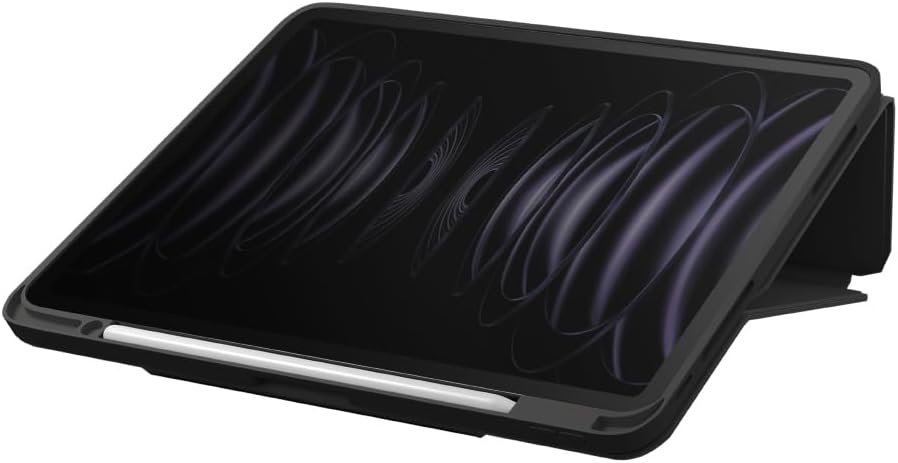
Image: The UNIQ Rovus iPad case holding an iPad Pro 11" at a comfortable viewing angle, with an Apple Pencil stored and charging in its designated slot.
Operating the Case Features
- Rotación de 360 graos: The magnetic disc allows for seamless 360-degree rotation of your iPad while it is attached to the folio cover. Simply rotate the iPad to switch between portrait and landscape orientations without removing it from the stand.
- Montaxe magnética: The detachable case can be snapped off and mounted onto other compatible magnetic surfaces, such as refrigerators or whiteboards. This feature provides hands-free viewen diversos entornos.

Image: An iPad Pro 11" in the UNIQ Rovus case, magnetically attached to a refrigerator door, displaying a recipe. A hand holds an Apple Pencil nearby.

Image: An iPad Pro 11" in the UNIQ Rovus case, magnetically attached to the console of a treadmill, displaying workout information. A person is interacting with the treadmill controls.
Mantemento
To clean your UNIQ Rovus iPad Case, gently wipe it with a soft, damp cloth. Avoid using harsh chemicals or abrasive cleaners, as these may damage the material. Ensure the case is completely dry before re-installing your iPad.
Resolución de problemas
- Issue: iPad not securely attaching to the folio cover.
Solución: Ensure there is no debris or obstruction between the magnetic disc on the folio and the back of the iPad frame. Verify that the iPad is correctly seated within its protective frame. - Problema: O soporte parece inestable.
Solución: Ensure the folio cover is folded correctly into the triangular stand shape and that the iPad is resting firmly in one of the anti-slip grooves.
Especificacións
- Dimensións do produto: 10.04 x 0.08 x 7.8 polgadas
- Peso do artigo: 7.8 onzas
- Número de modelo do artigo: UNIQ-NPDP11(2022)-ROVUSBLK
- Características especiais: Heavy Duty Protection, Detachable Case, 360° Rotation, Magnetic Attachment, Integrated Stand, Apple Pencil Storage
- Factor de forma: Caso
- Cor: Negro
- Fabricante: UNIQ
- Dispositivos compatibles: iPad Pro 11" (2nd-4th Gen or 2020-2022)
- Tipo de carcasa: Hybrid (Polyurethane, Polycarbonate, TPU)
Garantía e Soporte
For warranty information or technical support regarding your UNIQ Rovus iPad Case, please refer to the official UNIQ website or contact UNIQ customer service directly. Keep your proof of purchase for any warranty claims.


