Introdución
The Earclip Bluetooth Earphone LNV - XT83 II TWS Earbuds are designed for a comfortable and immersive audio experience. Featuring air conduction technology and 3D stereo sound, these earbuds are suitable for various activities including gaming, calls, and daily listening. Their ergonomic design ensures a secure and comfortable fit for extended wear, while touch controls provide easy management of audio and calls.

Image: The XT83 II TWS Earbuds in their open charging case, showcasing o seu deseño compacto.
O que hai na caixa
Upon opening your product package, please ensure all the following components are present:
- 1x Estuche de carga
- 2x Earbuds (Right & Left)
- 1x cable de carga USB C
- 1 x Manual de usuario
Guía de configuración
Cargando os auriculares e o estuche
Before first use, fully charge the earbuds and the charging case. Connect the provided USB-C charging cable to the charging port on the case and a compatible power source. The charging case has a battery capacity of 250 mAh and takes approximately 1 hour to fully charge. The earbuds themselves offer up to 15 hours of battery life on a full charge.
Emparejamento Bluetooth
To pair your XT83 II TWS Earbuds with a device:
- Asegúrate de que o Bluetooth do teu dispositivo estea activado.
- Abre a caixa de carga e retira os dous auriculares. Entrarán automaticamente no modo de emparellamento.
- On your device, search for "Lenovo XT83 II" in the Bluetooth settings and select it to connect.
- Unha vez conectados, reproducirase un son de confirmación e os auriculares estarán listos para usar.
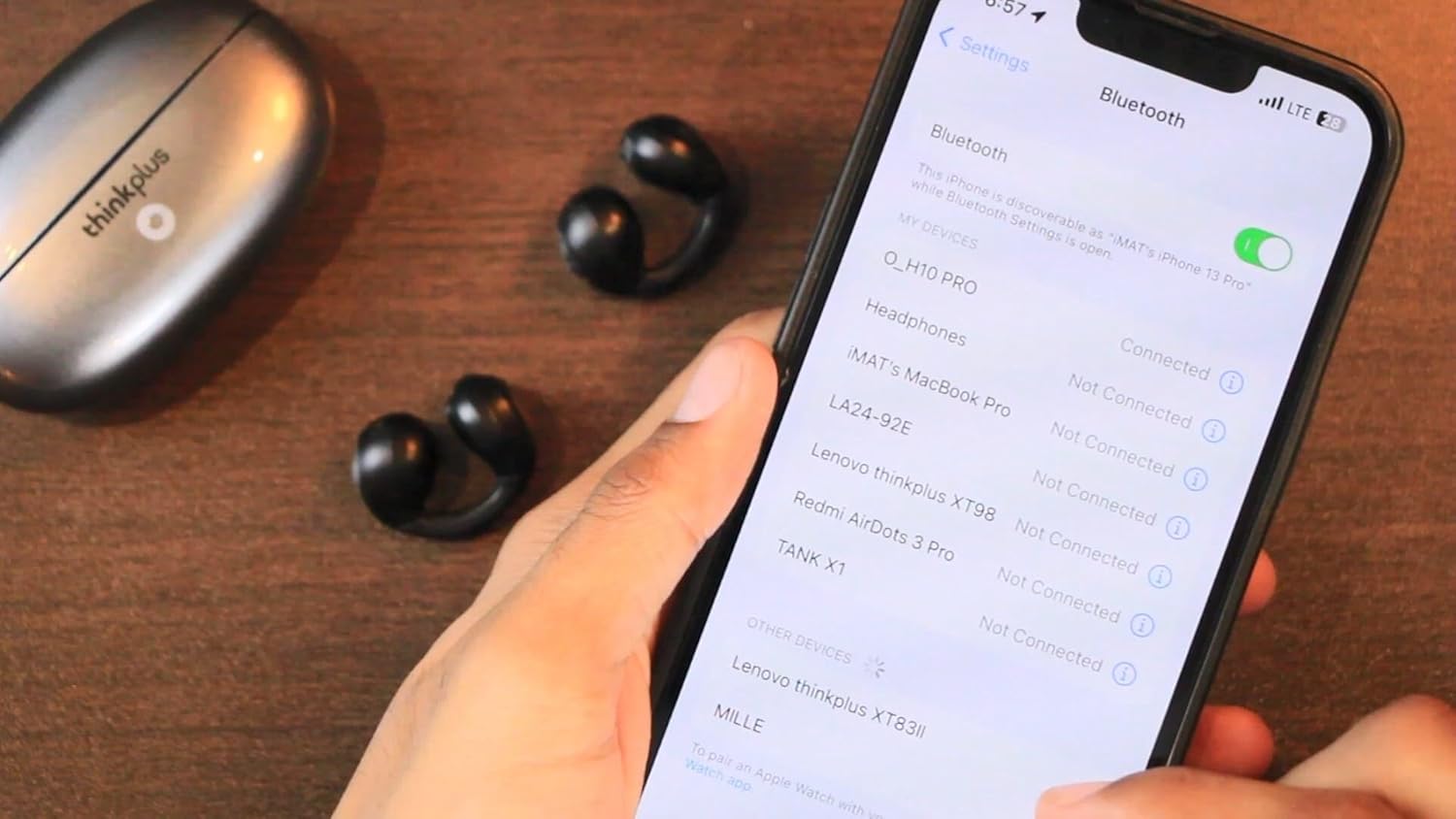
Image: Connecting the XT83 II earbuds to a smartphone via Bluetooth settings.
Video: This video demonstrates the physical details of the XT83 II earbuds and charging case, including how to remove the earbuds from the case, place them back, and shows the pairing process with a smartphone. It also illustrates how to wear the earbuds and use their touch controls for playback and volume adjustment.
Instrucións de funcionamento
Controis táctiles
The XT83 II earbuds feature intuitive touch controls for easy management of your audio and calls:
- Toca simple: Reproducir/Pausar o audio.
- Toca dúas veces: Increase or decrease volume (specific earbud for each function, refer to the video for demonstration).
- Toca tres veces: Switch to the next or previous song (specific earbud for each function).
- Prensa longa: Activate voice assistant or reject a call.
- Durante unha chamada: Single tap to answer/end a call.

Image: The XT83 II earbud worn comfortably on the ear, highlighting its ergonomic design.
Modo de xogo e modo de música
The earbuds support switching between Game Mode and Music Mode. Game Mode offers ultra-low latency, as low as 40ms, for a synchronized gaming experience. Refer to the product's specific instructions or experiment with touch controls to switch between these modes.

Image: Visual representation of the XT83 II earbuds' Game Mode and Music Mode functionality.
Mantemento
To ensure the longevity and optimal performance of your XT83 II TWS Earbuds, follow these maintenance guidelines:
- Limpeza: Limpe regularmente os auriculares e a funda de carga cun pano suave, seco e sen pelusa. Evite o uso de materiais abrasivos ou produtos químicos agresivos.
- Almacenamento: Cando non os uses, garda os auriculares no seu estoxo de carga para protexelos do po e dos danos. Mantéñeos nun lugar fresco e seco, lonxe da luz solar directa e de temperaturas extremas.
- Resistencia á auga: The earbuds have a waterproof rating. However, avoid submerging them in water or exposing them to excessive moisture for prolonged periods. Dry them thoroughly if they get wet.
- Cargando: Use only the provided USB-C cable or a certified equivalent for charging. Do not attempt to charge the device if it is wet.
Resolución de problemas
If you encounter issues with your XT83 II TWS Earbuds, try the following solutions:
- Auriculares sen emparellamento:
- Asegúrate de que os dous auriculares estean completamente cargados.
- Place both earbuds back into the charging case, close the lid, wait a few seconds, then open the lid and remove them again.
- Desactiva e activa o Bluetooth do teu dispositivo.
- Forget the device ("Lenovo XT83 II") from your device's Bluetooth list and attempt to pair again.
- Sen son dun auricular:
- Asegúrate de que os dous auriculares estean cargados.
- Place both earbuds back into the case and take them out simultaneously.
- Limpa os contactos de carga tanto dos auriculares como da funda.
- Problemas de carga:
- Comprobe se o cable de carga está conectado correctamente tanto á carcasa como á fonte de alimentación.
- Proba cun cable USB-C e un adaptador de corrente diferentes.
- Asegúrate de que os contactos de carga dos auriculares e do interior da funda estean limpos e libres de residuos.
- Mala calidade de son ou desconexións:
- Ensure your device is within the Bluetooth range (up to 10.2 meters).
- Reduce as interferencias afastándote doutros dispositivos sen fíos.
- Comproba a configuración de son do teu dispositivo.
Especificacións
| Característica | Detalle |
|---|---|
| Nome do modelo | Lenovo XT83 II |
| Tecnoloxía de conectividade | Sen fíos |
| Tecnoloxía de comunicación sen fíos | Bluetooth |
| Versión Bluetooth | 5.3 |
| Alcance Bluetooth | 10.2 metros |
| Duración da batería (auriculares) | 15 horas |
| Tempo de carga (caso) | 1 horas |
| Capacidade da batería do estuche de transporte | 250 millónsamp Horario |
| Tipo de control | Control multimedia, táctil |
| Nivel de resistencia á auga | Impermeable |
| Control de ruído | Active Noise Cancellation (DNS Precise Noise Reduction) |
| Material | Plástico |
| Factor de forma | In Ear (Earclip) |
Garantía e Soporte
For information regarding warranty coverage, technical support, or service inquiries, please refer to the warranty card included in your product packaging or contact the retailer from whom you purchased the product. Keep your proof of purchase for any warranty claims.