
1. Introdución
This manual provides instructions for the assembly, operation, and maintenance of your IDEALHOUSE Large Printer Stand. This versatile 3-tier rolling cart is designed to organize office machines, paper, files, and supplies. It includes integrated power outlets and USB charging ports for convenience.

Image 1.1: The IDEALHOUSE Large Printer Stand in an office environment, showcasing its capacity to hold a printer and a computer tower, along with storage for office supplies.
2. Información de seguridade
- Lea atentamente todas as instrucións antes de montar e usar.
- Manteña as pezas pequenas lonxe dos nenos.
- Ensure all connections are secure before placing heavy items on the stand.
- Do not overload the shelves. Refer to the specifications for weight limits.
- Only use the integrated power strip with compatible devices and within specified electrical ratings (120V/12A for AC outlets, 5V/2A for USB ports).
- Avoid exposing the stand to excessive moisture or direct sunlight.
3. Contido do paquete
Verifique que estean presentes todos os compoñentes antes de comezar a montaxe. Se falta algunha peza ou está danada, póñase en contacto co servizo de atención ao cliente.
- Top Shelf (MDF Board)
- Middle Shelf (MDF Board)
- Bottom Shelf (MDF Board)
- Compoñentes de estrutura metálica
- Regleta con 2 tomas de corrente CA e 2 portos USB
- 4 x Rolling Casters (2 with brakes)
- 4 x Adjustable Feet (optional use)
- Assembly Hardware (screws, wrench)
- Manual de instrucións
4. Instrucións de configuración e montaxe
A montaxe adoita levar uns 20 minutos. Siga estes pasos atentamente:
- Desempaquetar compoñentes: Retire con coidado todas as pezas da embalaxe e colóqueas sobre unha superficie limpa e suave para evitar rabuñaduras.
- Attach Casters or Adjustable Feet: Decide whether to use the rolling casters for mobility or the adjustable feet for stationary placement. Screw the chosen components into the bottom of the main frame legs. If using casters, ensure the two casters with brakes are installed on the front side for easy locking.
- Montaxe do cadro: Connect the metal frame components according to the diagrams in the included printed instructions. Secure with the provided screws and wrench.
- Instalar estantes: Place the MDF board shelves onto the designated frame sections. The middle shelf is adjustable.
- Conectar unha regleta de alimentación: Secure the power strip unit to the side of the stand using the provided screws. Ensure it is firmly attached.
- Verificación final: Verify that all screws are tightened and the stand is stable before placing any items on it.

Image 4.1: Detail showing the option to install either adjustable feet for stability or rolling casters for mobility on the printer stand.

Image 4.2: Illustration demonstrating how the middle shelf can be adjusted to different heights to accommodate various items.
5. Instrucións de funcionamento
5.1 Using the Power Outlets and USB Ports
A regleta integrada proporciona un acceso cómodo á alimentación para os teus dispositivos.
- Plug the stand's main power cord into a standard wall outlet.
- Connect your printer, laptop, or other AC-powered devices to the 2 AC outlets.
- Use the 2 USB ports to charge smartphones, tablets, or other USB-powered devices.
- Do not exceed the maximum electrical load for the outlets (120V/12A for AC, 5V/2A for USB).
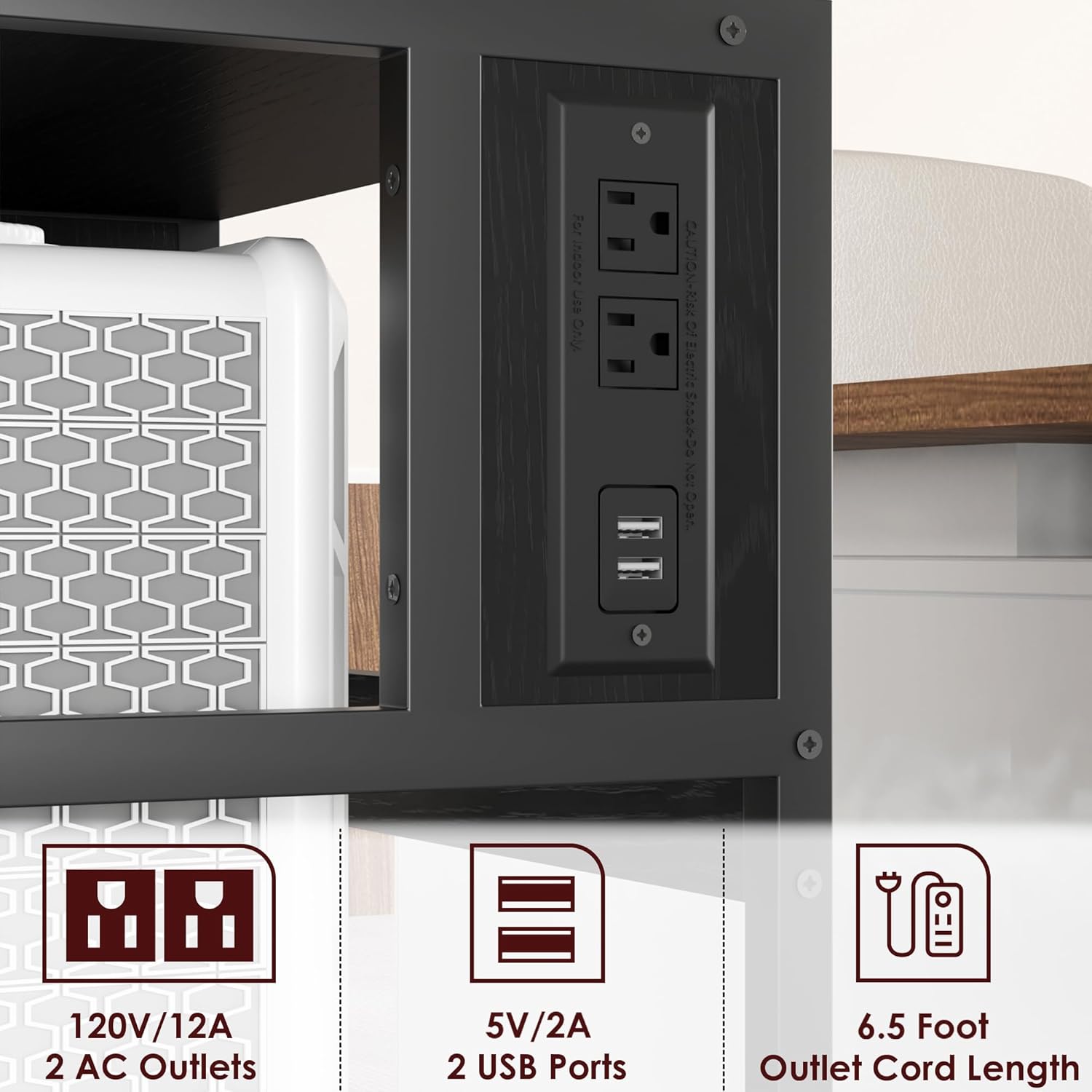
Imaxe 5.1: Detallada view of the integrated power strip, highlighting the two AC outlets and two USB charging ports, along with the 6.5-foot power cord.
5.2 Utilizing Mobility and Stability
If you have installed the rolling casters:
- To move the stand, ensure the brakes on the front casters are disengaged.
- To keep the stand stationary, push down the levers on the two front casters to engage the brakes.
6. Mantemento
- Limpeza: Limpar o soporte cun pano suaveamp pano. Evite produtos químicos agresivos ou produtos de limpeza abrasivos.
- Verificación de hardware: Comprobe periodicamente todos os parafusos e conexións para asegurarse de que permanecen ben axustados. Volva a apertalos se é necesario.
- Cable de alimentación: Inspect the power cord for any signs of damage. Do not use if the cord is frayed or damaged.
7 Solución de problemas
- O soporte está inestable: Ensure all screws are fully tightened. If using adjustable feet, ensure they are evenly adjusted on a flat surface.
- Power outlets/USB ports not working:
- Comprobe se o cable de alimentación principal está conectado correctamente a unha toma de corrente funcional.
- Verify that the total power draw of connected devices does not exceed the specified limits.
- Proba a toma de corrente con outro dispositivo para confirmar que subministra enerxía.
- As rodas non xiran con suavidade: Check for any debris or hair caught in the wheels. Clean as necessary.
8. Especificacións
| Característica | Detalle |
|---|---|
| Número de modelo | IDPRINTERSTAND-ZDYJ-23080306 |
| Marca | IDEALHOUSE |
| Material | Madeira enxeñadora, estrutura metálica |
| Cor | Negro rústico |
| Tipo de montaxe | Floor Stand (with casters or adjustable feet) |
| Dispositivos compatibles | Printers, Office Machines, General Storage |
| Peso do elemento | 25.2 libras |
| Saídas AC | 2 (120 V/12 A) |
| Portos USB | 2 (5 V/2 A) |
| Lonxitude do cable de alimentación | 6.5 pés |
| Dimensións (H x W x D) | 31.4" x 20.4" x 15.7" |

Image 8.1: Dimensional drawing of the printer stand, indicating its height, width, and depth.
9. Garantía e atención ao cliente
IDEALHOUSE is committed to providing quality products and excellent customer service. If your printer stand arrives damaged, has missing parts, or if you encounter any issues during assembly or use, please do not hesitate to contact our professional after-sales customer service team.
Our customer support team aims to address your concerns within 24 hours.
Información de contacto:
- For support, please refer to the contact details provided on your purchase receipt or the IDEALHOUSE official websitio.
- Please have your model number (IDPRINTERSTAND-ZDYJ-23080306) and purchase date ready when contacting support.