
1. Produto rematadoview
The SOLAKAKA SM800 is an ultra-lightweight, tri-mode wireless gaming mouse designed for high-performance gaming and versatile connectivity. It features a high-precision optical sensor, durable microswitches, and programmable buttons.

Figure 1: SOLAKAKA SM800 Wireless Gaming Mouse highlighting the PAW3395 Optical Sensor with specifications including 26000 DPI, 650 IPS, 50G ACC, and 1MM/2MM LOD.
Características principais:
- Sensor óptico PAW3395: High precision, low power consumption, low delay, up to 26,000 DPI.
- Conectividade trimodo: Supports Type-C wired, Bluetooth 5.1, and 2.4GHz wireless connections.
- Deseño ultralixeiro: Weighs approximately 58g for comfortable, extended use.
- Kailh GM8.0 Microswitches: Durable switches with 80 million click lifespan and quick response.
- Botóns programables: Customize button functions, DPI settings, lighting, polling rate, and macros via dedicated software.
- Forma ergonómica: Streamlined design for a comfortable grip across various hand positions.
Contido do paquete:
- Rato inalámbrico para xogos SOLAKAKA SM800
- Cable USB-C
- Receptor USB de 2.4 GHz
- Manual de usuario
- DIY Anti-slip Stickers
2. Configuración
2.1 Cargar o rato
Connect the provided USB-C cable to the mouse's Type-C port and the other end to a USB power source (e.g., computer, wall adapter). The mouse features a Type-C fast charging port.

Imaxe 2: Primeiro plano view of the SOLAKAKA SM800 mouse showing the Type-C fast charging port, anti-slip wheels, and the storage slot for the 2.4GHz receiver.
2.2 Conexión do rato
The SM800 offers three connection modes: 2.4GHz wireless, Bluetooth 5.1, and Type-C wired.

Figure 3: The SM800 mouse illustrating its tri-mode connectivity, allowing quick switching and saving up to 4 devices.
- Encendido/apagado: Locate the toggle switch on the bottom of the mouse. Slide it to the 'ON' position to power on the mouse.
- Modos de cambio: Press the mode switch button on the bottom of the mouse to cycle between 2.4GHz wireless (red indicator), Bluetooth 1 (blue indicator), and Bluetooth 2 (green indicator).
- Conexión sen fíos de 2.4 GHz:
- Remove the 2.4GHz USB receiver from its storage slot on the bottom of the mouse.
- Conecte o receptor a un porto USB dispoñible no seu ordenador.
- Switch the mouse to 2.4GHz mode (red indicator). The mouse should connect automatically.
- Conexión Bluetooth:
- Switch the mouse to Bluetooth 1 (blue indicator) or Bluetooth 2 (green indicator) mode.
- On your device, search for Bluetooth devices and select 'SOLAKAKA SM800' to pair.
- Type-C Wired Connection:
- Connect the USB-C cable directly from the mouse to your computer. The mouse will automatically switch to wired mode and begin charging.
3. Instrucións de funcionamento
3.1 Funcións dos botóns
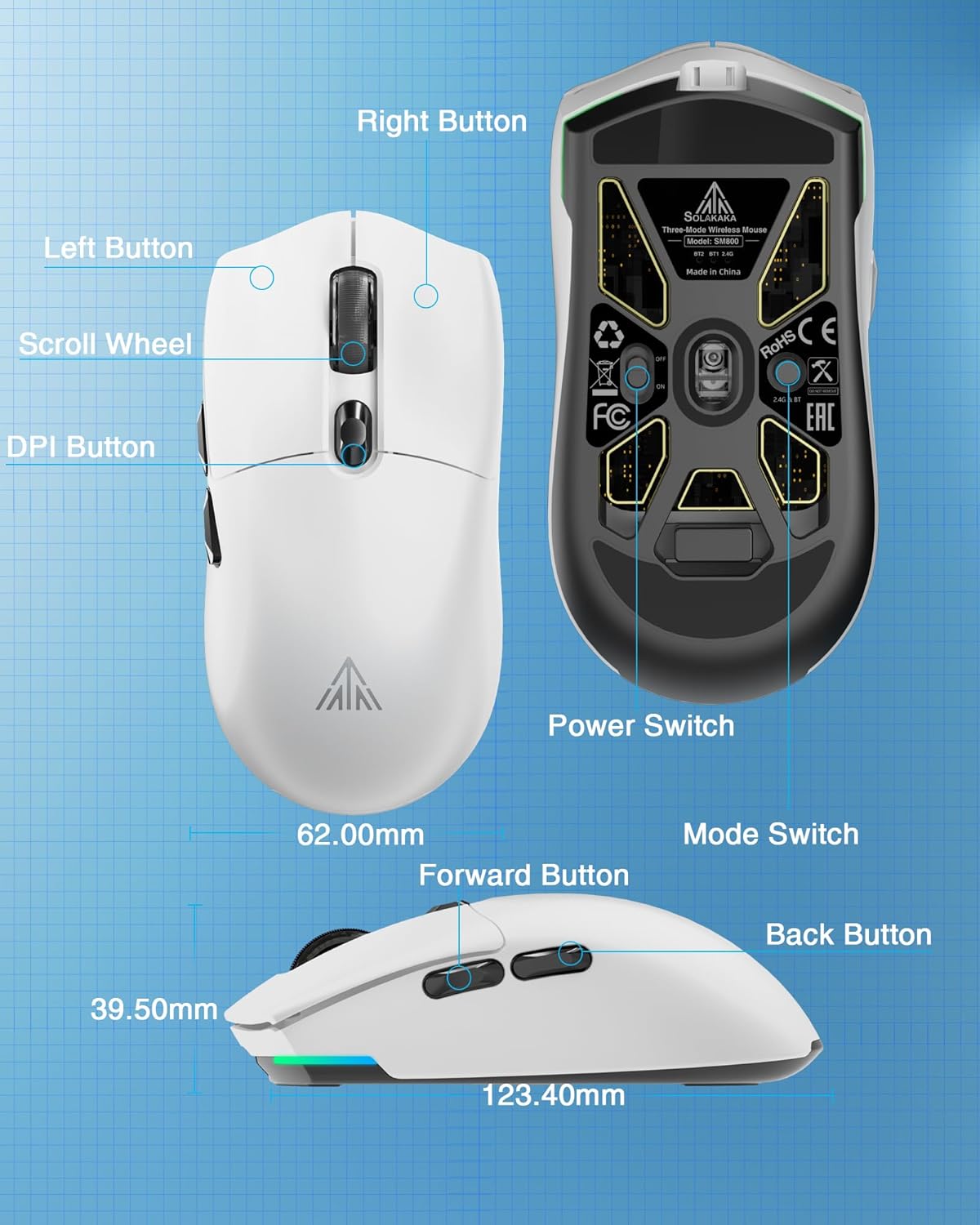
Figura 4: detallada view of the SM800 mouse, indicating the Left Button, Right Button, Scroll Wheel, DPI Button, Forward Button, Back Button, Power Switch, and Mode Switch, along with its dimensions.
- Botón esquerdo: Función de clic principal.
- Botón dereito: Función de clic secundario.
- Roda de desprazamento: Scroll up/down, Middle Button click.
- Botón DPI: Percorre ciclicamente os niveis de DPI predefinidos.
- Botón de avance: Navega cara adiante web navegadores ou aplicacións.
- Botón Atrás: Navega cara atrás en web navegadores ou aplicacións.
3.2 Axuste de DPI
The mouse supports 6 levels of adjustable DPI. Press the DPI button (located behind the scroll wheel) to cycle through the preset DPI settings. The default DPI levels are 800, 1600, 3200, 4800, 8000, and 26000. The 26,000 DPI setting requires the SOLAKAKA software for activation and customization.

Figure 5: Illustration of the SM800's 6 adjustable DPI levels, ranging from 800 to 26000, with a note that 26000 DPI requires SOLAKAKA software.
3.3 Personalización do software
For advanced customization, including button remapping, macro programming, DPI fine-tuning, polling rate adjustment, and RGB lighting effects, download and install the official SOLAKAKA SM800 software.

Figure 6: The SM800 mouse displayed with its programmable software interface, allowing users to customize buttons, DPI, lighting, polling rate, and macros.
Software Installation Steps:
- Introduza o URL: bit.ly/m/solakaka
- Click on "SM800" and download the zip file.
- Unzip the SM800 software zip file.
- Click the icon to install the SM800 software.
- Double-click the icon to enter the software settings.
4. Mantemento
4.1 Limpeza
Para manter un rendemento óptimo, limpa o rato regularmente cun pano suave e seco. Evita o uso de produtos químicos agresivos ou materiais abrasivos.
4.2 Applying Anti-slip Stickers
The package includes DIY anti-slip stickers for enhanced grip and personalization. Carefully peel the stickers and apply them to the desired areas on the mouse surface.
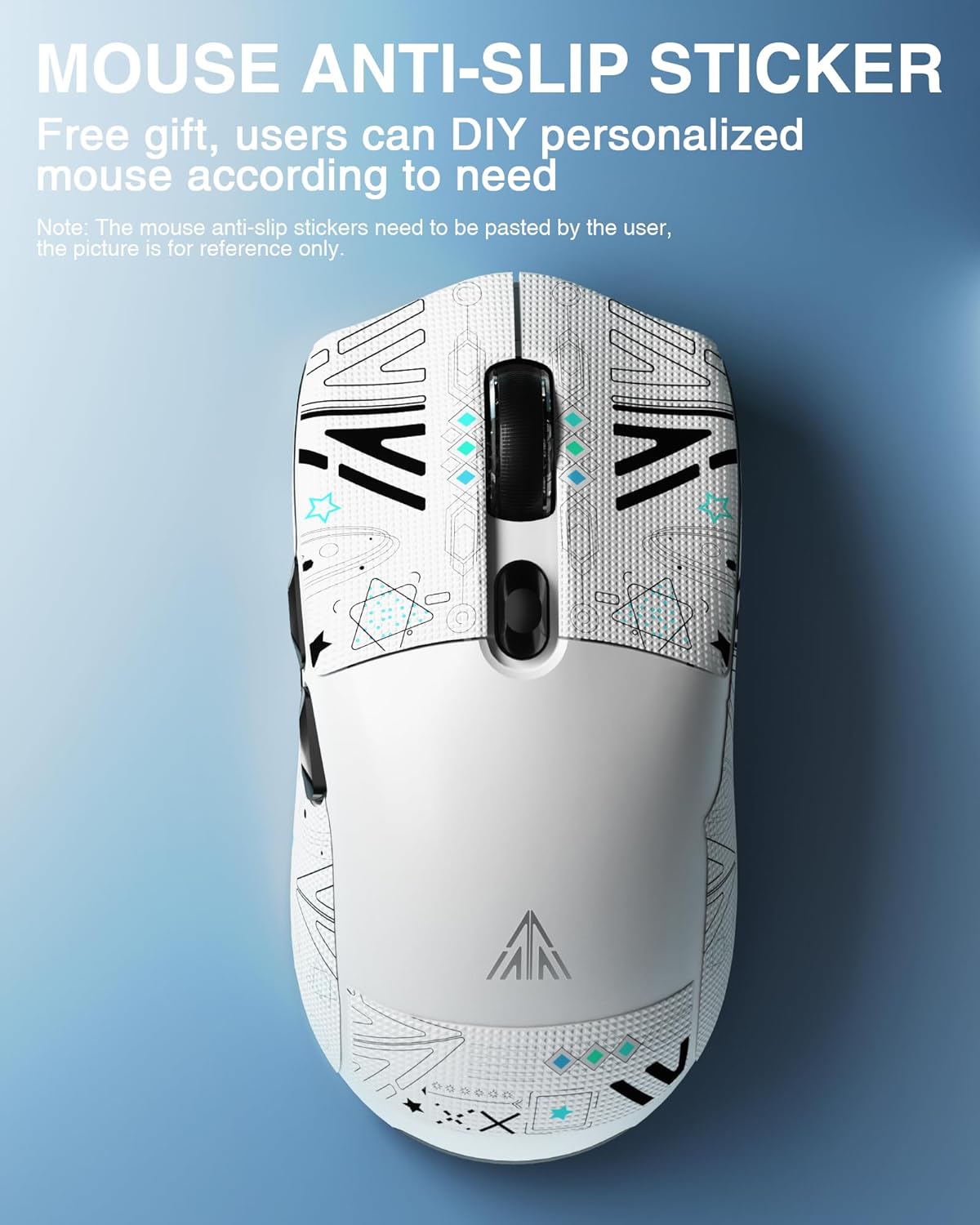
Figura 7: Presentación do rato SM800asing applied anti-slip stickers, which can be customized by the user.
5 Solución de problemas
- O rato non responde: Ensure the mouse is powered on and correctly connected via wired, 2.4GHz, or Bluetooth mode. Check battery level.
- Problemas de conexión de 2.4 GHz: Ensure the USB receiver is securely plugged in and the mouse is in 2.4GHz mode. Try a different USB port.
- Problemas de emparellamento por Bluetooth: Ensure the mouse is in Bluetooth pairing mode (flashing blue/green indicator) and your device's Bluetooth is enabled. Try re-pairing.
- DPI not changing to 26,000: The highest DPI setting requires the official SOLAKAKA software to be installed and configured.
- Software not installing/working: Ensure your operating system meets the software requirements. Temporarily disable antivirus/firewall if encountering installation issues.
6. Especificacións
| Característica | Especificación |
|---|---|
| Dimensións do produto | 4.8 x 2.56 x 1.54 polgadas |
| Peso do elemento | 2.05 onzas (aprox. 58 g) |
| Tecnoloxía de conectividade | Bluetooth 5.1, sen fíos de 2.4 GHz, con cable tipo C |
| Tecnoloxía de detección de movemento | Óptico (sensor PAW3395) |
| DPI máximo | 26,000 DPI |
| Número de botóns | 6 |
| Microinterruptores | Kailh GM8.0 (80 million clicks) |
| Batería | 1 Lithium Ion battery (included, 300mAh) |
| Cor | Branco |
7. Vídeos oficiais de produtos
Watch these official videos for a visual guide to the SOLAKAKA SM800 Wireless Gaming Mouse's features and functionality.
SOLAKAKA SM800 Ultra-lightweight 58g Tri-mode Gaming Mouse
Este vídeo ofrece un sobreview of the SOLAKAKA SM800's ultra-lightweight design, tri-mode connectivity, and key gaming features.
SOLAKAKA SM800 26K DPI Tri-Mode Wireless Gaming Mouse
This video highlights the 26,000 DPI optical sensor and the versatile tri-mode wireless connectivity of the SM800 gaming mouse.
8. Garantía e soporte
For warranty information and customer support, please refer to the official SOLAKAKA websitio web ou póñase en contacto directamente co servizo de atención ao cliente. Garde o recibo de compra para reclamacións de garantía.


