
1. Introdución
This manual provides essential information for the proper setup, operation, and maintenance of your Beyerdynamic M 201 Hypercardioid Dynamic Instrument Microphone. Please read this manual thoroughly before using the product to ensure optimal performance and longevity.
The Beyerdynamic M 201 is a high-quality dynamic microphone designed for instrument recording and live sound applications. Its hypercardioid polar pattern offers excellent off-axis rejection, making it suitable for isolating sound sources in complex acoustic environments.
2. Características clave
- Patrón polar hipercardioide: Provides superior isolation of the sound source and reduces feedback.
- Dynamic Transducer: Robust and capable of handling high sound pressure levels (SPL).
- Construción metálica duradeira: Ensures reliability and longevity in various environments.
- Conectividade XLR: Standard professional audio connection for compatibility with mixers and audio interfaces.
- Factor de forma compacto: Facilitates easy placement in tight spaces.
3. Que está incluído
Upon unpacking your Beyerdynamic M 201, please ensure all items are present:
- Beyerdynamic M 201 Microphone
- Microphone Clip (MA-CL 25)
- Maletín de transporte
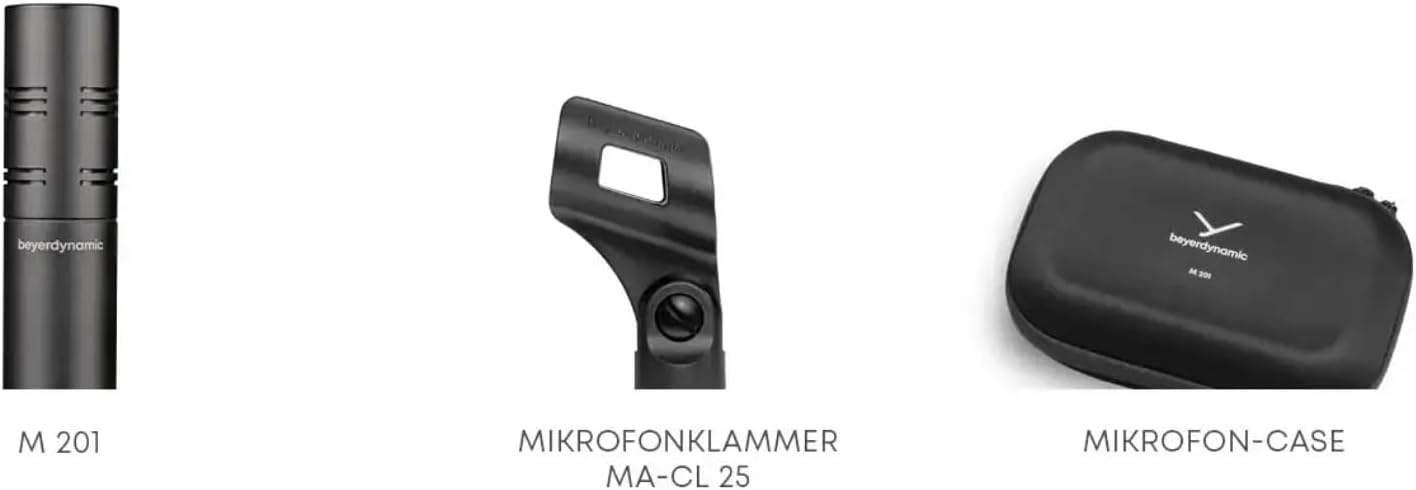
Image: The Beyerdynamic M 201 microphone, its MA-CL 25 microphone clip, and the protective carrying case.
4. Instrucións de configuración
- Attach Microphone Clip: Secure the MA-CL 25 microphone clip to a standard microphone stand.
- Micrófono de montaxe: Carefully insert the Beyerdynamic M 201 microphone into the clip. Ensure it is firmly seated.
- Conectar o cable XLR: Connect a balanced XLR cable (not included) to the microphone's XLR output and to an input on your audio mixer or audio interface.
- Posicionamento: Position the microphone appropriately for the sound source. The hypercardioid pattern is most sensitive directly in front of the microphone.

Image: The M 201 microphone mounted on a stand, positioned to capture sound from a snare drum. This illustrates a typical setup for drum recording.

Image: The M 201 microphone on a stand, capturing audio from an acoustic guitar. This demonstrates its use for acoustic instruments.

Image: The M 201 microphone placed in front of an electric guitar amplifier, suitable for capturing amplified instrument sounds.
5. Instrucións de funcionamento
The Beyerdynamic M 201 is a passive dynamic microphone and does not require phantom power. It is ready for use once connected to an appropriate input.
- Gaña Staging: Adjust the gain on your mixer or audio interface to achieve an optimal signal level without clipping.
- Efecto de proximidade: Be aware of the proximity effect, where bass frequencies are accentuated when the microphone is close to the sound source. Adjust positioning as needed for desired tonal balance.
- Off-Axis Rejection: Utilize the hypercardioid pattern by aiming the microphone directly at the desired sound source and positioning unwanted sound sources in the null points (sides) of the microphone.
6. Mantemento e coidados
- Limpeza: Usa un pano suave e seco para limpar o corpo do micrófono. Non empregues produtos de limpeza líquidos nin disolventes.
- Limpeza da reixa: If the microphone grille becomes dirty, gently wipe it with a slightly damp cloth. Ensure no moisture enters the microphone capsule.
- Almacenamento: When not in use, store the microphone in its provided carrying case to protect it from dust, moisture, and physical damage.
- Evita gotas: While robust, avoid dropping the microphone as this can damage internal components.

Imaxe: Detallada view of the microphone's internal components during assembly, demonstrating the precision engineering.
7 Solución de problemas
| Problema | Causa posible | Solución |
|---|---|---|
| Sen saída de son |
|
|
| Son distorsionado |
|
|
| Ruído de fondo excesivo |
|
|
8. Especificacións técnicas
| Tipo de transdutor | Dinámico |
| Patrón polar | Hypercardioid (Unidirectional) |
| Resposta en frecuencia | 40 Hz - 18 kHz |
| Sensibilidade Audio | 58 dB |
| Impedancia | 200 ohmios |
| Relación sinal-ruído | 76 dB |
| Conector | XLR |
| Material | Metal |
| Dimensións (L x W x H) | 9.3 x 6.6 x 3.55 polgadas |
| Peso | 1.4 libras |
9. Información da garantía
Beyerdynamic products are covered by a manufacturer's warranty. For detailed information regarding warranty terms, conditions, and registration, please refer to the official Beyerdynamic websitio web ou póñase en contacto co servizo de atención ao cliente. Garde o comprobante de compra para reclamacións de garantía.
10. Atención ao cliente
For further assistance, technical support, or service inquiries, please visit the official Beyerdynamic website or contact their customer service department. Contact information can typically be found on the Beyerdynamic websección de soporte do sitio.
Official Beyerdynamic Websitio: www.beyerdynamic.com