
PTHTECHUS A22
PTHTECHUS® Smart Watch for Kids User Manual
Modelo: A22
Produto rematadoview
The PTHTECHUS Smart Watch for Kids (Model A22) is a versatile device designed for children aged 4-14 years. It integrates entertainment, education, and practical tools to provide a comprehensive experience for young users. This manual provides detailed instructions for setting up, operating, and maintaining your smart watch.

Image: The PTHTECHUS Smart Watch A22, shown in pink, featuring a square display with a rocket ship wallpaper and a comfortable silicone strap.
Características principais:
- HD Camera & Video Recorder: Capture photos and videos with built-in fun stickers.
- Contido educativo: Includes 8 audio books and learning flashcards for vocabulary development.
- Entretemento: Features 22 puzzle games, a music player, and a video player.
- Seguimento da actividade: Built-in pedometer to track steps and calories.
- Ferramentas prácticas: Alarm clock, habit tracker, flashlight, calculator, calendar, and customizable wallpapers.
O que hai na caixa
Ao abrir o paquete, asegúrese de que estean presentes todos os seguintes elementos:
- 1 x PTHTECHUS Smart Watch (Model A22)
- 1 cable de carga (USB)
- 1 x Manual de usuario
Guía de configuración
1. Carga do reloxo intelixente
Before first use, fully charge the smart watch. The device uses a Lithium Polymer battery.
- Conecta o cable de carga USB fornecido ao porto de carga do reloxo.
- Conecta o outro extremo do cable USB a un adaptador de corrente USB estándar (non incluído) ou a un porto USB dun ordenador.
- A pantalla do reloxo indicará o estado da carga. Agarde aproximadamente de 2 a 3 horas para unha carga completa.
2. Acendido/apagado
- Para acender: Press and hold the power button (usually located on the side of the watch) until the screen lights up.
- Para apagar: Manteña premido o botón de acendido/apagado ata que apareza unha opción de apagado na pantalla e, a seguir, confirme.
3. Axuste de data e hora
Once powered on, navigate to the 'Settings' menu on the watch to adjust the date and time as needed.
Instrucións de funcionamento
The PTHTECHUS Smart Watch features a responsive touchscreen for easy navigation through its various functions.
Camera and Video Functions
The watch is equipped with an HD camera for capturing photos and videos. You can also apply fun stickers to your images.
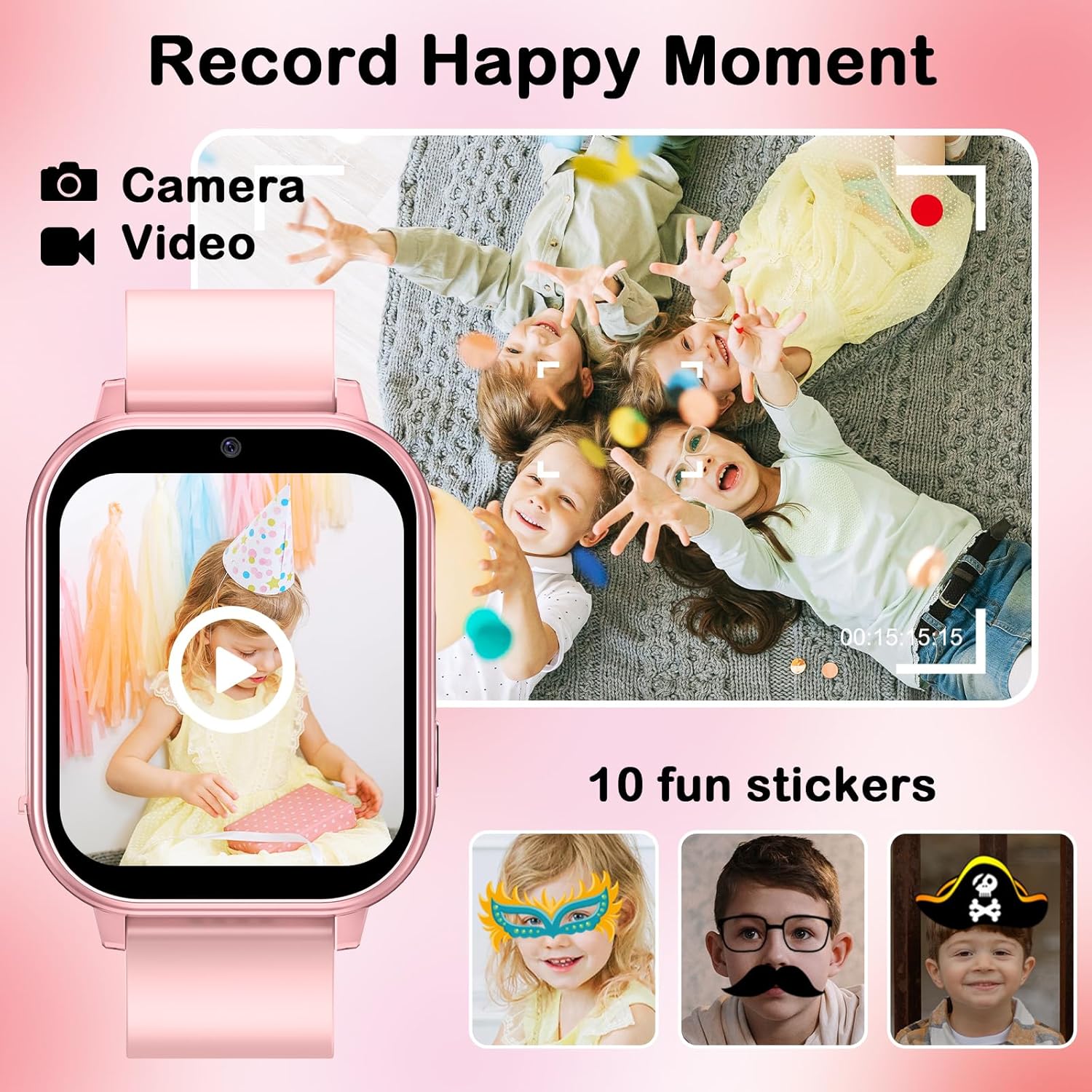
Image: A visual representation of the watch's camera and video recording capabilities, showing children playing and examples of 10 fun stickers that can be applied to photos.
- Navigate to the 'Camera' or 'Magic Camera' icon on the watch's main menu.
- Tap the screen to take a photo or switch to video recording mode.
- Explore the built-in 10 cute effect magic stickers to enhance your photos.
- Captured photos and videos can be viewed in the 'Photo Album' or 'Video Player' applications.
Music Player and Audio Books
Enjoy your favorite music and educational audio stories directly on the watch.

Image: The smart watch screen showing the music player interface, alongside illustrations of children engaging with audio books and learning cards, highlighting the device's multimedia and educational features.
- Transferencia de música: Connect the watch to a computer using the USB cable. The watch will appear as a removable disk. Drag and drop your child's favorite MP3 music files or audio stories into the designated music folder on the watch.
- Reproducir música: Select the 'Music Player' icon to browse and play transferred audio files.
- Audio Books: Access the 'Audiobooks' section to listen to the 8 pre-loaded audio stories.
Games and Parental Controls
The watch includes 22 engaging puzzle games designed to stimulate imagination. Parental controls are available to manage game time.

Image: A child holding a game controller, with the smart watch prominently displaying a 'Parental Control' screen, surrounded by icons representing the 22 fun games available on the device.
- Navigate to the 'Games' icon to access the selection of 22 puzzle games.
- Control parental: Within the settings, parents can set limits on game play duration to encourage balanced use.
Educational Features: Learning Cards
The watch supports learning through interactive flashcards.
- Select the 'Study Cards' icon.
- Explore vocabulary related to animals, colors, vegetables, and fruits.
Seguimento de hábitos
Cultivate good habits with the built-in habit tracker.
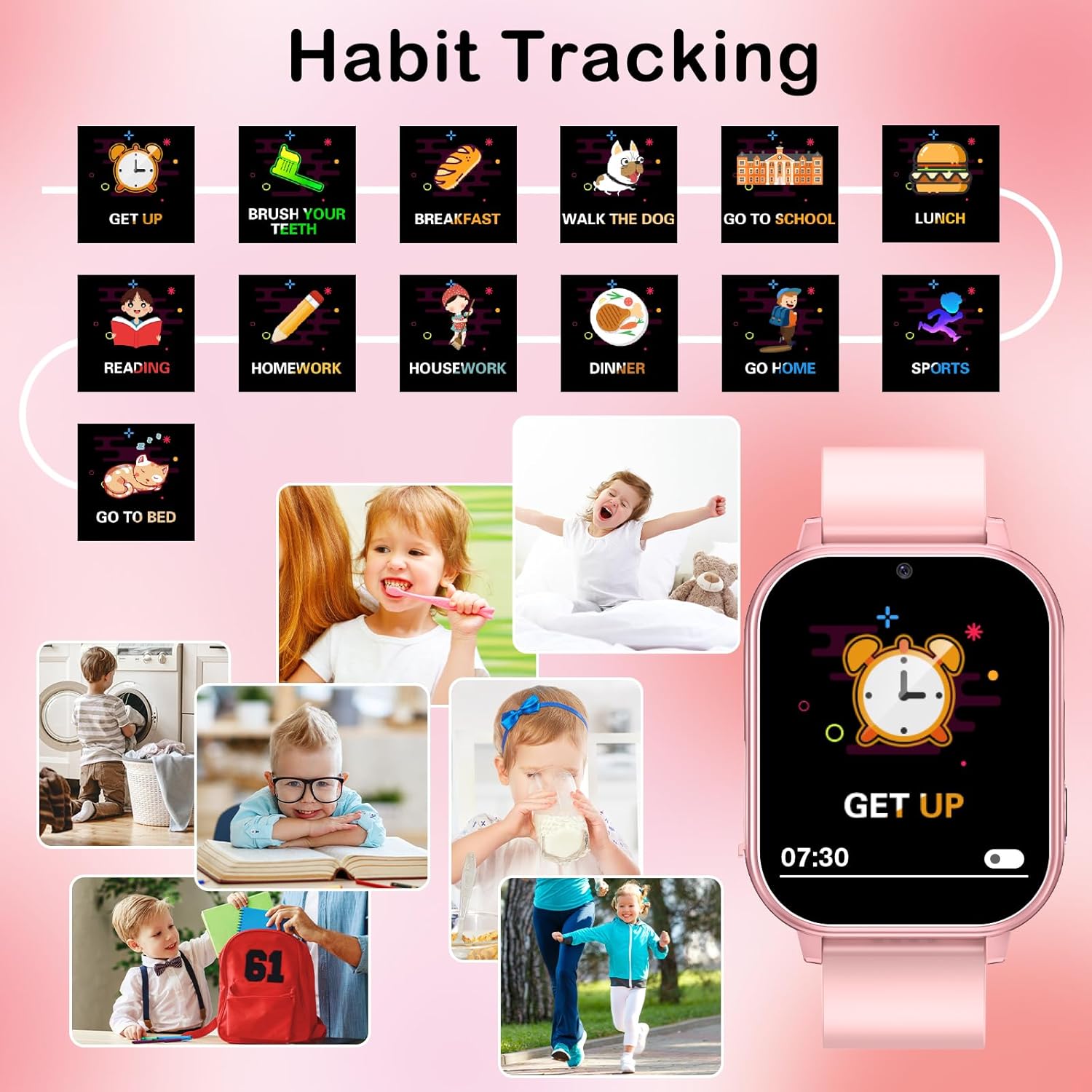
Image: The smart watch screen showing a 'GET UP' alarm, with a surrounding graphic illustrating various daily habits such as brushing teeth, eating breakfast, doing homework, and going to bed, demonstrating the habit tracking feature.
- Access the 'Habit Tracker' application.
- Set reminders for daily routines such as waking up, brushing teeth, meals, school, and bedtime.
Time Tools and Pedometer
The watch includes essential time management tools and a pedometer for activity tracking.
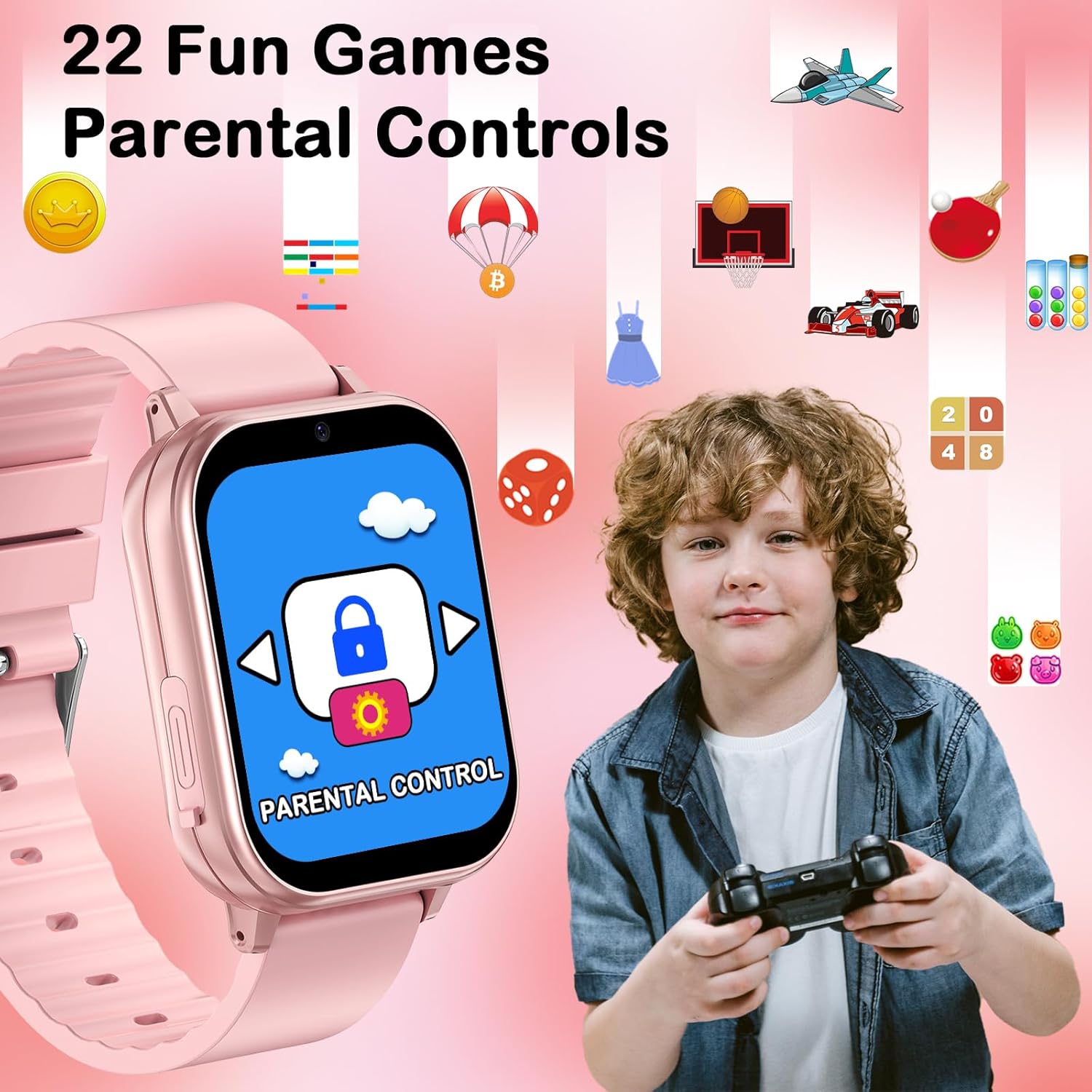
Image: A collage of four images depicting the watch's functions: a runner representing the Timer, a sleeping child for the Alarm clock, a child using a calculator, and children playing for the Pedometer, each with its corresponding icon.
- Espertador: Configura varias alarmas para recordatorios.
- Temporizador e cronómetro: Use for various activities and time management.
- Calculadora: Unha calculadora básica para aritmética sinxela.
- Podómetro: The built-in motion sensor tracks steps and estimates calories burned. Access this feature via the 'Pedometer' icon.
- Calendario: View the current date and plan events.
Outras Funcións
- Lanterna: Activate the flashlight function for illumination.
- Fondos de pantalla: Customize the watch face with 12 different wallpapers.
- Gravadora de voz: Record short audio notes.
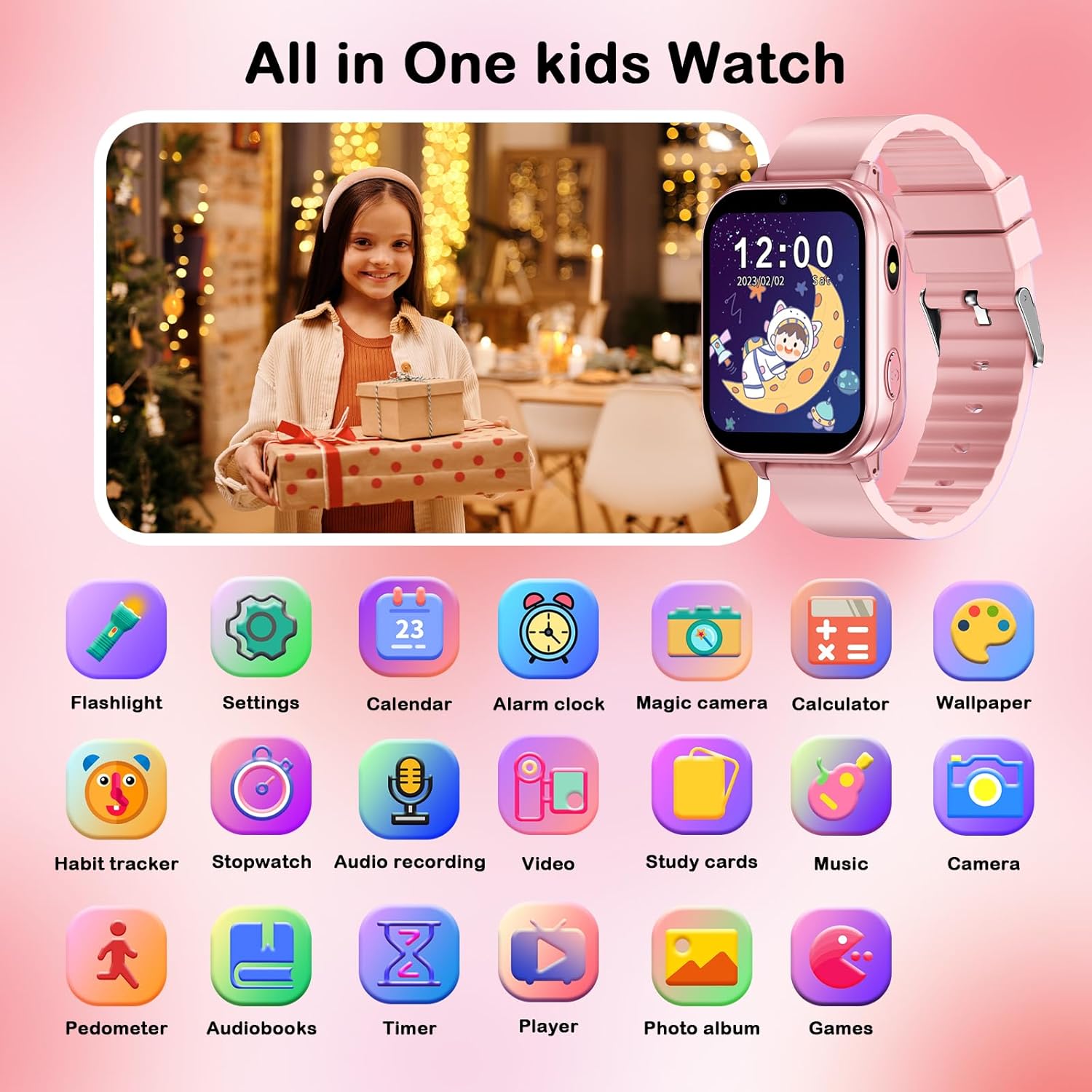
Image: A comprehensive grid displaying icons for all the integrated features of the smart watch, such as flashlight, settings, calendar, alarm clock, camera, calculator, wallpaper, habit tracker, stopwatch, audio recording, video, study cards, music, pedometer, audiobooks, timer, player, photo album, and games.
Mantemento
Proper care and maintenance will extend the life of your PTHTECHUS Smart Watch.
- Limpeza: Wipe the watch regularly with a soft, dry cloth. For stubborn smudges, a slightly damp cloth can be used, but ensure no moisture enters the charging port or speaker.
- Resistencia á auga: The watch is not waterproof. Avoid exposing it to water, rain, or excessive humidity.
- Temperatura: Non expoñas o reloxo a temperaturas extremas (calor ou frío) nin á luz solar directa durante períodos prolongados.
- Coidado da batería: To preserve battery life, avoid fully discharging the battery frequently. Charge the watch regularly, even if not in constant use.
- Almacenamento: Cando non o use durante períodos prolongados, garde o reloxo nun lugar fresco e seco.
Resolución de problemas
If you encounter issues with your smart watch, please refer to the following common solutions:
| Problema | Posible Solución |
|---|---|
| O reloxo non se acende. | Ensure the watch is fully charged. Connect to the charger for at least 30 minutes before attempting to power on again. |
| A pantalla non responde. | Restart the watch by holding the power button until it powers off, then power it back on. If unresponsive, allow the battery to fully drain and then recharge. |
| Non se pode transferir música files. | Ensure the USB cable is securely connected to both the watch and the computer. Verify that the watch is recognized as a removable storage device. Check file format compatibility (MP3 is supported). |
| Alarm goes off at unexpected times. | Check the alarm settings within the watch's 'Alarm Clock' application to ensure no unintended alarms are set. |
| Mala calidade de imaxe da cámara. | Ensure the camera lens is clean and free from smudges. Take photos in well-lit environments. |
Se o problema persiste despois de probar estas solucións, póñase en contacto co servizo de atención ao cliente para obter máis axuda.
Especificacións
| Característica | Detalle |
|---|---|
| Nome do modelo | A22 |
| Marca | PTHTECUS |
| Tamaño da pantalla | 1.54 polgadas |
| Dimensións do produto | 8.66 x 1.57 x 0.79 polgadas |
| Peso do elemento | 1.94 onzas (55 gramos) |
| Tipo de batería | Polímero de litio (requírese 1, incluído) |
| Capacidade de almacenamento da memoria | 500 MB |
| Tecnoloxía de conectividade | USB |
| Características especiais | Touchscreen, Video, Alarm Clock, Camera, Music Player, Pedometer, Habit Tracker, Study Cards, Audiostory, Games, Flashlight, Calculator, Calendar, Wallpapers |
| Fabricante | yangjiangshiyangdongquzhangtongjiayuankejico.LTD. |
| País de Orixe | China |
Garantía e Soporte
PTHTECHUS is committed to providing high-quality products and excellent after-sales service. If you have any questions or require assistance with your smart watch, please do not hesitate to contact our customer support team.
For support, please refer to the contact information provided on the product packaging or the official PTHTECHUS websitio. Tamén poden estar dispoñibles plans de protección para unha cobertura ampliada.