
1. Produto rematadoview
The BETAFPV BT2.0 Double Connectors Cable is a specialized pigtail designed for 2S FPV Whoop Drones, such as the Cetus X 2S. This package includes 5 cables, each featuring a BT2.0 connector with a 1.0mm banana connector, 45mm in length, and made with 22AWG wire. The BT2.0 connector is engineered to reduce internal resistance, providing a more efficient power discharge and an improved flight experience for compatible drones.
Características principais:
- Specifically designed for 2S whoop drones like Cetus X 2S brushless drones.
- BT2.0 connector features 1.0mm banana connectors, reducing internal resistance.
- Supports 9A continuous current and 15A burst current for enhanced performance.
- Addresses voltage sag issues, leading to more efficient 1S LiPo battery discharge.
- Allows for longer flight times without frequent low voltage avisos.
- Each cable measures 45mm in length (excluding the plug) and uses 22AWG wire.
2. Información de seguridade
This product contains small parts which may pose a choking hazard. Keep out of reach of small children. Always handle electronic components with care to prevent damage or injury.

Image: Product packaging displaying safety warnings regarding small parts and manufacturer details.
3. Contido do paquete
O paquete inclúe os seguintes elementos:
- 5 x 2S Whoop Cable Pigtail (BT 2.0)

Image: A set of five BT2.0 Double Connectors Cables, illustrating the product quantity.
4. Configuración e conexión
Proper connection of the BT2.0 cable pigtail is essential for safe and optimal performance with your 2S FPV Whoop Drone.
Wiring Diagram and Polarity:
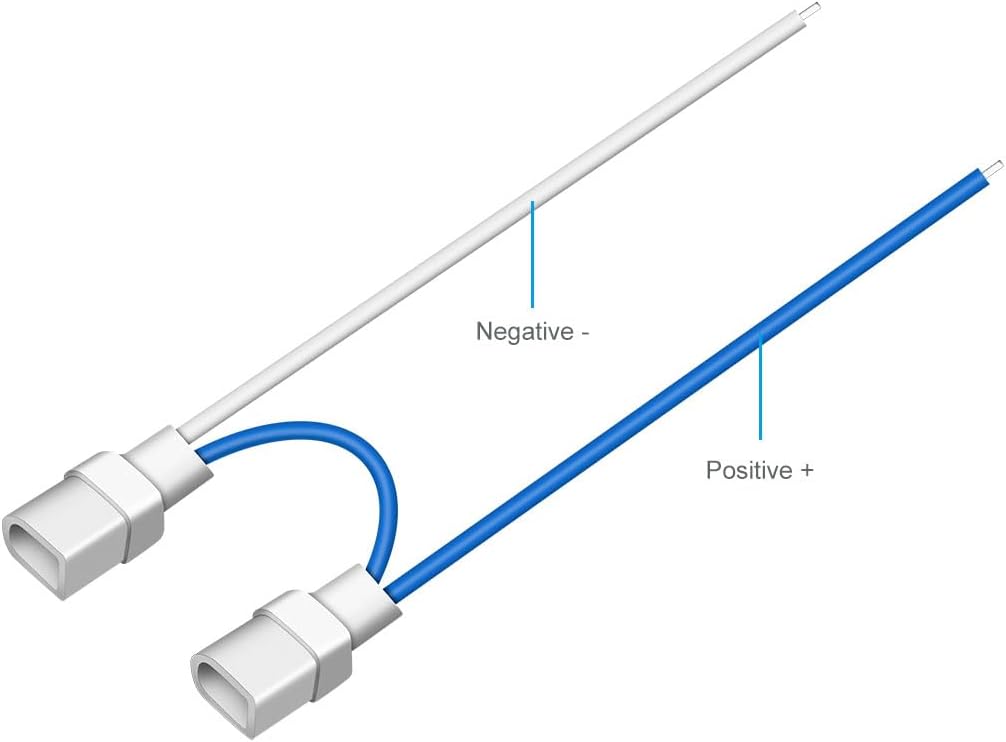
Imaxe: Unha detallada view of the BT2.0 connector cable, indicating that the blue wire is the Positive (+) pole and the white wire is the Negative (-) pole.
- Fío azul: Represents the Positive (+) pole.
- Fío branco: Represents the Negative (-) pole.
Pasos de conexión:
- Identify the positive and negative terminals on your 2S FPV Whoop Drone's flight controller or power distribution board.
- Carefully solder the blue wire of the BT2.0 pigtail to the positive (+) terminal.
- Carefully solder the white wire of the BT2.0 pigtail to the negative (-) terminal.
- Ensure all solder joints are secure and free from short circuits.
- After soldering, connect your BT2.0 compatible battery to the pigtail.
Nota: Incorrect polarity can cause severe damage to your drone's electronics. Always double-check connections before powering on your device.
5. Instrucións de funcionamento
Once the BT2.0 Double Connectors Cable is correctly installed, it functions as the power interface for your 2S FPV Whoop Drone. Connect a compatible 2S LiPo battery equipped with a BT2.0 connector to the pigtail. The enhanced design of the BT2.0 connector helps to minimize voltage sag during high current draw, providing a more stable power supply and improved flight performance. Ensure the battery is fully charged before use.
6. Mantemento
To ensure the longevity and reliable performance of your BT2.0 cables, follow these maintenance guidelines:
- Inspeccionar regularmente: Periodically check the cables and connectors for any signs of wear, fraying, or damage.
- Conexións limpas: Keep the connector pins clean and free from dirt or debris. Use a soft, dry brush if necessary.
- Evitar o estrés: Do not pull on the wires when disconnecting; always grasp the connector housing. Avoid sharp bends or excessive tension on the cables.
- Almacenamento adecuado: Store cables in a dry, cool place away from direct sunlight and extreme temperatures.
- Substituír cables danados: If a cable shows significant wear or damage, replace it immediately to prevent potential electrical issues or drone malfunction.
7 Solución de problemas
If you encounter issues with your BT2.0 Double Connectors Cable, consider the following:
- O dron non se acende:
- Check for correct polarity (Blue: Positive, White: Negative).
- Inspeccione as unións de soldadura para detectar unións frías ou curtocircuítos.
- Ensure the battery is charged and functioning correctly.
- Verify the BT2.0 connector on the battery is clean and undamaged.
- Excesivo Voltage Sag / Reduced Performance:
- Ensure the BT2.0 connector is fully seated.
- Check for any corrosion or damage on the connector pins.
- Confirm the battery itself is in good condition and capable of delivering the required current.
- Verify that the cable gauge (22AWG) is appropriate for your drone's power requirements.
- Conexión solta:
- If the connector feels loose, inspect for physical damage to the plastic housing or banana pins.
- Ensure the connector is fully inserted.
8. Especificacións
| Especificación | Valor |
|---|---|
| Elemento | 2S Whoop Cable Pigtail (BT 2.0) |
| Tipo de conector | BT2.0 (1.0mm Banana Connector) |
| Indicador de cable | 22 AWG |
| Lonxitude do cable | 45mm (1.77 inches) (Not including the plug) |
| Total Length (approx.) | 55mm (2.17 inches) (Including connectors) |
| Peso | 1.5 g (0.053 onzas) |
| Corrente Continua | 9A |
| Corrente de explosión | 15A |
| Positive Pole Color | Azul |
| Negative Pole Color | Branco |
| Dimensións do produto | 2.7 cm de longo x 0.03 cm de ancho x 3.9 cm de alto |
| Fabricante | BETAFPV |
| Número de modelo | 01130004 |

Image: Detailed diagram illustrating the cable's dimensions, including total length and connector size.

Image: The BT2.0 connector cable being weighed on a digital scale, indicating a weight of 1.5 grams.
9. Garantía e soporte
Specific warranty details for this product are typically provided at the point of purchase or within the product packaging. For technical support, product inquiries, or warranty claims, please refer to the official BETAFPV website or contact their customer service directly. Always retain your proof of purchase for warranty purposes.
Manufacturer: BETAFPV
Número de parte do fabricante: 01130004