
1. Introdución
This manual provides detailed instructions for the safe and effective operation of your WFLY ET08A 8-channel RC Transmitter and RF206S Receiver. Please read this manual thoroughly before using the product to ensure proper setup, operation, and maintenance. This system is designed for various remote-controlled models including airplanes, helicopters, quadcopters, boats, cars, and tanks.
2. Que hai na caixa
Ao abrir o paquete, comprobe que todos os compoñentes estean presentes e en bo estado:
- WFLY ET08A 8-Channel RC Transmitter
- WFLY RF206S Receiver
3. Produto rematadoview
3.1 WFLY ET08A Transmitter
The WFLY ET08A is an 8-channel digital proportional R/C remote control designed for ease of use and versatility. It features a user-friendly interface with both basic and advanced menu options to suit different user needs. The transmitter includes various functions such as Fail-safe setting, Battery Voltage Telemetry, RSSI (Received Signal Strength Indication), Dual/Triple Rates, End Point Adjustment, customizable switches, Reverse Polarity Protection, and Channels Mix Control.

Figura 3.1.1: Fronte view of the WFLY ET08A 8-Channel RC Transmitter. This image displays the main controls, including the gimbals, switches (SA, SB, SC, SD), and the LCD screen showing operational data.

Figura 3.1.2: Lado view of the WFLY ET08A 8-Channel RC Transmitter, showing its ergonomic design and profile.

Figura 3.1.3: De volta view of the WFLY ET08A 8-Channel RC Transmitter, showing the battery compartment and product label.
3.2 WFLY RF206S Receiver
The RF206S is a 6-channel receiver designed to work seamlessly with the ET08A transmitter. It supports PWM, PPM, and W.BUS output modes and features external voltage detection ports for telemetry. The receiver is equipped with a 'SET' button for binding and configuration.

Figura 3.2.1: Perspectiva view of the WFLY RF206S 6-Channel Receiver, showing the antenna connections and channel ports.
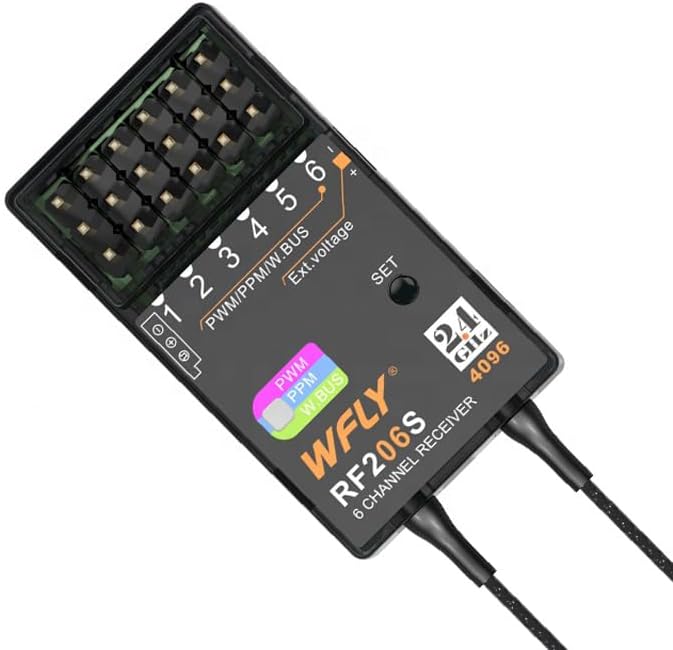
Figura 3.2.2: Arriba view of the WFLY RF206S 6-Channel Receiver, highlighting the PWM/PPM/W.BUS ports and the 'SET' button.
3.3 Características principais
- 8-channel RC transmitter with RF206S receiver.
- User-friendly interface with basic and advanced menu options.
- Supports Fail-safe Setting, Battery Voltage Telemetry, RSSI.
- Dual/Triple Rates, End Point Adjustment, Switch Customization.
- Reverse Polarity Protection, Multiple Battery Compatibility.
- Channels Mix Control.
- Built-in charging chips and MicroUSB charging port.
- Trainer function support.
- Two-way transmission system for real-time data.

Figura 3.3.1: The ET08A display showing channel outputs and dual rate settings, illustrating the user interface.

Figura 3.3.2: Diagram illustrating the English operating system menu structure of the WFLY ET08A, including Model Menu, System Setting, Linkage Setting, and General Menu options.
4. Configuración
4.1 Instalación e carga da batería
The ET08A transmitter requires 1 Lithium Polymer battery (not included). Ensure the battery is correctly oriented before closing the battery compartment. The transmitter features built-in charging chips and a MicroUSB charging port for convenient charging of 1S lithium batteries. Use a compatible charging plug or power bank.

Figura 4.1.1: Diagram showing the built-in charging chips and MicroUSB charging port on the WFLY ET08A transmitter, along with compatible charging accessories.
4.2 Binding the Receiver (RF206S)
To establish communication between the ET08A transmitter and the RF206S receiver, a binding process is required. Follow these general steps:
- Asegúrate de que tanto o transmisor como o receptor estean apagados.
- Connect a bind plug (if required by your receiver) to the bind port on the RF206S receiver, or press and hold the 'SET' button on the receiver.
- Power on the receiver. The receiver's LED should indicate it is in binding mode (e.g., flashing rapidly).
- While holding the bind button on the transmitter (if applicable) or entering bind mode via the transmitter's menu, power on the ET08A transmitter.
- The transmitter and receiver should bind within a few seconds. The receiver's LED will typically turn solid to indicate a successful bind.
- Power off both devices, then power them on normally to confirm the bind.
Refer to the specific instructions for your model's flight controller or ESC for proper connection of the RF206S receiver.

Figura 4.2.1: Primeiro plano view of the WFLY RF206S receiver, showing the 'SET' button used for binding and configuration.
5. Instrucións de funcionamento
5.1 Basic Controls and Navigation
The ET08A transmitter features two main gimbals for primary control (throttle, aileron, elevator, rudder), along with several switches (SA, SB, SC, SD) and rotary knobs for auxiliary functions. The LCD screen and navigation buttons (HOME/MON., EXIT/LOCK, and directional buttons) allow access to the menu system.
5.2 Sistema de menús
The ET08A utilizes an English operating system with a user-friendly interface. Press the 'HOME/MON.' button to access the main menu. Use the directional buttons to navigate and 'HOME/MON.' to select. 'EXIT/LOCK' is used to go back or exit a menu.
Key menu sections include:
- Model Menu: For managing model-specific settings like throttle curve, throttle hold, and throttle cut.
- Configuración do sistema: Includes Model Select, Model Type, Trainer function, and Display settings.
- Configuración da ligazón: For Telemetry, PPM/W.BUS settings, and Receiver Output configuration.
- Menú xeral: Access Monitor, Function, Servo Reverse, and Dual Rate settings.
5.3 Two-Way Transmission and Telemetry
The ET08A system supports two-way transmission, eliminating the need for a separate telemetry module. The RF206S receiver has built-in receiver voltage and external voltage detection ports. This allows for real-time monitoring of critical data such as battery voltage and RSSI directly on the transmitter's display.

Figura 5.3.1: Diagram illustrating the two-way transmission system, showing how receiver voltage and external voltage are detected and displayed on the ET08A transmitter from the RF206S receiver.
5.4 Fail-Safe Setting
The Fail-safe function is crucial for safety. It allows you to pre-set the positions of all channels in case of signal loss. Consult your model's specific requirements for recommended fail-safe settings (e.g., throttle to idle, control surfaces neutral).
5.5 Model Applications
The ET08A supports a wide variety of models and configurations:
- Airplane: Supports Aileron 1, Aileron 2, Elevon multiple models with built-in mixed control.
- Multi-copter FPV: Supports PPM, S.Bus signal, F/S (Fail-Safe) mode, and status selection.
- Helicóptero: Built-in (H-1) (HR3) models.
- DLG (Discus Launch Glider): Supports trimmer function for flight mode changes.
- Car Boat: Supports unidirectional and bidirectional ESC (Electronic Speed Controller).
- Tanque: Compatible with 180°/270° servo function and built-in hybrid control for tracked vehicles.

Figura 5.5.1: Visual representation of the diverse model applications supported by the WFLY ET08A, including airplanes, multi-copters, helicopters, DLG, cars, boats, and tanks.

Figura 5.5.2: Additional applications for the WFLY ET08A, such as agriculture plant protection drones, intelligent driverless cars, RC fishing boats, and Schmeiser Robots, alongside user-defined functions and screen lock settings.
6. Mantemento
Proper maintenance ensures the longevity and reliable performance of your WFLY ET08A and RF206S system.
- Limpeza: Emprega un pano suave e seco para limpar o transmisor e o receptor. Evita o uso de solventes ou produtos de limpeza abrasivos.
- Almacenamento: Store the devices in a cool, dry place away from direct sunlight and extreme temperatures. Remove batteries from the transmitter if storing for extended periods.
- Coidado da batería: Follow the manufacturer's guidelines for charging and discharging Lithium Polymer batteries. Do not overcharge or over-discharge.
- Inspección: Regularly inspect all cables, connectors, and antennas for any signs of damage or wear.
7 Solución de problemas
Esta sección aborda problemas comúns cos que podes atoparte.
7.1 Common Reminders and Warnings
The ET08A transmitter provides various reminders and warnings to ensure safe operation:
- Start Reminder: Alerts you to initial conditions.
- Shutdown Reminder: Guides you through proper power-off sequence.
- RF Off Reminder: Indicates when the radio frequency transmission is off.
- Voltage Reminders: Provides warnings for transmitter voltage, receptor voltage e vol externotage.

Figura 7.1.1: Examples of warning messages displayed on the ET08A screen, such as 'RX IS POWER ON', 'THR POSI', and 'RF IS OFF', which aid in safe operation and real-time control.
7.2 Pasos xerais para a resolución de problemas
- Sen enerxía: Comprobe a instalación da batería e o nivel de carga. Asegúrese de que o interruptor de alimentación estea na posición "ON".
- Sen sinal/Sen control: Verify that the transmitter and receiver are properly bound. Check all connections between the receiver and your model's components. Ensure the transmitter's RF is active.
- Control errático: Check for interference sources. Ensure all servo connections are secure. Re-bind the receiver if necessary.
- Problemas de visualización: If the screen is blank or unreadable, try restarting the transmitter. Ensure the battery has sufficient charge.
8. Especificacións
Technical specifications for the WFLY ET08A Transmitter and RF206S Receiver:
| Característica | Especificación |
|---|---|
| Dimensións do produto (transmisor) | 4.72 x 11.81 x 6.69 polgadas |
| Peso do artigo (transmisor) | 1.76 libras |
| Número de modelo do artigo | WFLY ET08A |
| Canles | 8 Channels (Transmitter), 6 Channels (Receiver) |
| Modelo de receptor | RF206S |
| Battery Requirement (Transmitter) | 1 Lithium Polymer battery (required) |
| Fabricante | Shezhen WFLY Technology Development Co.,Ltd |
9. Garantía e soporte
WFLY products are manufactured to high-quality standards. For warranty information, technical support, or service inquiries, please contact your retailer or visit the official WFLY websitio. Garde o recibo da compra como xustificante de compra para reclamacións de garantía.