
Star Micronics MCL32CBI
Manual do usuario da impresora térmica directa Star Micronics mC-Label3 MCL32CBI
Modelo: MCL32CBI
Introdución
Este manual proporciona información esencial para a configuración, o funcionamento, o mantemento e a resolución de problemas da súa impresora térmica directa Star Micronics mC-Label3 MCL32CBI. Lea este manual detidamente antes de usar a impresora para garantir un funcionamento correcto e seguro.
Contido do paquete
Verifique que todos os elementos que se indican a continuación estean incluídos no seu paquete:
- Impresora multifuncional mC-Label3
- Adaptador de CA
- Cable de alimentación
- Cables USB (CC 1.0 m e CA 1.8 m)
- Cable LAN (1 m)
- Guía de seguridade da folla de configuración sinxela

Imaxe: Fronte view da impresora Star Micronics mC-Label3, mostraasinpolo seu deseño compacto e a ranura de saída de etiquetas.
Configuración
1. Conexión da impresora
A impresora mC-Label3 MCL32CBI ofrece varias opcións de conectividade:
- USB-C: Conecta a impresora directamente ao teu PC, dispositivo Android ou iOS usando os cables USB-C a USB-C ou USB-C a USB-A fornecidos.
- Ethernet (LAN): Para a conectividade de rede, conecte a impresora ao seu enrutador ou conmutador de rede usando o cable LAN subministrado.
- Bluetooth: O modelo MCL32CBI admite conectividade Bluetooth para dispositivos iOS e Android. Asegúrate de que o Bluetooth estea activado no teu dispositivo e emparéllao coa impresora.

Imaxe: Traseira view da impresora mC-Label3, destacando os portos LAN, USB e de alimentación para varios tipos de conexión.
2. Cargando medios
A impresora admite varios tipos de soportes, incluíndo etiquetas sen soporte, etiquetas troqueladas, etiquetas continuas e papel térmico para recibos.
- Abra a tapa superior da impresora levantando o pestillo.
- Coloque o rolo de soporte no compartimento do soporte, asegurándose de que o bordo dianteiro saia pola parte superior.
- Tire dunha pequena cantidade de soporte por riba do cabezal de impresión e peche a tapa superior con seguridade.
- Asegúrese de que o soporte estea correctamente aliñado dentro das guías.

Imaxe: De arriba abaixo view da impresora mC-Label3 coa tapa aberta, que ilustra o mecanismo interno para cargar papel térmico ou rolos de etiquetas.
Instrucións de funcionamento
1. Acendido/apagado
Conecta o cable de alimentación á impresora e a unha toma de corrente. Preme o botón de acendido situado na parte frontal da impresora para acenderla. O indicador luminoso de estado acenderase.
2. Impresión de etiquetas e recibos
A impresora mC-Label3 MCL32CBI está deseñada para a impresión eficiente de etiquetas e recibos. É compatible con diversas aplicacións e servizos na nube.
- Compatibilidade de software: Funciona perfectamente con aplicacións para PC, Android e iOS.
- Servizos na nube: Utiliza os servizos na nube de Star Micronics para deseñar e xestionar etiquetas.
- Etiqueta dun só toque: Esta función permite almacenar recibos e etiquetas predefinidos para imprimir de forma rápida e sinxela directamente desde a impresora.
Imaxe: Unha man premendo o botón de alimentación na impresora mC-Label3, demostrando a impresión dunha etiqueta de "Agradecemento".

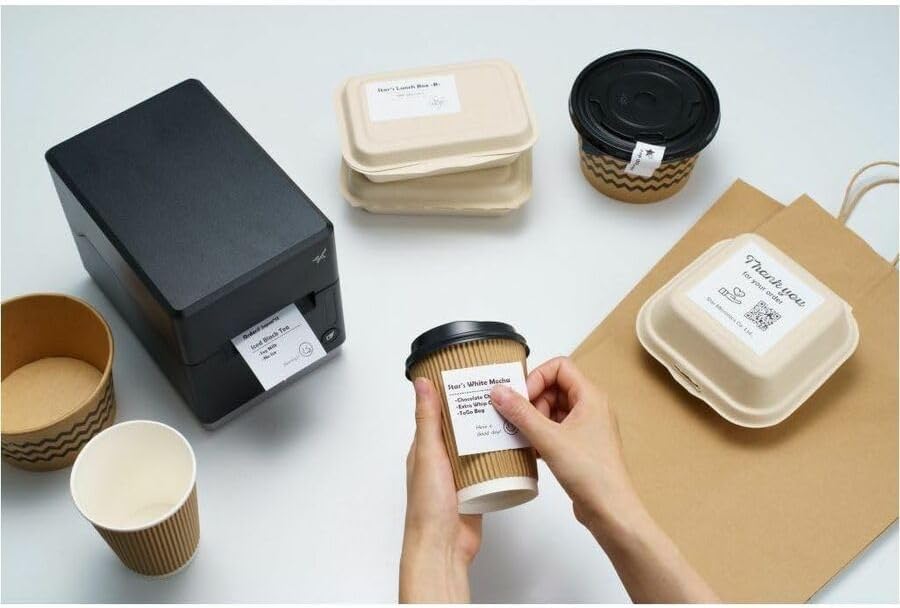
Imaxe: A impresora mC-Label3 nun escenario práctico, imprimindo etiquetas para envases de alimentos e cuncas de café, o que ilustra a súa versatilidade.
Mantemento
1. Limpeza da impresora
Unha limpeza regular garante un rendemento óptimo e prolonga a vida útil da túa impresora.
- Use un pano suave e sen pelusa damphumedecido con alcohol isopropílico para limpar o cabezal de impresión.
- Limpe o exterior da impresora cun pano suave e seco.
- Evite o uso de limpadores abrasivos ou disolventes.
2. Substitución de soportes
Cando o rolo de soporte estea esgotado, siga as instrucións de carga de soportes da sección Configuración para substituílo.
3. Reparacións sen esforzo
A mC-Label3 está deseñada para reparacións sen esforzo, sen ferramentas e cun mantemento mínimo, o que simplifica calquera substitución de compoñentes necesaria.
Resolución de problemas
Esta sección ofrece solucións a problemas comúns cos que podes atoparte.
| Problema | Causa posible | Solución |
|---|---|---|
| A impresora non se acende | Cable de alimentación non conectado; problema coa toma de corrente | Asegúrate de que o cable de alimentación estea conectado correctamente; proba cunha toma de corrente diferente. |
| Sen saída de impresión | Sen soportes; Soportes cargados incorrectamente; Problema co controlador | Cargar novos soportes; Volver a cargar os soportes correctamente; Reinstalar os controladores da impresora. |
| Mala calidade de impresión | Cabezal de impresión sucio; soportes de baixa calidade | Limpe o cabezal de impresión; use os soportes térmicos recomendados. |
| Problemas de conectividade | Conexión por cable incorrecta; Bluetooth non emparellado; Configuración de rede | Comprobe os cables USB/Ethernet; Volva emparellar o Bluetooth; Verifique a configuración da rede. |
Especificacións
| Característica | Detalle |
|---|---|
| Nome do modelo | mC-Label 3 |
| Número de modelo do artigo | MCL32CBI |
| Tecnoloxía de impresión | Térmica directa |
| Saída da impresora | Monocromo |
| Velocidade máxima de impresión monocromática | 23 ppm |
| Resolución máxima de impresión en branco e negro | 203 ppp (203 x 203 ppp) |
| Medios impresos | Etiquetas (sen lámina, troqueladas, continuas), para recibos térmicos |
| Tecnoloxía de conectividade | Bluetooth, con cable (USB, Ethernet) |
| Interface de hardware | USB-Ethernet |
| Dispositivos compatibles | PC, Android, iOS |
| Tipo de controlador | iOS, Android |
| Dimensións do produto | 17.0 x 14.2 x 21.1 cm (6.7 polgadas de profundidade x 5.6 polgadas de ancho x 8.3 polgadas de alto) |
| Peso do elemento | 7.2 libras (3.27 kg) |
| Capacidade de almacenamento da memoria | 64 MB |
| Cor | Negro |
| Fabricante | STAR MICRONICS |
| País de Orixe | China |
Información da garantía
A impresora Star Micronics mC-Label3 MCL32CBI inclúe unha garantía do fabricante. Para coñecer os termos e condicións específicos, consulte a tarxeta de garantía incluída no paquete ou visite o sitio web oficial de Star Micronics. websitio.
Tipo de garantía: Fabricante
Apoio
Para obter máis axuda, soporte técnico ou para descargar os controladores e firmware máis recentes, visite o sitio web de soporte oficial de Star Micronics. websitio ou póñase en contacto co seu servizo de atención ao cliente.
Oficial de Star Micronics Websitio: www.starmicronics.com
Ligazón de soporte: www.starmicronics.com/support
Documentos relacionadosMCL32CBI


Ask a question about this manual
Ask about setup, troubleshooting, compatibility, parts, safety, or missing instructions. Manuals+ will review the question and use this page’s manual context to help answer it.