
1. Introdución
This manual provides detailed instructions for the installation, operation, and maintenance of your GoHawk AN4-Halo Chrome Motorcycle Bluetooth Speaker System. This system features 4-inch full-range speakers with a built-in 300W Class-D amplifier, Bluetooth 5.0 connectivity, USB, and AUX inputs, and an integrated LED halo ring. It is designed for use on motorcycles, ATVs, scooters, and 4-wheelers.
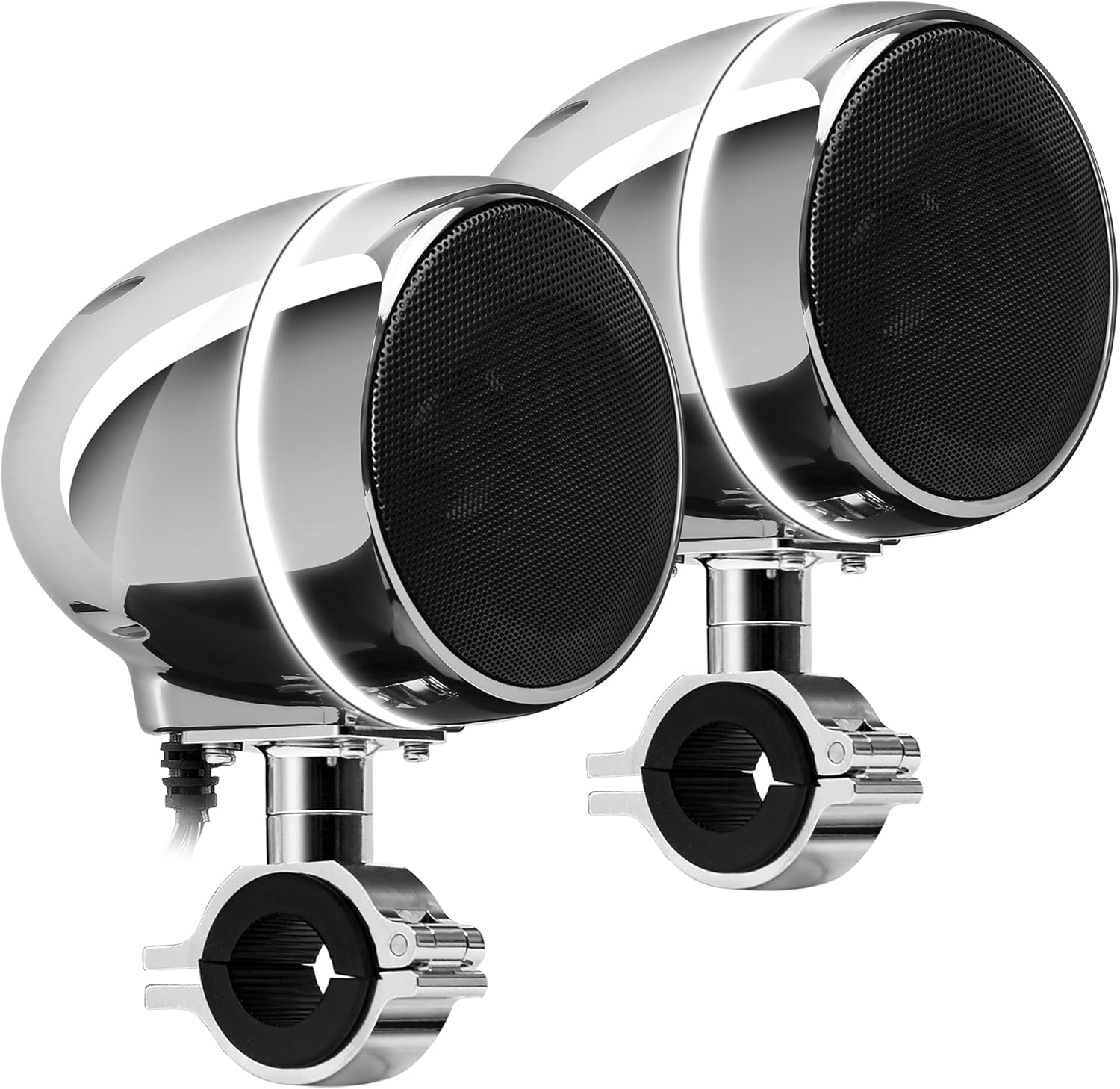
Image 1.1: GoHawk AN4-Halo Chrome Motorcycle Bluetooth Speaker System.
2. Información de seguridade
- Always ensure proper wiring and secure mounting to prevent accidents during vehicle operation.
- Do not attempt to disassemble or modify the speaker system. This may void the warranty and cause damage.
- Avoid prolonged exposure to extremely high volume levels, which can cause hearing damage.
- Ensure all connections are waterproofed and protected from the elements, despite the system's IP56 waterproof rating.
- Se tes dúbidas sobre algún paso, consulta cun profesional para a instalación.
3. Contido do paquete
Verifica que todos os elementos estean presentes no paquete:
- 1 x Master Speaker with Built-in Ampmáis vivo
- 1 x altofalante escravo
- 1 x Control con cable
- 1 x 3.5mm Audio AUX Cable
- 1 x SAE to Ring Terminal Power Cord (78 inches long)
- 2 x Montaxe Clamps (supports 7/8" to 1-1/4" bar size)
- 1 x Manual de usuario
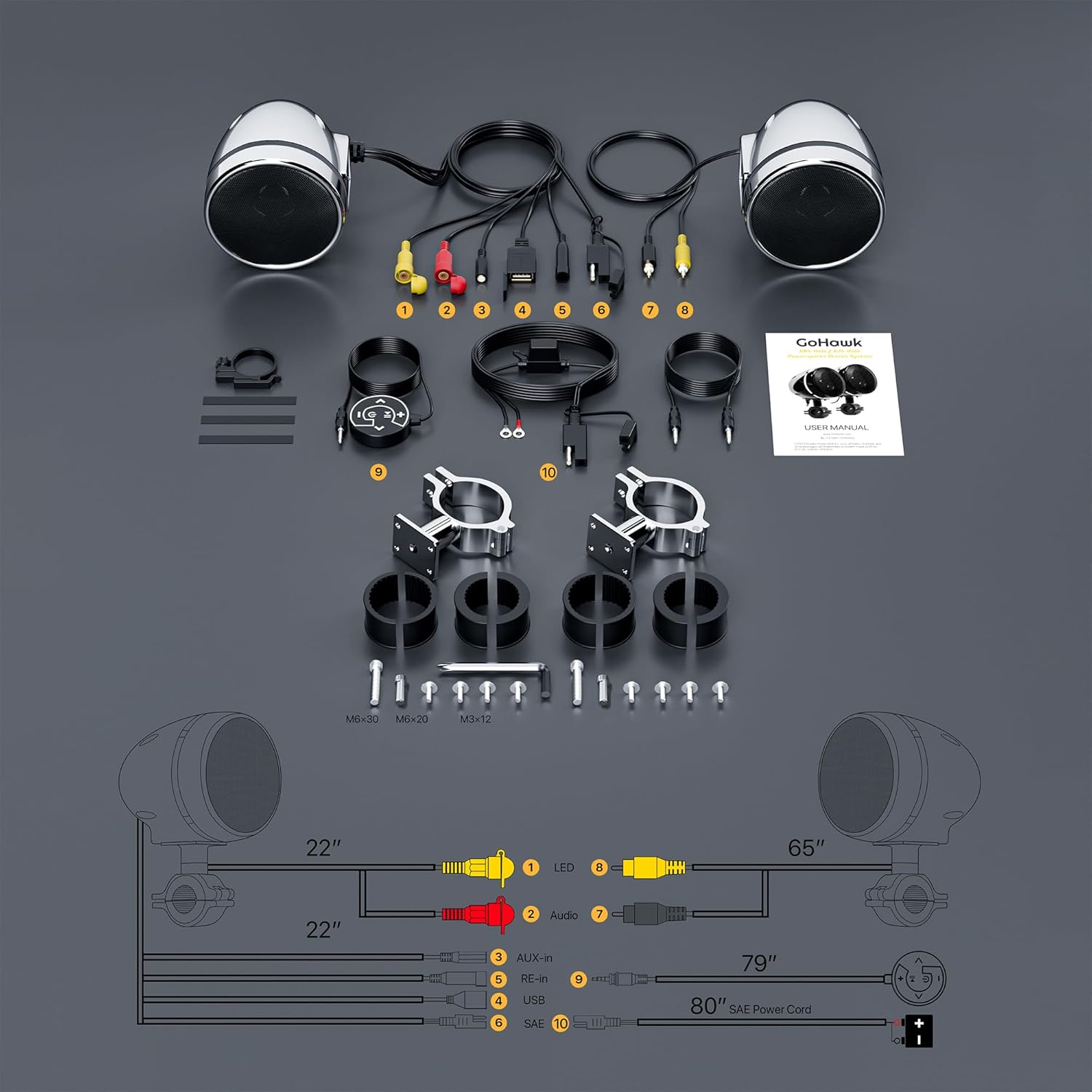
Image 3.1: Included components and wiring diagram.
4. Instalación e configuración
Siga estes pasos para a instalación correcta:
- Montaxe dos altofalantes: Attach the master and slave speakers to your vehicle's handlebars using the provided mounting clamps. Ensure the clamps are securely tightened for stability. The clamps support handlebar sizes from 7/8 inch to 1-1/4 inch.
- Conexión dos altofalantes: Connect the slave speaker to the master speaker using the provided speaker cable. The slave speaker cable is 70 inches long and uses a standard RCA male connector.
- Connecting the Wired Control: Plug the wired control unit into the designated port on the master speaker. Mount the wired control in an easily accessible location on your handlebars.
- Conexión de alimentación: Connect the SAE to ring terminal power cord to your vehicle's 12V power source. The red wire connects to the positive (+) terminal, and the black wire connects to the negative (-) terminal. Ensure a secure and stable power supply.
- Xestión de cables Route all cables safely, away from moving parts, heat sources, and potential pinch points. Secure cables with zip ties or similar fasteners.

Imaxe 4.1: Dimensións do produto para a planificación da instalación.
5. Instrucións de funcionamento
The system is controlled via the backlit wired control unit.

Image 5.1: Close-up of the full-function backlit wired control.
5.1 Wired Control Functions
- Botón de encendido: Press and hold to turn the system on or off. A short press may switch modes.
- Botón Reproducir/Pausa: Press to play or pause audio playback. Long-press to toggle the LED halo ring.
- Subir volume (+): Aumenta o nivel de volume.
- Baixar o volume (-): Diminuír o nivel de volume.
- Next Track (Right Arrow): Ir á seguinte pista ou estación.
- Previous Track (Left Arrow): Go to the previous track or station.
5.2 Emparejamento Bluetooth
To connect your smartphone or other Bluetooth-enabled device:
- Ensure the speaker system is powered on and in Bluetooth mode (indicated by an audible prompt or LED indicator).
- No teu dispositivo móbil, activa o Bluetooth e busca os dispositivos dispoñibles.
- Select "GOHAWK" from the list of discovered devices to pair.
- Once paired, you will hear a confirmation tone, and audio will stream wirelessly from your device.

Imaxe 5.2: Ex.ample of Bluetooth pairing on a smartphone.
Reprodución USB e AUX 5.3
The system supports audio playback from USB drives and devices connected via the 3.5mm AUX input.
- Entrada USB: Inserir unha unidade USB que conteña son files into the USB port. The system will automatically switch to USB mode and begin playback. Note: USB charging and direct playback from phones via USB are not supported.
- Entrada AUX: Connect an audio device (e.g., MP3 player) to the 3.5mm AUX input using the provided AUX cable. The system will switch to AUX mode for playback.

Image 5.3: USB input for audio files.

Image 5.4: 3.5mm AUX input for external devices.
5.4 LED Ring Control
The integrated white LED halo ring can be controlled directly from the wired control unit.
- Toggle LED: Long-press the Play/Pause button on the wired control to turn the LED halo ring on or off.

Image 5.5: Speakers featuring the LED halo ring.
6. Mantemento
To ensure the longevity and optimal performance of your GoHawk speaker system:
- Limpeza: Use un suave, damp pano para limpar as superficies dos altofalantes. Evite produtos de limpeza abrasivos ou solventes que poidan danar o acabado.
- Resistencia á auga: The system has an IP56 waterproof design, meaning it is protected against dust and high-pressure water jets. However, avoid submerging the unit or exposing it to prolonged heavy rain if possible. Ensure all port covers are securely closed.
- Comprobacións de conexión: Periodically inspect all wiring connections for tightness and signs of wear or corrosion.
- Almacenamento: If storing the vehicle for an extended period, ensure the speaker system is clean and disconnected from the power source.

Image 6.1: Visual representation of the system's waterproof design and features.
7 Solución de problemas
Se tes problemas co teu sistema de altofalantes, consulta os seguintes problemas e solucións comúns:
| Problema | Causa posible | Solución |
|---|---|---|
| Sen alimentación/Sen son | Loose power connection, blown fuse, system off. | Check power wiring (red to +, black to -). Ensure system is powered on. Check vehicle's fuse. |
| Bluetooth non se sincroniza | Speakers not in pairing mode, device Bluetooth off, too far from speakers. | Ensure speakers are in Bluetooth mode. Turn Bluetooth off/on on your device. Move device closer (within 15 meters). |
| Son de baixo volume ou distorsionado | Volume too low on device/speakers, poor audio source, speaker obstruction. | Increase volume on both the speaker system and your connected device. Ensure audio source quality is good. Check for any obstructions around speakers. Note: Volume may be affected by vehicle speed and wind noise. |
| A reprodución USB non funciona | USB drive not formatted correctly, unsupported file types, USB charging attempt. | Ensure USB drive contains compatible audio files. Verify the USB drive is properly inserted. Remember, USB charging is not supported. |
8. Especificacións
Key technical specifications for the GoHawk AN4-Halo Chrome Speaker System:
- Nome do modelo: AN4-Halo Chrome
- Vol. De entradatage: 12 voltios
- Tipo de altofalante: 4-inch Full Range Speaker Systems
- Potencia de saída máxima do altofalante: 300 vatios
- Impedancia: 4 ohmios
- Resposta en frecuencia: 20 kHz
- Tecnoloxía de conectividade: Bluetooth 5.0
- Alcance Bluetooth: Ata 15 metros
- Nivel de resistencia á auga: IP56 (Impermeable)
- Material: Aluminum, Metal, Plastic
- Tipo de montaxe: Handlebar Mount (7/8" to 1-1/4" bar size)
- Características especiais: LED Light, USB Port, AUX Input
- Dimensións do produto: 5.25" D x 4" W x 8" H
- Peso do artigo: 4 libras

Image 8.1: Speakers feature adjustable swivel for optimal positioning.
9. Garantía e soporte
The GoHawk AN4-Halo Chrome Motorcycle Bluetooth Speaker System comes with a limited warranty. For specific warranty details, please refer to the documentation included with your purchase or contact GoHawk customer support.
If you require technical assistance, have questions about installation, or need to report a defect, please contact GoHawk directly through their official support channels. Provide your product model number (AN4-Halo) and purchase details for efficient service.