
1. Introdución e finalview
The Epson PowerLite 97H is a versatile XGA conference room projector designed for clear and vibrant presentations. Utilizing 3LCD technology, it delivers bright, true-to-life images with excellent color brightness and a wide color gamut. This projector offers a native resolution of 1024x768 (XGA) and a brightness of 2,700 ANSI Lumens, making it suitable for various environments.
As características principais inclúen:
- Brillo: 2,700 lúmenes ANSI
- Resolución: 1024x768 (XGA)
- Relación de aspecto: 4:3
- Contraste: 10,000:1
- Tecnoloxía de visualización: 3LCD for vibrant colors
- Conectividade: Multiple options including HDMI, USB, LAN, VGA, S-Video, Composite, and Audio inputs/outputs.
2. Información de seguridade
Please read all safety instructions before using the projector to ensure safe operation and to prevent damage to the unit. Keep this manual for future reference.
- Aviso de calor: O proxector lamp and surrounding areas can become extremely hot during operation and immediately after shutdown. Avoid touching these areas.
- Ventilación: Ensure adequate ventilation around the projector. Do not block ventilation openings, as this can lead to overheating and potential damage.
- Lamp Substitución: Always turn off the projector and allow the lamp to cool completely before attempting to replace it. Refer to the lamp replacement instructions in the Maintenance section.
- Fonte de enerxía: Use only the specified power supply and cable. Do not overload power outlets.
- Líquido e humidade: Non expoñas o proxector á choiva, á humidade ou a un exceso de humidade. Non coloques obxectos cheos de líquidos enriba ou preto do proxector.
- Limpeza: Desconecte o cable de alimentación antes de limpar. Use un pano suave e seco. Non empregue produtos de limpeza líquidos nin en aerosol.
3. Contido do paquete
Verifica que todos os elementos estean presentes no teu paquete:
- Epson PowerLite 97H Projector
- Control remoto
- Cable de alimentación
- Cable HDMI
4. Configuración
4.1 Colocación física
Place the projector on a stable, flat surface. Ensure there is sufficient space around the projector for proper ventilation. Avoid placing it in direct sunlight or near heat sources. The projector is designed to be portable and can be used for tabletop projection.
4.2 Conexión de dispositivos
The PowerLite 97H offers a wide range of connectivity options. Refer to the image below for port identification.

Figure 1: Rear panel of the Epson PowerLite 97H Projector showing various input and output ports.
- USB-A: Connect USB storage devices or a document camera.
- USB-B: Connect to a computer for USB display or control.
- LAN (RJ-45): Connect to a network for control and monitoring.
- HDMI 1 & HDMI 2/MHL: Connect to devices with HDMI output (e.g., laptops, Blu-ray players, gaming consoles). HDMI 2 also supports MHL for compatible mobile devices.
- Computer1 (VGA) & Computer2 (VGA): Conectar a ordenadores mediante un cable VGA.
- Audio1 (Mini Jack) & Audio2 (Mini Jack): Connect audio from computers or other devices.
- Vídeo S: Connect to devices with S-Video output.
- Vídeo (RCA): Connect to devices with composite video output.
- Audio In (RCA R/L): Connect stereo audio from devices with RCA audio output.
- Micrófono: Conecta un micrófono.
- RS-232C: Para o control en serie do proxector.
- Monitor Out (VGA): Connect an external monitor to display the projector's input signal.
- Audio Out (Mini Jack): Connect external speakers or an audio system.
4.3 Encendido
- Connect the power cable to the projector's AC inlet and then to a power outlet.
- Preme o Poder button on the projector's control panel or the remote control. The power light will illuminate, and the projector will begin its startup sequence.
5. En funcionamento
5.1 Controis básicos
The projector can be operated using the control panel on the top of the unit or the included remote control. The top panel provides essential functions.

Figure 2: Top control panel of the Epson PowerLite 97H Projector.
- Botón de encendido: Acende ou apaga o proxector.
- Busca de fontes: Percorre ciclicamente as fontes de entrada dispoñibles.
- Menú: Abre o menú de visualización en pantalla (OSD).
- H/V (axuste trapezoidal horizontal/vertical): Adjusts image shape to correct trapezoidal distortion.
- Esc: Sae do menú ou función actual.
- Introduza: Confirms a selection in the menu.
- Botóns de frecha: Navigate through menu options and adjust settings.
- Botóns de volume: Axusta o nivel de saída de son.
- Axuda: Ofrece asistencia en pantalla.
- Luz de estado: Indicates projector status (e.g., power on, standby, error).
- Lamp Temp Light: Indicates lamp temperature status.
5.2 Axustar a imaxe
To achieve a clear and properly sized image:
- Anel de enfoque: Rotate the focus ring located near the lens to sharpen the image.
- Palanca de zoom: Use the zoom lever (if present, typically near the lens) to adjust the image size without moving the projector.
- Corrección Keystone: If the image appears trapezoidal, use the H/V keystone buttons on the control panel or remote to correct the shape.

Figure 3: Front/side view showing the projector lens and ventilation.
5.3 Selección de entrada
Preme o Busca de orixe button on the control panel or remote control to cycle through the connected input sources (e.g., HDMI 1, Computer1, USB-A). The projector will automatically detect and display the active input.
6. Mantemento
Un mantemento regular garante un rendemento óptimo e prolonga a vida útil do proxector.
6.1 Lamp Substitución
O proxector lamp ten unha vida útil limitada. Cando o lamp chega ao final da súa vida, a Lamp Temp indicator may light up, or the image brightness may decrease significantly. Always use genuine Epson replacement lamps.

Figura 4: Lateral view of the projector, showing a caution label regarding hot surfaces.
WARNING: Turn off the projector and wait until the lamp has cooled down completely before attempting replacement. Failure to do so can result in severe burns or damage to the projector. Refer to the specific lamp replacement instructions provided in the full Epson service manual for your model.
6.2 Limpeza/Substitución do filtro de aire
The air filter prevents dust from entering the projector and affecting performance. Clean the air filter regularly (e.g., every 100 hours of use) or when prompted by the projector. If the filter is damaged or excessively dirty, replace it.
- Turn off the projector and disconnect the power cable.
- Locate the air filter cover (refer to your full service manual for exact location).
- Remove the cover and carefully extract the filter.
- Use a small vacuum cleaner or soft brush to remove dust from the filter. If replacing, insert a new filter.
- Volva colocar a tapa do filtro de forma segura.
6.3 Coidados xerais
- Limpeza de lentes: Gently wipe the lens with a soft, non-abrasive lens cleaning cloth. Do not use harsh chemicals.
- Limpeza exterior: Wipe the projector's exterior with a soft, dry cloth. For stubborn dirt, use a slightly damp pano e deterxente suave e, a continuación, seque.
- Almacenamento: Cando non o use durante períodos prolongados, garde o proxector nun lugar fresco e seco, idealmente na súa embalaxe orixinal ou nunha funda protectora.
7 Solución de problemas
If you encounter issues with your projector, try the following solutions:
- Sen imaxe:
- Asegúrate de que o proxector estea acendido e de que o indicador de alimentación estea aceso de forma fixa.
- Check all cable connections (HDMI, VGA, etc.) are secure at both the projector and the source device.
- Preme o Busca de orixe botón para percorrer as entradas.
- Verify the source device is powered on and outputting a signal.
- Adjust the focus and zoom.
- Sen son:
- Increase the projector's volume using the volume buttons.
- Check audio cable connections (if using separate audio cables).
- Ensure the audio output on your source device is enabled and turned up.
- O control remoto non funciona:
- Ensure there are no obstructions between the remote and the projector's remote sensor.
- Substitúe as pilas do control remoto.
- Aviso de sobrequecemento:
- Ensure all ventilation openings are clear and not blocked.
- Limpe o filtro de aire como se describe na sección Mantemento.
- Fai funcionar o proxector nunha zona ben ventilada.
8. Especificacións
| Característica | Especificación |
|---|---|
| Fabricante | Epson |
| Modelo | PowerLite 97H |
| Tipo de visualización | 3LCD |
| Resolución nativa | 1024 x 768 (XGA) |
| Brillo | 2700 lúmenes ANSI |
| Relación de contraste | 10000:1 |
| Relación de aspecto | 4:3 |
| Tecnoloxía de conectividade | HDMI, USB, LAN, VGA, S-Video, Composite |
| Entradas de audio | Mini Jack x 2, RCA (L/R), Mic |
| Saída de audio | Mini Jack |
| Porto de control | RS-232C |
| Usos recomendados | Negocios |
| Característica especial | Portátil |
| Peso do elemento | 6 libras |
9. Información da garantía
For specific warranty details regarding your Epson PowerLite 97H projector, please refer to the warranty card included with your product or contact the seller/manufacturer directly. Warranty terms typically cover manufacturing defects for a specified period from the date of purchase.
10. Apoio
For technical support, service, or additional assistance with your Epson PowerLite 97H projector, please use the contact information below:
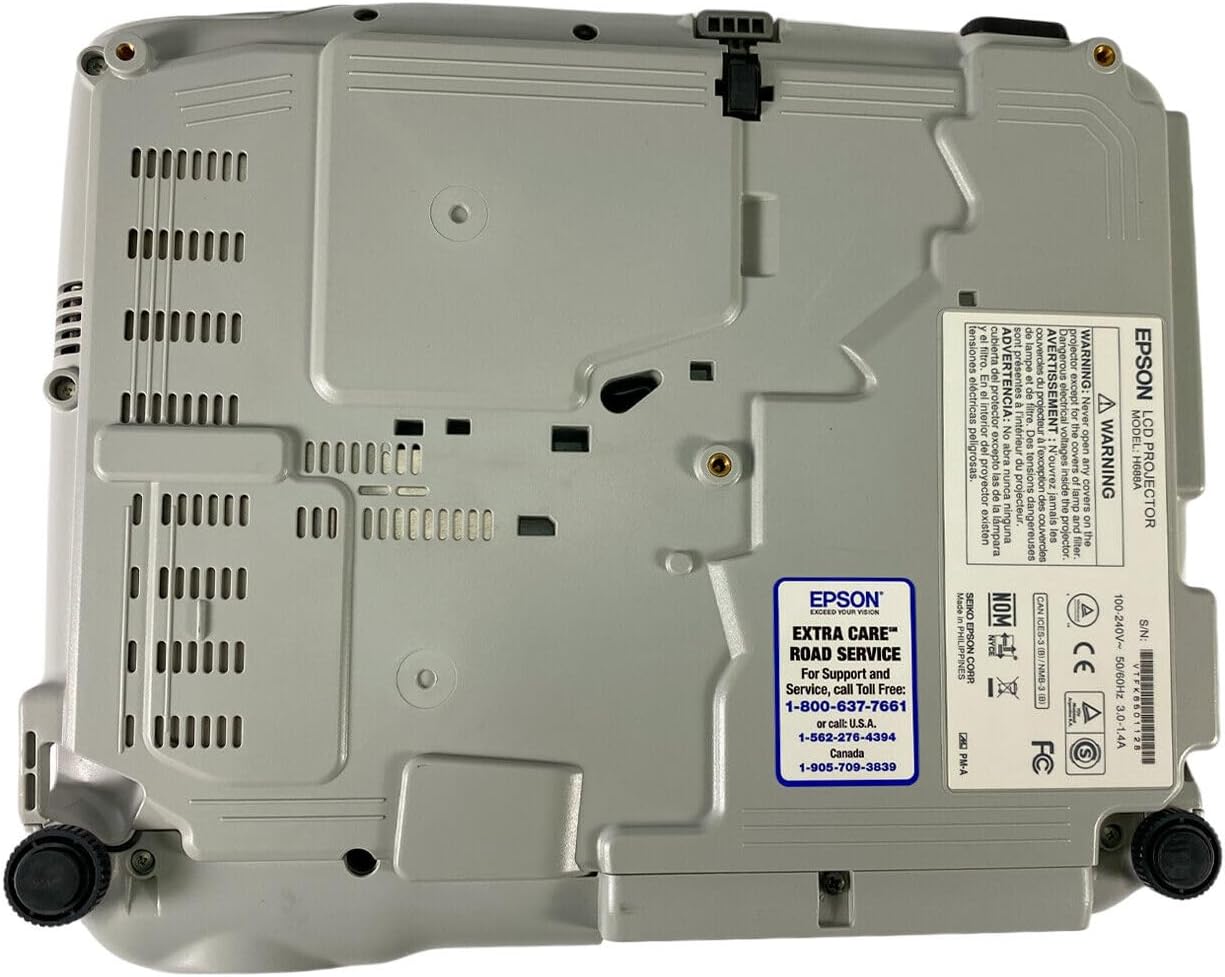
Figure 5: Bottom panel of the projector showing support contact details.
Epson Extra Care Road Service
- For support and service, call:
- EUA: 1-800-637-7661
- EUA: 1-866-276-4394
- Canadá: 1-905-709-3839