
Introdución
This manual provides comprehensive instructions for the setup, operation, maintenance, and troubleshooting of your SKYLOONG GK87 V3 TKL Wireless Mechanical Keyboard. Please read this manual thoroughly before using the keyboard to ensure optimal performance and longevity.
Contido do paquete
Verifique que todos os elementos que se indican a continuación estean incluídos no seu paquete:
- SKYLOONG GK87 V3 Keyboard
- Keyboard dust cover
- Free Extra Keycaps
- Satellite Switch & Silicone stopper
- Manual do teclado
- Adaptador
- Cable USB (USB-C)
- Interruptores adicionais
- Extractor de teclas e interruptores 2 en 1

Configuración
1. Carga inicial
Before first use, connect the keyboard to a USB power source using the provided USB-C cable to ensure it is fully charged. The keyboard features a 3600mAh Li-Battery.
2. Opcións de conectividade
The GK87 V3 keyboard supports three connection modes: 2.4G Wireless, Bluetooth 5.1, and USB-C Wired.
- Modo con cable USB-C: Connect the provided USB-C cable directly to your computer and the keyboard's USB-C port. This mode also charges the keyboard.
- Modo sen fíos 2.4G: Locate the 2.4G USB receiver, typically stored in a magnetic compartment on the side of the keyboard. Insert the receiver into an available USB port on your computer. Switch the keyboard to 2.4G mode using the toggle switch.
- Modo Bluetooth 5.1: Switch the keyboard to Bluetooth mode using the toggle switch. On your device (PC, laptop, tablet, phone), search for Bluetooth devices and select the GK87 V3 keyboard to pair.


Operación
1. Split Spacebar Functionality
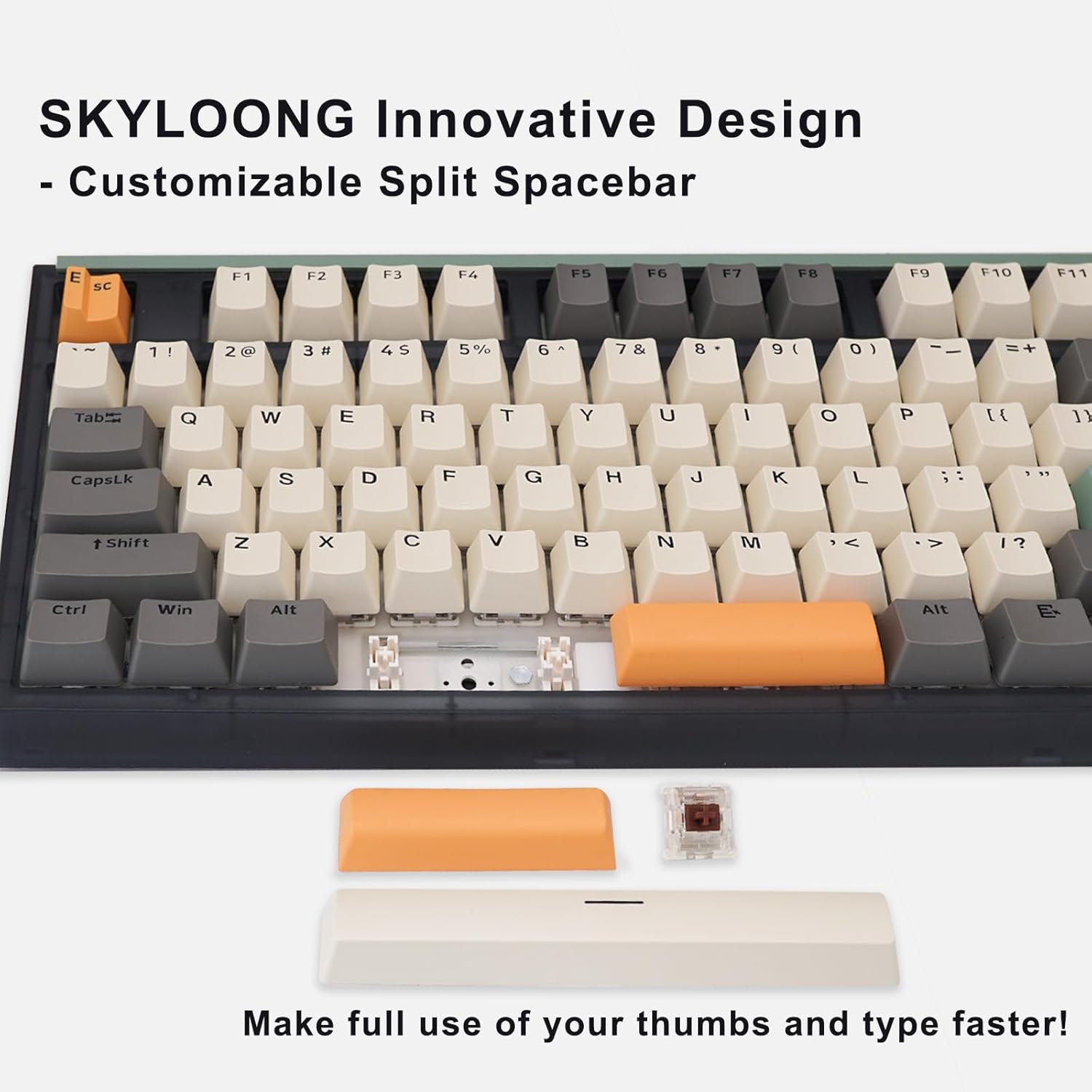
The GK87 V3 features an innovative split spacebar design. Each segment of the spacebar can be programmed with different functions, including Tap-Hold options for common keys or key combinations. This allows for more efficient use of thumb keys.

2. Programmable Rotary Knobs
The keyboard is equipped with three full programmable rotary knobs. These knobs can be customized to control various functions, such as volume, backlight brightness, or zoom. Refer to the software section for detailed customization instructions.

Video 1: Demonstrates how to change the function of the rotary knobs using the keyboard's software.
3. Retroiluminación RGB
The keyboard features 16.8 million RGB backlighting with various effects. Lighting can be adjusted via the rotary knobs or through the dedicated software.

4. Software and Customization
The SKYLOONG Professional Driver software allows for full customization of key assignments, macro creation, and RGB lighting effects. The keyboard has 3 programmable layers and 8MB of onboard memory to store your settings.

5. Compatibilidade do sistema
The GK87 V3 keyboard is compatible with Windows 10, Win 8, Win 7, Win Vista, Windows XP, and Mac OS systems. It can also connect with iPad, iPhone, MacBook, PC, and cell phones.
Mantemento
1. Substitución da tapa das teclas e do interruptor
The GK87 V3 features hot-swappable sockets, compatible with most MX style 3-pin and 5-pin mechanical switches. Use the provided 2-in-1 keycap and switch puller for safe removal and installation.
- Eliminación das teclas: Gently attach the keycap puller to the keycap and pull upwards.
- Eliminación de interruptores: After removing the keycap, use the switch puller to grip the top and bottom clips of the switch and pull upwards.
- Instalación de interruptores: Aliña os pines do novo interruptor cos orificios da placa de circuíto impreso e preme firmemente ata que encaixen no seu lugar. Asegúrate de que os pines non estean dobrados.
- Instalación das teclas: Align the keycap with the switch stem and press down gently.
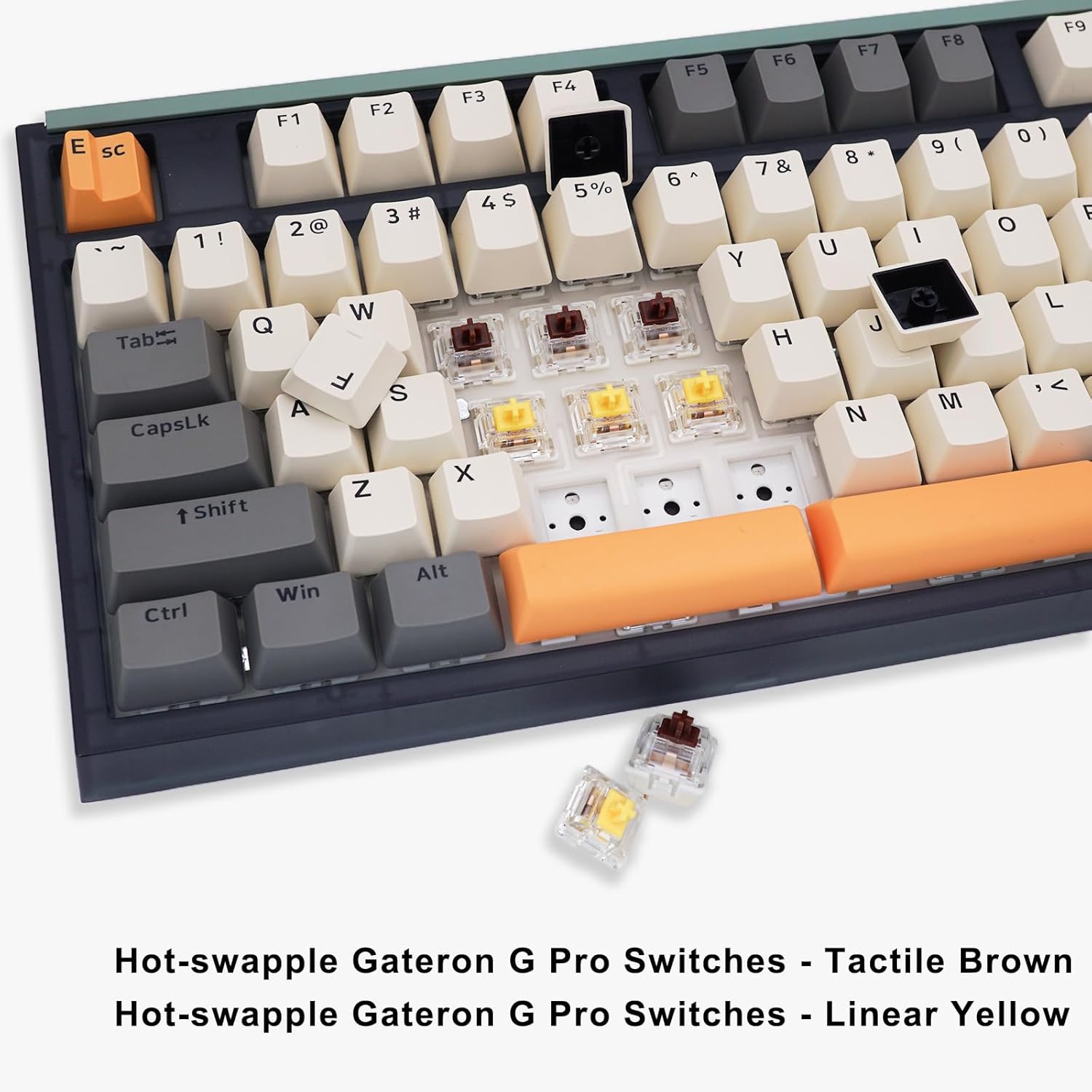
Video 2: Demonstrates the process of replacing the spacebar keycap and stabilizer on the keyboard.
2. Limpeza
Regular cleaning helps maintain keyboard performance and appearance.
- Use a soft brush or compressed air to remove dust and debris from between keycaps.
- Para a sucidade persistente, limpe suavemente as tapas das teclas cun pano húmido.amp un pano e unha solución de xabón suave. Asegúrese de que non entre líquido no teclado.
- Desconecte sempre o teclado antes de limpalo.
Resolución de problemas
1. Problemas de conectividade
- O teclado non responde: Ensure the keyboard is charged. Check the connection mode switch (2.4G, Bluetooth, Wired) matches your intended use.
- Sen fíos 2.4G: Asegúrate de que o receptor USB estea conectado correctamente a un porto USB que funcione. Proba cun porto USB diferente.
- Bluetooth: Ensure Bluetooth is enabled on your device. Unpair and re-pair the keyboard if connection is unstable.
- Cablado: Ensure the USB-C cable is properly connected to both the keyboard and the computer. Try a different USB-C cable or port.
2. Problemas de iluminación RGB
- As luces non funcionan: Check if the backlight is turned on using the rotary knob or software. Ensure the keyboard is powered.
- Cores/efectos incorrectos: Use the SKYLOONG Professional Driver software to reset or reconfigure lighting settings.
3. Key Input Errors
- Chaves que non se rexistran: If a specific key is not working, it might be a faulty switch. Utilize the hot-swappable feature to replace the switch.
- Ghosting/N-key rollover: The GK87 V3 supports N-key rollover. If experiencing issues, ensure the keyboard firmware is up to date via the software.
4. Problemas de software
- O software non recoñece o teclado: Ensure the keyboard is connected via USB-C wired mode when attempting to use the software for configuration.
- Software not installing/running: Download the latest version of the SKYLOONG Professional Driver from the official website. Ensure your operating system meets the minimum requirements.
Especificacións
| Característica | Detalle |
|---|---|
| Marca | SKYLOONG |
| Número de modelo | GK87-V3 |
| Tecnoloxía de conectividade | 2.4G, Bluetooth 5.1, USB-C Wired |
| Número de chaves | 87 |
| Disposición do teclado | QWERTY |
| Tipo de cambio | Gateron G Pro Yellow (Linear) |
| Cambiable en quente | Yes (3-pin and 5-pin MX style switches) |
| Retroiluminación | RGB (16.8 millóns de cores) |
| Características especiais | Split Spacebar, 3 Programmable Rotary Knobs, Gasket-like Noise Damping |
| Capacidade da batería | 3600 mAh |
| Dispositivos compatibles | Laptop, Mac, PC, Phones, iPad |
| Sistemas operativos | Windows 10/8/7/Vista/XP, Mac OS |
| Material | Plástico |
| Peso do elemento | 1.1 quilogramos |
| Nivel de resistencia á auga | Non resistente á auga |
Garantía e Soporte
1. Información da garantía
SKYLOONG provides a 12-month warranty for the GK87 V3 keyboard from the date of purchase. This warranty covers manufacturing defects under normal use. It does not cover damage caused by misuse, accidents, unauthorized modifications, or natural disasters.
2. Atención ao cliente
For any questions, technical assistance, or warranty claims, please contact SKYLOONG customer service through the platform where you purchased the product. You may also reach out via email:
Correo electrónico: Bery@SKYLOONG.VIP
