
JIGOO T600
JIGOO T600 Anti-Mite Mattress Vacuum Cleaner User Manual
Modelo: T600 | Marca: JIGOO
1. Introdución
Thank you for choosing the JIGOO T600 Anti-Mite Mattress Vacuum Cleaner. This manual provides essential information for the safe and effective operation, maintenance, and troubleshooting of your device. Please read it thoroughly before first use and keep it for future reference.

Image 1.1: The JIGOO T600 Anti-Mite Mattress Vacuum Cleaner, showcasing its sleek grey design and transparent dust bin.
2. Instrucións de seguridade
Para garantir un funcionamento seguro, siga sempre as seguintes precaucións:
- Non mergullo a unidade principal en auga ou outros líquidos.
- Manteña o aparello lonxe de fontes de calor e luz solar directa.
- Non empregue o aspirador en superficies molladas nin para recoller líquidos.
- Ensure the power cord is not damaged and avoid pulling it to unplug the device.
- Este aparello é só para uso doméstico.
- Manter fóra do alcance dos nenos.
- A UV lamp emits ultraviolet light. Avoid direct exposure to eyes and skin. The UV light automatically turns off when lifted from the surface by more than 15 degrees for safety.
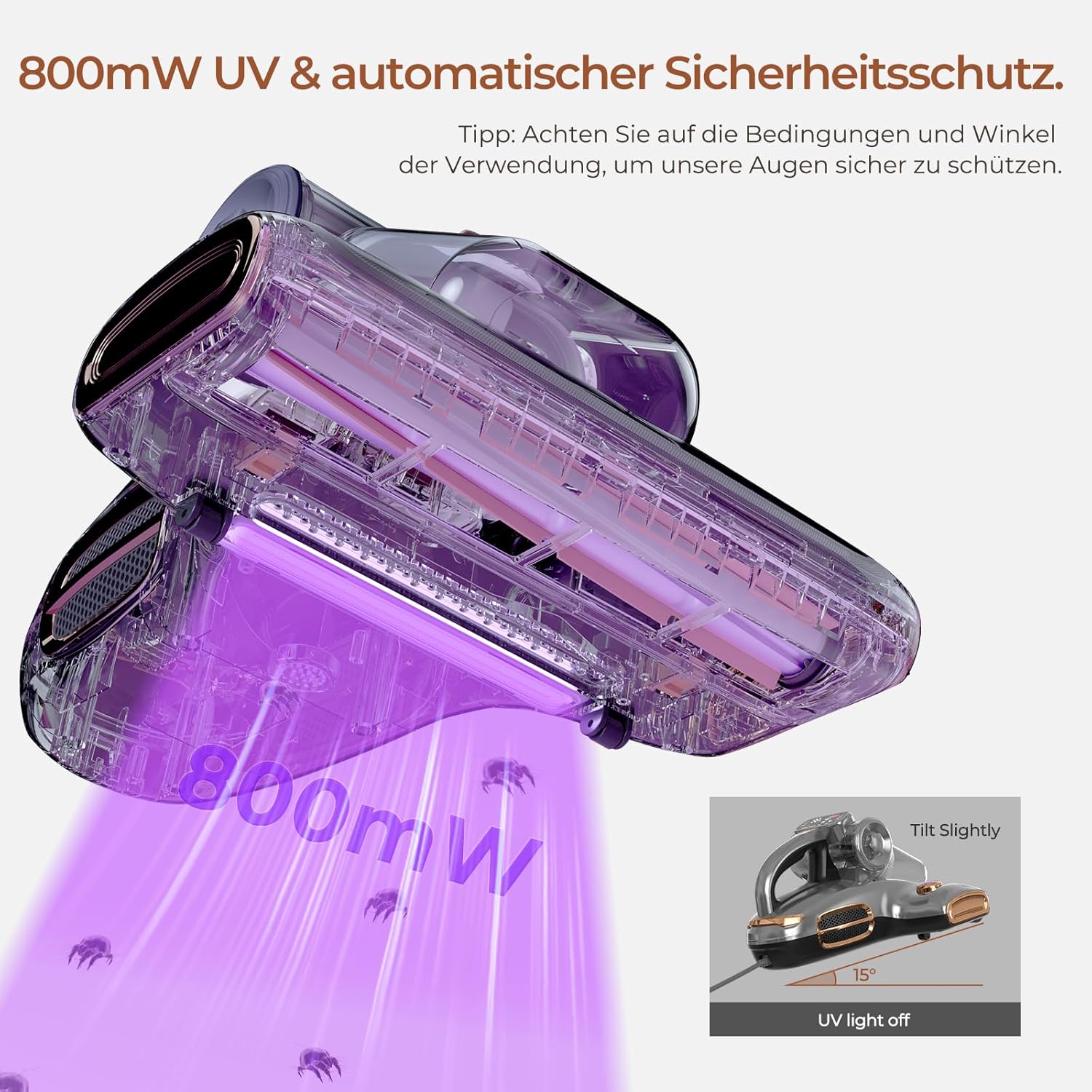
Image 2.1: Close-up of the JIGOO T600's UV light, illustrating its 800mW power and the automatic safety protection that turns off the UV light when tilted.
3. Características do produto
The JIGOO T600 is designed for efficient and thorough cleaning of mattresses and upholstered surfaces. Key features include:
- High Power and Suction: Equipped with a 700W motor and 15kPa suction power to effectively remove dust mites and bed bugs.
- Esterilización UV: Features a 253.7nm UV lamp for deep sterilization, eliminating up to 99.9% of mites and bacteria.
- 60°C Hot Air System: Rapid heating to 60°C in 5 seconds helps to kill mites and dry surfaces, preventing moisture buildup.
- Dual Dust Bin Design: Independent dust bins for optimal filtration and easy disposal, ensuring hygienic cleaning.
- Funcionamento silencioso: Operates at a low noise level of 72dB for discreet use.
- Pantalla LED: Provides real-time dust mite index and operational status for intelligent cleaning.
- Ultrasonic Sterilization: High-frequency ultrasonic waves disrupt the dust mite reproductive cycle.

Image 3.1: The JIGOO T600 demonstrating its 700W power and 15kPa suction, highlighting the metal brush roller for effective dust mite removal.

Image 3.2: Visual representation of the JIGOO T600's ability to reduce dust mite density by 99.99% through high-frequency ultrasonic waves, with a "Before" and "After" comparison.
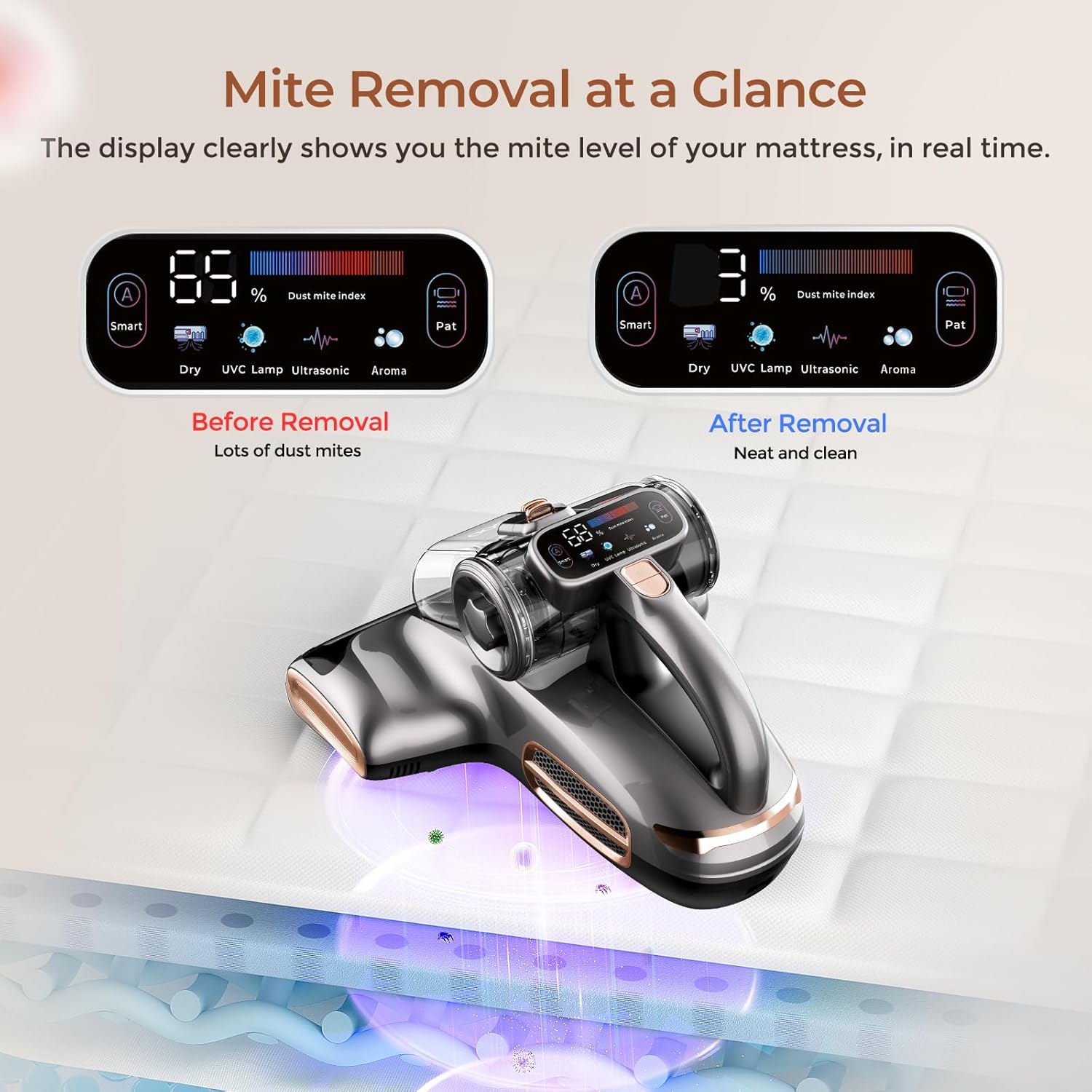
Image 3.3: The JIGOO T600's LED display showing real-time dust mite index, indicating a high level before cleaning and a low level after cleaning.
4. Configuración
The JIGOO T600 is designed for ease of use. Follow these steps for initial setup:
- Desembalaxe: Carefully remove the vacuum cleaner and all accessories from the packaging. Retain packaging for future storage or transport.
- Inspeccionar compoñentes: Verify that all components are present and undamaged. Refer to the packing list for details.
- Conexión de alimentación: Conecte o cable de alimentación a unha toma de corrente axeitada (220 voltios).
5. Instrucións de funcionamento
To operate your JIGOO T600, follow these steps:
- Encendido: Press the power button to turn on the vacuum cleaner. The LED display will illuminate.
- Select Mode (if applicable): The device automatically adjusts based on the dust mite index. Observe the LED display for real-time feedback.
- Limpeza de superficies: Gently glide the vacuum cleaner over the mattress, sofa, or other upholstered surfaces. Ensure the UV lamp is in contact with the surface for effective sterilization.
- Seguridade fronte á luz ultravioleta: The UV light will automatically turn off if the device is lifted or tilted more than 15 degrees from the surface. This is a safety feature to prevent direct UV exposure.
- Apagado: Press the power button again to turn off the vacuum cleaner after use.
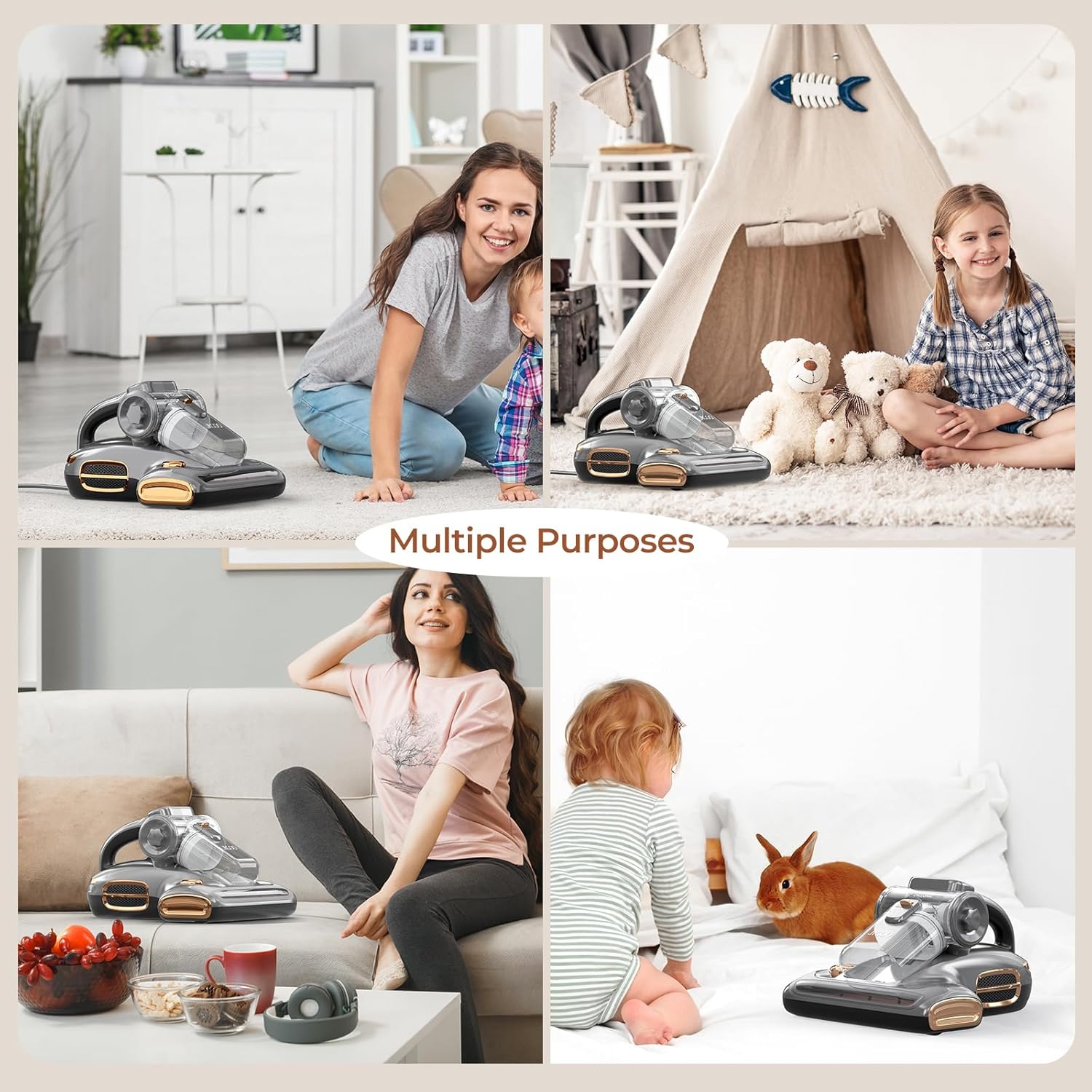
Image 5.1: The JIGOO T600 being used for multiple purposes, including cleaning mattresses, carpets, and sofas, demonstrating its versatility in a household setting.
6. Mantemento e Limpeza
Regular maintenance ensures optimal performance and extends the lifespan of your JIGOO T600. Always unplug the device before cleaning.
- Baleirar o colector de po:
The JIGOO T600 features a dual dust bin design for easy disposal. To empty:
- Press the release button to detach the dust bin assembly.
- Separate the two dust bins and empty their contents into a waste receptacle.
- Filtros de limpeza:
The device uses a HEPA filter and a stainless steel filter screen. For thorough cleaning:
- Remove the HEPA filter and stainless steel filter screen from the dust bin assembly.
- Rinse the filters under running water. Ensure they are completely dry before reinserting them into the vacuum cleaner.
- Do not use detergents or abrasive cleaners on the filters.
- Cleaning the Brush Roller:
Periodically check the metal brush roller for tangled hair or debris. Remove any obstructions to maintain effective tapping and suction.
- Limpeza da unidade principal:
Limpe o exterior do aspirador cun pano suave eamp pano. Non use produtos químicos agresivos.
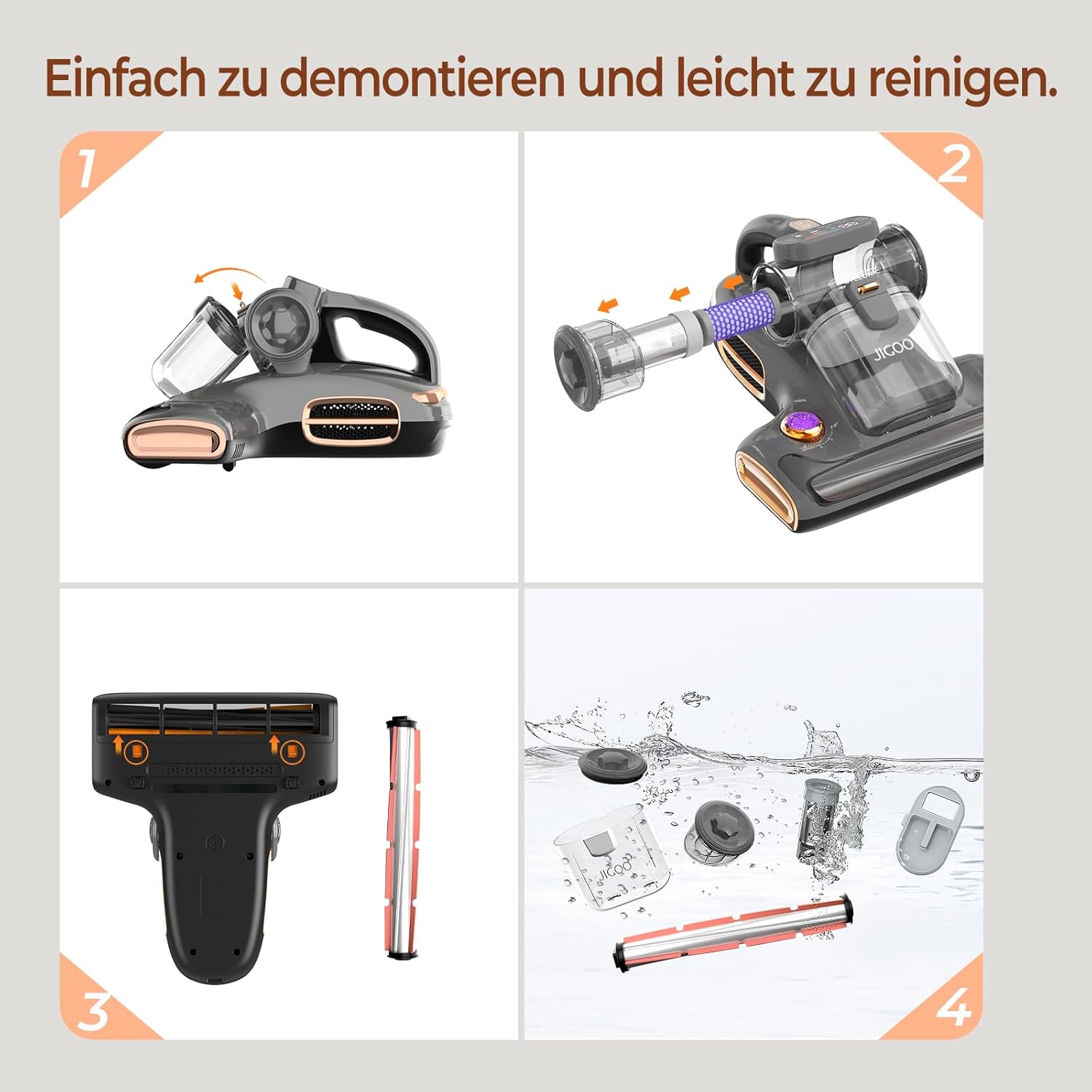
Image 6.1: Step-by-step guide on how to disassemble and clean the JIGOO T600, showing the removal of the dust bin, filters, and brush roller for washing.

Image 6.2: Diagram illustrating the JIGOO T600's filtration system, including the detachable dust cup, stainless steel filter screen, and static filter sponge, emphasizing easy disposal and up to 99.5% filtration efficiency.
7 Solución de problemas
If you encounter issues with your JIGOO T600, refer to the table below for common problems and solutions.
| Problema | Causa posible | Solución |
|---|---|---|
| A aspiradora non acende. | No power supply; power cord damaged; power button malfunction. | Check power outlet and cord. Ensure the power button is pressed correctly. Contact customer support if issues persist. |
| Poder de succión débil. | Dust bin full; filters clogged; brush roller obstructed. | Empty dust bin. Clean or replace filters. Remove any debris from the brush roller. |
| UV lamp not illuminating. | Device lifted or tilted; UV lamp defectuoso. | Ensure the vacuum cleaner is flat on the surface. If the problem persists, contact customer support. |
| Ruído inusual durante o funcionamento. | Obstruction in the brush roller or air ducts; motor issue. | Check for and remove any obstructions. If the noise continues, discontinue use and contact customer support. |
8. Especificacións
| Característica | Especificación |
|---|---|
| Marca | XIGOO |
| Modelo | T600 |
| Cor | Gris |
| Poder | 700 vatios |
| Potencia de succión | 15 kPa |
| Voltage | 220 voltios |
| Nivel de ruído | 72 dB |
| Dimensións do produto (L x W x H) | 32.89 x 27.18 x 18.8 cm |
| Peso do elemento | 2.72 quilogramos (6 libras) |
| Capacidade do colector de po | 16.9 onzas |
| Características especiais | HEPA Filter, UV Light, Lightweight, Animal Brush, LED Display |
| Tipo de filtro | Filtro HEPA |
| Recomendación de superficie | Mattress, Carpet |
| Fonte de enerxía | Eléctrico con cable |
9. Garantía e soporte
For warranty information and customer support, please refer to the product packaging or contact JIGOO customer service directly. Keep your purchase receipt as proof of purchase.
Política de devolución: The product typically comes with a 30-day return/replacement policy. Please check with your retailer for specific terms.
Fabricante: XIGOO