1. Introdución
This manual provides instructions for the use and maintenance of your new replacement remote control for various Hitachi Smart TV models. This remote is designed to function as a direct replacement for your original remote, offering essential control over your television.
Please note that as a replacement unit, some advanced or specific functions present on your original remote might not be fully supported. It is recommended to verify compatibility with your specific TV model.
2. Produto rematadoview
The replacement remote control features a standard layout for easy navigation and control of your Hitachi Smart TV. It is typically supplied in either black or white color, chosen at random.
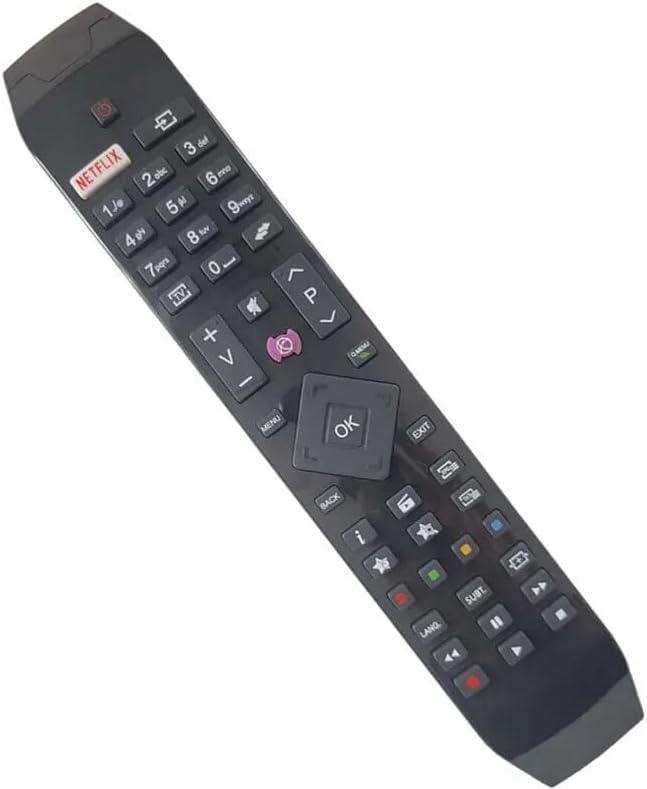
Figura 2.1: En ángulo view of the replacement remote control, highlighting its ergonomic design and button layout.

Figura 2.2: Frontal view of the replacement remote control, detailing the arrangement of function buttons.
The remote includes dedicated buttons for common functions such as Power, Volume Up/Down, Channel Up/Down, Mute, and a central navigation pad with an OK button. It also features quick access buttons for streaming services like Netflix and other smart TV functionalities.
3. Configuración
3.1 Instalación da batería
- Localice o compartimento da batería na parte traseira do control remoto.
- Deslice para abrir a tapa da batería.
- Insira dúas pilas AAA (non incluídas), asegurándose de que os terminais positivo (+) e negativo (-) estean aliñados correctamente coas marcas do interior do compartimento.
- Pecha a tapa da batería de forma segura.
3.2 Uso inicial
Once batteries are installed, the remote control is ready for use. Point the remote directly at your Hitachi Smart TV and press the Power button to turn on the television. No pairing or programming is typically required for this replacement remote.
4. Instrucións de funcionamento
This remote control provides standard functionality for your Hitachi Smart TV. Below are common operations:
- Botón de encendido: Acende ou apaga o televisor.
- Botóns de volume (+/-): Aumenta ou diminúe o volume do televisor.
- Channel Buttons (P+/-): Cambia a canle de televisión cara arriba ou cara abaixo.
- Botón de silencio: Silencia ou activa o son do televisor.
- Panel de navegación (Arriba/Abaixo/Esquerda/Dereita/Aceptar): Used to navigate menus and confirm selections on the TV screen.
- Botón de Netflix: Direct access to the Netflix application (if supported by your TV model).
- Botón de menú/inicio: Accesses the TV's main menu or smart home screen.
- Botón Atrás/Saída: Volta á pantalla anterior ou sae dun menú.
- Botóns numéricos (0-9): For direct channel input or other numerical selections.
For specific advanced functions or smart TV features, refer to your Hitachi TV's original user manual.
5. Compatibilidade
This replacement remote control is compatible with various Hitachi Smart TV models. Known compatible models include, but are not limited to:
- 43HL15W69
- 43HL5W69
- 48HB6W62A
- 49HB5W62
- 49HB6W62H
- 32HB6T41A
- 43HB5T62
- 43HK4W64
- 43HK5W64
If your specific TV model is not listed, it is recommended to compare your original remote with the images provided or contact the seller for confirmation of compatibility.
6. Mantemento
6.1 Substitución da batería
Substitúa as pilas cando a resposta do mando a distancia sexa lenta ou deixe de funcionar. Substitúa sempre as dúas pilas ao mesmo tempo por unhas novas do mesmo tipo (AAA). Non mestures pilas vellas e novas, nin pilas de diferentes tipos.
6.2 Limpeza
Para limpar o mando a distancia, limpe con coidado cun pano suave e seco. Para a sucidade persistente, límpeo lixeiramente cun panoamp cloth can be used, but ensure no moisture enters the remote. Do not use abrasive cleaners or solvents.
6.3 Almacenamento
Garda o mando a distancia nun lugar fresco e seco, lonxe da luz solar directa e de temperaturas extremas. Se o mando a distancia non se vai usar durante un período prolongado, é recomendable retirar as pilas para evitar fugas.
7 Solución de problemas
- O mando a distancia non responde:
- Comprobe se as pilas están inseridas correctamente coa polaridade correcta.
- Substitúe as pilas por outras novas.
- Asegúrate de que non haxa obstrucións entre o mando a distancia e o sensor de infravermellos do televisor.
- Apunta o mando a distancia directamente ao televisor.
- Algunhas funcións non funcionan:
- As a replacement remote, certain advanced or specific functions of your original TV remote may not be supported. This is normal.
- Verify that the function you are trying to use is standard for a TV remote.
- Funcionamento remoto de forma intermitente:
- Pode que as baterías estean baixas; substitúeas.
- Asegúrese de que os contactos da batería estean limpos e libres de corrosión.
If issues persist after following these steps, please contact the seller for further assistance.
8. Especificacións
| Marca | Xenérico |
| Fabricante | Xenérico |
| Dispositivos compatibles | Hitachi Smart TVs (e.g., 43HL15W69, 43HL5W69, 48HB6W62A, 49HB5W62, 49HB6W62H, 32HB6T41A, 43HB5T62, 43HK4W64, 43HK5W64) |
| Característica especial | Ergonómico |
| Cor | Black/White (randomly sent) |
| Número máximo de dispositivos compatibles | 5 (as a universal remote, though this is a replacement for specific TVs) |
| Fonte de enerxía | 2 pilas AAA (non incluídas) |
| Material | Plástico ABS |
9. Garantía e soporte
Specific warranty information for this replacement remote control is not provided in the product details. For any warranty claims, technical support, or further inquiries, please contact the seller directly through your purchase platform.
It is recommended to retain your purchase receipt as proof of purchase for any support requests.


