
1. Introdución
Thank you for choosing the MAIRDI M890DBTC Wireless Headset. This manual provides detailed instructions for setting up, operating, and maintaining your headset to ensure optimal performance and longevity. Please read this manual thoroughly before use.

Unha parte dianteira detallada view of the MAIRDI M890DBTC Wireless Headset, showcasing its over-ear design, adjustable headband, and microphone boom.
2. Contido do paquete
Verifica que todos os elementos estean presentes no teu paquete:
- MAIRDI M890DBTC Bluetooth Headset x1
- Cable de carga USB x1
- Manual de usuario x1
3. Produto rematadoview
3.1 Compoñentes dos auriculares
- Diadema axustable
- Padded Earmuffs
- Rotatable Microphone Boom (330-degree)
- Botón de encendido
- Botóns para subir/baixar o volume
- Botón multifunción (MFB)
- Botón de silencio
- Luz indicadora LED
- Charging Port (Mini USB)
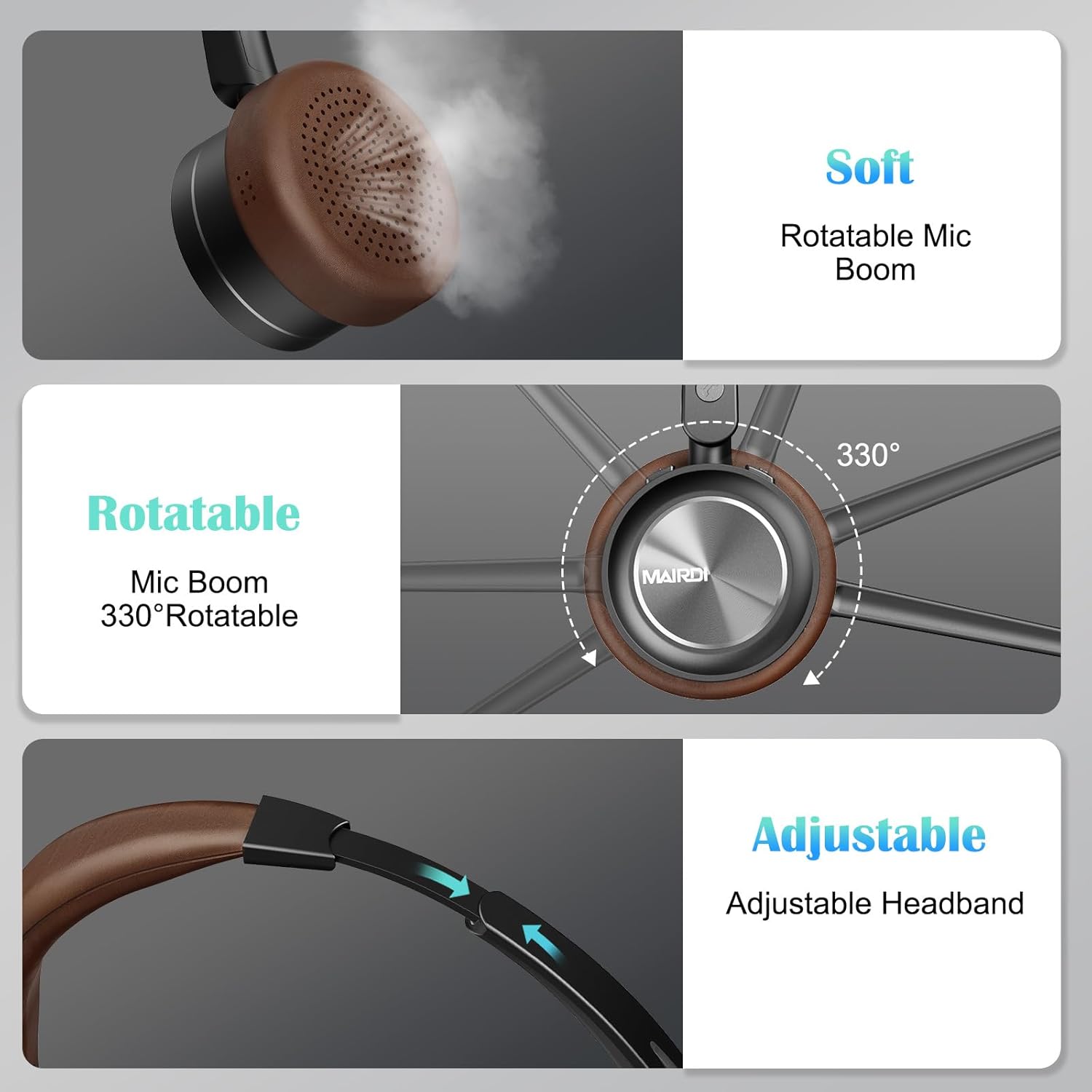
A visual breakdown of the MAIRDI M890DBTC headset's comfort features, including soft earpads, a 330-degree rotatable microphone boom, and an adjustable stainless steel headband.
4. Configuración e carga
4.1 Cargo inicial
Before first use, fully charge the headset. Connect the provided USB charging cable to the headset's Mini USB port and a power source (e.g., computer USB port or USB wall adapter). The LED indicator will show charging status and turn off or change color when fully charged (approximately 2 hours).
4.2 Encendido/apagado
- Encendido: Prema e manteña premido o botón de acendido durante 3 segundos ata que o indicador LED parpadee en azul.
- Apagado: Manteña premido o botón de acendido durante 3 segundos ata que o indicador LED parpadee en vermello e despois se apague.
5. Instrucións de funcionamento
5.1 Emparejamento Bluetooth
- Asegúrese de que os auriculares están apagados.
- Press and hold the Power Button for approximately 5-7 seconds until the LED indicator flashes red and blue alternately. This indicates pairing mode.
- On your device (smartphone, PC, laptop), enable Bluetooth and search for available devices.
- Select "MAIRDI M890DBTC" from the list of found devices.
- Unha vez conectado, o indicador LED parpadeará azul lentamente.
5.2 Multipoint Connectivity
The MAIRDI M890DBTC supports connecting to two Bluetooth devices simultaneously.
- Pair the headset with the first device (e.g., smartphone) as described in Section 5.1.
- Desactiva o Bluetooth no primeiro dispositivo. Os auriculares volverán entrar no modo de emparellamento.
- Pair the headset with the second device (e.g., laptop).
- Volve activar o Bluetooth no primeiro dispositivo. Os auriculares deberían conectarse automaticamente aos dous dispositivos.

The MAIRDI M890DBTC headset connected simultaneously to a smartphone and a laptop, illustrating its multipoint pairing capability for stable connection with two devices.
5.3 Xestión de chamadas
- Responder/Finalizar chamada: Prema o botón multifunción (MFB) unha vez.
- Rexeitar a chamada: Manteña premido o MFB durante 2 segundos.
- Volver a marcar o último número: Prema dúas veces o MFB.
- Silenciar/Activar o micrófono: Press the Mute Button once during a call. The LED indicator on the microphone will illuminate when muted.

An image depicting a person wearing the MAIRDI M890DBTC headset, highlighting the noise-canceling microphone feature and the mute button functionality. Visual representation of sound waves before and after noise cancellation is included.
5.4 Control de volume
- Subir volume: Prema o botón Subir volume (+).
- Baixar volume: Prema o botón para baixar o volume (-).
6. Mantemento
- Limpa os auriculares regularmente cun pano suave e seco.
- Avoid exposing the headset to extreme temperatures, humidity, or corrosive substances.
- Garda os auriculares nun lugar fresco e seco cando non estes en uso.
- Non intentes desmontar nin reparar os auriculares ti mesmo, xa que isto anulará a garantía.
7 Solución de problemas
7.1 Headset Does Not Power On
- Ensure the headset is fully charged. Connect it to a power source and allow it to charge for at least 30 minutes before attempting to power on again.
7.2 Non se pode emparellar co dispositivo
- Ensure the headset is in pairing mode (LED flashing red and blue alternately).
- Make sure Bluetooth is enabled on your device and it is within 10 meters (33 feet) of the headset.
- Tenta reiniciar tanto os auriculares como o dispositivo.
- Clear the Bluetooth pairing list on your device and attempt to pair again.
7.3 Sen son ou mala calidade de son
- Comprobe os niveis de volume tanto nos auriculares como no dispositivo conectado.
- Ensure the headset is properly connected to your device. Re-pair if necessary.
- Acércate máis ao teu dispositivo para evitar interferencias ou problemas de alcance.
- If using with a PC, ensure the MAIRDI M890DBTC is selected as the default audio input/output device in your sound settings.
7.4 O micrófono non funciona
- Ensure the microphone is not muted (check the LED indicator on the microphone boom).
- Verify that the microphone boom is positioned correctly towards your mouth.
- Comproba a configuración de son do teu dispositivo para asegurarte de que o micrófono dos auriculares estea seleccionado como dispositivo de entrada.
8. Especificacións
| Modelo | M890DBTC |
| Tecnoloxía de conectividade | Sen fíos (Bluetooth 5.1) |
| Alcance Bluetooth | Ata 20 metros (60 pés) |
| Duración da batería (tempo de conversa) | Ata 30 horas |
| Duración da batería (tempo de espera) | Ata 200 horas |
| Tempo de carga | Aproximadamente 2 horas |
| Micrófono | Advanced Noise-Canceling |
| Tamaño do controlador de altofalante | 40 mm |
| Rango de frecuencias | 20 Hz - 20,000 Hz |
| Peso | 0.21 quilogramos (7.4 onzas) |
| Material | Coiro, plástico, aceiro inoxidable |

The MAIRDI M890DBTC headset positioned over a circuit board, illustrating its advanced Bluetooth 5.1 technology and 40mm speaker drivers for high-definition audio.
9. Garantía e soporte
MAIRDI products are designed for reliability and performance. For warranty information or technical support, please refer to the contact details provided on the MAIRDI official websitio web ou a documentación da compra. Garde o comprobante de compra para reclamacións de garantía.
Para obter máis axuda, visite o MAIRDI Store on Amazon.