
1. Introdución
The BTMETER BT-1600APP is a high-precision digital infrared thermometer gun designed for non-contact temperature measurement in various industrial applications. It features a wide temperature range, dual laser pointers for accurate targeting, multiple measurement modes, and Bluetooth connectivity for data logging and remote monitoring via a mobile application. This manual provides essential information for safe and effective use of the device.
2. Información de seguridade
WARNING: This device is not intended for human temperature measurement.
- Non apunte o láser directamente aos ollos nin indirectamente a superficies reflectantes.
- Exercise caution when measuring high-temperature surfaces. The device measures surface temperature, and objects may remain hot long after the measurement.
- Do not use the device in environments with explosive gas, vapor, or dust.
- Manteña o dispositivo lonxe de campos electromagnéticos fortes.
- Ensure the battery is correctly installed before use.
3. Contido do paquete
Verifica que todos os elementos estean presentes no paquete:
- Digital Thermometer Gun (BT-1600APP)
- Cable de carga USB
- Small Screwdriver (for battery compartment)
- Maletín de transporte portátil
- Manual de usuario

Figura 3.1: Contido do paquete
4. Produto rematadoview e Características
The BT-1600APP thermometer is designed for precision and ease of use in demanding environments.
- Precise and Rapid Response: Measures temperatures from -50℃ to 1600℃ (-58℉ to 2912℉) with an accuracy of ±4℃/7.2℉ or ±(2% of reading +2℃/3.6℉) and a response time under 0.25 seconds.
- 30:1 Distance-to-Spot Ratio: Allows accurate measurement of high temperatures from a safe distance using dual infrared laser pointers.
- Emisividade axustable: Features 0.1 to 1.0 adjustable emissivity for accurate readings on various surface types.
- Multifaceted Measurement Modes: Includes REC (Record), MAX (Maximum), MIN (Minimum), DIF (Difference), AVG (Average), HAL (High Alarm), and LAL (Low Alarm).
- Data Logging & Export: Built-in Bluetooth module for mobile phone/tablet connectivity, remote control, monitoring, and data export in TXT format.
- Deseño fácil de usar: Backlit screen, dual laser with on/off function, sensitive touchscreen buttons, Celsius/Fahrenheit switching, and USB rechargeable.

Figure 4.1: Key Features of the BT-1600APP

Figure 4.2: Distance-to-Spot Ratio (30:1)
5. Configuración
5.1 Conexión da batería
Before first use, connect the internal rechargeable battery:
- Unscrew the battery cover using the provided screwdriver.
- Connect the battery line to the designated port inside the compartment.
- Tighten the battery cover securely.

Figure 5.1: Battery Connection Steps
5.2 Carga do dispositivo
The device is USB rechargeable. Connect the provided USB charging cable to the device's USB-C port and a suitable USB power source.
Vídeo 5.1: Rematadoview of the BTMETER Digital Infrared Thermometer Gun BT-1600APP, demonstrating its features and charging process.
6. Instrucións de funcionamento
6.1 Medición básica da temperatura
To take a temperature reading, press the 'TEST' button. Briefly pressing it will take a single reading, while holding it down will continuously scan the temperature. The measured temperature will be displayed on the backlit LCD screen.
6.2 Funcións dos botóns
The device features sensitive touchscreen buttons for various functions:
- Botón do punteiro láser: Toggles the dual laser pointers on/off for precise targeting.
- Botón MODE: Selects different measurement modes (REC, MAX, MIN, DIF, AVG, HAL, LAL).
- E/Flash Button: Adjusts emissivity settings or activates the flashlight function.
- Botón TEST: Inicia a medición da temperatura.
- T/DN Button: Switches between Celsius (℃) and Fahrenheit (℉) temperature units.
- Botón ARRIBA: Activates the backlight for the LCD display.
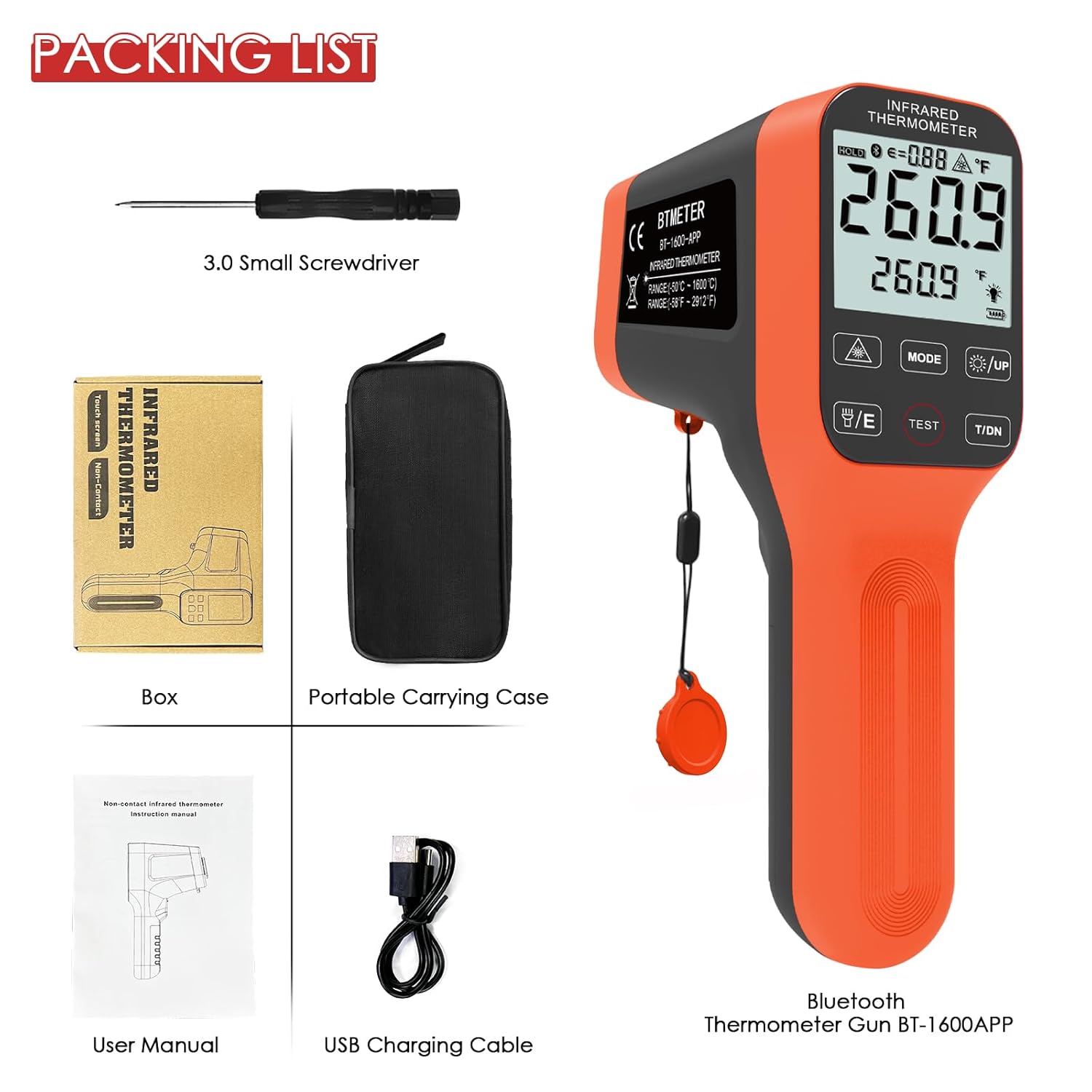
Figure 6.1: Device Buttons and Functions
7. Modos de medición
The BT-1600APP offers several measurement modes for comprehensive temperature analysis:
- MAX / MIN: Measures and displays the maximum and minimum temperatures detected during a scan.
- AVG: Calculates and displays the average temperature.
- DIF: Shows the difference between the maximum and minimum temperatures.
- HAL (High Temperature Alarm): Alerts the user if the measured temperature exceeds a preset high limit.
- LAL (Low Temperature Alarm): Alerts the user if the measured temperature falls below a preset low limit.
- GRAVACIÓN (Gravación): Stores temperature readings, supporting up to 12 sets of data.
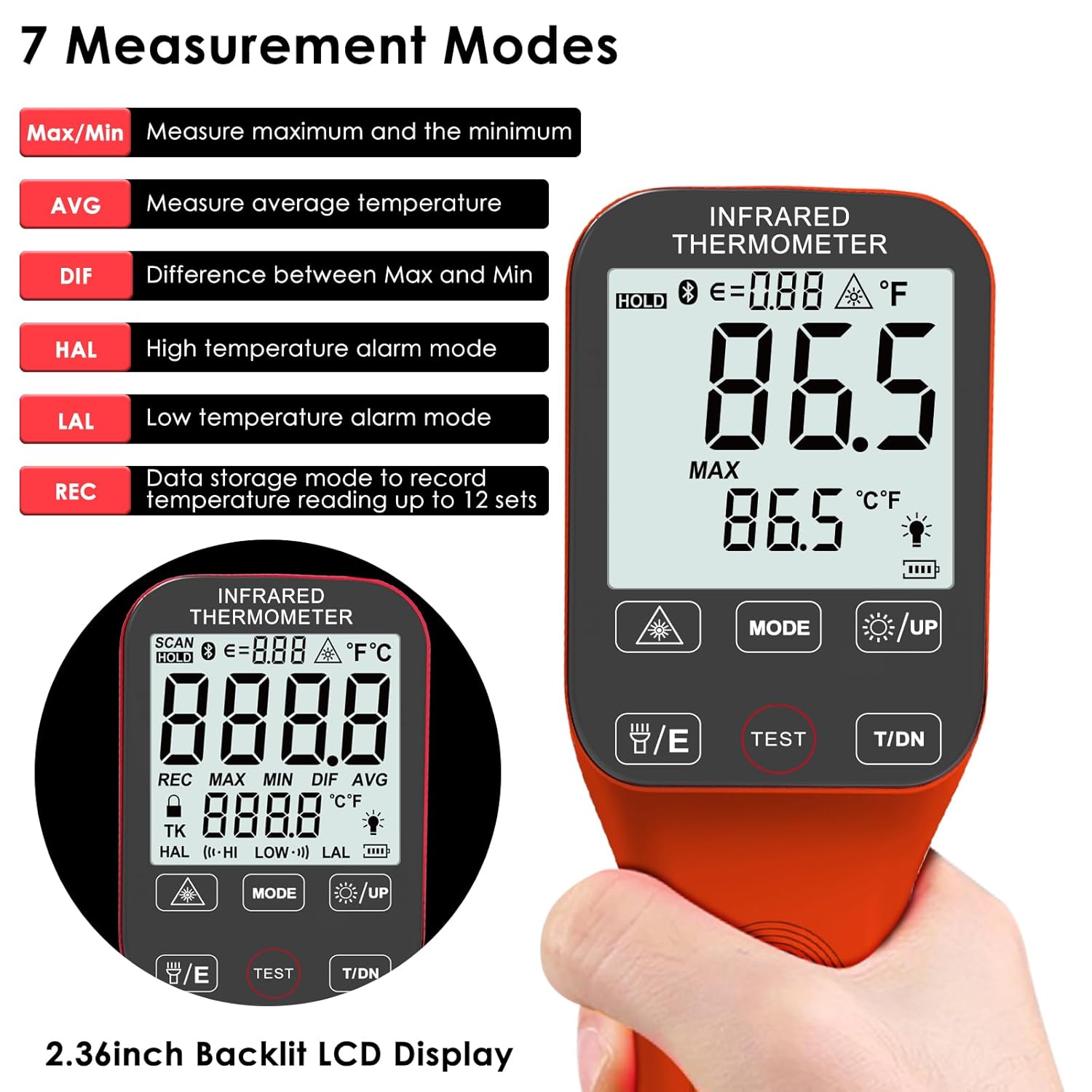
Figure 7.1: Seven Measurement Modes
8. Axuste da emisividade
Emissivity (ε) is a crucial factor for accurate infrared temperature measurement. The BT-1600APP allows adjustment from 0.1 to 1.0 to match the surface being measured. Different materials have different emissivities (e.g., oil: 0.94, asphalt: 0.9, water: 0.96). Adjusting this setting ensures higher accuracy.

Figure 8.1: Emissivity Adjustment Examples
9. Bluetooth Connectivity and Data Logging
The BT-1600APP includes a Bluetooth module for connecting to a mobile phone or tablet. This allows for remote control, real-time monitoring, and data export in TXT format. Download the companion app (refer to the user manual for app details and QR code) to utilize these features.

Figure 9.1: Bluetooth Connectivity and App Interface
10. Mantemento
To ensure the longevity and accuracy of your BTMETER BT-1600APP thermometer:
- Limpe o dispositivo cun pano suave eamp pano. Non use produtos de limpeza ou disolventes abrasivos.
- Keep the lens clean and free from dust or debris. Use a soft brush or compressed air for cleaning.
- Store the device in its portable carrying case when not in use to protect it from damage.
- Ensure the battery is charged regularly, especially if not used frequently, to prevent deep discharge.
11 Solución de problemas
If you encounter issues with your BT-1600APP thermometer, consider the following:
- O dispositivo non se acende: Ensure the internal battery is properly connected and charged. Connect the USB charging cable and allow it to charge for at least 30 minutes.
- Lecturas inexactas: Verify the emissivity setting matches the material being measured. Ensure the target is within the optimal distance-to-spot ratio. Check for obstructions or damage to the lens.
- A batería esgótase rapidamente: The device may have internal leakage causing faster battery drain when not in use. Ensure the device is fully charged before each use, especially if it has been stored for a period.
- Problemas de conexión Bluetooth: Ensure Bluetooth is enabled on your mobile device and the thermometer. Restart both devices and try pairing again. Refer to the app's instructions for specific pairing steps.
- O dispositivo apágase inesperadamente: The device has an automatic shutdown function. If it shuts off too quickly, check the automatic shutdown time settings in the mobile app.
12. Especificacións
| Característica | Especificación |
|---|---|
| Marca | BTMETER |
| Nome do modelo | BT-1600APP |
| Característica especial | Sen contacto |
| Cor | Laranxa |
| Tipo de visualización | Dixital |
| Tecnoloxía de conectividade | Bluetooth |
| Fonte de enerxía | Alimentado por batería (recargable por USB) |
| Rango de medición | -50 ℃ a 1600 ℃ (-58 ℉ a 2912 ℉) |
| Precisión | ±4℃/7.2℉ or ±(2% of reading +2℃/3.6℉) |
| Tempo de resposta | 0.25 segundos |
| Relación Distancia a Punto | 30:1 |
| Emisividade | 0.1 ~ 1.0 Adjustable |
| Peso do elemento | 8.1 onzas |
| Lonxitude do elemento | 7 polgadas |
| Uso interior/exterior | Interior |
| Compoñentes incluídos | Digital Thermometer Gun |
13. Garantía e soporte
The BTMETER BT-1600APP Digital Infrared Thermometer Gun comes with a 365-day quality warranty and lifetime technical support. For assistance, please refer to the contact information provided in your product packaging or visit the official BTMETER websitio.