
1. Introdución
This manual provides essential information for the safe and efficient operation of your JVC XS-N318B Portable Bluetooth Speaker. Please read it thoroughly before use and retain it for future reference. Your speaker features Bluetooth and Wi-Fi connectivity, integrated Alexa voice control, 360-degree omnidirectional audio with Dolby technology, and a long-lasting battery for extended playtime. It is also designed with IPX4 splash resistance for outdoor use.
2. Produto rematadoview
2.1 Contido do paquete
- JVC XS-N318B Portable Bluetooth Speaker
- Cable de carga
- Control remoto
- Manual de usuario
2.2 Compoñentes e controis do altofalante
The JVC XS-N318B speaker features an intuitive control panel located on the top surface, along with indicator lights for connectivity status. A remote control is also included for convenient operation from a distance.
- Botón de encendido: Mantén premido para activar ou desactivar o altofalante.
- Botón Volume +: Aumenta o volume da reprodución.
- Botón de volume: Diminúe o volume da reprodución.
- Botón Reproducir/Pausa: Controls audio playback (play/pause).
- Tap Button (Alexa): Activates the Alexa voice assistant.
- Indicador Bluetooth: Illuminates when connected via Bluetooth.
- Indicador Wi-Fi: Illuminates when connected to a Wi-Fi network.
- Indicador auxiliar: Illuminates when an auxiliary device is connected.

Figura 1: Fronte view of the JVC XS-N318B Portable Bluetooth Speaker, showcasing o seu elegante deseño.

Figura 2: Lateral view of the JVC XS-N318B Portable Bluetooth Speaker, highlighting its compact form factor.

Figura 3: Atrás view of the JVC XS-N318B Portable Bluetooth Speaker, showing the rear panel.
3. Configuración
3.1 Carga do altofalante
Before initial use, fully charge the speaker. Connect the provided charging cable to the speaker's charging port and a compatible 5V USB power adapter (not included). The charging indicator will show the charging status and turn off when fully charged. A full charge provides up to 9 hours of playtime.

Figure 4: The JVC XS-N318B speaker is equipped with a built-in 7.4V 6600mAh lithium battery, offering extended playtime.
3.2 Acendido/Apagado
To power on the speaker, press and hold the Power button until the indicator lights illuminate. To power off, press and hold the Power button again until the lights turn off.
3.3 Emparejamento Bluetooth
- Ensure the speaker is powered on and the Bluetooth indicator is blinking, indicating it is in pairing mode.
- No teu dispositivo móbil, activa o Bluetooth e busca os dispositivos dispoñibles.
- Select "JVC XS-N318B" from the list of devices.
- Once paired, the Bluetooth indicator on the speaker will glow steadily.
3.4 Conexión Wi-Fi
For Wi-Fi streaming and Alexa functionality, connect your speaker to a Wi-Fi network. Refer to the JVC Connect app (if applicable, or general Wi-Fi setup instructions) for detailed steps on connecting your speaker to your home network. The Wi-Fi indicator will illuminate steadily once connected.
3.5 Entrada auxiliar
To connect an external audio device via the auxiliary input, use a 3.5mm audio cable (not included). Plug one end into the speaker's Aux-In port and the other into your device's headphone jack. The Aux indicator will illuminate.

Figure 5: The JVC XS-N318B offers seamless connectivity options including Bluetooth, Wi-Fi, and Aux In.
4. Instrucións de funcionamento
4.1 Reprodución de audio
Once connected via Bluetooth, Wi-Fi, or Aux-In, begin playing audio from your source device. Use the Play/Pause button on the speaker or remote to control playback. The speaker delivers 20 Watts RMS output for clear audio.

Figure 6: Experience crystal-clear audio with 20 Watts of output power from your JVC XS-N318B speaker.
4.2 Control de volume e pista
Adjust the volume using the Volume + and Volume - buttons on the speaker's top panel or the dedicated buttons on the remote control. For track selection, use the remote control's track navigation buttons.
4.3 Usando o control por voz de Alexa
With Wi-Fi connected and Alexa configured (via the JVC Connect app or Amazon Alexa app), tap the Tap Button (Alexa icon) on the speaker to activate Alexa. You can then issue voice commands for music playback, information, smart home control, and more.
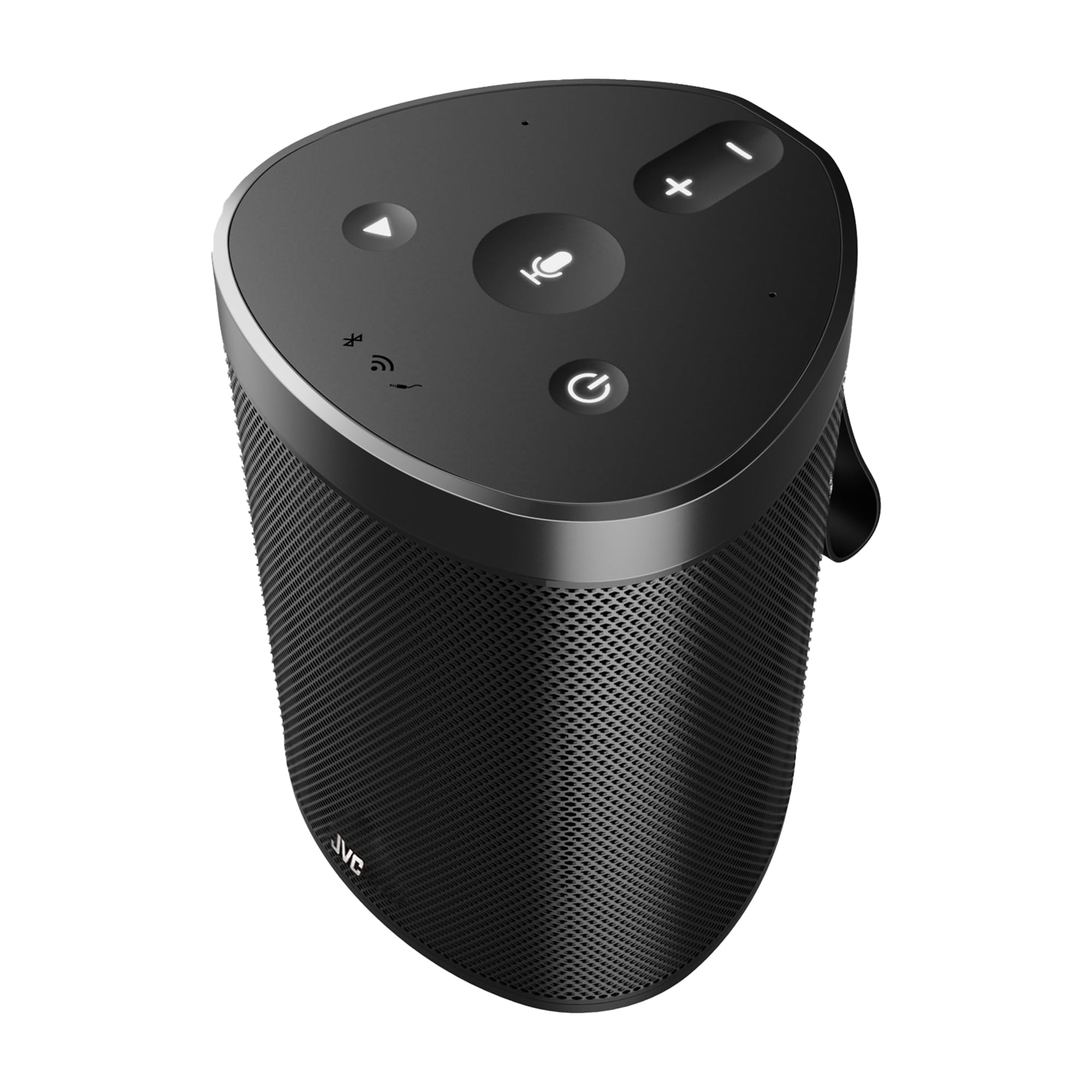
Figure 7: Control your music and more using just your voice with built-in Alexa support on the JVC XS-N318B speaker.
4.4 360-Degree Omnidirectional Audio and Dolby
The JVC XS-N318B is engineered with 360-degree omnidirectional audio and dual stereo speakers powered by Dolby technology, providing immersive sound that fills your space evenly.
5. Mantemento
5.1 Limpeza
To clean the speaker, use a soft, dry, lint-free cloth. Do not use abrasive cleaners, waxes, or solvents. Ensure no liquids enter the speaker openings.
5.2 Coidado coa batería
To prolong battery life, avoid fully discharging the speaker frequently. Recharge the battery regularly, even if the speaker is not in use for extended periods. Store the speaker in a cool, dry place.
5.3 Resistencia á auga (IPX4)
The JVC XS-N318B speaker has an IPX4 rating, meaning it is resistant to splashes of water from any direction. It is suitable for outdoor use and can withstand light rain or splashes. Do not submerge the speaker in water or expose it to pressurized water jets.

Figure 8: The JVC XS-N318B speaker is IPX4 waterproof, making it suitable for use in splash-prone environments.
6 Solución de problemas
- Sen enerxía: Ensure the speaker is charged. Connect the charging cable and allow it to charge for a few minutes before attempting to power on again.
- Sen son: Check the volume level on both the speaker and your connected device. Ensure the correct input source (Bluetooth, Wi-Fi, Aux) is selected and active.
- Problemas de sincronización Bluetooth: Make sure the speaker is in pairing mode (blinking Bluetooth indicator). Turn off and on Bluetooth on your device, and try pairing again. Ensure no other devices are currently connected to the speaker.
- Problemas de conexión wifi: Verify your Wi-Fi network is active and within range. Re-attempt the Wi-Fi setup process via the JVC Connect app.
- Alexa non responde: Ensure the speaker is connected to Wi-Fi and your Alexa account is properly linked. Tap the Alexa button to activate it before speaking your command.
- O control remoto non funciona: Check the battery in the remote control. Ensure there are no obstructions between the remote and the speaker.
7. Especificacións
| Marca | JVC |
| Número de modelo | XS-N318B |
| Potencia de saída máxima do altofalante | 20 vatios RMS |
| Tecnoloxía de conectividade | Bluetooth, Wi-Fi, Aux |
| Modo de saída de audio | Stereo (Dual Stereo Speakers) |
| Vol. De entradatage | 5 voltios |
| Material | Plástico |
| Tipo de altofalante | Ao aire libre |
| Cor | Negro |
| Alcance máximo (Bluetooth) | 10 metros |
| Relación sinal-ruído | 70 dB |
| Fonte de enerxía | Alimentado por batería |
| Tipo de batería | 1 Lithium Ion (7.4V 6600mAh) |
| Approximate Playtime | Ata 9 horas |
| Clasificación de resistencia á auga | IPX4 (resistente a salpicaduras) |
| Dimensións (ancho x alto) | Aproximadamente 12.7 cm x 17.2 cm |
| País de Orixe | China |
8. Garantía e soporte
8.1 Información da garantía
Your JVC XS-N318B Portable Bluetooth Speaker comes with a 1 ano de garantía from the date of purchase. This warranty covers manufacturing defects under normal use. Please retain your proof of purchase for warranty claims. The warranty does not cover damage caused by misuse, accidents, unauthorized modifications, or normal wear and tear.
8.2 Atención ao cliente
For technical assistance, warranty inquiries, or further information, please refer to the official JVC website or contact your local JVC customer support. Contact details can typically be found on the product packaging or the official brand websitio.