
1. Introdución
The Black Shark Lucifer T7 TWS Gaming Earbuds (Model: BS-T7) are designed to provide an immersive audio experience for both gaming and music. Featuring advanced Bluetooth 5.3 technology, these earbuds offer lightning-fast transmission speeds and low latency, ensuring a responsive and stable connection. With 10mm drivers for powerful bass, Environmental Noise Cancellation (ENC) for clear calls, and smart touch controls, the Lucifer T7 earbuds are built for performance and convenience. They also boast IPX5 water resistance and dynamic lighting effects, enhancing your overall user experience.

Figure 1: Black Shark Lucifer T7 TWS Gaming Earbuds in their open charging case.
2. Que hai na caixa
Ao desembalar, comproba o contido do paquete para asegurarte de que estean presentes todos os elementos:
- Black Shark Lucifer T7 TWS Gaming Earbuds (Left and Right)
- Estuche de carga sen fíos
- Manual de usuario (este documento)
- Almofadas para os oídos (varios tamaños)
- Charging Cable (USB-C) - (Assumed, not explicitly listed but standard for TWS earbuds)

Figure 2: Black Shark Lucifer T7 TWS Gaming Earbuds and their charging case.
3. Configuración
3.1 Carga dos auriculares e da funda
Antes do primeiro uso, carga completamente os auriculares e a caixa de carga.
- Coloca os auriculares na caixa de carga. Asegúrate de que estean correctamente asentados nos seus respectivos orificios.
- Conecte o estuche de carga a unha fonte de alimentación mediante o cable USB-C proporcionado.
- Os indicadores LED da carcasa acenderanse para mostrar o estado de carga. Unha carga completa indicarase cando todos os LED estean acesos de forma fixa.
Os auriculares ofrecen ata 23 horas de reprodución total coa funda de carga.
3.2 Emparejamento cun dispositivo
Os auriculares empregan Bluetooth 5.3 para unha conexión estable e eficiente.
- Open the charging case. The earbuds will automatically enter pairing mode, indicated by flashing LED lights on the earbuds.
- On your device (smartphone, tablet, laptop, etc.), navigate to the Bluetooth settings.
- Busca available devices and select "Black Shark Lucifer T7" from the list.
- Once connected, the earbud LEDs will stop flashing.
- Se o emparellamento falla, peche a funda, agarde uns segundos e repita os pasos.
3.3 Colocación dos auriculares
For optimal sound quality and comfort, choose the ear cushions that best fit your ears. Gently insert the earbuds into your ear canal and twist slightly to secure them.
4. Instrucións de funcionamento
4.1 Encendido/apagado
- Encendido: Abre o estuche de carga e os auriculares acenderanse automaticamente.
- Apagado: Volve colocar os auriculares na caixa de carga e pecha a tapa. Apagaranse automaticamente e comezarán a cargar.
Controis táctiles intelixentes 4.2
The Black Shark Lucifer T7 earbuds feature intuitive touch controls on each earbud. The specific functions are as follows:
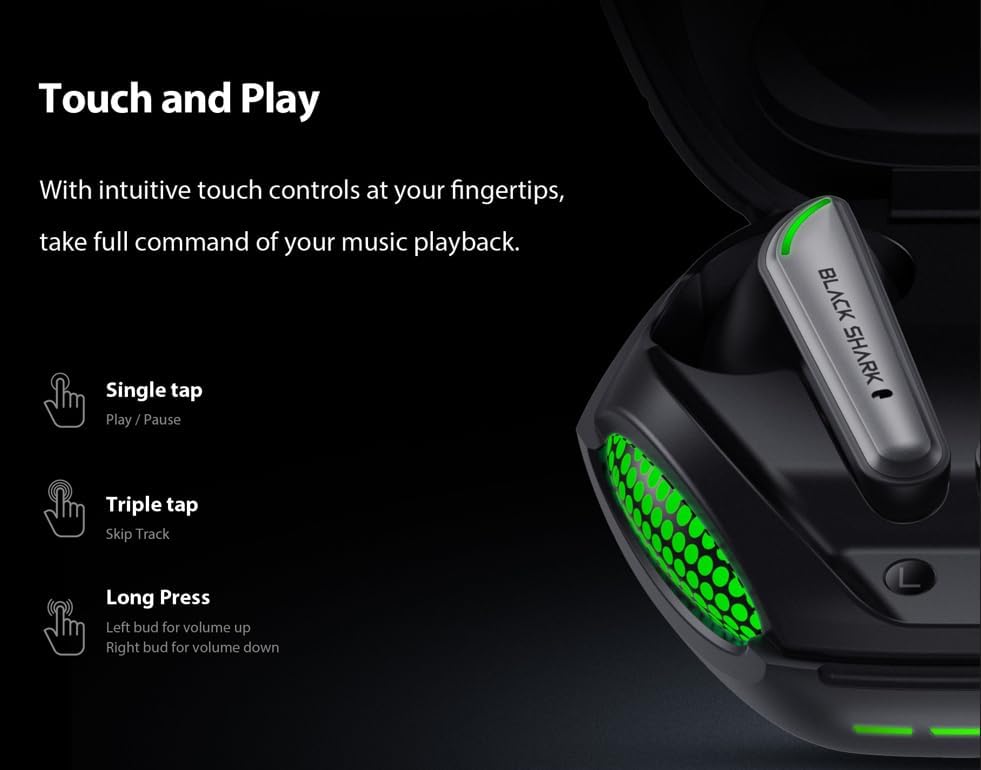
Figure 3: Smart Touch Controls Overview.
- Toca simple: Reproducir/pausar música.
- Toca tres veces: Ir á seguinte pista.
- Long Press (Left Earbud): Subir volume.
- Long Press (Right Earbud): Baixar o volume.
- Atender / finalizar chamadas: Toca un só auricular en calquera dos auriculares.
- Rexeitando chamadas: Prema longamente en calquera dos auriculares.
- Activando o asistente de voz: Toca dúas veces en calquera dos auriculares.
4.3 Game and Music Dual Mode
The earbuds support a dual mode for optimized audio performance in both gaming and music listening. Switch between modes by performing a specific touch gesture (e.g., quadruple tap or specific long press combination). Refer to the quick start guide included in your package for the exact gesture to toggle between game mode (low latency) and music mode (high-fidelity audio).
4.4 Environmental Noise Cancellation (ENC) for Calls
The built-in ENC technology helps reduce background noise during calls, ensuring your voice is clear and distinct to the person on the other end. This feature is automatically active during phone calls.

Figure 4: Environmental Noise Cancellation for clear communication.
5. Mantemento
5.1 Limpeza
- Limpa os auriculares regularmente, especialmente as almofadas e os contactos de carga, cun pano suave, seco e sen fiapos.
- Non empregue produtos de limpeza abrasivos, alcol nin disolventes químicos.
- Asegúrate de que non entre humidade en ningunha das aberturas.
5.2 Resistencia á auga (IPX5)
The Black Shark Lucifer T7 earbuds are rated IPX5 water resistant, meaning they can withstand low-pressure water jets from any direction. This makes them suitable for workouts and light rain. However, they are not designed for swimming or submersion in water. Do not charge the earbuds if they are wet.
5.3 Almacenamento
Cando non estean en uso, garda os auriculares no seu estoxo de carga para protexelos e mantelos cargados. Garda o estoxo nun lugar fresco e seco, lonxe de temperaturas extremas.
6 Solución de problemas
Auriculares 6.1 sen emparellamento
- Asegúrate de que os dous auriculares estean cargados.
- Place both earbuds back into the charging case, close the lid, and then open it again to re-enter pairing mode.
- Desactiva e activa o Bluetooth do teu dispositivo.
- Forget "Black Shark Lucifer T7" from your device's Bluetooth list and try pairing again.
- Asegúrate de que os auriculares estean dentro do alcance inalámbrico de 10 metros do teu dispositivo.
6.2 Sen son ou volume baixo
- Check the volume level on both your device and the earbuds (using long press controls).
- Asegúrate de que os auriculares estean conectados correctamente ao dispositivo.
- Limpa calquera residuo dos altofalantes e das almofadas dos auriculares.
- Tenta reproducir audio desde unha aplicación ou dispositivo diferente.
6.3 Problemas de carga
- Verifica que o cable de carga estea conectado de forma segura tanto á caixa como á fonte de alimentación.
- Proba cun cable USB-C e un adaptador de corrente diferentes.
- Asegúrate de que os contactos de carga dos auriculares e do interior da funda estean limpos e libres de obstrucións.
- If the earbuds are wet, dry them completely before attempting to charge.
6.4 Os controis táctiles non responden
- Asegúrate de ter os dedos limpos e secos ao usar os controis táctiles.
- Try restarting the earbuds by placing them in the case and closing the lid for a few seconds.
7. Especificacións
| Nome do modelo | Tiburón negro Lucifer T7 |
| Número de modelo | BS-T7 |
| Conectividade | Bluetooth 5.3 |
| distancia wireless | Ata 10 metros (33 pés) |
| Controladores de audio | Controladores dinámicos de 10 mm |
| Latencia de audio | 65 milisegundos |
| Control de ruído | Cancelación de ruído ambiental (ENC) para chamadas |
| Resistencia á auga | IPX5 |
| Playtime (Total with Case) | Ata 23 horas |
| Método de control | Toca |
| Dimensións (caso) | 3.5 x 3.5 x 1.54 polgadas (aproximado) |
| Peso | 4.16 onzas (aproximadamente) |
| Material | Plástico |
| Dispositivos compatibles | Cellphones, Gaming Consoles, Laptops, Tablets, iPhone |

Figure 5: Key features of the Black Shark Lucifer T7.
8. Produto rematadoview Vídeo
Mira este vídeo oficial para ver máisview of the Black Shark Lucifer T7 Gaming Earbuds, highlighting their design and key functionalities.
Vídeo 1: Rematado oficialmenteview of the Black Shark Lucifer T7 Gaming Earbuds.
9. Garantía e soporte
For detailed warranty information and customer support, please refer to the official Black Shark websitio web ou póñase en contacto directamente co servizo de atención ao cliente. Garde o recibo de compra para reclamacións de garantía.
Fabricante: Tiburón Negro
Tenda da marca: Tenda Black Shark en Amazon