
Xiaomi OB03729
Micrófono de karaoke Xiaomi negro - Manual de usuario
Modelo: OB03729
Introdución
This user manual provides comprehensive instructions for the safe and effective use of your Xiaomi Karaoke Microphone Black. Please read this manual thoroughly before operating the device and retain it for future reference.
The Xiaomi Karaoke Microphone is designed to deliver an immersive audio experience with its dual high-power speakers and advanced sound processing. Its portable design and long-lasting battery make it ideal for various entertainment settings.
Produto rematadoview
Familiarize yourself with the components and controls of your Xiaomi Karaoke Microphone.
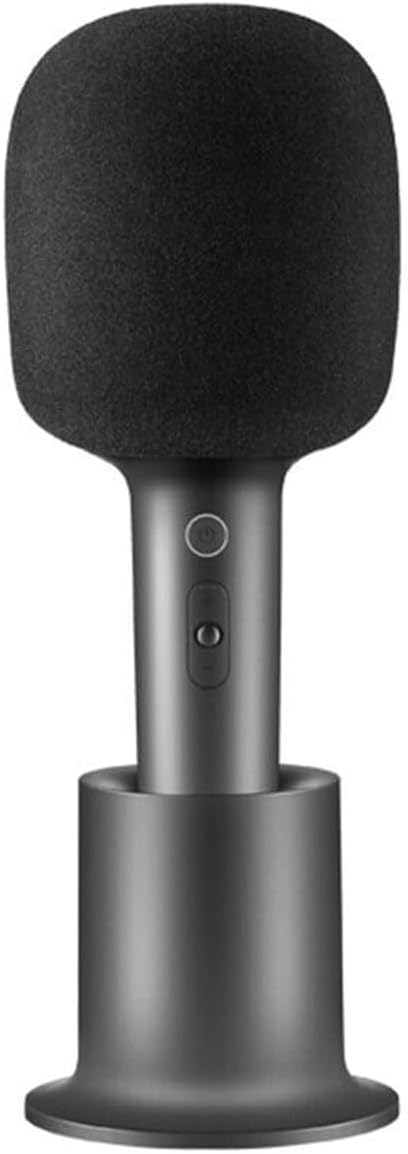
Figure 1: Xiaomi Karaoke Microphone with its charging base.

Figura 2: Fronte view of the microphone, showing the power button and volume/effect controls.
Características principais:
- Dual 5W High-Power Speakers: Provides immersive audio with rich bass and clear vocals for a karaoke-like experience.
- Batería de alta capacidade de 2500 mAh: Offers up to 7 hours of continuous singing on a single charge.
- One-Key Smart Elimination of Original Sound: Easily removes vocal tracks from songs, allowing you to sing along.
- Botóns multifunción: Control volume, change sound effects, and pause/play music directly on the microphone.
- Deseño elegante e portátil: Lixeiro e compacto para facilitar o transporte.
Configuración
Carga do micrófono:
- Connect the provided USB Type-C charging cable to the charging port on the microphone or the charging base.
- Connect the other end of the cable to a compatible USB power adapter (5V) or a computer USB port.
- O indicador luminoso mostrará o estado da carga. Unha carga completa adoita tardar aproximadamente de 3 a 4 horas.

Figure 3: The microphone can be connected to a smartphone for use.
Emparejamento mediante Bluetooth:
- Press and hold the power button on the microphone to turn it on. The indicator light will flash, indicating it is in pairing mode.
- No teu teléfono intelixente ou noutro dispositivo compatible con Bluetooth, navega ata a configuración de Bluetooth.
- Select "Xiaomi Karaoke Mic" (or similar name) from the list of available devices.
- Once paired, the indicator light on the microphone will turn solid.
Instrucións de funcionamento
Funcións básicas:
- Encendido/apagado: Manteña premido o botón de acendido.
- Control de volume: Use the volume up (+) and down (-) buttons to adjust the microphone's output volume.
- Reprodución de música: When connected to a device, use the play/pause button to control music playback.
Funcións avanzadas:
- Eliminación do son orixinal: Press the dedicated "one-key smart elimination" button to remove vocals from a song, allowing you to sing along to the instrumental track.
- Efectos de son: Cycle through various sound effects by pressing the sound effect button. The microphone features 9 interesting sound effects, including monster and cartoon effects.

Figure 4: The microphone offers various sound effects for an enhanced experience.

Figure 5: Experience KTV-level stereo sound with the dual 5W high-power opposed speakers.
Mantemento e coidados
- Clean the microphone's exterior with a soft, dry cloth. Do not use abrasive cleaners or solvents.
- Evite expoñer o micrófono a temperaturas extremas, humidade ou luz solar directa.
- Garda o micrófono nun lugar fresco e seco cando non o uses.
- Do not attempt to disassemble or repair the microphone yourself. Contact authorized service personnel for assistance.
Resolución de problemas
| Problema | Causa posible | Solución |
|---|---|---|
| O micrófono non se acende. | A batería está esgotada. | Charge the microphone using the provided USB Type-C cable. |
| Non se pode sincronizar co dispositivo Bluetooth. | Microphone is not in pairing mode or device's Bluetooth is off. | Ensure microphone is on and indicator light is flashing. Turn on Bluetooth on your device and search for "Xiaomi Karaoke Mic". |
| Sen saída de son. | Volume is too low or microphone is not properly connected. | Increase microphone volume. Ensure Bluetooth connection is stable. Check volume on connected device. |
| A calidade do son é baixa. | Interference or microphone too far from source. | Move closer to the connected device. Avoid sources of strong electromagnetic interference. |
Especificacións
| Característica | Detalle |
|---|---|
| Número de modelo | OB03729 |
| Cor | Negro |
| Material | Aluminio |
| Dimensións (L x W x H) | 10 x 5 x 1.3 cm |
| Peso | 100 g |
| Fonte de enerxía | Alimentado por batería |
| Tipo de batería | 1 Lithium Ion battery (2500mAh) |
| Duración da batería | Ata 7 horas de uso continuo |
| Conectividade | Bluetooth |
| Tipo de conector | USB tipo C |
| Saída do altofalante | Dobre altofalante de 5 W |
| Impedancia | 4 ohmios |
| Rango de frecuencias | 100 Hz - 10 kHz |
| Dispositivos compatibles | Voice Recorder, Smartphone, Karaoke Machine |
| Compoñentes incluídos | Base de carga |
Información da garantía
Xiaomi products are manufactured to the highest quality standards. This product is covered by a limited warranty from the date of purchase. Please refer to the warranty card included with your product or visit the official Xiaomi websitio web para obter termos e condicións de garantía detallados específicos da súa rexión.
Garda o teu recibo de compra como xustificante de compra para reclamacións de garantía.
Atención ao cliente
For technical support, troubleshooting assistance, or service inquiries, please contact Xiaomi customer support through their official websitio web ou a información de contacto que se inclúe na embalaxe do produto.
Tamén podes visitar o Tenda Xiaomi en Amazon para obter información e recursos adicionais sobre o produto.
Ask a question about this manual
Ask about setup, troubleshooting, compatibility, parts, safety, or missing instructions. Manuals+ will review the question and use this page’s manual context to help answer it.