
Introdución
The Strich BT-FP2 is a wireless page turner pedal designed to enhance your musical performance or presentation by providing hands-free control over digital content. This device allows musicians, presenters, and other users to effortlessly navigate through sheet music, lyrics, chords, or presentation slides on their mobile phones, tablets, or computers via Bluetooth connectivity. By eliminating the need to use your hands for page turning, you can maintain focus on your instrument or presentation, ensuring a smooth and uninterrupted experience.
Configuración
Contido do paquete
Antes de comezar, asegúrate de que todos os elementos estean presentes no paquete:
- Strich BT-FP2 Wireless Page Turner Pedal
- Cable de carga
Cargando o dispositivo
The BT-FP2 pedal features a built-in rechargeable Lithium-ion battery. For optimal performance, fully charge the device before its first use.
- Connect the provided charging cable to the charging port on the pedal.
- Conecta o outro extremo do cable de carga a un adaptador de corrente USB estándar (non incluído) ou ao porto USB dun ordenador.
- A luz indicadora de carga acenderase. Unha vez cargada completamente, a luz pode cambiar de cor ou apagarse, dependendo do modelo.
- Unha carga completa proporciona ata 20 horas de uso continuo.
Emparejando co seu dispositivo
The Strich BT-FP2 uses Bluetooth for wireless connectivity with your mobile phone, tablet, or computer. It is compatible with both Apple iOS and Android platforms.
- Ensure the BT-FP2 pedal is charged and powered on. The power switch is typically located on the central unit.
- No teu dispositivo móbil ou ordenador, vai á configuración de Bluetooth.
- Activa o Bluetooth e busca os dispositivos dispoñibles.
- Select "BT-FP2" from the list of discovered devices to initiate the pairing process.
- Once paired, the device's Bluetooth indicator light will confirm a successful connection. The operating range is up to 10 meters (33 feet).

Figura 1: Fronte view of the Strich BT-FP2 pedal, showing the two foot pedals and the central control panel with various buttons and indicator lights. This view is useful for identifying the power switch and pairing buttons.
Instrucións de funcionamento
Funcións básicas
The BT-FP2 pedal features two foot pedals, allowing for intuitive control of your digital content.
- Pedal esquerdo: Typically used for moving backward (e.g., previous page, previous slide).
- Pedal dereito: Typically used for moving forward (e.g., next page, next slide).
- Botóns de modo: The central control panel includes buttons to switch between different operating modes, which may emulate various keyboard commands (e.g., page up/down, left/right arrow keys). Refer to your application's settings for optimal configuration.
Compatibilidade de aplicacións
The pedal is compatible with a wide range of applications that support external keyboard or Bluetooth input for navigation. Supported software includes, but is not limited to, GarageBand and CAKEWALK. For other applications, check their settings for options to assign keyboard shortcuts to page turning or navigation functions.

Figura 2: The Strich BT-FP2 pedal shown in a usage scenario, connected to a device via a red cable (likely for charging or wired connection, though primarily wireless). This image illustrates the pedal's compact design and how it might appear during use.

Figura 3: Un primeiro plano view of a foot pressing one of the pedals on the Strich BT-FP2. This demonstrates the hands-free operation and the ergonomic design for foot control, highlighting its practical application during a performance.
Mantemento
Proper care and maintenance will extend the life of your Strich BT-FP2 pedal.
- Limpeza: Use a soft, dry cloth to clean the surface of the pedal. Avoid using abrasive cleaners or solvents, as they may damage the finish.
- Almacenamento: Garda o pedal nun lugar fresco e seco, lonxe da luz solar directa e de temperaturas extremas.
- Coidado da batería: To maintain battery health, avoid fully discharging the battery frequently. If storing for an extended period, charge the battery to approximately 50% every few months.
- Exposición á auga: This device is not waterproof. Avoid exposure to liquids to prevent damage.
Resolución de problemas
If you encounter issues with your Strich BT-FP2 pedal, refer to the following common problems and solutions:
- O dispositivo non se acende:
- Ensure the battery is charged. Connect the charging cable and allow it to charge for at least 30 minutes.
- Verifique que o interruptor de alimentación estea na posición "ON".
- Non se pode emparellar por Bluetooth:
- Make sure the pedal is powered on and within the 10-meter range of your device.
- Turn off and on Bluetooth on your mobile device or computer.
- Forget the device from your Bluetooth settings and attempt to pair again.
- Ensure no other devices are actively connected to the pedal.
- O pedal non responde na aplicación:
- Check if the pedal is successfully paired with your device.
- Verify the application settings to ensure it supports external input or keyboard shortcuts for navigation.
- Try switching the operating mode on the pedal using the central buttons to see if a different mode is compatible with your application.
- Restart the application and/or your mobile device.
- Autonomía curta da batería:
- Asegúrese de que o dispositivo estea completamente cargado antes de usalo.
- Battery life can vary based on usage and environmental conditions.
- If the issue persists, the battery may need replacement (contact support).
Especificacións
Detailed technical specifications for the Strich BT-FP2 Wireless Page Turner Pedal:
| Característica | Detalle |
|---|---|
| Número de modelo | BT-FP2 |
| Tecnoloxía de conectividade | Bluetooth |
| Dispositivos compatibles | PC, portátil, teléfono intelixente, tableta |
| Software compatible | GarageBand, CAKEWALK (and others supporting keyboard input) |
| Number of Keys/Pedals | 2 |
| Tipo de batería | 1 batería de ións de litio (incluída) |
| Duración da batería | Ata 20 horas |
| distancia wireless | Ata 10 metros |
| Peso do elemento | 420 g |
| Dimensións do paquete | 21.3 x 19.2 x 4.2 cm |
| Característica especial | Compacto, portátil |
| Fabricante | Strich |
| País de Orixe | China |
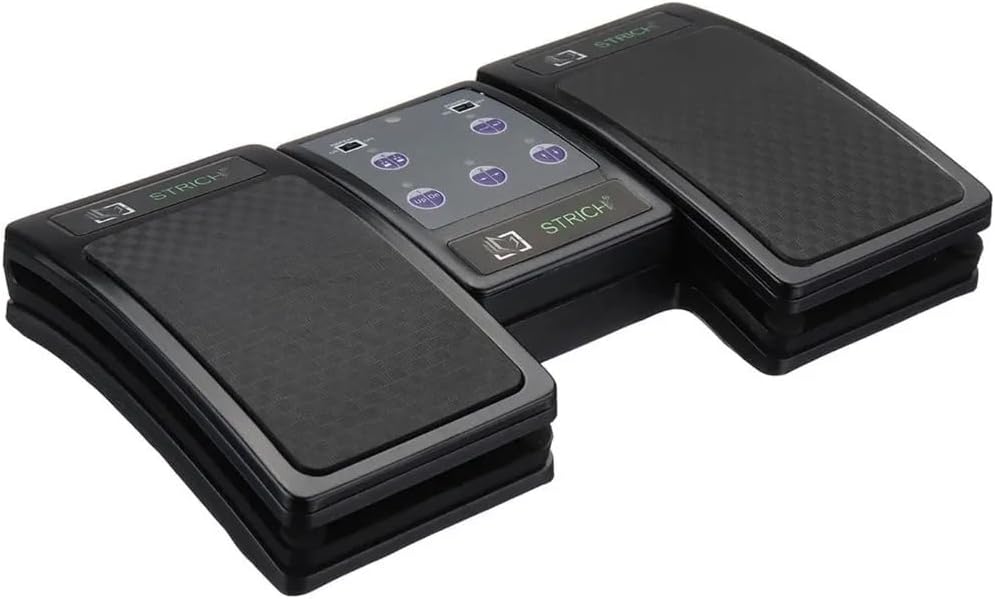
Figura 4: An angled top-down view of the Strich BT-FP2 pedal, showcasing its overall design and footprint. This image provides a comprehensive look at the product's physical characteristics.
Garantía e Soporte
Para obter información sobre a garantía ou asistencia técnica, consulte a documentación incluída coa súa compra ou póñase en contacto directamente co vendedor/fabricante. Garde o comprobante de compra para calquera reclamación de garantía.