
Introdución
This manual provides comprehensive instructions for the JIARUIXIN JR1839 2.4G Bluetooth Remote Control, designed for use with children's electric ride-on cars. Please read this manual carefully before use to ensure proper operation and safety.
Configuración
1. Instalación da batería
The remote control requires two AAA (1.5V) batteries. To install, locate the battery compartment on the back of the remote, loosen the screw, and insert the batteries according to the polarity markings. Secure the cover by tightening the screw.
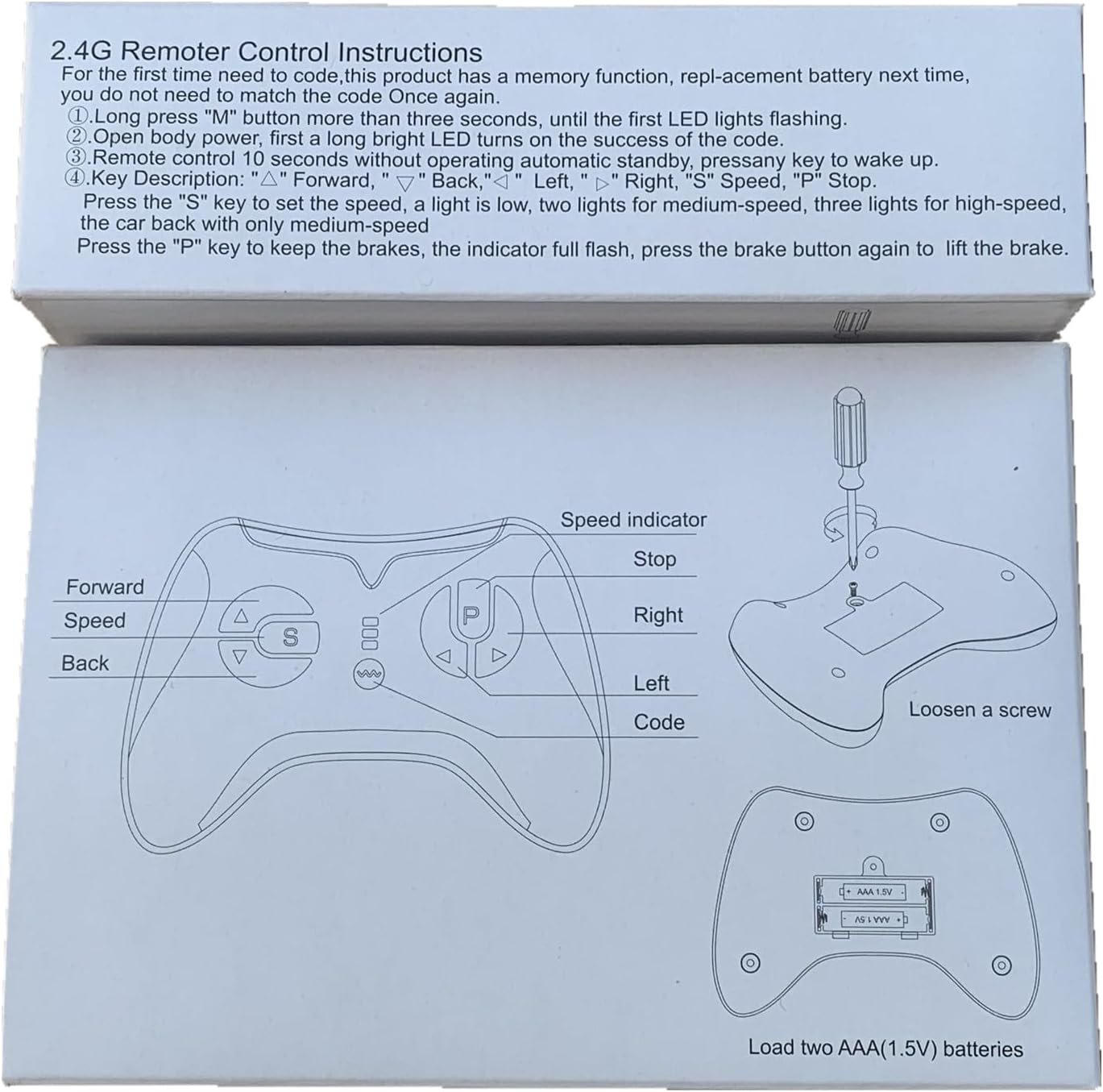
Figure 1: Remote control diagram illustrating battery compartment and button functions.

Figura 2: Traseira view of the remote control, highlighting the battery cover.
2. Pairing (Match Code) Instructions
Follow these steps to pair the remote control with your electric ride-on car:
- Asegúrese de que o control remoto teña pilas novas instaladas.
- Turn off the power switch on the electric ride-on vehicle.
- On the remote control, press and hold the "▲" (Forward) and "▼" (Back) keys simultaneously for 3 seconds. The first LED indicator on the remote will begin to flicker, indicating it is in pairing mode.
- While the remote's LED is flickering, turn on the power switch of the electric ride-on vehicle.
- The red indicator light on the remote should stop flashing and remain solid, indicating successful pairing.
- If pairing is unsuccessful, turn off both devices and repeat the steps. The remote control has a memory function, so re-pairing is generally not required after battery replacement.

Figure 3: Detailed pairing instructions and remote control layout.
Instrucións de funcionamento
Familiarize yourself with the remote control buttons and their functions:

Figura 4: Fronte view of the JR1839 remote control.
- ▲ (Forward): Moves the vehicle forward.
- ▼ (Back): Moves the vehicle backward.
- ◀ (Left): Turns the vehicle left.
- ▶ (Right): Turns the vehicle right.
- S (Speed): Press this button to cycle through speed settings.
- 1 LED lit: Low speed
- 2 LEDs lit: Medium speed
- 3 LEDs lit: High speed
- P (Brake/Stop): Press and hold this key to engage the brake. All LED indicators will flicker while the brake is active. Release the key to disengage the brake.
The remote control is intended for use by adults to supervise and control the ride-on vehicle for children.
Mantemento
- Keep the remote control dry and away from moisture.
- Clean the remote control with a soft, dry cloth. Do not use harsh chemicals or abrasive cleaners.
- Replace batteries promptly when the remote's performance degrades. Always use new AAA (1.5V) batteries.
- Store the remote control in a safe place when not in use, away from extreme temperatures.
Resolución de problemas
- O mando a distancia non responde:
- Comprobe se as baterías están instaladas correctamente e teñen a carga suficiente. Substitúaas se é necesario.
- Ensure the remote is properly paired with the ride-on car by following the "Pairing Instructions" section.
- Verify that the ride-on car's power switch is on and its battery is charged.
- Problemas de interferencia:
- Este dispositivo cumpre coa Parte 15 das normas da FCC. O funcionamento está suxeito ás dúas condicións seguintes: (1) Este dispositivo non pode causar interferencias prexudiciais e (2) Este dispositivo debe aceptar calquera interferencia recibida, incluídas as que poidan causar un funcionamento non desexado.
- Se se producen interferencias, intente reorientar ou reubicar a antena receptora.
- Aumentar a separación entre o equipo e o receptor.
- Conecte o equipo a unha toma dun circuíto diferente ao que está conectado o receptor.
- Consulte ao distribuidor ou a un técnico experimentado de radio/TV para obter axuda.
- O control remoto non está a emparellarse:
- Ensure the ride-on car is turned off before initiating the pairing sequence.
- Hold the "▲" e "▼" keys for the full 3 seconds until the LED flickers.
- Turn on the car's power switch immediately after the remote enters pairing mode.
Importante: Changes or modifications to this unit not expressly approved by the party responsible for compliance could void the user's authority to operate the equipment.
Especificacións
| Modelo | 1839 JR |
| Marca | JIARUIXIN |
| Tecnoloxía de conectividade | Bluetooth 2.4G |
| Tipo de controlador | Gamepad |
| Cor | Negro |
| Fonte de alimentación | DC 3.0V (2 pilas AAA de 1.5 V, non incluídas) |
| Frecuencia | 2.407 GHz-2.473 GHz (potencia de saída máxima: 5 dBm) |
| Dimensións do produto | 4.9 x 3.8 x 2 polgadas |
| Peso do elemento | 2.88 onzas |
Garantía e Soporte
For warranty information or technical support, please contact the manufacturer or your retailer. Ensure you have your product model number (JR1839) and purchase details available when seeking assistance.
The remote controller is only to be used with adult's guidance.
Declaración de conformidade da FCC
Este dispositivo cumpre coa parte 15 das normas da FCC. O funcionamento está suxeito ás dúas condicións seguintes:
- Este dispositivo pode non causar interferencias daniñas.
- Este dispositivo debe aceptar calquera interferencia recibida, incluídas as que poidan causar un funcionamento non desexado.
Nota: Este equipo foi probado e comprobouse que cumpre cos límites para un dispositivo dixital de Clase B, segundo a Parte 15 das Normas da FCC. Estes límites están deseñados para proporcionar unha protección razoable contra interferencias daniñas nunha instalación residencial. Este equipo xera, utiliza e pode irradiar enerxía de radiofrecuencia e, se non se instala e se usa de acordo coas instrucións, pode causar interferencias prexudiciais nas comunicacións por radio. Non obstante, non hai garantía de que non se produzan interferencias nunha determinada instalación. Se este equipo causa interferencias daniñas na recepción de radio ou televisión, o que se pode determinar acendendo e apagando o equipo, recoméndase ao usuario que intente corrixir a interferencia mediante unha ou máis das seguintes medidas:
- Reorienta ou reubica a antena receptora.
- Aumentar a separación entre o equipo e o receptor.
- Conecte o equipo a unha toma dun circuíto diferente ao que está conectado o receptor.
- Consulte ao distribuidor ou a un técnico experimentado de radio/TV para obter axuda.
O dispositivo foi avaliado para cumprir os requisitos xerais de exposición a RF. O dispositivo pódese usar en condicións de exposición portátil sen restricións.