
1. Introdución
This manual provides detailed instructions for the installation, operation, and maintenance of your UNITOPSCI Double Din Apple CarPlay & Android Auto Car Stereo. Please read this manual thoroughly before using the product to ensure proper functionality and safety.
2. Que hai na caixa
- 1 x Car Stereo
- 1 x cámara de respaldo
- 1 x Remote Control (Battery Not included)
- 1 x Steering Wheel Control (Battery Not included)
- 1 x cable de alimentación
- 1 x cable de altofalante
- 1 x Manual de usuario
- 1 x micrófono
3. Características clave
- Compatible with Apple CarPlay & Android Auto via USB cable connection.
- 7-inch HD Capacitive Touch Screen for clear visuals and smooth operation.
- Built-in Bluetooth 5.1 for hands-free calling and music streaming.
- Radio FM con 18 emisoras predefinidas.
- Mirror Link function for screen mirroring from smartphones (Android/iOS).
- Includes Backup Camera for safer parking.
- Supports Steering Wheel Control for convenient operation.
- EQ Sound settings (Classic, Pop, Rock, Flat, DSP).
- Multiple playback options: USB, AUX, TF Card input.
- 7 colorful backlight display options.
4. Configuración e instalación
Proper installation is crucial for optimal performance. It is recommended to have this unit installed by a professional if you are unfamiliar with car audio wiring.
4.1 Diagrama xeral de cableado
Refer to the following diagram for the general wiring connections of the car stereo. Ensure all connections are secure and correctly matched to your vehicle's wiring harness.

Figure 1: General Wiring Diagram
4.2 Backup Camera Wiring
The included backup camera requires specific wiring for proper functionality. Connect the red power cable of the camera to the positive back battery supply and the black cable to the negative battery supply. The yellow video input port of the camera connects to the CAM IN port on the rear of the car radio. Locate the wire labeled "BACK" on the car radio's harness and connect it to the positive power supply (typically the reverse light trigger wire). This ensures the display automatically switches to the reversing image when the car is in reverse gear.

Figure 2: Backup Camera Wiring Diagram
5. Instrucións de funcionamento
5.1 Apple CarPlay e Android Auto
Connect your smartphone to the car stereo via a USB cable. The unit will automatically detect and launch Apple CarPlay or Android Auto, allowing you to access navigation, music, calls, and messages directly from the stereo's screen. Voice control functions are supported for hands-free operation.

Figura 3: Interface de CarPlay e Android Auto
5.2 Bluetooth 5.1
Enable Bluetooth on your smartphone and search for available devices. Select the car stereo from the list to pair. Once connected, you can make and receive hands-free calls and stream audio directly to the stereo. The built-in microphone ensures clear call quality.

Figure 4: Bluetooth Hands-free Calls
5.3 Radio FM
Access the FM radio function to listen to your favorite stations. The unit supports a radio range of FM 87.5-108.0MHZ and allows you to save up to 18 preset stations for quick access to news, sports, and music.

Figure 5: Stable FM Radio Operation
5.4 Ligazón de espello
Utilize the Mirror Link function by connecting your smartphone via USB. This feature allows you to mirror your phone's screen content, including videos and navigation maps, directly onto the car stereo's display.

Figura 6: Funcionalidade da ligazón de espello
5.5 Axustes de son do ecualizador
Adjust the audio output to your preference using the built-in EQ sound settings. Choose from predefined modes like Classic, Pop, Rock, Flat, or customize your sound with DSP settings.

Figure 7: Digital Sound Effect Adjustment
5.6 Control do volante
Connect the steering wheel control wires to enable convenient control of the stereo directly from your steering wheel. This allows you to easily switch songs, adjust volume, and manage phone calls without taking your hands off the wheel.

Figura 8: Configuración do control do volante
5.7 USB/AUX/TF Card Playback
The unit supports multiple input sources for audio and video playback. Insert a USB drive, TF card, or connect an external device via the AUX input to enjoy your media files.
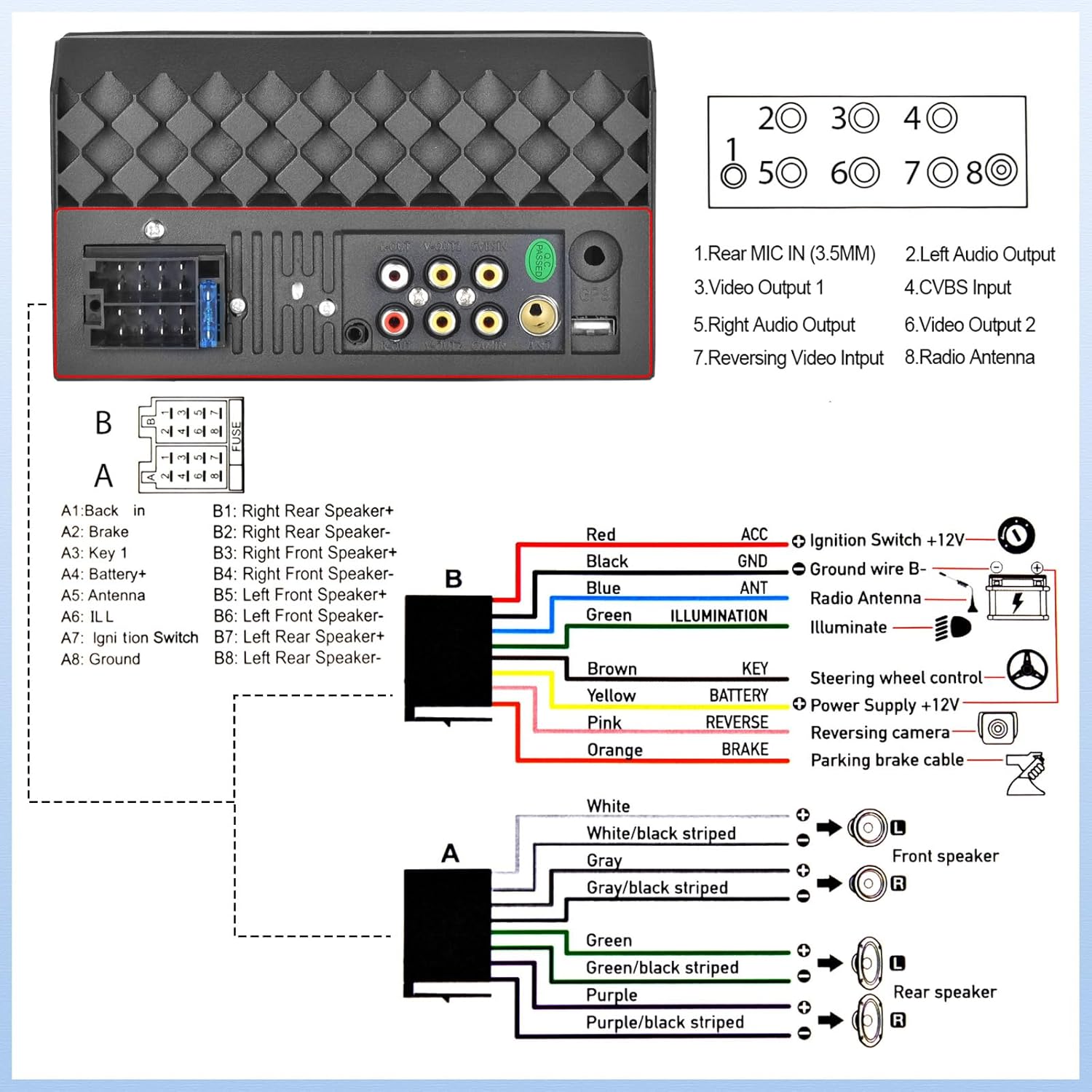
Figure 9: USB/AUX/TF Card Input
6. Mantemento
Para garantir a lonxevidade e o rendemento óptimo do equipo de son do teu coche, segue estas pautas de mantemento:
- Manteña a pantalla limpa cun pano suave e sen pelusa. Evite produtos de limpeza abrasivos.
- Asegure unha ventilación adecuada ao redor da unidade para evitar o sobreenriquecido.
- Evite expoñer a unidade a temperaturas extremas ou á luz solar directa durante períodos prolongados.
- Regularly check wiring connections for looseness or corrosion.
7 Solución de problemas
Se tes problemas co equipo de son do teu coche, consulta os seguintes problemas e solucións comúns:
- Sen enerxía: Check all power connections, including the ACC (ignition switch) and B+ (battery) wires. Ensure the fuse is not blown.
- Sen son: Verify speaker connections are secure and correctly polarized. Check the volume level and EQ settings.
- Problemas de conectividade Bluetooth: Ensure Bluetooth is enabled on both the stereo and your phone. Try unpairing and re-pairing the devices.
- Non se mostra a cámara de marcha atrás: If the camera is powered on but the head unit does not switch to the reversing image, check the trigger wire for the backup camera connection. Ensure it is correctly connected to a positive power supply that activates when reverse gear is engaged.
- A pantalla táctil non responde: Try resetting the unit (refer to the main unit for a small reset button, if available, or disconnect power briefly).
8. Especificacións
| Característica | Especificación |
|---|---|
| Dimensións do produto | 2.48 x 7 x 4 polgadas |
| Peso do elemento | 1.1 libras |
| Número de modelo do artigo | L2 |
| Tecnoloxía de conectividade | Bluetooth, Auxiliar, USB |
| Tipo de controlador | Android |
| Características especiais | Touchscreen, Backup Camera Input, Android Auto, Built-In Bluetooth, Apple CarPlay |
| Dispositivos compatibles | Teléfono intelixente |
| Tipo de conector | USB 2.0 |
| Modo de saída de audio | Mono |
| Configuración da canle de son envolvente | 4.0 |
| Codificación de vídeo | H.264, H.265 |
| Fabricante | UNIDADESCI |
| País de Orixe | China |
9. Garantía e soporte
UNITOPSCI is committed to providing high-quality products and satisfactory services. Your product comes with the following support:
- Replacement Available within 24 Months
- 60-days No Worry to Return
- Lifetime After-Sales Consult and Technical Support
- Resposta rápida en 16 horas
Para calquera consulta ou asistencia técnica, póñase en contacto connosco en: UNITOPSCI@126.com