
Introdución
Thank you for choosing the ACEZUK M01 Car Jump Starter. This device is designed to provide a reliable emergency start for your vehicle, act as a portable power bank, and offer a multi-mode LED flashlight. Please read this manual carefully before use to ensure proper operation and safety.
Compoñentes do produto
The ACEZUK M01 package includes the following items:
- Arrancador de coche ACEZUK M01
- Batería intelixente Clamps (vermello e negro)
- Cable de carga USB-C
- Manual de usuario
- Storage Pouch (Note: A storage case is not included with this model.)

Image: Contents of the ACEZUK M01 package. This image displays the jump starter unit, smart battery clamps, a USB-C charging cable, the user manual, and a soft storage pouch.
Especificacións
| Marca | ACEZUK |
| Modelo | M01 |
| Corrente máxima | 6000A |
| Capacidade da batería | 12800 mAh |
| Voltage | 12 voltios |
| Compatibilidade do motor | Up to 7.0L Gasoline, 5.5L Diesel |
| Composición da pila da batería | Ion de litio |
| Peso do elemento | 730 gramos |
| Vehicle Fit Type | Ajuste universal |

Image: The 2.5-inch LCD screen on the ACEZUK M01 jump starter. The screen clearly shows the battery charge level, input/output indicators, and alerts for extreme temperatures, ensuring the device is ready for use.
Configuración e carga
Cargo Inicial
Before first use, fully charge the ACEZUK M01 jump starter. Connect the provided USB-C charging cable to the device's Type-C input port and a suitable USB power adapter (not included). The LCD screen will indicate the charging status. A full charge is recommended for optimal performance.
Comprobando o nivel da batería
The 2.5-inch LCD screen displays the current battery percentage. It is recommended to maintain the battery level above 25% for successful jump starts. Recharge the device when the battery level is low.
Instrucións de funcionamento: Arranque auxiliar dun vehículo
Siga estes pasos atentamente para arrancar o seu vehículo con axuda de cables:
- Conectar o cable intelixente: Insira a batería intelixente clamp cable into the jump starter's output port. Ensure a secure connection.
- Adxunta Clamps á batería: Conecta o positivo vermello (+) clamp to the positive (+) terminal of your vehicle's battery. Connect the black negative (-) clamp ao terminal negativo (-) da batería do teu vehículo.
- Arrancar o vehículo: Unha vez que o clamps are securely connected and the smart cable indicator shows a ready state (refer to the smart cable's indicator lights for specific signals), start your vehicle's engine.
- Eliminar Clamps: Despois de que o motor arranque, retire inmediatamente o cle intelixenteamps from the vehicle battery terminals, then disconnect the smart cable from the jump starter.
Importante: Always remove the clamps from the car battery immediately after the engine starts to prevent damage to the jump starter or vehicle.
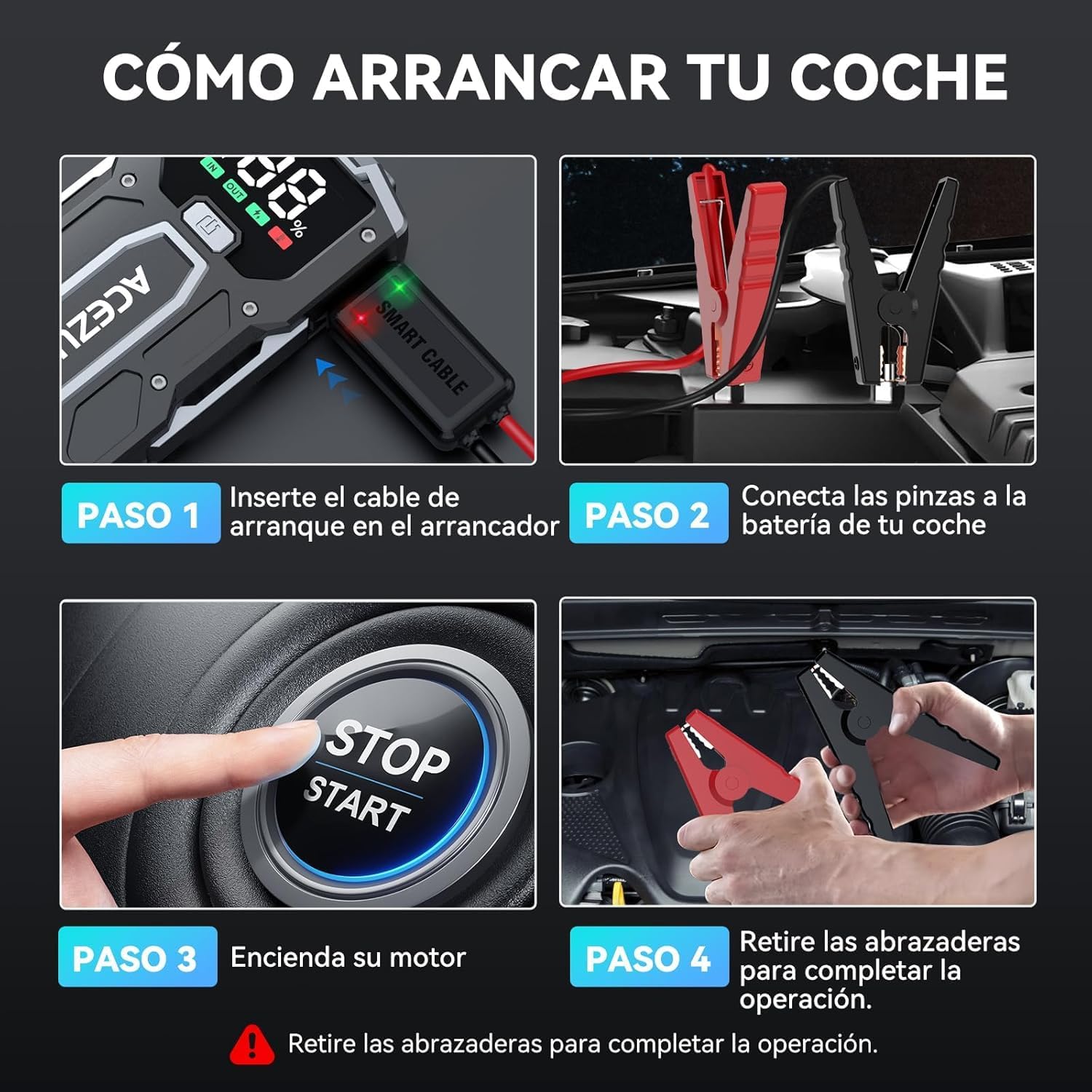
Image: A visual guide demonstrating the four steps to jump start a car. Step 1 shows inserting the smart cable into the jump starter. Step 2 shows connecting the clamps to the car battery. Step 3 shows starting the car engine. Step 4 shows removing the clamps after the car starts.

Image: The ACEZUK M01 jump starter connected to a vehicle battery. The image highlights its 6000A peak current capability and compatibility with 7.0L gasoline and 5.5L diesel engines, operating at 12V.
Función Power Bank
The ACEZUK M01 can also function as a 12800mAh portable power bank to charge your electronic devices.
- Porto de saída: It features a USB output port (5V/2.4A) for charging smartphones, tablets, e-readers, and other USB-powered devices.
- Porto de entrada: The Type-C port (5V/2A, 9V/2A) is used for recharging the jump starter itself.
Simply connect your device's charging cable to the USB output port on the jump starter to begin charging.

Image: The ACEZUK M01 jump starter acting as a power bank, simultaneously charging a smartphone and a tablet. This illustrates its 12800mAh capacity and compatibility with various USB-chargeable devices like game consoles, phones, iPads, drones, earphones, smartwatches, and cameras.
Función de linterna LED
The M01 includes a built-in LED flashlight with three modes for various situations:
- Iluminación: Standard steady light for general visibility.
- Fast Strobe: Rapid flashing light for signaling or attracting attention.
- Slow Flash (SOS): Slow, rhythmic flashing for emergency signaling.
To activate and cycle through the flashlight modes, press the dedicated flashlight button on the device.

Image: The ACEZUK M01 jump starter highlighting its multifunctional LED flashlight. The image shows the three available modes: Illumination, Slow Flash (SOS), and Rapid Flashing, useful for various outdoor and emergency scenarios.
Características de seguridade
The ACEZUK M01 is equipped with 8 types of intelligent safety protections to ensure safe operation and prevent damage:
- Protección a proba de faíscas
- Protección contra polaridade inversa
- Protección contra sobrecorriente
- Protección contra altas temperaturas
- Protección de sobrecarga
- Protección contra descarga excesiva
- Sobrevoltage Protección
- Anti-interference Protection
A batería intelixente clamps feature an indicator that provides audible warnings and flashing lights in case of incorrect connection or other issues.

Image: A diagram detailing the 8 intelligent safety protections integrated into the smart clamps. These protections include safeguards against overheating, overcharging, over-discharging, overvoltage, short circuits, reverse polarity, and anti-interference, ensuring a secure jump start.
Mantemento
- Recarga regularmente: To prolong battery life, recharge the jump starter at least once every three months, even if not in use.
- Almacenamento: Garde o dispositivo nun lugar fresco e seco, lonxe da luz solar directa e de temperaturas extremas.
- Limpeza: Usa un pano suave e seco para limpar o dispositivo. Non empregues produtos químicos agresivos nin materiais abrasivos.
- Comproba os cables: Periodically inspect the smart clamps and cables for any signs of damage or wear. Replace if necessary.
Resolución de problemas
O dispositivo non se acende
- Ensure the device is charged. Check the LCD screen for battery level.
- If the battery is low, recharge the unit.
Vehicle Does Not Start
- Comprobe que o cl intelixenteamps are correctly connected to the vehicle battery terminals (red to positive, black to negative).
- Ensure the smart cable is fully inserted into the jump starter.
- Verify that the jump starter's battery level is above 25%.
- Se o cl intelixenteamp indicator shows an error, refer to the indicator's specific meaning (e.g., reverse polarity, short circuit) and correct the issue.
- The vehicle's battery might be severely discharged or damaged. In such cases, the jump starter may not be able to start the vehicle.
Power Bank Not Charging Devices
- Asegúrate de que o arrancador teña carga suficiente.
- Verify that the charging cable is properly connected to both the jump starter's USB output and your device.
- Proba cun cable ou dispositivo de carga diferente para descartar problemas co cable ou co dispositivo.
Garantía e Soporte
For warranty information or technical support, please refer to the contact details provided with your purchase or visit the official ACEZUK websitio. Garde o comprobante de compra para reclamacións de garantía.