
Tele System SMART24 LS2 A11
Tele System SMART24 LS2 A11 24-inch Android Smart TV User Manual
Model: SMART24 LS2 A11
1. Introdución
This manual provides essential information for the proper setup, operation, and maintenance of your Tele System SMART24 LS2 A11 24-inch Android Smart TV. Please read it thoroughly before using the product to ensure safe and efficient operation.
2. Que hai na caixa
Verifica que estean presentes todos os compoñentes:
- Tele System SMART24 LS2 A11 Smart TV
- Control remoto
- Cable de alimentación
- Guía de inicio rápido
- Papel de garantía
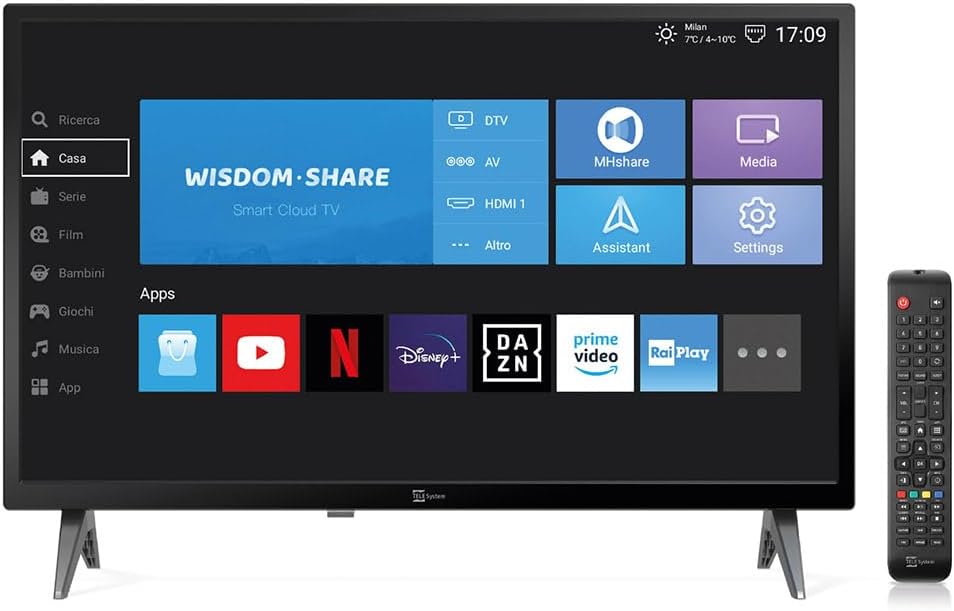
Image: The Tele System SMART24 LS2 A11 Smart TV displaying its home screen, with the included remote control positioned to the right. This illustrates the main components and initial user interface.
3. Configuración
3.1. Desembalaxe e colocación
- Retire con coidado o televisor da súa embalaxe.
- Place the TV on a stable, flat surface or mount it on a wall using a compatible VESA 100x100 wall mount (sold separately).
- Asegúrese de que haxa unha ventilación axeitada arredor do televisor.
3.2. Potencia de conexión
Connect the power cable to the TV's power input and then to a suitable electrical outlet (100-240V AC). While the product description mentions 12/220V, the specifications indicate 100-240V AC. Ensure the power source matches the TV's requirements.
3.3. Asistente de configuración inicial
Ao acender o televisor por primeira vez, este guiarache a través dun asistente de configuración inicial. Isto inclúe:
- Selección de idioma.
- Conexión de rede (Wi-Fi ou Ethernet).
- Channel scanning for DVB-T2 (Digital Terrestrial) and Satellite channels.
- Tivùsat LCN channel numbering setup (if applicable).
4. Instrucións de funcionamento
4.1. Control remotoview

Image: The standard remote control for the Tele System Smart TV, showing various buttons for power, numbers, volume, channel, navigation, and smart TV functions.
Familiarize yourself with the remote control buttons for power, volume, channel selection, navigation, and smart TV functions.
4.2. Android Smart TV Features
Your TV runs on Android AOSP, providing access to a wide range of applications.
- Acceso á aplicación: Navigate to the "Apps" section on the home screen to download and use applications like Prime Video, YouTube, Disney Plus, and DAZN.
- Espello da pantalla: Use the mirroring function to share content from your mobile devices (smartphone, tablet) to the TV screen. This includes photos, videos, and music.
- MHshare App: Download the free MHshare app on your smartphone to use it as an additional remote control for your TV.

Image: The Smart TV displaying a streaming service interface with various movie and series titles, demonstrating the Android app capabilities.

Image: The Smart TV screen displaying "Mirroring" with an arrow pointing from a smartphone icon to the TV, illustrating the screen mirroring function.
4.3. TV Pause (USB)
The TV Pause function allows you to temporarily pause live TV broadcasts. To use this feature:
- Connect an external USB memory stick (not included) to the TV's USB port.
- While watching live TV, press the 'Play/Pause' button on your remote control to pause the program.
- Press 'Play' again to resume.

Image: A TV screen displaying a "TV Pause" overlay with playback controls, indicating the functionality to pause live television.
4.4. Digital Terrestrial (DVB-T2) and Satellite (Tivùsat LCN)
The TV supports DVB-T2 for digital terrestrial broadcasts and satellite reception. It features a CI+ slot for maximum compatibility with TELE System certified Tivùsat CAMs, enhancing viewing quality and experience.
- Busca de canles: The TV allows for satellite channel search with Tivùsat HD classification.
- Slot CI+: Insert a compatible CI+ module (e.g., Tivùsat CAM) into the CI+ slot for access to encrypted channels.
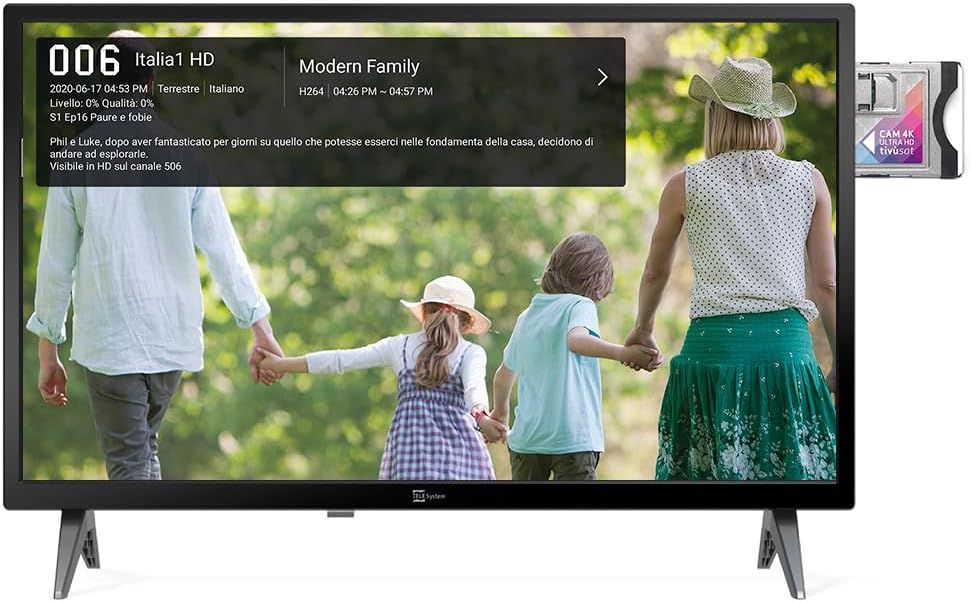
Image: The Smart TV displaying channel information for "Italia 1 HD" and a CI+ module inserted into the side, indicating support for encrypted satellite channels.
4.5. Modo Hotel
The Hotel Mode function is designed for use in hospitality environments. It allows for specific settings to be pre-defined:
- Set maximum audio levels.
- Determine the default channel upon power-on.
- Adjust the initial volume when the unit is turned on.
- Select the default source signal.
5. Mantemento
5.1. Limpeza
- Desconecte sempre o televisor antes de limpalo.
- Usa un pano suave e seco para limpar a pantalla e a carcasa.
- Para marcas difíciles, espolvoree lixeiramenteampEnxágüe o pano con auga ou cun limpador de pantallas suave e non abrasivo.
- Evite o uso de produtos químicos agresivos ou materiais abrasivos.
5.2. Almacenamento
If storing the TV for an extended period, ensure it is kept in a cool, dry place, protected from dust and extreme temperatures.
6 Solución de problemas
Se tes problemas, consulta as seguintes solucións habituais:
- Sen enerxía: Comprobe se o cable de alimentación está conectado correctamente tanto ao televisor como á toma de corrente. Asegúrese de que a toma de corrente funcione.
- Sen imaxe/son: Verify the correct input source is selected. Check cable connections for external devices. For broadcast channels, perform a channel scan.
- O control remoto non funciona: Substitúa as pilas. Asegúrese de que non haxa obstrucións entre o mando a distancia e o sensor de infravermellos do televisor.
- Problemas de conexión á rede: Check your Wi-Fi router or Ethernet cable. Try restarting the TV and your router.
- Fallos de software: Perform a factory reset (refer to the TV's settings menu for this option). Note that a factory reset will erase all personal settings and installed apps.
7. Especificacións
Below are the technical specifications for the Tele System SMART24 LS2 A11 Smart TV:
| Característica | Detalle |
|---|---|
| Número de modelo | TELE System SMART24 LS2 A11 2022 |
| Tamaño da pantalla | 23.6 polgadas (60 cm) |
| Tecnoloxía de visualización | LED |
| Resolución | 720p (1366x768) |
| Taxa de actualización | 60 Hz |
| Sistema Operativo | Android AOSP |
| Conectividade | Ethernet, Wi-Fi |
| Relación de aspecto | 16:9 |
| Dimensións (con soporte) | 60.4 x 37.5 x 10.5 cm |
| Peso | 3 kg |
| Clasificación de eficiencia enerxética | E |
| Entrada de enerxía | 100-240V, 50/60Hz (AC) |
| Características especiais | TV Pause (USB), Digital Terrestrial DVB-T2, Satellite, Tivùsat LCN, Hotel Mode, Screen Mirroring |

Image: A detailed table listing the technical specifications of the SMART24 LS2 A11 TV, including display size, resolution, operating system, and connectivity options.

Image: The EU Energy Label for the Tele System SMART24 LS2 A11, showing an energy efficiency rating of 'E' and power consumption details. For more information, visit eprel.ec.europa.eu/qr/1183185.
8. Garantía e soporte
Your Tele System SMART24 LS2 A11 TV comes with a standard manufacturer's warranty. Please refer to the included Warranty Paper for specific terms and conditions.
For technical support, service, or further inquiries, please visit the official Tele System websitio web ou póñase en contacto co seu departamento de atención ao cliente. A información de contacto adoita atoparse na Guía de inicio rápido ou no folleto do fabricante. websitio.
Official Tele System Websitio: www.telesystem-world.com
Ask a question about this manual
Ask about setup, troubleshooting, compatibility, parts, safety, or missing instructions. Manuals+ will review the question and use this page’s manual context to help answer it.