
Micool Y30
Micool Y30 Open Ear Headphones User Manual
Modelo: Y30
1. Introdución
Thank you for choosing the Micool Y30 Open Ear Headphones. These wireless Bluetooth 5.3 earbuds are designed to provide a comfortable and safe listening experience by resting gently on your ears without blocking the ear canal. This design allows you to remain aware of your surroundings while enjoying high-quality audio, making them ideal for sports and daily activities.
2. Que hai na caixa
- Micool Y30 Open Ear Headphones (Left and Right)
- Estuche de carga sen fíos
- Cable de carga USB-C
- Manual de usuario
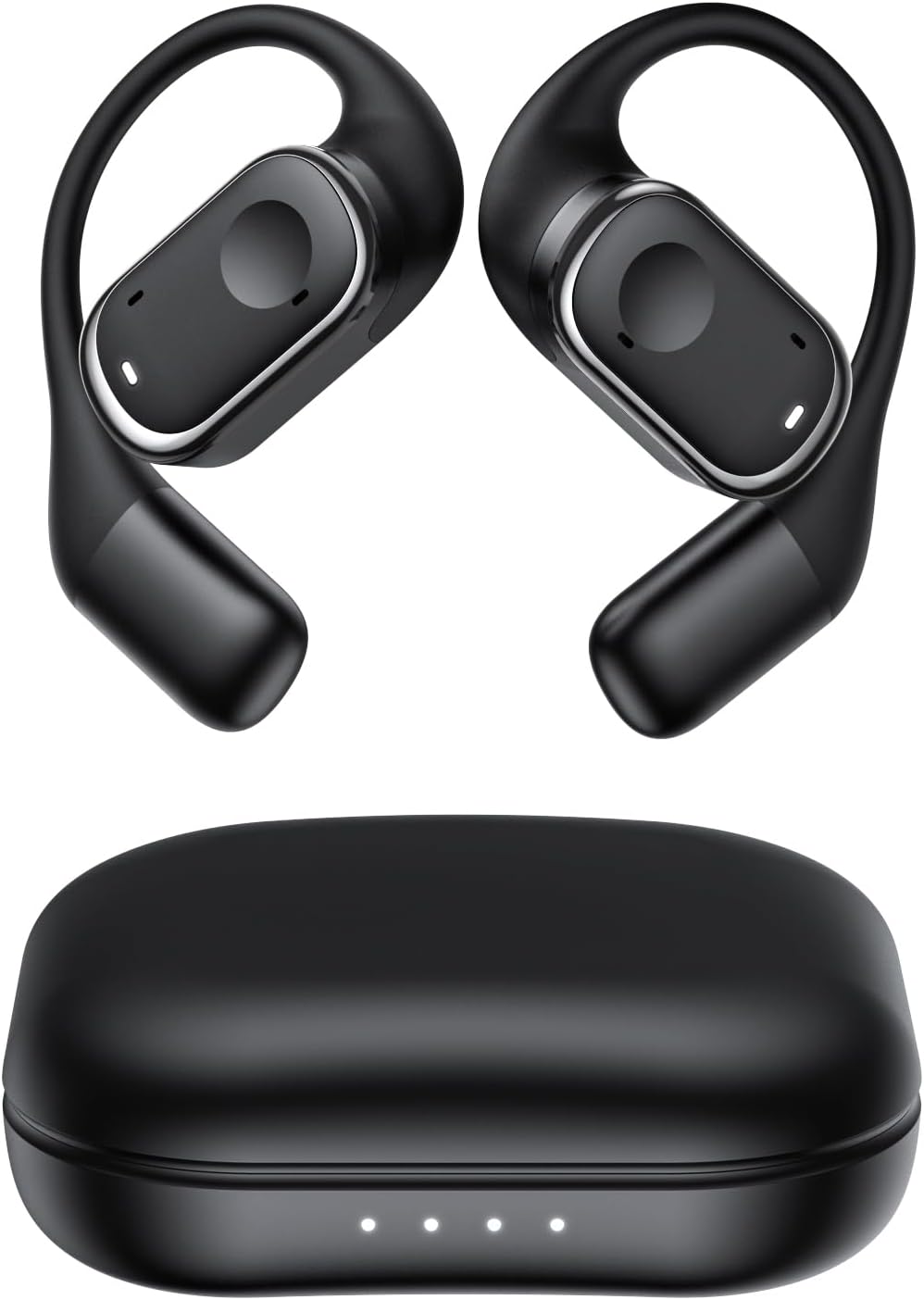
Figura 2.1: Micool Y30 Open Ear Headphones and their charging case. The image shows two black open-ear earbuds with ear hooks, positioned above a sleek black charging case with four LED indicator lights on the front.
3. Produto rematadoview
3.1 Compoñentes dos auriculares
Each earbud features an ergonomic design with a soft silicone ear hook for secure and comfortable placement. The main body houses the speaker and touch control area.

Figura 3.1: Primeiro plano view illustrating the ergonomic design of the Micool Y30 earbud. The image highlights the curved ear hook and the soft silicone material designed for comfort and secure fit, conforming to the ear's contour.
3.2 Estuche de carga
The charging case protects the earbuds and recharges them. It has a USB-C charging port and LED indicators to show battery status.

Figura 3.2: Interno view of the Micool Y30 charging case, showcasing the earbuds nestled inside. The image highlights the Bluetooth 5.3 technology and the digital display indicating battery levels, emphasizing fast response and stable connection.
4. Configuración
4.1 Carga do dispositivo
Antes do primeiro uso, carga completamente os auriculares e a caixa de carga.
- Carga do estuche: Connect the provided USB-C cable to the charging port on the case and to a USB power adapter (not included). The LED indicators on the case will show the charging status. A full charge takes approximately 1-2 hours.
- Cargando os auriculares: Place the earbuds into the charging case. Ensure they are correctly seated. The earbuds will automatically begin charging. The case can charge the earbuds 4-5 times, providing up to 6 hours of playback per single earbud charge.
4.2 Emparejamento Bluetooth
To connect your Micool Y30 headphones to your device:
- Asegúrate de que os auriculares estean cargados.
- Abre a caixa de carga. Os auriculares entrarán automaticamente no modo de emparellamento.
- No teu dispositivo (por exemplo, teléfono intelixente ou tableta), vai á configuración de Bluetooth e activa Bluetooth.
- Busca available devices. Select "Micool Y30" from the list.
- Unha vez conectados, escoitarás un ton de confirmación e os auriculares estarán listos para usar.
The headphones support Bluetooth 5.3 for stable and efficient connection.
5. Instrucións de funcionamento
5.1 Encendido/apagado
- Encendido: Abre o estuche de carga e os auriculares acenderanse automaticamente.
- Apagado: Volve colocar os auriculares na caixa de carga e pecha a tapa. Apagaranse automaticamente e comezarán a cargar.
5.2 Reprodución de música
The Micool Y30 headphones feature touch controls for media management.
- Reproducir/Pausa: Toca unha vez en calquera dos auriculares.
- Próxima pista: Toca dúas veces o auricular dereito.
- Pista anterior: Toca dúas veces o auricular esquerdo.
- Subir volume: Toca tres veces o auricular dereito.
- Baixar volume: Toca tres veces o auricular esquerdo.
5.3 Xestión de chamadas
- Responder/Finalizar chamada: Toca unha vez en calquera dos auriculares.
- Rexeitar a chamada: Mantén premido calquera dos auriculares durante 2 segundos.
5.4 Modo de auricular único e dual
The Micool Y30 headphones support seamless switching between using a single earbud or both earbuds.
- Modo auricular único: You can use either the left or right earbud independently. Simply take one earbud out of the case, and it will connect to your device.
- Modo de auriculares duplos: Take both earbuds out of the case, and they will automatically connect to each other and then to your device for a stereo audio experience.

Figura 5.1: Illustration of the Micool Y30's flexible usage modes. The diagram shows how the earbuds can be used independently in "Single Earphone Mode" or together in "Dual Headphone Mode" for a synchronized connection.
6. Mantemento
6.1 Limpeza
- Usa un pano suave, seco e sen fiapos para limpar os auriculares e a caixa de carga.
- Non use produtos químicos agresivos, disolventes de limpeza ou deterxentes fortes.
- The earbuds have an IPX6 waterproof rating, meaning they are resistant to strong jets of water. However, they are not designed for submersion. Wipe them dry after exposure to sweat or water.
6.2 Almacenamento
- Garda os auriculares no seu estuche de carga cando non estes en uso para protexelos e mantelos cargados.
- Avoid storing the device in extreme temperatures (hot or cold) or in highly humid environments.
7 Solución de problemas
| Problema | Solución |
|---|---|
| Os auriculares non se emparellan co dispositivo. |
|
| Sen son dun auricular. |
|
| Os auriculares non cargan. |
|
| Poor sound quality or connection drops. |
|
8. Especificacións
| Característica | Detalle |
|---|---|
| Nome do modelo | Y30 |
| Tecnoloxía de conectividade | Sen fíos (Bluetooth) |
| Versión Bluetooth | 5.3 |
| Colocación do oído | Orella aberta |
| Capacidade da batería dos auriculares | 100 mAh (cada un) |
| Capacidade da batería do estuche de carga | 450 mAh |
| Playback Time (single charge) | Ata 6 horas |
| Tempo total de reprodución (con estuche) | Up to 30 hours (4-5 full charges from case) |
| Tempo de carga (caso) | 1-2 horas |
| Porto de carga | USB tipo C |
| Clasificación impermeable | IPX6 |
| Material | Plástico |
| UPC | 776584469303 |
9. Garantía e soporte
Micool products are designed with quality and reliability in mind. For warranty information or technical support, please refer to the warranty card included in your product packaging or visit the official Micool websitio. Tamén podes contactar co teu vendedor para obter axuda.
Para obter máis axuda, visite o Micool Store on Amazon.
Ask a question about this manual
Ask about setup, troubleshooting, compatibility, parts, safety, or missing instructions. Manuals+ will review the question and use this page’s manual context to help answer it.