Introdución
Thank you for choosing the Serve Wireless Headphone KST-900 Black. This manual provides essential information for the safe and efficient operation of your new wireless headphones. Please read this manual thoroughly before use and retain it for future reference.
The Serve Wireless Headphone is designed for comfortable listening to music and making phone calls, featuring excellent tone quality and a humanized design for extended wear.
Información de seguridade
- Non expoñas os auriculares a temperaturas extremas, humidade nin substancias corrosivas.
- Evite deixar caer os auriculares nin someterlos a impactos fortes.
- Do not disassemble or modify the headphones. This may void the warranty and pose a safety risk.
- Limpa os auriculares cun pano suave e seco. Non empregues produtos de limpeza líquidos.
- Listen at moderate volume levels to prevent hearing damage. Prolonged exposure to loud sounds can cause irreversible hearing loss.
- Manter fóra do alcance dos nenos.
Contido do paquete
Comprobe o contido do paquete para asegurarse de que estean presentes todos os elementos:
- 1 x Serve Wireless Headphone KST-900 Black
- 1 cable de carga (USB)
- 1 x Audio Cable (3.5mm Jack)
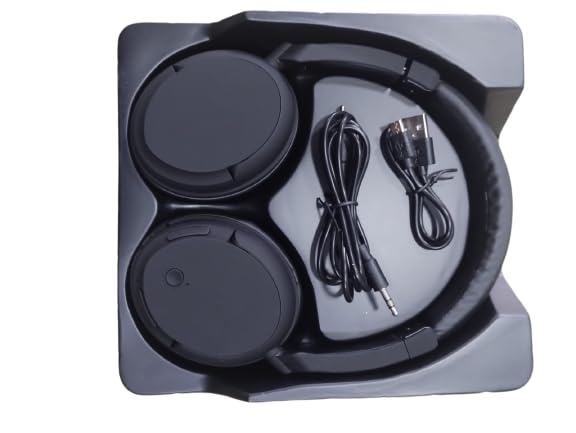
Image: The Serve Wireless Headphone KST-900 Black, along with its charging cable and 3.5mm audio cable, neatly arranged within its packaging tray.
Produto rematadoview
The Serve Wireless Headphone KST-900 features a comfortable over-ear design with soft earcups for extended listening. It includes integrated controls for easy operation and a built-in microphone for hands-free calls.

Imaxe: Un lado view of the Serve Wireless Headphone KST-900 Black, showcasing its foldable design and over-ear earcups.
Características principais:
- Soft & comfortable earcups for prolonged use.
- Superior Sound Quality for an immersive audio experience.
- Built-in microphone for hands-free call function.
- Long battery life: Up to 6 hours for music, 8 hours for calls.
- Excellent compatibility with Wireless 4.2 technology.
- Deseño plegable para unha fácil portabilidade.
Configuración
1. Carga dos auriculares
Antes do primeiro uso, carga completamente os auriculares. Unha carga completa tarda aproximadamente 1.5 horas.
- Connect the small end of the USB charging cable to the charging port on the headphone.
- Connect the other end of the USB charging cable to a USB power adapter (not included) or a computer's USB port.
- The LED indicator light will illuminate during charging and turn off or change color once fully charged.
2. Emparellamento Bluetooth
Pair your headphones with your device (smartphone, tablet, laptop) to enable wireless audio.
- Asegúrate de que os auriculares estean completamente cargados e apagados.
- Press and hold the Power/Multi-function button on the headphones until the LED indicator light flashes rapidly (usually blue and red alternately), indicating pairing mode.
- No teu dispositivo, vai á configuración de Bluetooth e asegúrate de que o Bluetooth estea activado.
- Busca available devices. You should see "KST-900" or "Serve Headphone" in the list.
- Select "KST-900" to connect. Once connected, the LED indicator light will typically flash slowly or turn solid blue.
- Se se lle solicita un contrasinal, introduza "0000".
Nota: Os auriculares tentarán reconectarse automaticamente co último dispositivo emparellado ao acenderse.
Instrucións de funcionamento
Encendido/apagado
- Encendido: Press and hold the Power/Multi-function button for approximately 3 seconds until the LED indicator lights up.
- Apagado: Press and hold the Power/Multi-function button for approximately 3-5 seconds until the LED indicator turns off.
Reprodución de música
- Reproducir/Pausa: Prema o botón de acendido/multifunción unha vez.
- Próxima pista: Manteña premido o botón para subir o volume (+).
- Pista anterior: Manteña premido o botón para baixar o volume (-).
- Subir volume: Prema brevemente o botón para subir volume (+).
- Baixar volume: Prema brevemente o botón para baixar o volume (-).
Función de chamada
- Responder chamada: Press the Power/Multi-function button once when an incoming call rings.
- Finalizar a chamada: Prema o botón de acendido/multifunción unha vez durante unha chamada.
- Rexeitar a chamada: Press and hold the Power/Multi-function button for approximately 2 seconds when an incoming call rings.
- Volver a marcar o último número: Prema dúas veces o botón de acendido/apagado/multifunción.
Modo con cable (cable de audio de 3.5 mm)
You can use the headphones with the included 3.5mm audio cable when the battery is low or for devices without Bluetooth connectivity.
- Plug one end of the 3.5mm audio cable into the audio input jack on the headphone.
- Plug the other end into the 3.5mm audio output jack of your device.
- In wired mode, the headphone's built-in controls may not function, and audio control will be managed by your connected device.
Mantemento
- Limpeza: Usa un pano suave, seco e sen fiapos para limpar os auriculares. Non empregues produtos de limpeza abrasivos, alcol nin disolventes químicos.
- Almacenamento: Cando non os uses, garda os auriculares nun lugar fresco e seco, lonxe da luz solar directa e de temperaturas extremas. O deseño pregable permite un almacenamento compacto.
- Coidado da batería: To prolong battery life, avoid fully discharging the battery frequently. Charge the headphones regularly, even if not in frequent use.
Resolución de problemas
| Problema | Causa posible | Solución |
|---|---|---|
| Os auriculares non se acenden. | A batería está baixa ou esgotada. | Cargue os auriculares completamente. |
| Non se pode emparellar co dispositivo. | Os auriculares non están en modo de emparellamento; Bluetooth desactivado no dispositivo; dispositivo demasiado lonxe. | Ensure headphones are in pairing mode (flashing red/blue). Turn on Bluetooth on your device. Move headphones closer to the device (within 10m). Forget previous pairings on your device and try again. |
| Sen son ou volume baixo. | Volume too low on headphones or device; headphones not connected; incorrect audio output selected. | Increase volume on both headphones and device. Ensure headphones are properly paired/connected. Check audio output settings on your device. Try using the 3.5mm audio cable. |
| Mala calidade de son. | Interferencia; dispositivo demasiado lonxe; batería baixa. | Move away from sources of interference (Wi-Fi routers, other Bluetooth devices). Move headphones closer to the device. Charge the headphones. |
| O micrófono non funciona. | Incorrect microphone input selected on device; software issue. | Check microphone input settings on your device. Restart your device. |
Especificacións
| Característica | Detalle |
|---|---|
| Nome do modelo | Wireless headphone KST-900 |
| Tecnoloxía de conectividade | Sen fíos (Bluetooth 4.2) |
| Protocolo sen fíos | A2DP, AVRCP, HFP, HSP |
| Distancia de comunicación | Ata 10 metros (33 pés) |
| Capacidade da batería | 150 mAh |
| Tempo de carga | Aprox. 1.5 horas |
| Tempo de reprodución de música | Ata 6 horas |
| Hora de chamada | Ata 8 horas |
| Material | Quality ABS Plastic |
| Formato de micrófono | Integrado |
| Factor de forma | Over-Ear, Foldable |
| Jack para auriculares | 3.5 mm Jack (for wired use) |
| Fabricante | in one smart technology (H.K) LTD |
Garantía e Soporte
Información da garantía
This Serve Wireless Headphone KST-900 Black comes with a 1 ano de garantía desde a data de compra. Esta garantía cobre defectos de fabricación nos materiais e na man de obra en condicións de uso normal.
A garantía non cobre:
- Damage caused by accident, abuse, misuse, liquid contact, fire, or other external causes.
- Damage caused by operating the product outside the guidelines published in this manual.
- Damage caused by service performed by anyone who is not an authorized representative of the manufacturer.
- Danos cosméticos, incluídos pero non limitados a arañazos, abolladuras e plástico roto nos portos.
Conserve o comprobante de compra para reclamacións de garantía.
Atención ao cliente
For technical support, warranty claims, or any inquiries regarding your Serve Wireless Headphone KST-900 Black, please contact your retailer or the manufacturer's customer service department. Refer to your purchase documentation for contact details.


