
IPRO IPRO P1
Manual do usuario do teléfono móbil IPRO P1 GSM 2G
Model: IPRO P1
Introdución
This manual provides comprehensive instructions for the IPRO P1 GSM 2G Mobile Phone. Designed for ease of use, particularly for seniors, this phone features large buttons, a clear display, and essential functions. Please read this manual carefully before using your device to ensure proper operation and maintenance.
O que hai na caixa
Ao desembalar, comproba que inclúa todos os seguintes elementos:
- 1 x IPRO P1 Mobile Phone
- 1 x Micro-USB Charger
- 1 x batería
- 1 x Manual de usuario
Configuración
1. Inserción da tarxeta SIM e da batería
- Retire con coidado a tapa traseira do teléfono.
- Insert your 2G GSM SIM card(s) into the designated SIM card slot(s). This phone supports Dual SIM.
- Insert the battery into the battery compartment, ensuring the gold contacts align with the phone's terminals.
- Volva colocar a tapa traseira ata que encaixe firmemente no seu lugar.
2. Cargando a batería
Antes do primeiro uso, carga completamente a batería do teléfono.
- Connect the Micro-USB charger cable to the charging port on the phone.
- Conecte o cargador a unha toma de corrente.
- The charging indicator on the phone will show the charging status. Once fully charged, disconnect the charger.

Figura 1: Fronte e traseiro view of the IPRO P1 mobile phone, showcasing its compact design and textured back cover.
Instrucións de funcionamento
1. Acendido/apagado
- To power on: Press and hold the Power/End Call button (usually red) until the screen lights up.
- To power off: Press and hold the Power/End Call button until the power off options appear, then select "Power off".
2. Facer chamadas
- Introduza o número de teléfono usando o teclado.
- Prema o botón Chamar (normalmente verde) para iniciar a chamada.
- Para finalizar unha chamada, prema o botón de acendido/finalizar chamada.
3. Sending SMS Messages
- Navega ata o menú "Mensaxes" desde a pantalla principal.
- Select "Write message" or "New SMS".
- Introduce a túa mensaxe usando o teclado numérico.
- Introduza o número de teléfono do destinatario ou seleccione un dos contactos.
- Selecciona "Enviar".
4. Using Key Features

Figura 2: The IPRO P1 phone with visual representations of its core functionalities, including communication, settings, multimedia, and utility features.
- Radio FM: Plug in headphones (not included) to use as an antenna, then navigate to the FM Radio application.
- Cámara: Access the camera application from the menu to take photos. The phone has a basic camera.
- Bluetooth: Enable Bluetooth in the settings menu to connect to compatible devices like headsets.
- Lanterna: The phone features a powerful LED flashlight. It can usually be activated by a dedicated button or a long press of a specific key (refer to quick guide or on-screen prompts).
- Espertador: Set alarms through the "Clock" or "Alarm" application.
- Calendar & Calculator: Basic utility applications are available in the menu.

Figura 3: The IPRO P1 phone demonstrating its powerful LED flashlight feature, illuminating a dark path.
Mantemento
- Limpeza: Usa un pano suave e seco para limpar a superficie do teléfono. Evita produtos de limpeza líquidos ou materiais abrasivos.
- Coidado da batería: Non expoñas a batería a temperaturas extremas. Se non vas usar o teléfono durante un período prolongado, cárgao periodicamente para manter a batería en bo estado.
- Almacenamento: Garda o teléfono nun lugar fresco e seco, lonxe da luz solar directa e da humidade.
- Evita gotas: While durable, avoid dropping the phone to prevent damage to internal components or the screen.
Resolución de problemas
| Problema | Causa posible | Solución |
|---|---|---|
| O teléfono non se acende | A batería está baixa ou non está inserida correctamente. | Cargue a batería. Asegúrese de que a batería estea inserida correctamente. |
| Non se poden facer nin recibir chamadas | No SIM card, SIM card not active, or out of network coverage. | Ensure SIM card is inserted and active. Check network signal strength. Contact your service provider. |
| Mala calidade das chamadas | Sinal de rede débil ou interferencias. | Move to an area with better signal. Avoid using near other electronic devices. |
| A batería esgotarase rapidamente | Frequent use, background applications, or old battery. | Reduce o brillo da pantalla. Pecha as aplicacións que non uses. Considera substituír a batería se é antiga. |
| A pantalla non responde | Fallo de software. | Retire e volva inserir a batería para reiniciar o teléfono. |
Especificacións
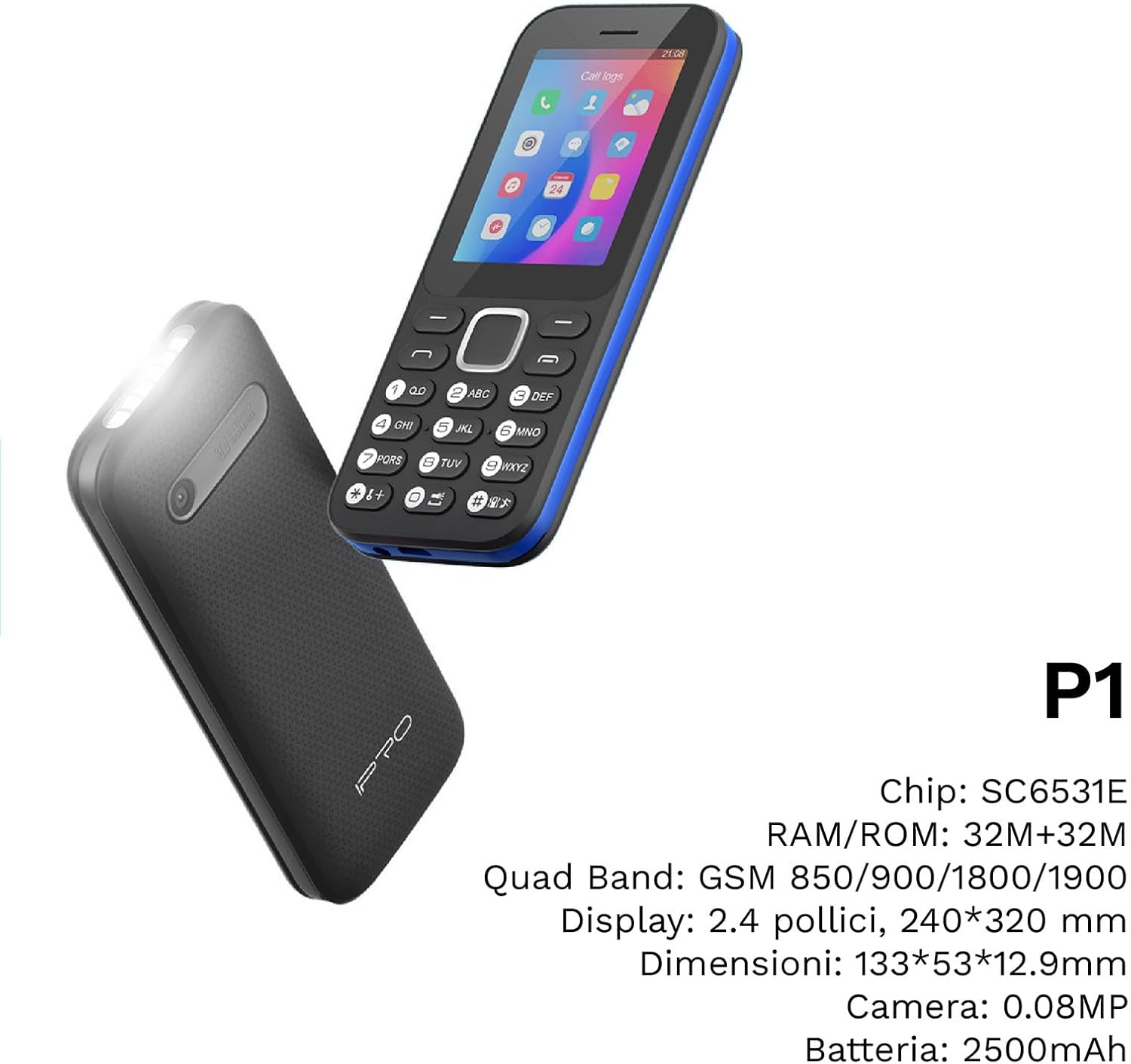
Figura 4: Un ángulo view of the IPRO P1 phone, accompanied by a summary of its technical specifications.
- Rede: 2G GSM Quad Band (850/900/1800/1900 MHz)
- Chipset: SC6531E
- Visualización: 2.4-inch Color Display (240 x 320 resolution)
- RAM: 4 MB
- ROM: 4 MB
- Memoria ampliable: Supports up to 16 GB (MicroSD card not included)
- SIM: Soporte dual SIM
- Conectividade: Bluetooth
- Características: Camera, FM Radio, MP3, MP4, Alarm Clock, Calendar, Calculator, Integrated Games, LED Flashlight
- Batería: 2500 mAh de iones de litio
- Idiomas: Spanish, English, French, Italian, Portuguese
- Cor: Negro
- Dimensións do produto: 133 x 53 x 12.9 mm
- Peso: Aproximadamente 200 gramos

Figura 5: A close-up of the IPRO P1's screen, illustrating its 2.4-inch display size for clear viewing.
Garantía e Soporte
IPRO offers technical service and customer support for two years from the date of purchase. This warranty covers manufacturing defects but does not include artificial damage.
For support, please contact IPRO customer service through the details provided on the product packaging or the official IPRO website. When contacting support, please have your product model number (IPRO P1) and purchase details ready.

Figura 6: A visual representation of the IPRO P1 phone's target audience, showing various seniors comfortably interacting with mobile devices, highlighting its user-friendly design.

Figura 7: Display of the IPRO P1 phone in two color variants: classic black and a version with a distinctive blue trim.
Documentos relacionadosIPRO P1


Ask a question about this manual
Ask about setup, troubleshooting, compatibility, parts, safety, or missing instructions. Manuals+ will review the question and use this page’s manual context to help answer it.