
1. Introdución
This manual provides comprehensive instructions for the setup, operation, maintenance, and troubleshooting of your Winnes Mini 4G GPS Tracker TK901. This compact, magnetic, and waterproof device is designed for real-time location tracking of vehicles, people, luggage, and other valuable assets using 4G LTE networks and GPS satellites.

Imaxe 1: The Winnes Mini 4G GPS Tracker TK901.
Características clave

Imaxe 2: Acabadoview of Winnes Mini 4G GPS Tracker TK901 features.
The TK901 offers a range of features including real-time tracking, historical route playback, geo-fencing, and various alerts. Its compact size and strong magnetic attachment make it versatile for different tracking needs.
Aplicacións versátiles

Imaxe 3: Examples of how the Winnes Mini 4G GPS Tracker TK901 can be used.
This tracker is suitable for a wide array of uses, from monitoring vehicles and valuable equipment to ensuring the safety of children, the elderly, and pets.
For visual guidance, please refer to the official user guide video below:
Vídeo 1: Winnes Mini 4G GPS Tracker TK901 User Guide. This video demonstrates unboxing, SIM card installation, SMS tracking, app usage, and APN settings.
2. Contido do paquete
Verifica que todos os elementos estean presentes no paquete:
- 1 x Winnes Mini 4G GPS Tracker TK901
- 1 x cable de carga USB
- 1 x Magnet (for attachment)
- 1 x Manual de usuario
- 1 x Screwdriver (for SIM card compartment)

Imaxe 4: Contents of the Winnes Mini 4G GPS Tracker TK901 package.
3. Configuración
3.1 SIM Card Requirements
The Winnes Mini 4G GPS Tracker TK901 requires a Nano SIM card (not included). Ensure the SIM card meets the following criteria:
- 4G LTE Network Compatibility: The SIM card must support 4G LTE for optimal performance.
- Internet Data: The SIM card must have an active data plan (minimum 50MB/month recommended).
- Call and SMS Functions: These functions are necessary for communication and configuration.
- PIN Code Disabled: The SIM card's PIN code must be disabled before insertion. You can typically do this by inserting the SIM into a mobile phone and disabling the PIN through the phone's settings.
- Voicemail Disabled: Ensure voicemail is turned off.
For instructions on disabling the SIM card PIN, refer to Vídeo 1 dende 0:24 a 0:52.
3.2 Inserción da tarxeta SIM
- Localice a ranura da tarxeta SIM no dispositivo.
- Carefully open the SIM card compartment using the provided screwdriver.
- Insert the Nano SIM card into the slot with the gold contacts facing down, ensuring correct orientation.
- Pecha o compartimento de forma segura.
Consulte Vídeo 1 dende 0:52 a 1:05 for a visual guide on inserting the SIM card.
3.3 Encendido/apagado
The device will automatically power on once the SIM card is correctly inserted and the battery is charged. To power off, you may need to remove the SIM card or use specific SMS commands if available (refer to the full user manual for advanced commands).
3.4 Estado da luz indicadora
The device features indicator lights to show its status. Understanding these lights is crucial for proper operation:
| Indicador de estado da luz | Significado |
|---|---|
| Yellow light - Solid | Conexión GPRS |
| Yellow light - Flash | Sen sinal GPRS |
| Blue light - Solid | Conexión GPS |
| Blue light - Flash | Sen sinal GPS |
| Red light - Solid | GPS working |
| Red light - Off | Suspensión/desactivación do GPS |
This table is also shown in Vídeo 1 at 1:03.
4. Funcionamento do dispositivo
4.1 Seguimento en tempo real
The Winnes Mini 4G GPS Tracker TK901 offers real-time tracking through SMS commands or a dedicated mobile application/web plataforma.
4.1.1 SMS Tracking
To get the device's location via SMS, send the command "G123456#" to the tracker's phone number. The tracker will reply with an SMS containing a Google Maps link to its current location. This method also provides battery status and device ID.

Imaxe 5: Real-time tracking interface on a mobile device.
Vexa Vídeo 1 dende 1:05 a 1:36 for a demonstration of SMS tracking.
4.1.2 App Download and Login
For a more interactive tracking experience, download the "WINNES GPS" app from your smartphone's app store (Google Play Store for Android, Apple App Store for iOS). Once installed, log in using the device ID (found in SMS replies) and the default password "123456".

Imaxe 6: Winnes GPS tracking app and web platform login.
The app can be downloaded from http://www.mytkstar.net/download.htm.
A visual guide for app download and login is available in Vídeo 1 dende 1:36 a 2:04.
4.1.3 Continuous Tracking
Within the app's real-time tracking interface, you can activate continuous tracking to receive updated location data at regular intervals. You can also switch between map views (e.g., satellite, street map) and view the distance to your device.
Consulte Vídeo 1 dende 2:04 a 2:49 for details on real-time tracking features.
4.2 Historical Route Playback
A aplicación permítelle view the device's historical routes for up to the last 6 months. Select the desired start and end times to review the movement history.
Vexa Vídeo 1 dende 2:49 a 3:09 for a demonstration of historical route playback.
4.3 Geo-fencing
Set up virtual boundaries (geo-fences) in the app. You will receive an alarm message when the device enters or exits these predefined areas. This feature is useful for monitoring specific zones like home or work.
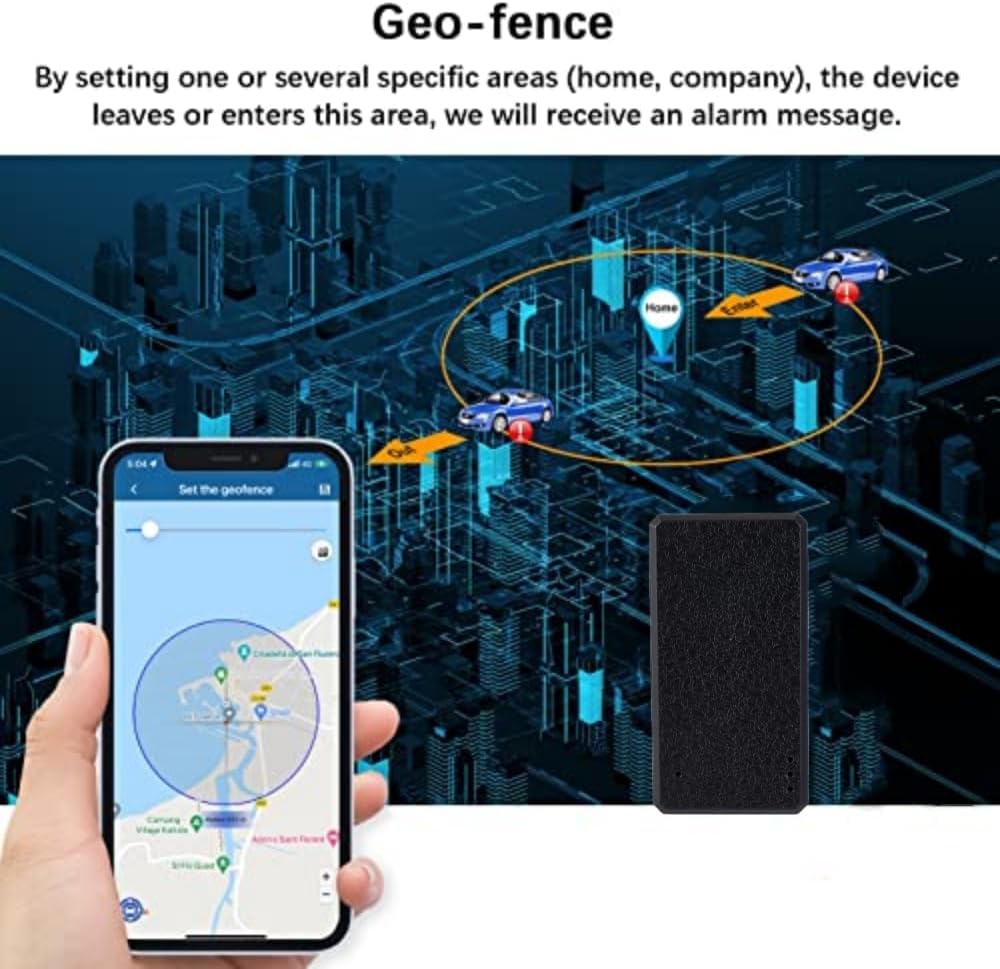
Imaxe 7: Setting up a geo-fence in the tracking application.
4.4 Alertas e notificacións
The device can send various alerts to your phone via the app. It is recommended to keep the default notification settings and enable all notifications for comprehensive monitoring.
- Alarma de vibración: Enable this to receive alerts when the device detects movement or vibration. After parking for 5 minutes, if the device senses vibration (e.g., car restart), an alarm is sent. Note: If the device is already in motion, it will detect vibration but no alarm will be sent.
- Alarma de batería baixa: Notifica cando o nivel da batería é baixo.
- Alarma de exceso de velocidade: Alerts you if the device exceeds a set speed limit.
- Alarma SOS: Triggered by pressing the SOS button (if available on the model).
- Moving Alarm: Alerts when the device starts moving after being stationary.
For enabling the Vibration Alarm, refer to Vídeo 1 dende 3:28 a 3:41. For general notification settings, see 4:15 a 4:24.
4.5 GPS Work Mode Settings
You can configure the GPS working mode to balance tracking frequency and battery consumption. Higher frequency provides more accurate historical routes but consumes battery faster.
- Modo en tempo real: Updates location frequently (e.g., every 30 seconds).
- Modo de aforro de enerxía: Updates less frequently (e.g., every hour).
- Modo de espera: Updates even less frequently (e.g., every 24 hours).
- Custom Upload Interval: Allows you to set a specific interval (e.g., 10-3600 seconds).
To set the GPS working mode, refer to Vídeo 1 dende 3:09 a 3:28.
5. Mantemento
5.1 Carga da batería
Use the provided USB cable to charge the device. Connect the cable to the tracker and a standard 5V-1A USB power adapter. A full charge typically provides 24-48 hours of active use or up to 200 hours in standby mode.
5.2 Coidados xerais
- Impermeable: The device is designed to be waterproof, but avoid prolonged submersion or exposure to high-pressure water jets.
- Accesorio magnético: The strong magnet allows for convenient installation on metal surfaces. Ensure the device is securely attached to prevent accidental detachment.

Imaxe 8: The strong magnetic feature of the tracker for easy attachment.
- Temperatura: Operate and store the device within recommended temperature ranges to ensure optimal battery life and performance.
- Limpeza: Limpe o dispositivo cun pano suave e seco. Evite o uso de produtos químicos agresivos ou materiais abrasivos.
6 Solución de problemas
6.1 Device Not Online / No Location Data
- Comproba a tarxeta SIM: Ensure the Nano SIM card is correctly inserted, has an active data plan, and its PIN code is disabled.
- Configuración de APN: The Access Point Name (APN) must be correctly configured for your SIM card's network provider.
- Search online for your SIM card provider's APN settings.
- Insert the SIM card into a mobile phone and find the APN settings in the phone's network settings.
- Cobertura da rede: Ensure the device is in an area with good 4G network coverage.
- Nivel de batería: A low battery can affect connectivity. Charge the device fully.
To find your SIM card's APN:
To set the APN via SMS, send the command: apn123456 [APN Name] (por exemplo, apn123456 mobile.vodafone.it for Vodafone Italy). Replace "123456" with your device's password if changed from default. After receiving an "apn ok" reply, remove and reinsert the SIM card to restart the device.
Consulte Vídeo 1 dende 4:24 a 4:53 for a visual guide on APN setting via SMS.
6.2 Inaccurate Location
- Sinal GPS: Asegúrate de que o dispositivo teña unha imaxe clara view of the sky for optimal GPS signal reception. Indoor or underground locations may result in LBS (Location Based Service) tracking, which is less precise.
- Modo de traballo: Check the GPS work mode settings in the app. Real-time mode provides the most frequent and accurate updates.
6.3 Duración curta da batería
- Frecuencia de seguimento: High tracking frequency (e.g., 30-second updates) consumes more battery. Adjust the GPS work mode to a longer interval (e.g., power saving or standby mode) to extend battery life.
- Sinal de rede: Poor network signal can cause the device to consume more power searching for a connection.
- Cargando: Asegúrese de que o dispositivo estea completamente cargado antes de usalo.
7. Especificacións
| Característica | Detalle |
|---|---|
| Modelo | 4G TK901 |
| Dimensións | 47 mm * 24 mm * 18 mm |
| Peso | 25 g |
| Cor | Negro |
| Rede | GSM / GPRS (4G LTE compatible) |
| Sensibilidade GPS | -159 dBm |
| Precisión GPS | 15 m |
| Vol. De entradatage | 5V-1A |
| Batería | 3.7 V 600 mAh Rechargeable Lithium Battery |
| Tempo de espera | Ata 200 horas |
| Tempo de traballo | 24-48 horas (dependendo do uso) |
| Tecnoloxía de conectividade | 4G |
| Aplicación compatible | GPS tracking App, Web plataforma de seguimento |
| Características especiais | Real-time tracking, Magnetic, Geo-fencing, Smart power saving, Location history, Anti-theft |
| Dispositivos compatibles | PC, Smartphone |
| Material | Plástico |
8. Garantía e soporte
The product comes with a standard warranty. Please refer to the purchase documentation for specific warranty terms and conditions.
For any questions or technical assistance during use, please contact Winnes customer support:
- WhatsApp: +8615200963282
- Online Platform: The tracking platform and app are free to use for life with your own SIM card.