
1. Introdución
This manual provides essential information for the installation, operation, and maintenance of your SYLVOX 43-inch Outdoor Signage TV (Model SS43A0KAGD). Please read this manual thoroughly before using the product to ensure proper function and safety. This television is designed for commercial outdoor use, offering high brightness and robust weather protection.
2. Información de seguridade
Observe as seguintes precaucións de seguridade para evitar danos ao produto e garantir a seguridade do usuario:
- Fonte de alimentación: Asegúrese de que a fonte de enerxía coincide co voltage requisitos especificados na etiqueta do produto.
- Auga e humidade: While the TV is IP55 waterproof, avoid direct high-pressure water jets. Ensure all port covers are securely closed when not in use.
- Ventilación: Do not block ventilation openings. Adequate airflow is necessary to prevent overheating.
- Montaxe: Use appropriate mounting hardware and follow VESA standards (400 x 200 mm) for secure installation. Professional installation is recommended for outdoor environments.
- Limpeza: Desconecte a corrente antes de limpar. Use un pano suave eamp pano. Evite produtos químicos agresivos.
- Temperatura: Operate the TV within the specified temperature range (-4°F to 113°F).
3. Contido do paquete
Verifica que todos os elementos estean presentes no paquete:
- SYLVOX 43-inch Outdoor Signage TV
- Mando a distancia (inclúe 2 pilas AAA)
- Cable de alimentación
- Manual de usuario
- Tarxeta de garantía
- Screws for mounting (BM8X14MM for full motion cantilever mount, BM8X28MM & Gasket for fixed wall mount)

Figure 3.1: Included accessories with the SYLVOX 43-inch Outdoor Signage TV.
4. Produto rematadoview
4.1 Características principais
- Visualización: 43-inch 4K UHD (3840x2160) LED display with 1000 nits brightness and 1.07 Billion Colors.
- Durabilidade: IP55 waterproof rating, corrosion-resistant and scratch-resistant metal casing. Designed for 7x24 hour operation with temperature protection.
- Sistema operativo: Linux-based system with pre-installed applications (Netflix, Pandora, Facebook, YouTube, Twitter). Note: Signage 1.0 series does not support downloading additional apps.
- Conectividade: Built-in ATSC & NTSC tuners, Bluetooth, 2.4G WiFi.
- Audio: Altofalantes incorporados.

Figure 4.1: SYLVOX 43-inch Outdoor Signage TV in a commercial setting, showcasing its bright 4K display.

Figure 4.2: The TV's IP55 waterproof and wide temperature range capabilities.

Figure 4.3: Visual representation of 4K UHD picture quality and color depth.

Figura 4.4: Máisview of the Linux system and integrated features.
4.2 Portos e conexións
The TV offers a variety of input and output ports for versatile connectivity:
- RS232
- USB Input x 2 (USB 1.0, USB 2.0, USB 3.0 compatible)
- RJ45 (Ethernet)
- HDMIx3
- Saída óptica
- Audio L/R In
- YPbPr In
- Antenna In (ATSC/NTSC Tuner)
- Saída de auriculares
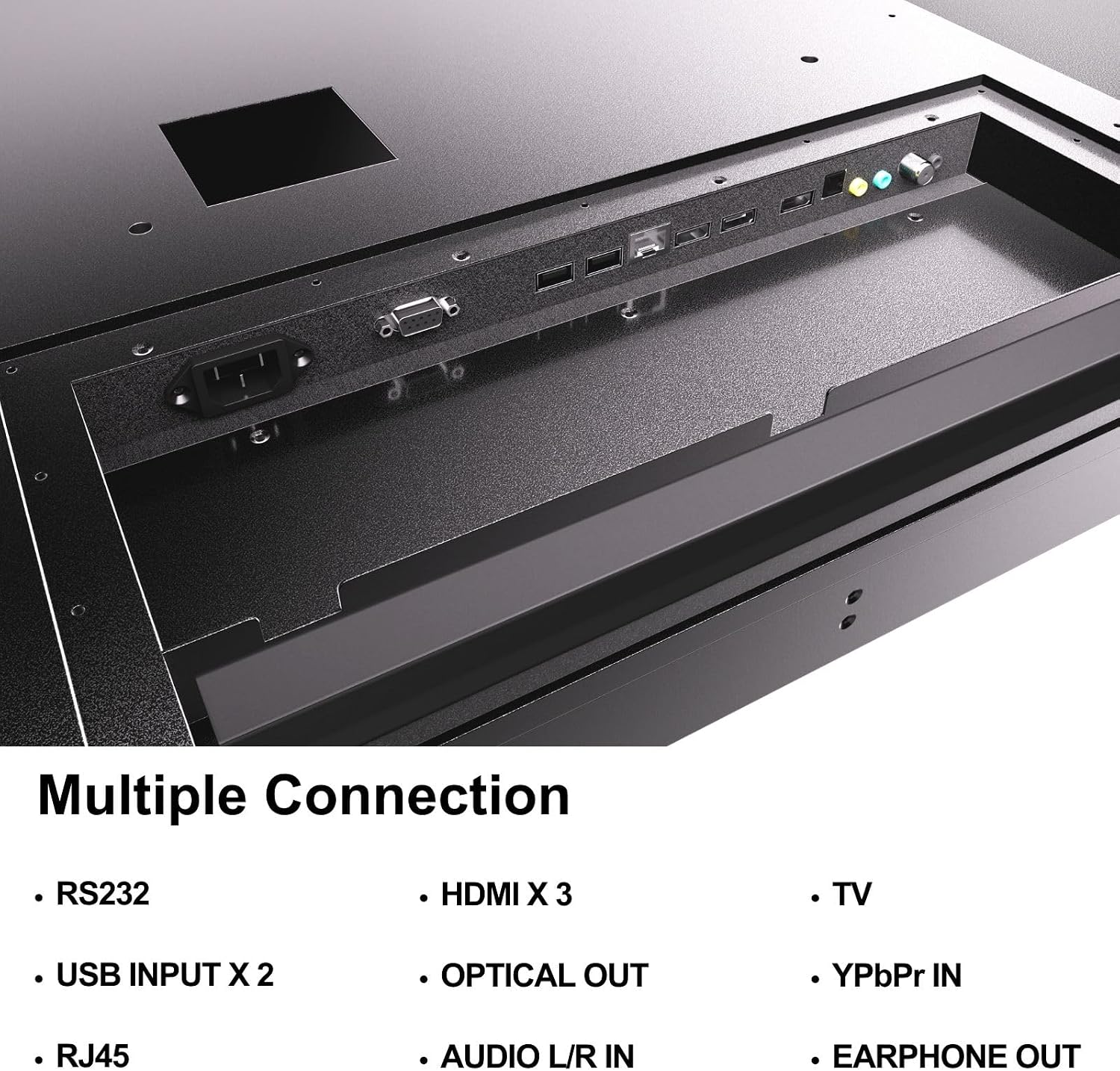
Figure 4.5: Rear panel connections of the SYLVOX Outdoor Signage TV.
5. Configuración
5.1 Montaxe do televisor
The SYLVOX Outdoor Signage TV supports wall mounting. Ensure the mounting surface is sturdy enough to support the TV's weight and is suitable for outdoor conditions.
- Escolle unha localización: Select a location that provides optimal viewing and protection from extreme weather, even with the TV's waterproof rating.
- Instalar soporte de parede: Attach a VESA-compatible wall mount (400 x 200 mm) to the desired location according to the mount manufacturer's instructions. Use the provided screws (BM8X14MM for full motion, BM8X28MM with gasket for fixed mount).
- Attach TV to Mount: Carefully lift the TV and secure it to the installed wall mount. Ensure all connections are tight and secure.
5.2 Encendido inicial
- Conectar enerxía: Plug the power cord into the TV's power input and then into a grounded outdoor-rated power outlet.
- Inserir pilas: Abra o compartimento das pilas do mando a distancia e insira as dúas pilas AAA, respectando a polaridade.
- Encendido: Prema o botón de acendido/apagado do mando a distancia ou do televisor.
- Asistente de configuración inicial: Follow the on-screen instructions to select language, time zone, and perform initial channel scanning.
5.3 Conexión de rede
To access smart TV features and streaming applications, connect the TV to your network.
- Conexión Wi-Fi: Navigate to the TV's settings menu, select 'Network', then 'Wi-Fi'. Choose your network from the list and enter the password.
- Conexión Ethernet: Connect an Ethernet cable from your router to the RJ45 port on the TV. The TV will automatically detect the wired connection.
- Bluetooth: For connecting audio devices, go to the Bluetooth settings, enable Bluetooth, and pair with your desired device.
6. Instrucións de funcionamento
6.1 Funcións básicas da televisión
- Potencia: Preme o Poder button on the remote to turn the TV on or off.
- Fonte de entrada: Preme o Entrada button to cycle through available input sources (HDMI 1/2/3, TV, YPbPr, USB).
- Volume: Usa o Volume +/- botóns para axustar o nivel do son.
- Canle: Usa o Canle +/- buttons to change channels when using the built-in tuner.
- Navegación: Usa as frechas direccionais e OK botón para navegar polos menús.
6.2 Características da Smart TV
The TV runs on a Linux operating system and comes with several pre-installed applications:
- Access the home screen to view and launch applications like Netflix, Pandora, Facebook, YouTube, and Twitter.
- Use the remote control's dedicated app buttons (if available) for quick access.
- Note that the Signage 1.0 series does not support downloading additional applications.
6.3 Screencasting (Android Only)
The TV supports screencasting from Android mobile phones:
- Ensure your Android device and the TV are connected to the same Wi-Fi network.
- On your Android phone, enable the screen mirroring or screencasting feature (names may vary by device, e.g., 'Smart View', 'Cast', 'Wireless Display').
- Select your SYLVOX TV from the list of available devices.
6.4 Vertical/Horizontal Display
The TV can be installed and operated in both horizontal (landscape) and vertical (portrait) orientations. When using the screen vertically, the display direction is adjusted by the input device or content source.
7. Mantemento
Proper maintenance ensures the longevity and performance of your outdoor TV:
- Limpeza da pantalla: Limpe a pantalla con suavidade cun pano suave e sen pelusa. Para marcas difíciles, d lixeiramenteampen the cloth with water. Do not spray cleaners directly onto the screen.
- Limpeza do Casing: Use un suave, damp cloth to clean the metal casing. Evitar produtos de limpeza ou solventes abrasivos.
- Cubertas de portos: Regularly check that all unused port covers are securely sealed to maintain the IP55 waterproof rating.
- Comprobacións ambientais: Periodically inspect the TV and mounting hardware for any signs of wear, corrosion, or damage, especially after severe weather conditions.
- Actualizacións de software: Check for available software updates through the TV's settings menu to ensure optimal performance and security.
8 Solución de problemas
If you encounter issues with your SYLVOX Outdoor Signage TV, refer to the following common problems and solutions:
| Problema | Causa posible | Solución |
|---|---|---|
| Sen poder | Power cord disconnected; no power from outlet; remote batteries dead. | Check power cord connection; test outlet; replace remote batteries. |
| Sen imaxe, pero hai son | Fonte de entrada incorrecta seleccionada; problema co dispositivo externo. | Press 'Input' button to select correct source; check external device connections. |
| Sen son, pero si imaxe | Volume muted or too low; external audio device issue. | Unmute volume or increase level; check audio cables for external devices. |
| Wi-Fi connection unstable or disconnected | Router issue; TV too far from router; incorrect password. | Restart router; move TV closer or use a Wi-Fi extender; re-enter Wi-Fi password. |
| O control remoto non funciona | Pilas gastadas ou inseridas incorrectamente; obstrución entre o mando a distancia e o televisor. | Replace batteries; ensure clear line of sight to TV's IR receiver. |
If the problem persists after trying these solutions, please contact SYLVOX customer support.
9. Especificacións
| Nome do modelo | SS43A0KAGD |
| Tamaño da pantalla | 43 polgadas |
| Tecnoloxía de visualización | LED |
| Resolución | 4K (3840x2160) |
| Taxa de actualización | 60 Hz |
| Maximum Display Brightness | 1000 nit |
| Relación de contraste | 3000:1 |
| Tempo de resposta | 8 milisegundos |
| Clasificación impermeable | IP55 |
| Sistema Operativo | Linux |
| Tecnoloxía de conectividade | Wireless (Bluetooth, Wi-Fi), Wired (HDMI, USB, RJ45, RS232) |
| Entrada de audio | HDMI, Optical, USB, Audio L/R In |
| Formato de sinal | ATSC, NTSC |
| Total Number of HDMI Ports | 3 |
| Total de portos USB | 2 |
| Dimensións do produto (P x A x A) | 3.4" D x 38.6" W x 22.4" H |
| Estándar de montaxe VESA | 400 x 200 mm |
| Wattage | 120 vatios-hora |
| Fabricante | Kontech Electronics Co., Ltd. |
| UPC | 810079224838 |
10. Garantía e soporte
10.1 Información da garantía
SYLVOX provides a 2 anos de garantía do fabricante para este produto. Esta garantía cobre defectos de materiais e fabricación en condicións de uso normal. Conserve o comprobante de compra para reclamacións de garantía.
10.2 Atención ao cliente
If you require assistance with installation, operation, troubleshooting, or warranty service, please contact SYLVOX customer support. We recommend checking the product upon receipt to ensure it is in good condition and functions normally.
For further support, please visit the official SYLVOX website or refer to the contact information provided on your warranty card.