
Introdución
This manual provides comprehensive instructions for the Dapper Supply DP-FM1303 13-inch Floor Buffer Polisher Machine. This multi-functional machine is designed for cleaning, buffing, scrubbing, and polishing various floor surfaces, including carpets. It features a high-torque random orbit motor, a 13-inch cleaning path, and a 350-Watt pure copper motor for consistent performance. An optional 1-gallon solution tank is included for wet cleaning applications.
Información de seguridade
Read all safety warnings and instructions before operating this machine. Failure to follow these instructions may result in electric shock, fire, or serious injury. Keep this manual for future reference.
- Always ensure the machine is unplugged before assembly, disassembly, or maintenance.
- Do not operate the machine in wet conditions or near flammable liquids or gases.
- Manteña as mans, os pés e a roupa solta lonxe das pezas móbiles.
- Empregue só accesorios e accesorios aprobados polo fabricante.
- Ensure the power cord is not damaged and avoid tripping hazards.
- The machine features an anti-collision buffer rubber ring on the nose edge to reduce impact during operation.
- Store the machine in a dry, secure location away from children.
Que está incluído
The Dapper Supply DP-FM1303 includes the following components:
- Floor Buffer Polisher Machine Unit
- Optional 1-Gallon Solution Tank
- Hard Brush for Hard Floors (Red)
- Soft Brush for Carpets (Yellow)
- Set of 3 Scouring Pads for Polishing (Light Abrasive, Medium Abrasive, Heavy Duty Abrasive)
- Ferramentas de montaxe (por exemplo, chave Allen)

Figura 1: Compoñentes incluídos
Especificacións
| Característica | Especificación |
|---|---|
| Número de modelo | DP-FM1303 |
| Camiño de limpeza | 13 polgadas |
| Potencia do motor | 350 Watts (Pure Copper High-Power Motor) |
| Potencia máxima | 500 vatios |
| Velocidade | 1440 RPM |
| Lonxitude do cordón | 43 pés |
| Voltage | 110 voltios (CA) |
| Peso do elemento | 21.68 kg (aprox. 47.8 lbs) |
| Dimensións do produto | 33.02 x 33.02 x 121.92 cm (13 x 13 x 48 polgadas) |
| Material | Aluminum (Main Bracket) |
| Compoñentes incluídos | Hard Brush, Soft Brush, 3 Scouring Pads |
Configuración
Follow these steps to assemble your Dapper Supply DP-FM1303 Floor Buffer Polisher Machine:
- Coloque o asa: Secure the handle to the main shaft using the provided screws and Allen wrench. Ensure it is firmly tightened.
- Conectar o cable de alimentación: Plug the power cable into the machine's motor unit. Secure the cable along the handle using the provided clips.
- Install Solution Tank (Optional): If using the solution tank, attach it to the handle bracket and secure it. Connect the solution hose from the tank to the machine's dispensing port.
- Attach Brush or Pad: Tilt the machine back to access the base. Align the desired brush (hard or soft) or scouring pad onto the velcro base. Ensure it is centered and securely attached.
Video 1: Multi-Surface Floor Buffer/Scrubber Installation Guide. This video demonstrates the assembly process, including attaching the handle, connecting the power cable, installing the solution tank, and attaching different brushes.
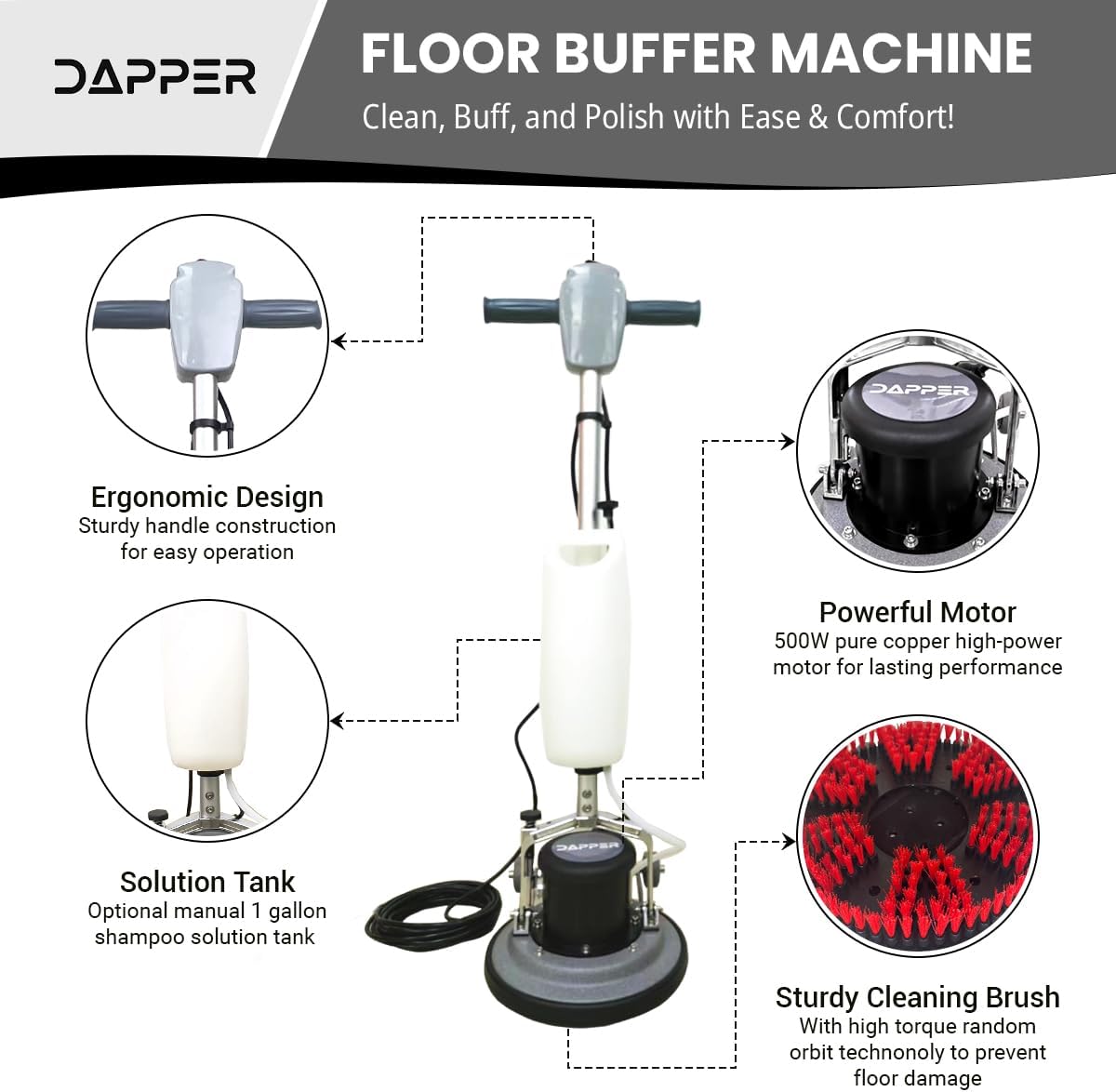
Figure 2: Key Components and Assembly Points
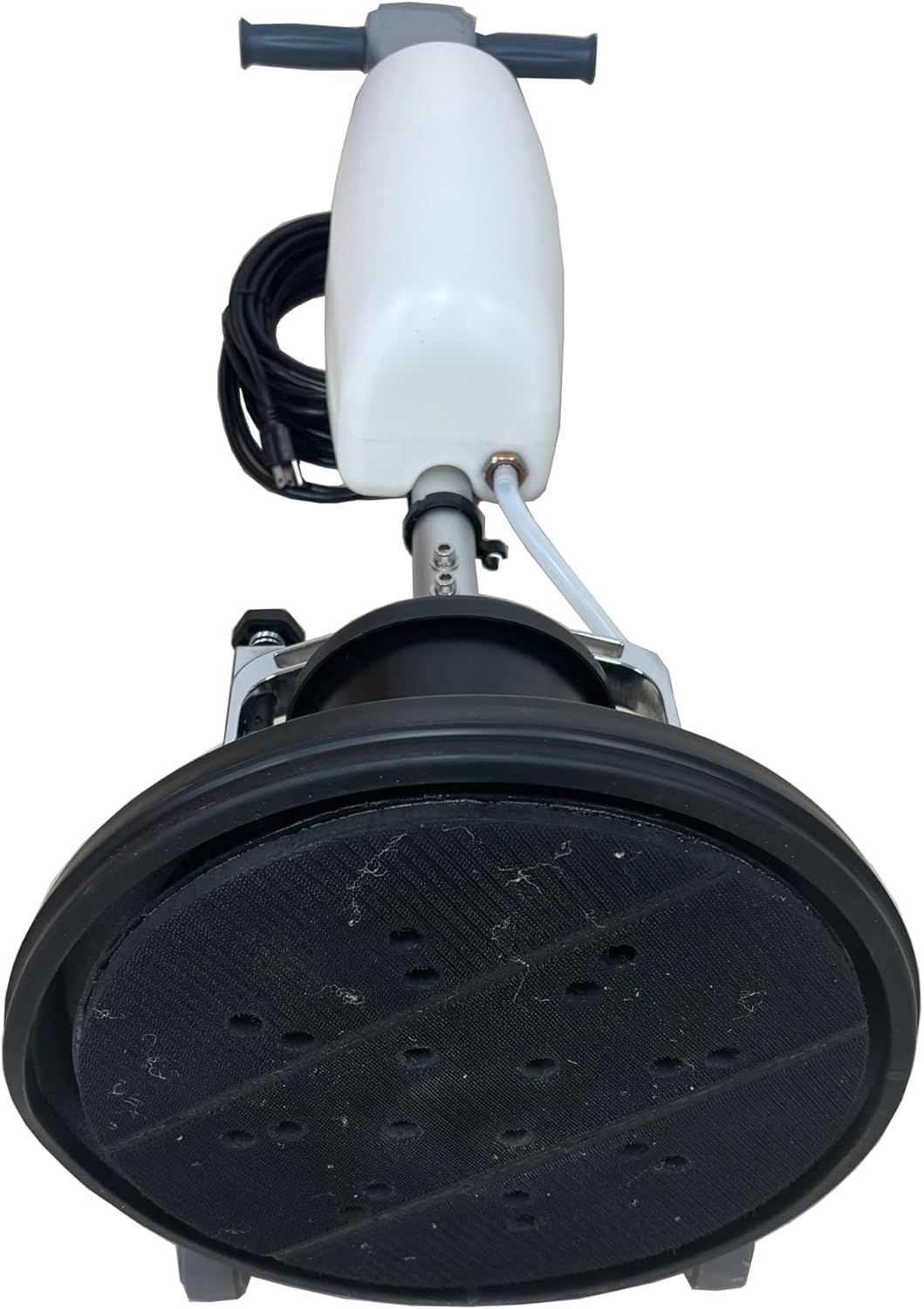
Figure 3: Brush/Pad Attachment Mechanism
Instrucións de funcionamento
The DP-FM1303 is designed for versatile floor care. Always ensure the correct brush or pad is installed for your specific floor type and task.
Funcionamento xeral:
- Preparar a zona: Clear the floor of any loose debris or obstacles.
- Seleccione o anexo: Choose the appropriate brush or pad for your task (e.g., hard brush for concrete, soft brush for carpet, scouring pads for polishing).
- Fill Solution Tank (if applicable): For wet cleaning or scrubbing, fill the optional 1-gallon solution tank with the appropriate cleaning solution.
- Conectar: Connect the 43-foot power cord to a suitable electrical outlet (110V AC).
- Arrancar a máquina: Press the power switch located on the handle to turn on the machine. The machine's counterweighted head provides pressure for effective cleaning.
- Guide the Machine: Gently guide the machine across the floor. The random orbit motor and bidirectional cleaning action help prevent gouges and swirls.
- Dispensar a solución: If using the solution tank, adjust the flow valve to dispense the cleaning solution as needed.
- Remate: Once the task is complete, turn off the machine, unplug it, and clean the attachments.
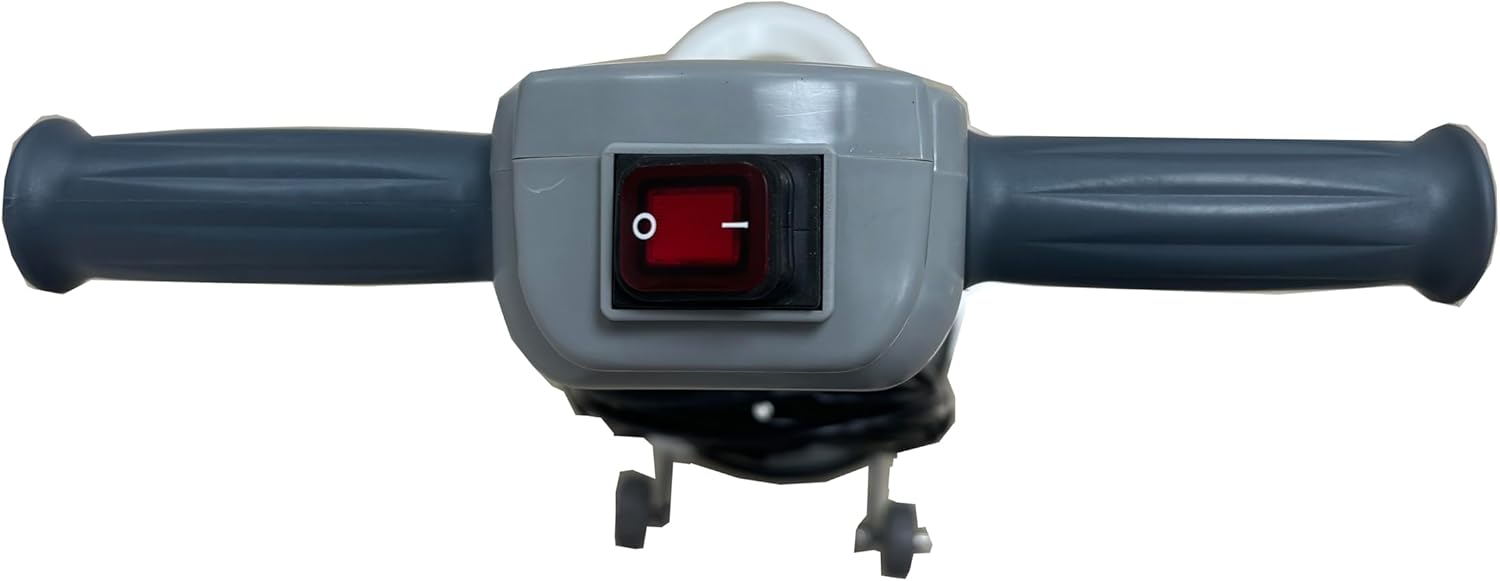
Figure 4: Power Switch on Handle
Aplicacións:
- Fregado: Use the hard brush for concrete, tile, and other hard surfaces. The soft brush is suitable for carpets.
- Buffing & Polishing: Use the appropriate scouring pads for buffing and polishing hardwood, vinyl, marble, and travertine floors.
- Limpeza de alfombras: The soft brush and solution tank can be used for shampooing and deep cleaning carpets.

Figure 5: Machine in use on various floor types
Mantemento
Regular maintenance ensures the longevity and optimal performance of your DP-FM1303 machine.
- Limpar despois de cada uso: After each use, remove the brush or pad and rinse it thoroughly. Clean the machine's base and exterior with a damp pano.
- Empty Solution Tank: If the solution tank was used, empty any remaining solution and rinse the tank and hose with clean water to prevent clogging.
- Inspeccionar o cable de alimentación: Regularly check the 43-foot power cord for any signs of damage, fraying, or cuts. Replace if damaged.
- Almacenar correctamente: Store the machine in a dry, clean environment. The sturdy tires allow for effortless moving and storage.
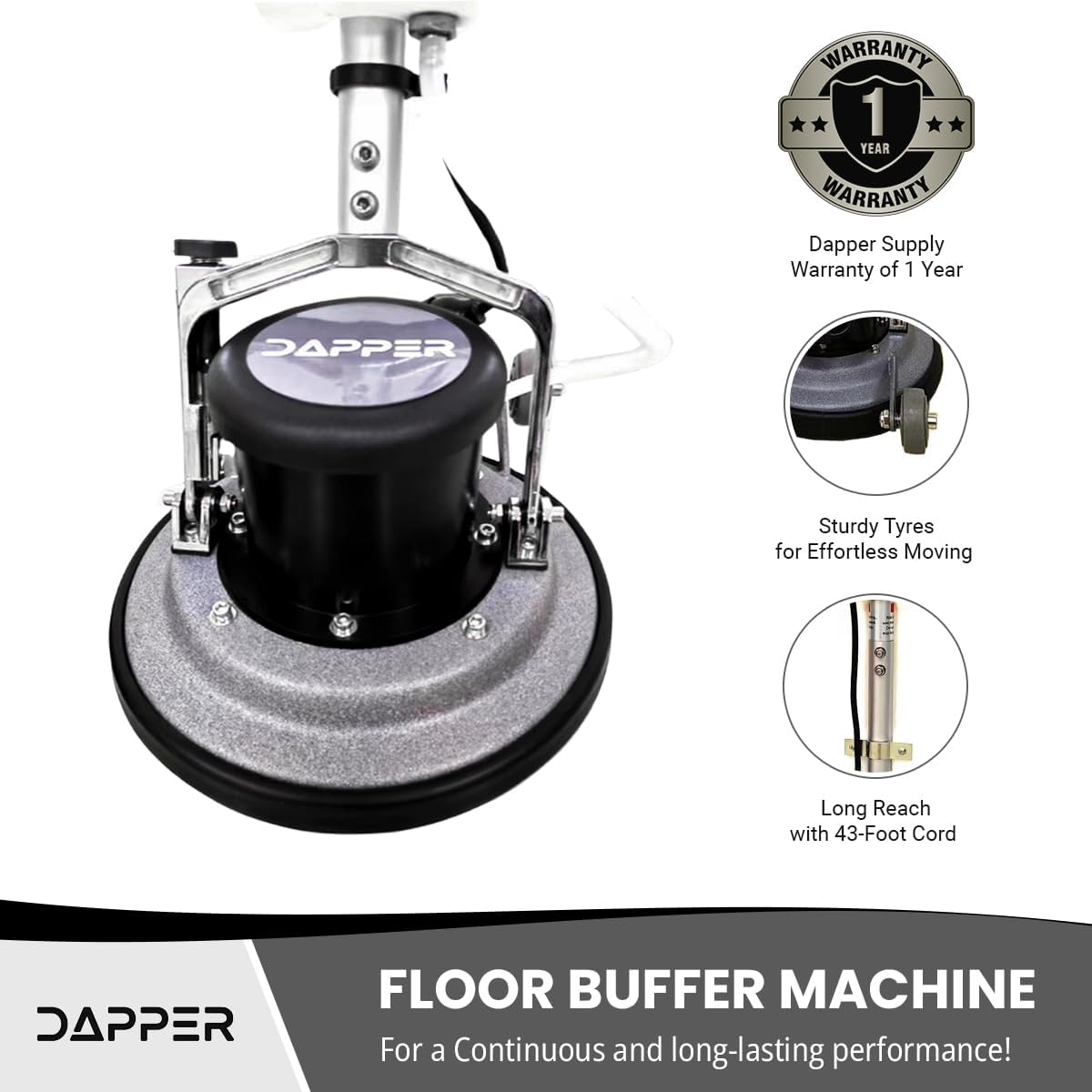
Figure 6: Machine with Sturdy Tires and Long Cord
Resolución de problemas
If you encounter issues with your DP-FM1303 machine, refer to the following common troubleshooting steps:
- A máquina non arranca:
- Asegúrese de que o cable de alimentación estea ben conectado a unha toma de corrente que funcione.
- Check the power switch on the handle to ensure it is in the 'ON' position.
- Inspeccione o cable de alimentación en busca de danos visibles.
- Mal rendemento de limpeza:
- Verify that the correct brush or pad is installed for the floor type and task.
- Check if the brush or pad is worn out and needs replacement.
- Ensure the solution tank (if used) contains sufficient cleaning solution and the flow valve is open.
- Machine Vibrates Excessively:
- Ensure the brush or pad is properly centered and securely attached to the base.
- Check for any foreign objects caught in the brush or motor area.
If problems persist after attempting these steps, contact Dapper Supply customer support.
Garantía e Soporte
The Dapper Supply DP-FM1303 Floor Buffer Polisher Machine comes with a 1 anos de garantía do fabricante. This warranty covers manufacturing defects and malfunctions under normal use.
For warranty claims, technical assistance, or any questions regarding your product, please contact Dapper Supply customer support through their official channels. Keep your purchase receipt as proof of purchase for warranty validation.
Figure 7: 1-Year Manufacturer Warranty