
Introdución
Welcome to the iRobot Roomba i1 (1152) Robot Vacuum user manual. This guide provides essential information for setting up, operating, maintaining, and troubleshooting your robot vacuum. The Roomba i1 is designed to efficiently clean hard floors and carpets, utilizing Wi-Fi connected mapping technology to navigate your home.
Información importante de seguridade
Before using your Roomba i1 robot vacuum, please read all safety instructions carefully. Failure to follow these instructions may result in electric shock, fire, or serious injury.
- Este aparello pode ser usado por nenos a partir de 8 anos e persoas con capacidades físicas, sensoriais ou mentais reducidas ou con falta de experiencia e coñecementos se recibiron supervisión ou instrucións sobre o uso do aparello de forma segura e comprenden os perigos que implica. .
- Os nenos non deben xogar co aparello. A limpeza e o mantemento non deben ser realizados por nenos sen supervisión.
- Use só como se describe neste manual.
- Non use ao aire libre nin en superficies húmidas.
- Non permita que se use como xoguete. É necesario prestar moita atención cando o usen ou preto dos nenos.
- Non o empregue cun cable ou enchufe danados. Se o aparello non funciona como debería, se deixou caer, se danou, se deixou no exterior ou caeu na auga, devólvao a un centro de servizo.
- Non tire ou transporte co cable, non use o cable como asa, non peche unha porta sobre o cable nin tire do cable por bordos ou esquinas afiadas. Non pase o aparello sobre o cable. Manteña o cable lonxe de superficies quentes.
- Non desconecte tirando do cable. Para desenchufar, agarre o enchufe, non o cable.
- Non manipule o enchufe ou o aparello coas mans molladas.
- Non coloque ningún obxecto nas aberturas. Non use con ningunha abertura bloqueada; manteña libre de po, pelusa, cabelos e calquera cousa que poida reducir o fluxo de aire.
- Manteña o cabelo, a roupa solta, os dedos e todas as partes do corpo lonxe das aberturas e das partes móbiles.
- Non coller nada que arde ou fume, como cigarros, mistos ou cinzas quentes.
- Non o use para recoller líquidos inflamables ou combustibles, como a gasolina, nin o use en áreas onde poidan estar presentes.
- Non use sen bolsa de po e/ou filtros colocados.
- Evitar o arranque involuntario. Asegúrese de que o interruptor estea na posición de apagado antes de conectar a batería, coller ou transportar o aparello.
- Recarga só co cargador especificado polo fabricante. Un cargador axeitado para un tipo de batería pode xerar un risco de incendio cando se usa con outro paquete de batería.
- Use aparellos só con baterías especificamente designadas. O uso de calquera outro paquete de batería pode xerar un risco de lesións e incendios.
- Cando a batería non estea en uso, mantéñaa lonxe doutros obxectos metálicos, como clips de papel, moedas, chaves, cravos, parafusos ou outros pequenos obxectos metálicos que poidan conectarse dun terminal a outro. O curtocircuito entre os terminais da batería pode provocar queimaduras ou un incendio.
- En condicións abusivas, pódese expulsar líquido da batería; evitar o contacto. Se o contacto ocorre accidentalmente, lave con auga. Se o líquido entra en contacto cos ollos, tamén busque axuda médica. O líquido expulsado da batería pode causar irritación ou queimaduras.
- Non use unha batería ou aparello que estea danado ou modificado. As baterías danadas ou modificadas poden presentar un comportamento imprevisible que provoca incendio, explosión ou risco de lesións.
- Non expoña a batería ou o aparello ao lume ou a unha temperatura excesiva. A exposición ao lume ou a unha temperatura superior a 130 ° C (265 ° F) pode causar explosión.
- Siga todas as instrucións de carga e non cargue a batería ou o aparello fóra do intervalo de temperatura especificado nas instrucións. A carga inadecuada ou a temperaturas fóra do rango especificado pode danar a batería e aumentar o risco de incendio.
- Encargue o servizo a unha persoa de reparación cualificada que utilice só pezas de substitución idénticas. Isto garantirá que se manteña a seguridade do produto.
- Non modifique nin intente reparar o aparello ou a batería (según corresponda) agás o que se indique nas instrucións de uso e coidado.
Contido do paquete
Verify that all original components are included in your package:
- iRobot Roomba i1 Robot Vacuum
- Estación de carga base doméstica
- Cordón de liña
- 1 Lithium Ion Battery (pre-installed)
- Cepillo lateral
- Filter (Cloth Type)
- Cepillos de goma multisuperficie duplos
Configuración
Follow these steps to set up your Roomba i1 robot vacuum for first use:
- Escolla unha localización para a base de operacións: Place the Home Base charging station against a wall in an open, uncluttered area. Ensure there is at least 1.5 feet (0.5 meters) of clear space on each side of the Home Base and 4 feet (1.2 meters) in front of it.
- Conecte o cable de alimentación: Plug the line cord into the Home Base and then into a wall outlet. Ensure the Home Base is powered on.
- Carga o robot: Place your Roomba i1 onto the Home Base. The robot will emit a tone to confirm it is properly docked and charging. Allow the robot to charge for at least 3 hours before its first cleaning mission. The light ring around the CLEAN button will pulse white while charging and turn solid white when fully charged.
- Descarga a aplicación iRobot Home: For full functionality, download the iRobot Home App on your smartphone or tablet. The app will guide you through connecting your robot to your Wi-Fi network and setting up cleaning schedules.
- Conectar a wifi: Follow the in-app instructions to connect your Roomba i1 to your home Wi-Fi network. This enables smart features like mapping, scheduling, and integration with voice assistants.

Operating Your Roomba i1
Your Roomba i1 is designed for intelligent and efficient cleaning. Here's how to operate it:
Comezar un traballo de limpeza
- Using the CLEAN Button: Press the large CLEAN button on top of the robot once to wake it up, then press it again to start a cleaning cycle.
- Usando a aplicación iRobot Home: Open the app and tap the "CLEAN" button to start a cleaning job from anywhere. You can also schedule cleaning times and customize cleaning preferences through the app.
- Control de voz: The Roomba i1 is compatible with Google Home. Once connected via the iRobot Home App, you can use voice commands like "Hey Google, ask Roomba to start cleaning."
Características de limpeza
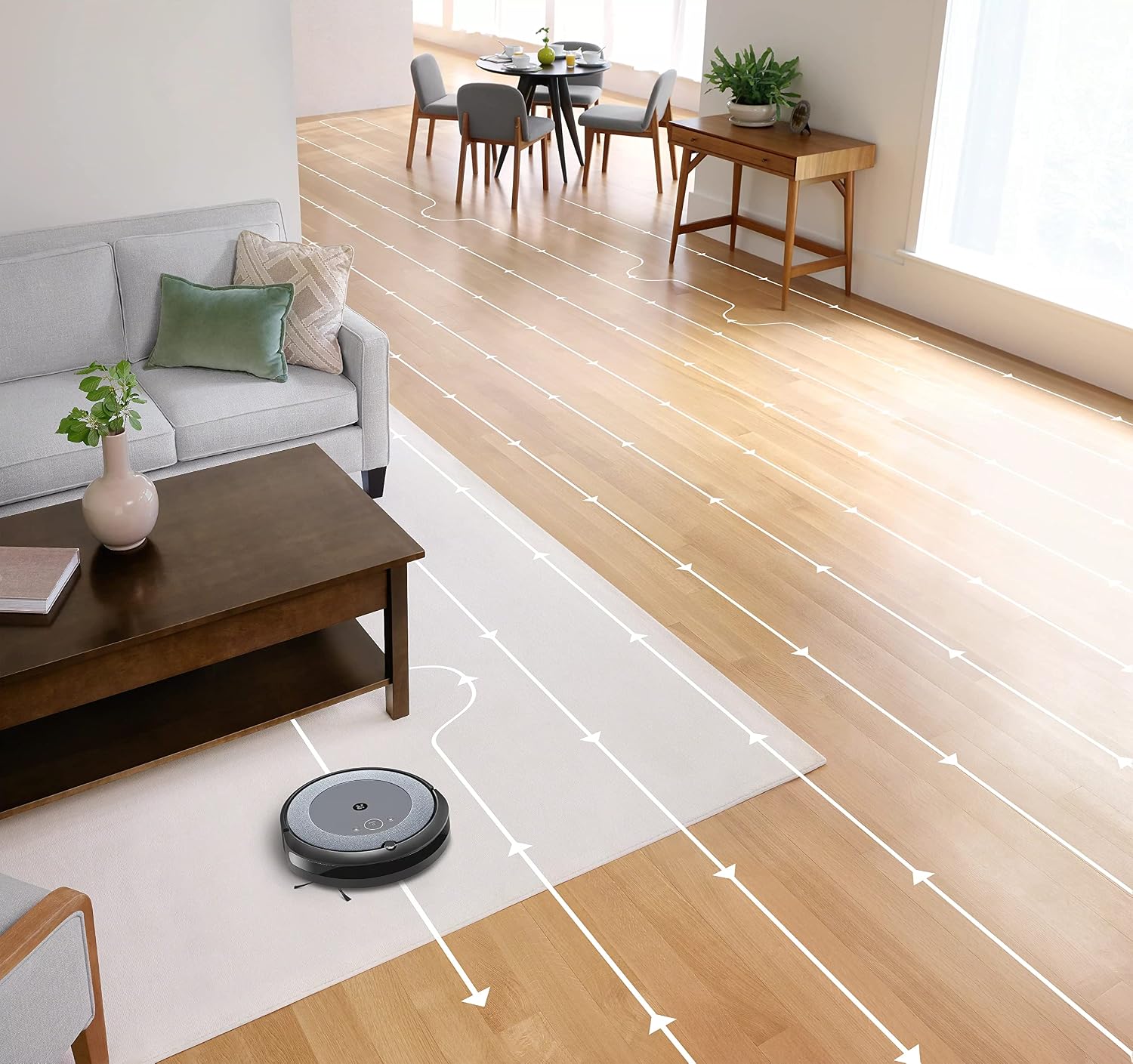
- Navegación intelixente: The robot cleans in neat, efficient rows, adapting to different floor types including carpets and hard floors.
- Dual Multi-Surface Rubber Brushes: These brushes are designed to prevent tangles with pet hair and effectively pick up dirt and debris from various surfaces.
- Dirt Detect™ Technology: The robot uses acoustic and optical sensors to find dirtier areas and spends more time cleaning them.
- Automatic Dirt Disposal (with compatible Clean Base): If you have a compatible Clean Base (sold separately), the robot will automatically empty its dustbin into an enclosed bag, allowing for weeks of hands-free cleaning.


Mantemento
Regular maintenance ensures your Roomba i1 operates at peak performance. Always turn off the robot and disconnect it from the Home Base before performing any maintenance.
Baleirando a papeleira
- Prema o botón de liberación do colector e tire do colector cara a fóra.
- Abre a porta do colector e baleira os residuos nun colector de lixo.
- Golpea o colector contra o colector de lixo para desaloxar os residuos atrapados.
Cleaning the Filter (Cloth Type)
- Retire o filtro do colector de po.
- Golpea o filtro contra un colector de lixo para eliminar os residuos. Non laves o filtro.
- Replace the filter every 2 months, or more frequently if you have pets.
Limpeza dos cepillos
- Pinch the yellow brush release tabs to lift the brush frame.
- Remove the brushes and remove any hair or debris wrapped around them or trapped beneath the yellow caps.
- Reinstall the brushes, ensuring they click into place.
Limpeza do cepillo lateral
- Use a coin or small screwdriver to remove the screw holding the side brush.
- Remove the side brush and clean any hair or debris from the brush and its post.
- Volva instalar o cepillo lateral e aperte o parafuso.
Limpeza dos sensores e contactos de carga
- Wipe the charging contacts on the robot and Home Base with a clean, dry cloth.
- Wipe the cliff sensors (located on the bottom of the robot) and the front bumper sensor window with a clean, dry cloth.
Resolución de problemas
If your Roomba i1 encounters an issue, the robot will play an audible alert and the light ring around the CLEAN button will flash. Consult the iRobot Home App for specific error messages and solutions.
Problemas comúns e solucións:
- O robot non carga: Ensure the Home Base is plugged in and the robot is properly docked. Clean the charging contacts on both the robot and Home Base.
- Robot stuck or trapped: Clear obstacles from the robot's path. If it frequently gets stuck in the same area, consider using Virtual Wall Barriers (sold separately) or adjusting furniture.
- Baixo rendemento de limpeza: Empty the dust bin, clean or replace the filter, and clean the main brushes and side brush. Ensure the robot's sensors are clean.
- O robot non se conecta á wifi: Ensure your Wi-Fi router is on and within range. Restart your router and the robot. Follow the Wi-Fi setup instructions in the iRobot Home App again.
- Robot facendo ruídos estraños: Check the brushes and wheels for any trapped debris or hair. Clean them thoroughly.
For more detailed troubleshooting, refer to the iRobot Home App or the iRobot support websitio.
Especificacións
| Marca | iRobot |
| Nome do modelo | Roomba i1 (1152) |
| Característica especial | Smart, Wi-Fi Connected Mapping |
| Cor | Negro/Gris |
| Compoñentes incluídos | Robot Vacuum, Home Base, Line Cord, Battery, Side Brush, Filter, Dual Multi-Surface Rubber Brushes |
| Tipo de filtro | Pano |
| Fonte de enerxía | Alimentado por batería |
| Baterías | 1 batería de iones de litio (incluída) |
| Método de control | Aplicación |
| Dispositivos compatibles | Google Home |
| Factor de forma | Robótica |
| Dimensións do produto | 13.5 x 3.6 x 13.4 polgadas |
| Peso do elemento | 13.2 libras |
| Recomendación de superficie | Alfombras, pisos duros |
| UPC | 657768820809 |
| ASIN | B0CPQ3RVDK |
Garantía e Soporte
This product is sold as a renewed item. Please refer to the specific warranty terms provided by the seller or Amazon Renewed at the time of purchase. For technical support, troubleshooting assistance, or to purchase replacement parts, please visit the official iRobot support website or contact iRobot customer service. You can also find helpful resources within the iRobot Home App.
Soporte en liña: www.irobot.com/support