
1. Introdución
The Vivolink USB-C 4K KVM Extender (Model W126974534) is designed to extend USB-C signals, including 4K video, USB data (for keyboard, mouse, and other peripherals), and control signals, over long distances using HDBaseT 3.0 technology. This system consists of a Transmitter (TX) unit and a Receiver (RX) unit, connected by a single Cat6a/7 Ethernet cable. It enables users to operate a computer or other USB-C source device from a remote location with a display, keyboard, and mouse, maintaining high-quality 4K resolution.
2. Información de seguridade
- Lea atentamente todas as instrucións antes de utilizar o dispositivo.
- Do not expose this unit to rain, moisture, or excessive humidity.
- Garantir unha ventilación adecuada para evitar o sobrequecemento. Non bloquee as aberturas de ventilación.
- Use only the power adapters provided with the unit.
- Non intente abrir nin modificar a unidade. Encargue calquera mantemento a persoal cualificado.
- Manteña o dispositivo lonxe de campos electromagnéticos fortes.
- Desconecte a corrente durante as tormentas eléctricas ou cando non se use durante períodos prolongados.
3. Contido do paquete
Please check the package contents carefully. If any items are missing or damaged, contact your dealer immediately.
- 1x Vivolink USB-C 4K KVM Extender Transmitter (TX) Unit
- 1x Vivolink USB-C 4K KVM Extender Receiver (RX) Unit
- 2 adaptadores de corrente (12 V CC)
- 1 cable USB-C a USB-C
- 1 x Manual de usuario
- Mounting accessories (if included)
4. Produto rematadoview
The Vivolink USB-C 4K KVM Extender leverages HDBaseT 3.0 technology to provide uncompressed 4K video, audio, USB 2.0, and control signals over a single Cat6a/7 cable up to 100 meters. This solution is ideal for applications requiring remote access to a USB-C enabled computer, such as control rooms, medical imaging, digital signage, and educational facilities.
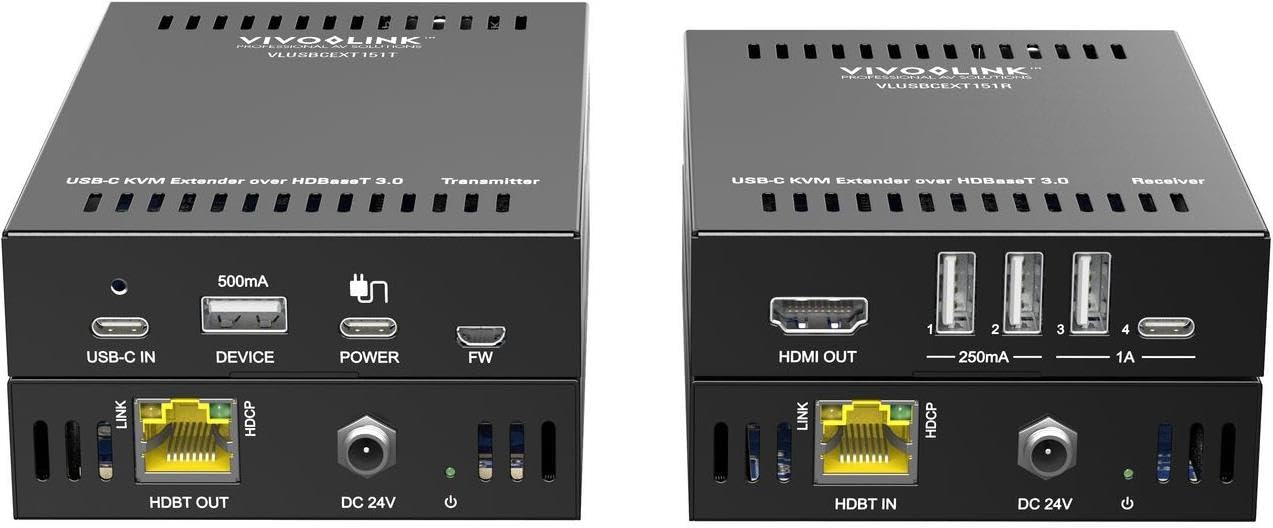
Imaxe 1: Vivolink USB-C 4K KVM Extender units. This image displays the compact design of both the transmitter and receiver units, highlighting their various ports for connectivity.
The Transmitter unit connects to your USB-C source device (e.g., laptop, PC), while the Receiver unit connects to your display, keyboard, mouse, and other USB peripherals at the remote location. The HDBaseT 3.0 link ensures reliable and high-bandwidth transmission.
5. Instrucións de configuración
Follow these steps to set up your Vivolink USB-C 4K KVM Extender:
- Apagar dispositivos: Ensure all devices, including your source computer, display, and the KVM extender units, are powered off before making any connections.
- Connect Source to Transmitter: Connect your USB-C source device (e.g., PC, laptop) to the USB-C input port on the Transmitter (TX) unit using the provided USB-C cable.
- Connect Display to Receiver: Connect your display (monitor) to the HDMI output port on the Receiver (RX) unit using an HDMI cable.
- Connect Peripherals to Receiver: Connect your USB keyboard, mouse, and any other USB peripherals to the USB ports on the Receiver (RX) unit.
- Connect TX and RX Units: Connect the HDBaseT OUT port on the Transmitter (TX) unit to the HDBaseT IN port on the Receiver (RX) unit using a single, high-quality Cat6a or Cat7 Ethernet cable. Ensure the cable length does not exceed 100 meters for optimal performance.
- Aplicar potencia: Connect the provided 12V DC power adapters to both the Transmitter (TX) and Receiver (RX) units, then plug them into power outlets.
- Dispositivos de encendido: Power on your display, then your source computer. The extender units will typically power on automatically when connected to power.
- Verificar a conexión: Check for signal on your remote display and test the functionality of your keyboard and mouse.
6. Instrucións de funcionamento
Once the Vivolink USB-C 4K KVM Extender is set up correctly, operation is straightforward:
- Automatic Signal Detection: The extender units are designed to automatically detect and transmit the video, audio, and USB signals from your source device to the remote display and peripherals.
- Resolución: The system supports resolutions up to 4K (3840x2160) at 60Hz, depending on the capabilities of your source and display devices.
- Funcionalidade USB: All connected USB devices (keyboard, mouse, USB drives, etc.) should function as if directly connected to the source computer.
- Ciclo de potencia: If you encounter any issues, try power cycling both the Transmitter and Receiver units, as well as your source computer and display.
7. Mantemento
To ensure the longevity and optimal performance of your Vivolink USB-C 4K KVM Extender, follow these maintenance guidelines:
- Limpeza: Empregue un pano suave e seco para limpar o exterior das unidades. Non empregue produtos de limpeza líquidos nin en aerosol.
- Ventilación: Asegúrate de que as aberturas de ventilación de ambas as unidades non estean obstruídas para evitar o sobrequecemento.
- Xestión de cables Keep cables neatly organized and avoid sharp bends or excessive tension on connectors.
- Ambiente: Store and operate the device in a cool, dry environment, away from direct sunlight, heat sources, and extreme temperatures.
8 Solución de problemas
If you experience issues with your KVM extender, refer to the following troubleshooting steps:
| Problema | Posible Solución |
|---|---|
| No video on remote display |
|
| O teclado/rato non responde |
|
| Intermittent signal or flickering video |
|
9. Especificacións
- Marca: Vivolink
- Modelo: W126974534 (VLUSBCEXT150)
- Tecnoloxía: HDBaseT 3.0
- Resolución de vídeo: Ata 4K (3840 x 2160) a 60 Hz
- Entrada: USB-C (on TX unit)
- Saída: HDMI (on RX unit)
- USB: USB 2.0 (on RX unit for peripherals)
- Distancia de extensión: Up to 100 meters (328 feet) over Cat6a/7 cable
- Fonte de alimentación: DC 12V (via included power adapters)
- Fabricante: Vivolink
- ASIN: B0CPWLBPGF
10. Garantía e soporte
Vivolink products are designed for reliability and performance. For information regarding warranty coverage, technical support, or service, please refer to the warranty card included with your product or visit the official Vivolink website. Please have your product model number (W126974534) and purchase details ready when contacting support.
Recursos en liña: For the latest drivers, firmware updates, and additional support documentation, please visit the Vivolink support page.