
hygger HGG115
hygger Aquarium Heater User Manual
Model: HGG115 Series (300W, 500W, 800W, 1000W, 1200W)
1. Introdución
Thank you for choosing the hygger Aquarium Heater. This intelligent and reliable heating system is designed to maintain a stable and optimal temperature for your aquatic environment, suitable for both freshwater and saltwater aquariums. Featuring a rapid heating system, digital LED display controller, and comprehensive safety protections, this heater ensures the well-being of your fish and aquatic pets.
This manual provides detailed instructions for the proper installation, operation, maintenance, and troubleshooting of your hygger Aquarium Heater. Please read it thoroughly before use to ensure safe and efficient operation.
2. Información de seguridade
Always prioritize safety when operating electrical appliances near water. Failure to follow these instructions may result in electric shock, fire, or damage to the product.
- Ensure the heater is totalmente mergullado in water before plugging it in. The product features an "Off-water warning" that will flash "auto shut off" and stop heating if not completely submerged.
- Non poñas en funcionamento o quentador se o cable de alimentación ou a ficha están danados.
- Do not attempt to repair or modify the heater yourself. Refer all servicing to qualified personnel.
- Always unplug the heater from the power outlet before performing any maintenance, water changes, or handling the heater.
- Keep the external controller dry. It is not waterproof.
- The heater has an "Overheating warning" (flashes "HH" and stops heating if temperature exceeds 95°F) and a "Low temperature warning" (flashes "LL" and sounds an alarm if temperature drops below 58°F).
- Asegúrese de voltage (110-120V) is supplied to the heater.
- Manter fóra do alcance dos nenos e animais.
3. Compoñentes do produto
Your hygger Aquarium Heater package includes the following items:
- Heater Unit (Quartz Glass, ABS Anti-scald Shell)
- External Digital LED Display Controller
- Suction Cups (for heater installation)
- Mounting Bracket (for controller)
- Hook (for controller hanging option)

Image: Hygger Aquarium Heater unit and its external digital controller.
4. Configuración e instalación
Follow these steps to properly set up your hygger Aquarium Heater:
- Attach Suction Cups to Heater: Securely attach the provided suction cups to the designated slots on the back of the heater unit. Ensure they are firmly in place.
- Position Heater in Aquarium: Place the heater unit inside your aquarium, ensuring it is 100% fully submerged in water. It is recommended to place the heater at a 30-45° angle for optimal heat distribution, especially when used with a water circulation system.
- Montar o controlador:
- Option 1 (Adhesive Hook): Peel the backing from the adhesive hook and stick it to a clean, dry surface near your aquarium. Hang the controller using the loop at the top.
- Option 2 (Mounting Bracket): Use the provided mounting bracket. It can be attached to a surface using its adhesive backing or screws (not included). Slide the controller into the bracket until it clicks securely.

Image: Proper installation of the heater unit fully submerged and the controller mounted outside the tank.
- Conectar á enerxía: Plug the heater's power cord into a standard 110-120V electrical outlet. The digital LED display on the controller will illuminate.
Video: Official Hygger video demonstrating the installation process of the aquarium heater and controller.
5. Instrucións de funcionamento
The hygger Aquarium Heater features an intuitive digital LED display controller for easy temperature management.
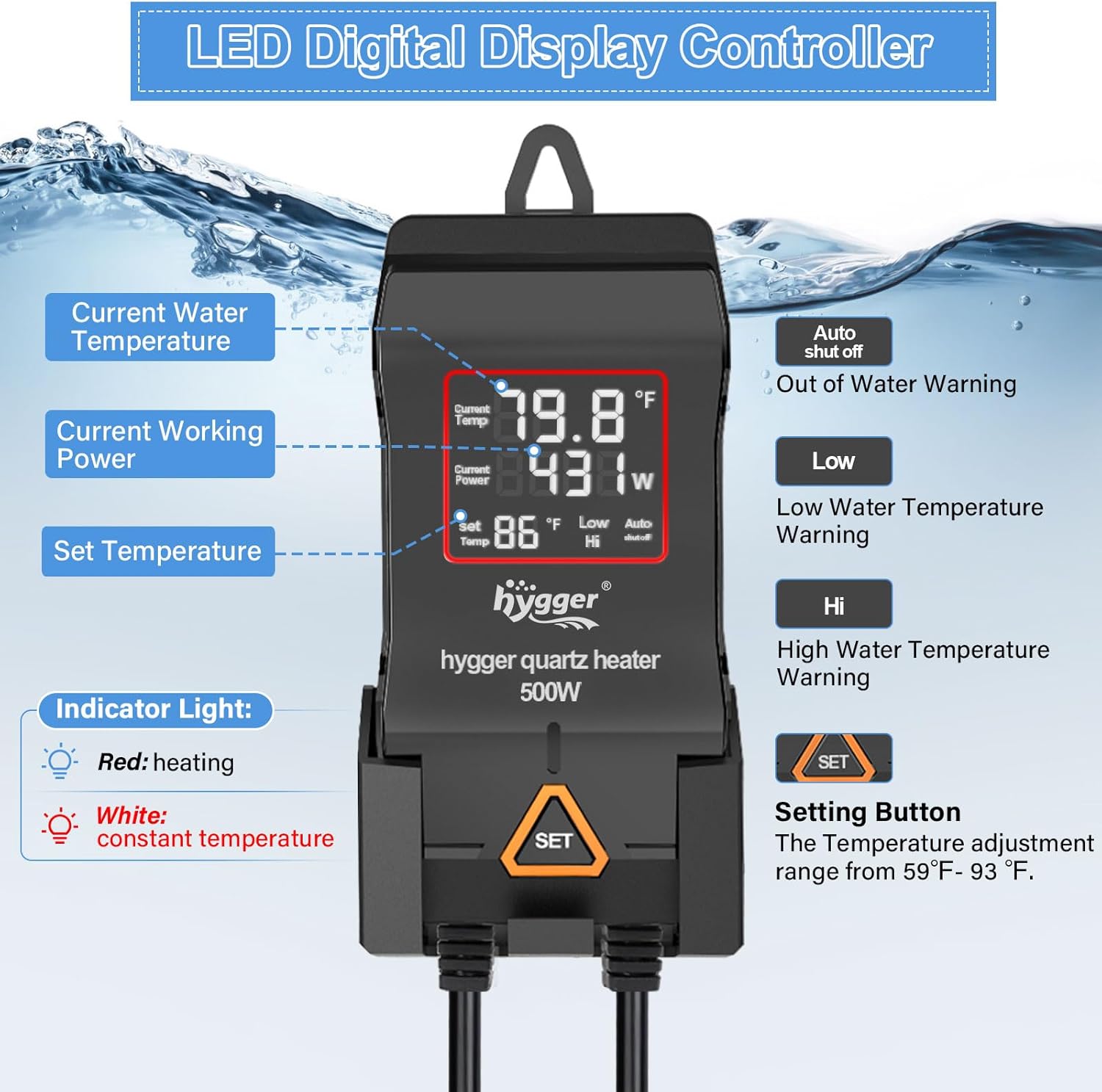
Imaxe: Detallada view of the LED digital display controller, showing current water temperature, current working power, and set temperature.
Axuste da temperatura:
- The controller displays the temperatura actual da auga e o temperatura establecida.
- Preme o SET button on the controller to adjust the target temperature. The temperature adjustment range is between 59°F and 93°F (15°C to 34°C).
- Cada prensa do SET button will cycle through the temperature settings. Stop at your desired temperature. The setting will automatically save.
Indicator Lights and Display:
- Luz vermella: Indicates the heater is actively heating the water.
- Luz branca: Indicates the water temperature has reached the set temperature and the heater is maintaining it.
- The LED screen also displays the current power (W) being used by the heater.
Función de memoria intelixente:
The heater features a memory function. In case of a power outage, the heater will remember your last temperature setting and automatically resume operation at that setting once power is restored. There is no need to reset the temperature.
6. Mantemento
Regular maintenance ensures the longevity and efficient operation of your hygger Aquarium Heater.
- Limpeza: Periodically clean the heater unit to prevent algae and mineral buildup. Always unplug the heater and allow it to cool completely before removing it from the water for cleaning. Use a soft brush or cloth to gently wipe the surface. Do not use harsh chemicals or abrasive materials.
- Cambios de auga: When performing water changes, ensure the heater remains fully submerged. If the water level drops below the heater, it will automatically shut off. Unplug the heater before draining significant amounts of water.
- Inspección de cables: Regularly inspect the power cord and connections for any signs of damage, fraying, or corrosion. If any damage is found, discontinue use immediately and contact customer support.
7 Solución de problemas
The hygger Aquarium Heater is equipped with intelligent protection systems to alert you to potential issues:
| Error Code/Indication | Significado | Solución |
|---|---|---|
| "auto shut off" (intermitente) | Off-water warning: Heater is not completely submerged. | Ensure the heater is fully submerged in water. Check water level and add water if necessary. |
| "HH" (intermitente) | Overheating warning: Water temperature is higher than 95°F (35°C). | Unplug the heater and allow the water to cool down naturally. Check for proper water circulation. Re-plug once temperature is safe. |
| "LL" (flashing) and alarm sound | Low temperature warning: Water temperature is lower than 58°F (14°C). | Ensure the heater is properly plugged in and functioning. Check if the set temperature is appropriate for your aquarium. Allow time for the heater to raise the temperature. |

Image: Visual representation of the "HH" (overheating) and "LL" (low temperature) warning displays on the controller.
8. Especificacións
| Característica | Detalle |
|---|---|
| Número de modelo | HGG115 |
| Opcións de enerxía | 300 W, 500 W, 800 W, 1000 W, 1200 W |
| Voltage | 110-120 V |
| Rango de temperatura | 59-93 °F (15-34 °C) |
| Heater Dimensions (300W) | 11.8" x 2.8" x 1.4" |
| Lonxitude do cable de alimentación | 10.1 ft (approx. 3.1m) |
| Material | Explosion-proof Quartz Glass, High-temperature resistant Nickel-chromium Electric Heating Wire, Quartz Sand, ABS Plastic |
| Aplicación | Marine Saltwater and Freshwater Aquariums, Fish Tanks, Turtle Tanks, Betta Tanks, Small Ponds |
| Suitable Tank Size (300W) | 40-80 galóns (152-302 L) |
| Peso do elemento | 2.4 libras |
| Fabricante | hygger |
| País de Orixe | China |
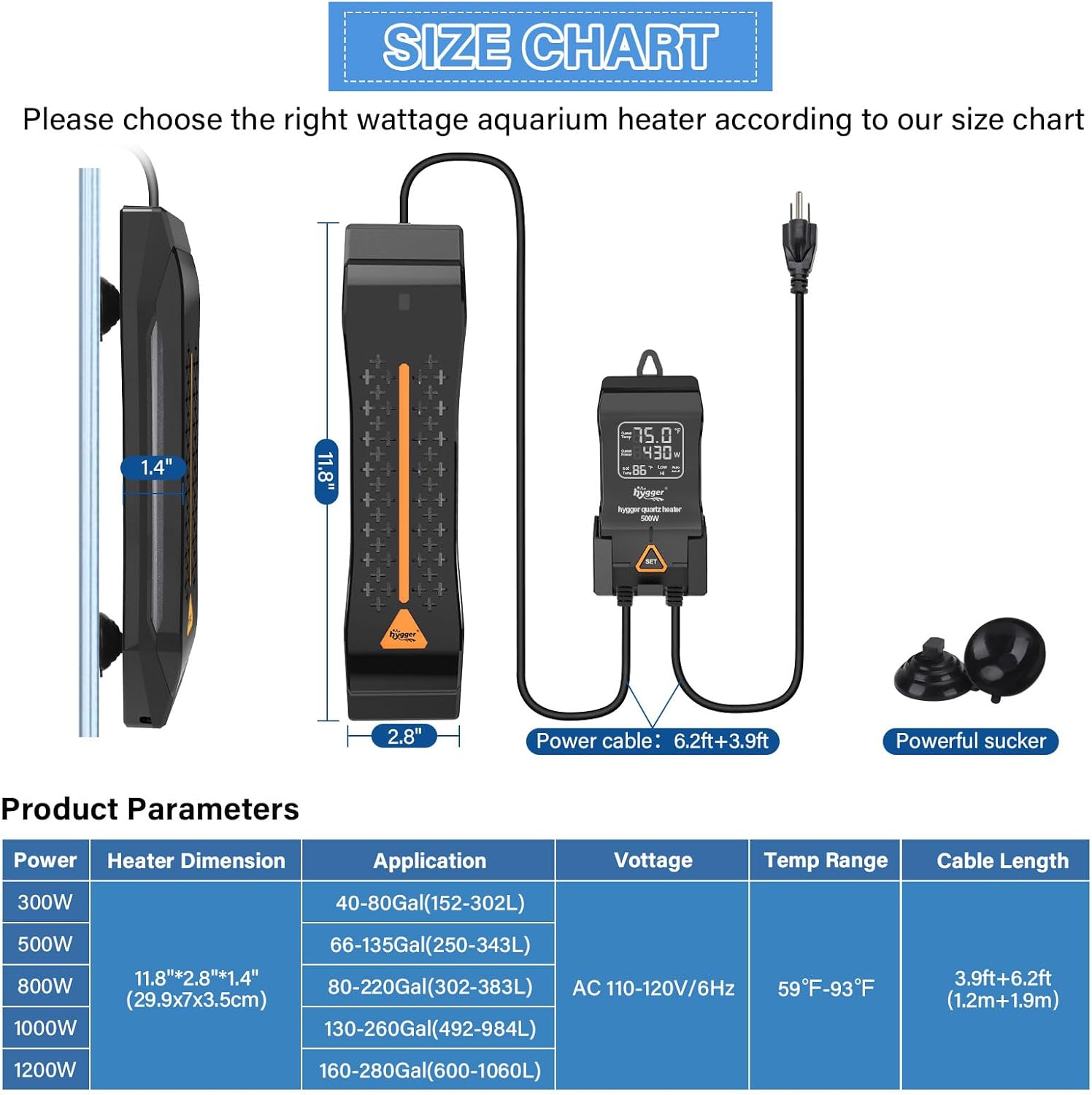
Image: Comprehensive size chart and product parameters for various wattage models of the Hygger Aquarium Heater.
9. Garantía e soporte
hygger offers a 12 meses de garantía for this product. If you encounter any problems with your hygger Aquarium Heater, please do not hesitate to contact hygger customer service for assistance. They are committed to helping you resolve any issues.
For further information or support, you may visit the official hygger store on Amazon: hygger Store.
Ask a question about this manual
Ask about setup, troubleshooting, compatibility, parts, safety, or missing instructions. Manuals+ will review the question and use this page’s manual context to help answer it.