
Newentor Q3-BLACK-CA
Newentor Weather Station Wireless Indoor Outdoor Thermometer User Manual
Model: Q3-BLACK-CA
Introdución
The Newentor Weather Station is a comprehensive device designed to monitor indoor and outdoor temperature and humidity. It features a large 7.5-inch HD color screen, provides weather forecasts, moon phase, and barometric pressure readings. Additionally, it includes an alarm clock with snooze function and a convenient USB output port for charging devices. This manual provides detailed instructions for setup, operation, maintenance, and troubleshooting to ensure optimal performance of your weather station.

Image: The Newentor Weather Station main display unit and its accompanying wireless outdoor sensor.
Información de seguridade
- To keep the screen continuously on, ensure the power adapter is plugged in. Disabling WWVB will not affect the device's normal operation.
- After initial setup or restarting, allow 7-10 days for the weather station to learn and calibrate barometric pressure for accurate forecasts.
- Mount the outdoor sensor vertically on a North-facing wall to prevent direct sunlight and rain exposure. Direct sunlight can lead to inaccurate temperature readings.
- Be aware that metal siding, stucco, and certain types of glass can significantly reduce the wireless signal range between the main unit and the sensor.
- The outdoor sensor has an IPX4 waterproof rating, but it is recommended to place it under a cover to protect it from prolonged heavy rain, which could cause internal damage.
- Ensure the main unit and the remote sensor are placed within 100 meters (328 feet) of each other in open areas for optimal wireless communication.
- Keep both units at least 1 meter (3 feet) away from electronic devices such as TVs, microwaves, computers, or radios, as these may interfere with wireless communication.
Contido do paquete
Verifica que todos os elementos estean presentes no teu paquete:
- Newentor Weather Station Main Unit (1)
- Wireless Outdoor Sensor (1)
- Adaptador de alimentación (1)
- Manual de usuario (este documento)
Configuración
1. Alimentando o dispositivo
The main unit can be powered by the included AC adapter for continuous display or by batteries for temporary backlight activation. The outdoor sensor requires batteries.
- Unidade principal: Plug the power adapter into the DC 5V port on the back of the main unit and into a wall outlet. For battery backup (memory retention during power outages), insert 2 AA batteries (not included) into the battery compartment.
- Sensor exterior: Open the battery compartment on the back of the sensor and insert 2 AA batteries (not included), observing polarity.
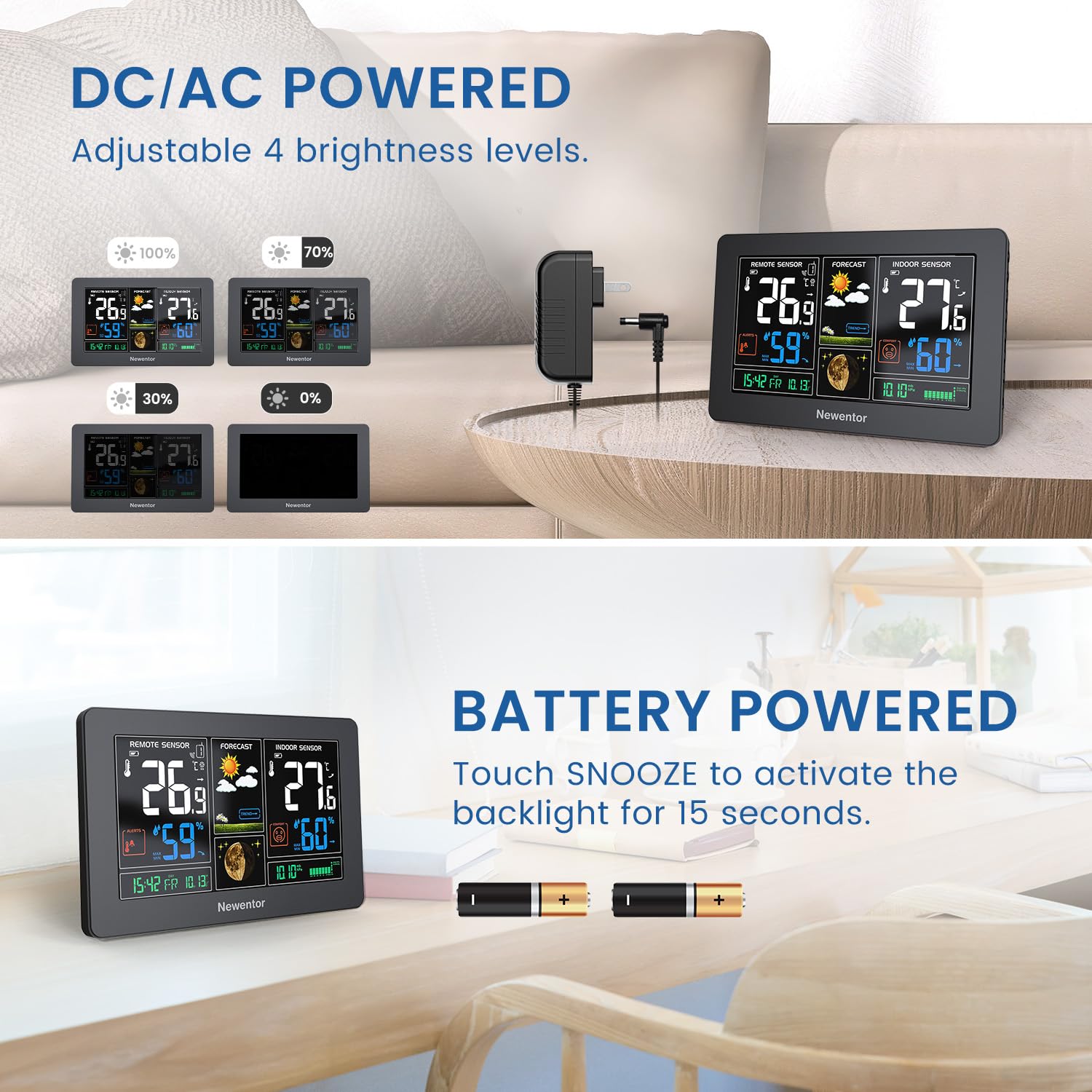
Image: Illustration showing the weather station powered by an AC adapter for continuous display and by batteries for temporary backlight.

Image: Visual comparison of the weather station's display when powered by the 5.0V adapter (4 levels of brightness) versus only batteries (backlight lights up for 15 seconds).
2. Emparellamento de sensores
Once both units are powered, the main unit will automatically search for the outdoor sensor. Ensure the sensor is within range. The main unit can support up to 3 remote sensors (additional sensors sold separately).

Image: Depiction of the weather station's ability to connect to up to three remote sensors, showing placement examples in a backyard, kitchen, and greenhouse.
3. Placement Recommendations
- Unidade principal: Place the main unit on a flat surface using its integrated tabletop stand or mount it on a wall using the hanging hole.
- Sensor exterior: For best results, mount the sensor vertically on a North-facing wall, away from direct sunlight and rain. Ensure it is within the 100m (328ft) transmission range of the main unit and at least 1m (3ft) away from other electronics.

Image: Visual guide demonstrating how to wall mount the main unit and how to use its tabletop stand for desk placement.
4. Calibración inicial
After initial setup or a restart, the weather station requires approximately 7-10 days to learn and calibrate the barometric pressure for accurate weather forecasting. During this period, the forecast may not be fully precise.
Instrucións de funcionamento
1. Características da pantalla
The 7.5-inch HD color screen provides a clear overview of various environmental data:
- Temperatura e humidade interiores/exteriores: Displays current readings for both environments.
- Pronóstico do tempo: Predicts weather conditions for the next 12-24 hours based on barometric pressure changes.
- Hora / data: Mostra a hora e data actuais.
- Fase da Lúa: Indica a fase actual da lúa.
- Presión barométrica: Displays the current atmospheric pressure and its trend.
- Alertas personalizables: Allows setting alerts for specific temperature conditions.

Imaxe: Unha detallada view of the weather station's colorful display, highlighting sections for outdoor temperature & humidity, weather forecast, indoor temperature & humidity, time & date, moon phase, and barometric pressure.
2. Axuste da luz de fondo
The main unit features 4 levels of adjustable backlight brightness (100%, 70%, 30%, 0%).
- When powered by the AC adapter, press the "SNOOZE/LIGHT" button to cycle through brightness levels.
- When operating on batteries only, touch the "SNOOZE" button to activate the backlight for 15 seconds.

Image: Visual representation of the four adjustable backlight brightness levels (100%, 70%, 30%, 0%) for the weather station display.
3. Alarm Clock with Snooze
The weather station includes an atomic clock with an alarm function and a 5-minute snooze feature. Refer to the on-screen menu or dedicated buttons for setting the alarm time and activating snooze.
4. Función de carga USB
A convenient USB output port (5V/1A) is located on the main unit, allowing you to charge your phone or other small devices.

Imaxe: Primeiro plano view of the USB output port on the weather station, illustrating its use for charging a smartphone.
5. Customizable Temperature Alerts
You can set custom temperature alerts for both indoor and outdoor readings. This feature is useful for monitoring specific temperature ranges in different areas of your home, such as a child's room or a greenhouse.

Image: Illustration showing the weather station's alert function, useful for monitoring comfort levels in different rooms, such as a child's bedroom.
Mantemento
- Clean the display and unit surfaces with a soft, dry cloth. Avoid abrasive cleaners or solvents.
- Regularly check the batteries in both the main unit (if using backup) and the outdoor sensor. Replace them when the low battery indicator appears on the display.
- Ensure the outdoor sensor's placement remains optimal, protected from direct harsh weather conditions, to prolong its lifespan.
Resolución de problemas
| Problema | Causa posible | Solución |
|---|---|---|
| Sen lectura de temperatura/humidade exterior. | Sensor out of range, low sensor battery, interference, or sensor not paired. |
|
| Temperatura exterior incorrecta. | Direct sunlight exposure on the sensor. | Relocate the sensor to a shaded, North-facing wall. |
| A pantalla está escura ou apagada. | Power adapter not connected, low main unit batteries, or backlight setting. |
|
| Previsión meteorolóxica imprecisa. | Unit still calibrating or local atmospheric conditions. | Allow 7-10 days for initial barometric pressure calibration. Forecasts are based on local pressure changes and may not always match official forecasts. |
Especificacións
- Número de modelo: Q3-BLACK-CA
- Dimensións do produto: 2.7 x 20.2 x 12.7 cm; 350 g
- Fonte de alimentación (unidade principal): AC Adapter (included), 2 x AA batteries (backup, not included)
- Fonte de alimentación (sensor exterior): 2 pilas AA (non incluídas)
- Alcance sen fíos: Up to 100m / 328ft (in open areas)
- Visualización: 7.5-inch HD Color Screen with 4-level adjustable backlight
- Características: Indoor/Outdoor Temperature & Humidity, Weather Forecast, Moon Phase, Barometric Pressure, Alarm Clock with Snooze, USB Output Port (5V/1A), Customizable Alerts.
- Sensor Waterproof Rating: IPX4
- Fabricante: Newentor
- País de orixe: China
Garantía e Soporte
Newentor products are designed for reliability and performance. For warranty information, technical support, or customer service inquiries, please refer to the contact information provided with your purchase or visit the official Newentor websitio. Garde o recibo da compra como xustificante de compra para reclamacións de garantía.
You can also visit the Newentor Store on Amazon for more products and support: Newentor Store
Ask a question about this manual
Ask about setup, troubleshooting, compatibility, parts, safety, or missing instructions. Manuals+ will review the question and use this page’s manual context to help answer it.