
1. Introdución
Thank you for choosing the Micool BT-X Bluetooth V5.3 Clip-On Wireless Headphones. This manual provides essential information for setting up, operating, and maintaining your headphones to ensure optimal performance and longevity. Please read this manual thoroughly before first use and retain it for future reference.
2. Contido do paquete
- Micool BT-X Wireless Headphones (Left and Right)
- Estuche de carga
- Cable de carga USB-C
- Manual de usuario
3. Produto rematadoview
The Micool BT-X headphones are designed for comfort and high-quality audio, featuring an open-ear design with earhooks. They incorporate Bluetooth 5.3 technology for stable connections and 28mm speakers for clear stereo sound and powerful bass. Four integrated microphones enhance call clarity by reducing ambient noise.

Image: Micool BT-X Headphones and Charging Case

Image: Internal structure highlighting the 28mm neodymium magnetic horn for enhanced sound quality.

Image: User demonstrating clear call functionality with Micool BT-X headphones, featuring 4 microphones for noise cancellation.
4. Getting Started: First Use and Pairing
4.1 Configuración inicial
Before first use, ensure you remove the charging protection insulation film from both earbuds. This film prevents charging during shipping.
Video: Demonstrates removing the charging protection insulation film and initiating Bluetooth pairing for first-time use.
4.2 Emparejamento Bluetooth
- Ensure the headphones are fully charged and the insulation film has been removed.
- Open the charging case lid. The headphones will automatically enter Bluetooth pairing mode, indicated by a green light flashing intermittently on the earbuds.
- No teu dispositivo (teléfono intelixente, tableta, portátil), activa o Bluetooth.
- Busca available Bluetooth devices and select 'Micool BT-X' from the list.
- Once connected, the green light on the earbuds will stop flashing, indicating successful pairing.
The headphones will automatically reconnect to the last paired device when removed from the charging case and within range.
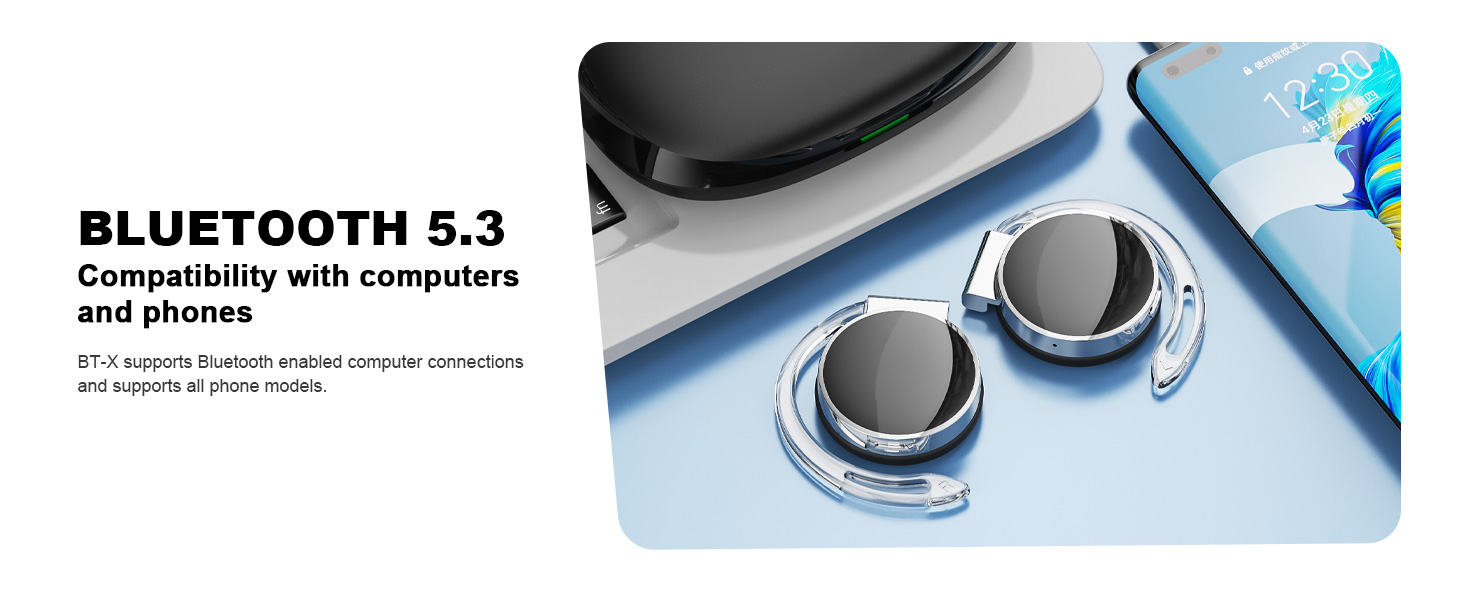
Image: Micool BT-X headphones demonstrating compatibility with various devices including laptops and smartphones via Bluetooth 5.3.
5. Usar os auriculares
For optimal sound and comfort, wear the headphones correctly as shown below:

Image: Step-by-step guide on how to wear the Micool BT-X headphones.
- Paso 1: Separate the earhooks at a 30-degree angle.
- Paso 2: Rotate the earhook along the inside of your ear to the bottom.
- Paso 3: Press the headphones gently until they feel secure on your ears.
- Paso 4: Adjust for a comfortable and stable fit. The sponge earmuffs are designed for comfort during extended wear.
6. Instrucións de funcionamento
The Micool BT-X headphones feature multi-function buttons on each earbud for easy control.
6.1 Control de música
- Reproducir/Pausa: Prema unha vez o botón multifunción de calquera dos auriculares.
- Próxima canción: Prema dúas veces o botón multifunción do auricular dereito.
- Canción anterior: Prema dúas veces o botón multifunción do auricular esquerdo.
- Subir volume: Prema tres veces o botón multifunción do auricular dereito.
- Baixar volume: Prema tres veces o botón multifunción do auricular esquerdo.
6.2 Control de chamadas
- Responder/Finalizar chamada: Prema unha vez o botón multifunción de calquera dos auriculares.
- Rexeitar a chamada: Manteña premido o botón multifunción de calquera dos auriculares durante 2 segundos.
6.3 Asistente de voz
- Activar o asistente de voz: Manteña premido o botón multifunción de calquera dos auriculares durante 3 segundos.
7. Cargando
The Micool BT-X headphones offer extended battery life with their charging case.
- Headphone Battery Life: Up to 15 hours of music playback on a single full charge.
- Duración total da batería coa funda: The charging case provides approximately 3 additional full charges, extending total listening time up to 42 hours.
- Carga do estuche: Connect the provided USB-C cable to the charging port on the case and a power source. The battery indicator on the case will show the charging status and remaining battery capacity.
- Carga dos auriculares: Place the headphones into the charging case. They will automatically begin charging.

Image: Visual representation of the extended battery life for Micool BT-X headphones and their charging case.
8. Especificacións
| Característica | Especificación |
|---|---|
| Marca | Micool |
| Número de modelo | BT-X |
| Versión Bluetooth | 5.3 |
| Tecnoloxía de conectividade | Sen fíos |
| Colocación do oído | Na Orella |
| Duración media da batería | 15 Hours (Headphones), 42 Hours (with Charging Case) |
| Tipo de control | Control de voz |
| Método de control | Toque, Voz |
| Tipo de controlador de audio | Dynamic Driver (28mm speakers) |
| Micrófonos | 4 (with Noise Cancelling) |
| Dispositivos compatibles | Teléfonos móbiles, tabletas, portátiles, ordenadores de sobremesa |
9 Solución de problemas
- Non se pode emparellar co dispositivo:
Ensure the headphones are charged and the insulation film is removed. Turn off Bluetooth on other nearby devices. Restart your device and try pairing again. If issues persist, reset the headphones (refer to manufacturer's websitio web para obter instrucións específicas de restablecemento se non están no manual). - Sen son ou volume baixo:
Check the volume levels on both your device and the headphones. Ensure the headphones are properly connected to your device. Try playing audio from a different application or device. - Conexión intermitente:
Ensure there are no obstructions between the headphones and your device. Stay within the Bluetooth range (up to 10 meters). Avoid environments with strong electromagnetic interference. - Os auriculares non cargan:
Verify the USB-C cable is securely connected to both the charging case and the power source. Ensure the headphones are correctly seated in the charging case. Check the charging case's battery level.
10. Información de seguridade
- Non expoñas os auriculares nin a caixa de carga a temperaturas extremas, humidade ou líquidos.
- Evite deixar caer, golpear ou desmontar o produto.
- Use só o cable de carga fornecido ou un cable USB-C certificado para cargar.
- Limpa os auriculares cun pano suave e seco. Non empregues produtos químicos agresivos.
- Escoitar música durante un tempo prolongado a volumes altos pode causar danos auditivos. Axuste o volume a un nivel seguro.
- Be aware of your surroundings when using headphones, especially in traffic or hazardous situations.
11. Garantía e soporte
Micool products come with a standard warranty. For detailed warranty information, product support, or service inquiries, please refer to the official Micool websitio web ou póñase en contacto co servizo de atención ao cliente a través da súa plataforma de compra.
Micool is committed to providing 24-hour after-sales service for all purchased items.
Websitio: Visit the Micool Store on Amazon