
1. Iniciación
1.1. Que hai na caixa
Before you begin, ensure all components are present in your product packaging:
- Xiaomi Redmi Note 13 4G LTE Smartphone
- Cable USB
- Adaptador de parede
- Expulsor da bandexa SIM
- Fast Car charger (Note: This item is listed in the product details, but typically a car charger is a separate accessory. Please verify your specific package contents.)
1.2. Dispositivo rematadoview
Familiarize yourself with the physical layout of your Redmi Note 13 4G LTE.

Imaxe: Anverso e reverso view of the Xiaomi Redmi Note 13 4G LTE in Ice Blue, highlighting the display and the triple camera setup on the rear.
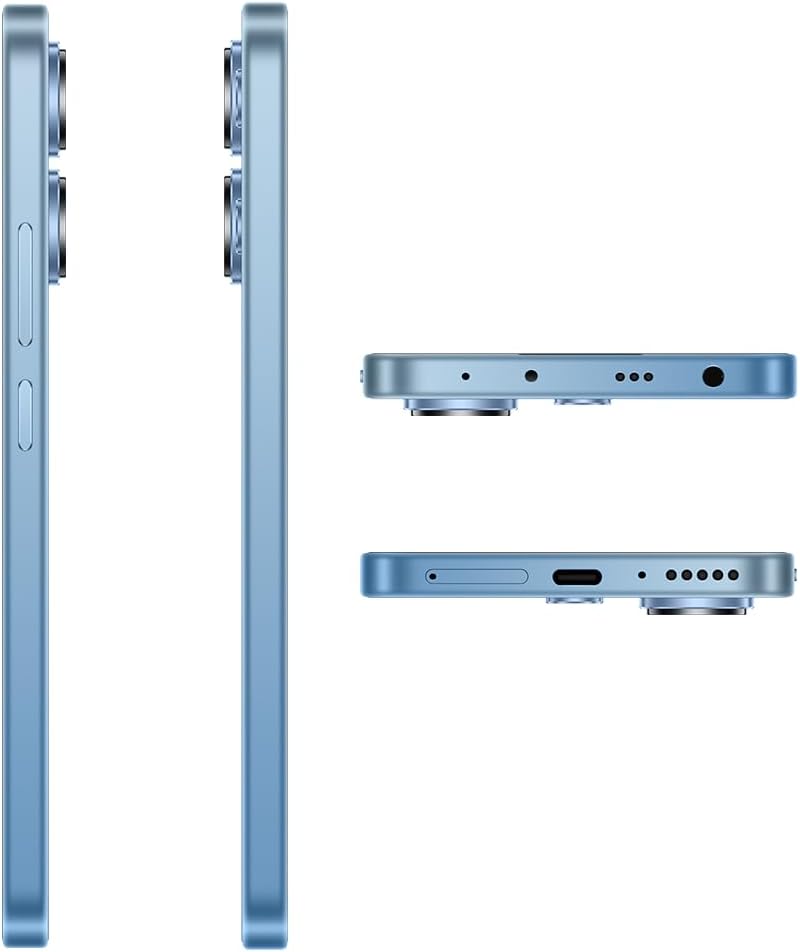
Imaxe: Detallada views of the Xiaomi Redmi Note 13 4G LTE's sides, top, and bottom, illustrating the placement of the SIM tray, USB port, 3.5mm headphone jack, and speaker grilles.
1.3. SIM Card and MicroSD Installation
The Redmi Note 13 4G LTE supports a hybrid SIM tray, allowing for either two SIM cards or one SIM card and one MicroSD card for expanded storage.
- Localiza a bandexa da tarxeta SIM no lateral do dispositivo.
- Insira a ferramenta de expulsión da bandexa da SIM no pequeno orificio que hai xunto á bandexa e prema suavemente ata que esta saia.
- Coloque a(s) tarxeta(s) nano-SIM e/ou tarxeta(s) microSD nas ranuras designadas da bandexa. Asegúrese de que os contactos dourados estean cara abaixo.
- Volva inserir a bandexa con coidado no dispositivo ata que encaixe no seu lugar.
Note: This device is designed for the USA market and primarily works on T-Mobile, Mint, Tello, or any network under the T-Mobile umbrella. Outside the USA, it works with any GSM carrier SIM. An already activated SIM card is required for network functionality.
1.4. Acendido e carga iniciais
To power on your device for the first time, press and hold the Power button until the Xiaomi logo appears. If the battery is depleted, connect the device to the wall adapter using the provided USB cable to charge it. It is recommended to fully charge the device before first use.
2. Funcionamento do teu dispositivo
2.1. Pantalla e navegación
The Redmi Note 13 features a 6.67-inch FHD+ AMOLED DotDisplay with a refresh rate of up to 120Hz, providing a smooth and responsive user experience. Navigation is primarily done via the touchscreen.

Imaxe: Fronte view of the Xiaomi Redmi Note 13 4G LTE, showcasing its vibrant AMOLED display and punch-hole front camera.
- Xestos na pantalla táctil: Swipe, tap, pinch-to-zoom, and long-press are standard gestures for interacting with the MIUI 14 operating system.
- Axuste de brillo: The display offers 4096 levels of brightness for comfortable viewing. Adjust this in the Quick Settings panel or Display settings.
- Características do coidado dos ollos: The device includes SGS eye care certification and circadian rhythm adjustment to reduce eye strain, especially during night use.
2.2. Características da cámara
Capture high-quality photos and videos with the advanced camera system.

Image: Close-up of the Xiaomi Redmi Note 13 4G LTE's rear camera module, featuring the 108MP main sensor, ultra-wide, and macro lenses, along with the LED flash.
- Cámara principal: 108MP (f/1.8) ultra-clear main camera with built-in zoom technology for telephoto effects.
- Cámara ultra gran angular: 8MP (f/2.2) for capturing broader scenes.
- Cámara macro: 2MP (f/2.4) for detailed close-up shots.
- Cámara frontal: 13MP (wide) for selfies and video calls.
- Xiaomi Imaging Engine: Ensures faster startup speeds and clearer photos.
2.3. Conectividade
O teu dispositivo admite varias opcións de conectividade:
- Celular: Dual 4G support (SIM1 + Hybrid SIM/MicroSD). Supports various LTE, WCDMA, and GSM bands.
- Wi-Fi: 802.11a/b/g/n/ac protocol for high-speed internet access.
- Bluetooth: Versión 5.2 para conectar accesorios sen fíos.
- GPS: GPS/AGPS and Glonass for accurate location services.
2.4. Funcións de audio
The Redmi Note 13 4G LTE is equipped with dual speakers for an immersive audio experience and a 3.5mm headphone jack for wired audio connections. It also supports Hi-Res Audio.
3. Mantemento
3.1. Coidado da batería
The device is powered by a 5000 mAh Lithium Polymer battery. To maximize battery life:
- Evita temperaturas extremas.
- Use o cargador e o cable orixinais fornecidos.
- Evita descargar completamente a batería con frecuencia.
- Desconecta o cargador unha vez que a batería estea chea.
3.2. Limpeza do dispositivo
Usa un pano suave e sen pelusa para limpar a pantalla e a carcasa do teléfono. Evita o uso de produtos químicos agresivos ou materiais abrasivos que poidan danar o acabado ou o revestimento da pantalla.
3.3. Actualizacións de software
Regularly check for and install system updates to ensure your device has the latest features, security patches, and performance improvements. You can usually find this option in the Settings menu under "About phone" or "System update."
4 Solución de problemas
If you encounter issues with your Redmi Note 13 4G LTE, try the following common troubleshooting steps:
- O dispositivo non responde: Mantén premido o botón de acendido/apagado durante uns 10-15 segundos para forzar un reinicio.
- Problemas de rede: Check if your SIM card is properly inserted. Toggle Airplane Mode on and off. Restart the device. Verify your mobile data settings.
- Conectividade Wi-Fi: Reinicia o teu enrutador Wi-Fi. Esquécete da rede no teu teléfono e volve conectar.
- Fallos da aplicación: Borra a caché e os datos da aplicación problemática en Configuración > Aplicacións. Se o problema persiste, desinstálaa e volve instalala.
- Esgotando a batería rapidamente: Review app usage in battery settings. Reduce screen brightness. Disable unnecessary background apps or features like GPS, Bluetooth, and Wi-Fi when not in use.
- Rendemento lento: Close unused apps. Clear cache. Consider performing a factory reset as a last resort (back up your data first).
For more complex issues, refer to the official Xiaomi support websitio ou póñase en contacto co servizo de atención ao cliente.
5. Especificacións
Detailed technical specifications for the Xiaomi Redmi Note 13 4G LTE (Model: 23129RA5FL):
| Característica | Especificación |
|---|---|
| Nome do modelo | Nota 13 4G |
| Sistema Operativo | MIUI 14 |
| Procesador | Qualcomm Snapdragon 4 Gen 1 (2X Cortex-A78 @ 2.0GHz; 6X Cortex-A55 @ 1.8GHz) |
| GPU | Adreno 619 |
| Mostrar | 6.67 Inches FHD+ AMOLED DotDisplay, 120Hz Refresh Rate, 1200nits brightness, 4,500,000:1 Contrast Ratio |
| Resolución | 1920 x 1080 |
| Memoria RAM | 8 GB |
| Capacidade de almacenamento | 256 GB |
| Cámara principal | 108MP (f/1.8) |
| Cámara ultra gran angular | 8MP (f/2.2) |
| Cámara macro | 2MP (f/2.4) |
| Cámara frontal | 13 MP |
| Batería | 5000 mAh Lithium Polymer (5000 Watt Hours) |
| Tecnoloxías sen fíos | Bluetooth 5.2, Wi-Fi (802.11a/b/g/n/ac), Cellular (4G LTE, WCDMA, GSM) |
| Jack de audio | 3.5 mm |
| Dimensións | 7.09 x 3.54 x 2.36 polgadas |
| Peso do elemento | 1.04 libras (470 gramos) |
| Cor | Ice Blue Global ROM |
6. Garantía e soporte
6.1. Garantía do produto
Your Xiaomi Redmi Note 13 4G LTE comes with a standard manufacturer's warranty. Please refer to the warranty card included in your product packaging or visit the official Xiaomi websitio web para obter termos e condicións detallados relativos á cobertura da garantía, a duración e os procedementos de servizo.
6.2. Atención ao cliente
For technical assistance, service inquiries, or further information, please contact Xiaomi customer support through their official channels. You can typically find contact information on the Xiaomi global website or within the support section of the MIUI operating system on your device.
Online resources such as FAQs, user forums, and software downloads may also be available on the official Xiaomi support portal.