
XIAOMI CW300
Manual do usuario da cámara exterior Xiaomi CW300
Modelo: CW300
1. Introdución
This manual provides detailed instructions for the installation, operation, and maintenance of your Xiaomi Outdoor Camera CW300. This camera is an entry-level outdoor Pan-Tilt-Zoom (PTZ) camera designed for various outdoor monitoring needs, including doors, shops, and farms. It features 2.5K ultra-clear picture quality, 4MP resolution, smart full-color night vision, bidirectional gimbal movement, IP66 water and dust resistance, and AI human tracking.
2. Produto rematadoview
Familiarize yourself with the components of your Xiaomi Outdoor Camera CW300.

Figura 2.1: Fronte view of the Xiaomi Outdoor Camera CW300, showing the lens, status indicator, and light sensor.
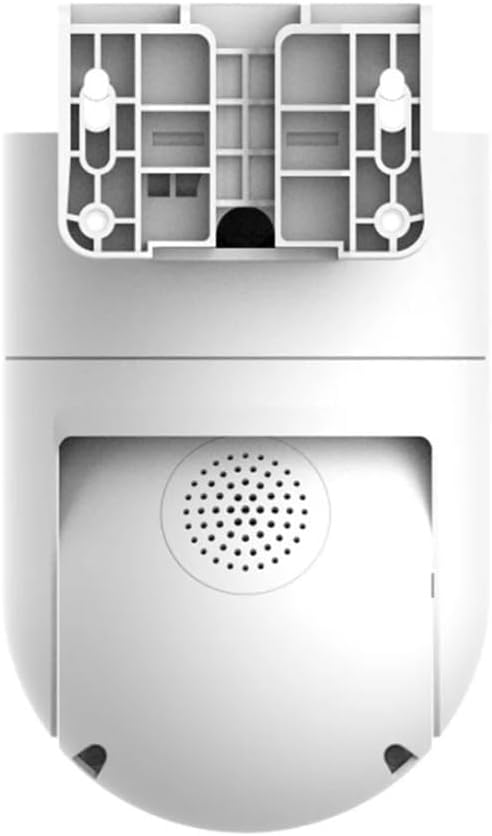
Figura 2.2: Atrás view of the camera, highlighting the integrated speaker for two-way audio and alarm functions.
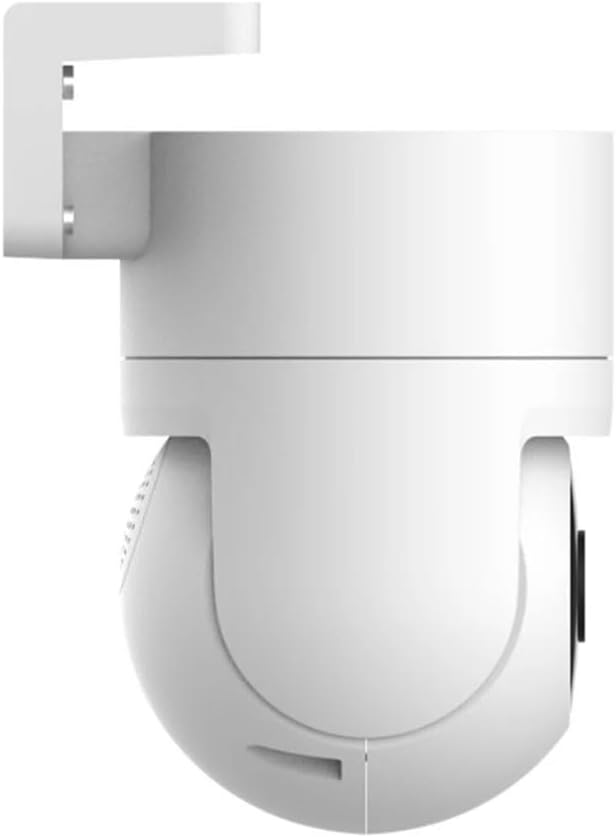
Figura 2.3: Lateral view of the camera, illustrating its compact design and mounting bracket.
3. Guía de configuración
3.1 Desembalaxe e inspección inicial
Retire con coidado todos os compoñentes da embalaxe. Comprobe que todos os elementos enumerados na lista de embalaxe estean presentes e non estean danados.
3.2 Conexión de alimentación
Connect the camera to a suitable power source using the provided power adapter. Ensure the connection is secure to prevent interruptions.
3.3 Instalación e emparellamento da aplicación
- Descarga o Mi Home/Xiaomi Home app desde a tenda de aplicacións do teu dispositivo (Google Play Store ou Apple App Store).
- Abre a aplicación e crea ou inicia sesión na túa conta de Xiaomi.
- Toca a icona "+" na esquina superior dereita para engadir un novo dispositivo.
- Select the "Xiaomi Outdoor Camera CW300" from the list of available devices.
- Follow the on-screen instructions to connect the camera to your Wi-Fi network and complete the pairing process. Ensure your Wi-Fi signal is strong at the installation location.
3.4 Montaxe da cámara
The camera can be mounted on a wall or pole. Choose a location that provides optimal viewing angles and is within Wi-Fi range.
- Montaxe na parede: Use the provided mounting bracket and screws to secure the camera to a sturdy wall.
- Montaxe en poste: Utilize the included straps or clamps to attach the camera securely to a pole.

Figura 3.1: Example of the camera mounted on a pole, demonstrating flexible installation options.
4. Instrucións de funcionamento
4.1 En directo View e Gravación
Access the live feed from your camera via the Mi Home/Xiaomi Home app. You can initiate manual recordings or set up continuous recording and event-triggered recording.
4.2 Pan-Tilt-Zoom (PTZ) Control
The bidirectional gimbal allows for 360° coverage. Use the controls within the app to remotely adjust the camera's viewing angle (pan and tilt) and zoom in on specific areas.
4.3 Smart Full-Color Night Vision
The camera features intelligent full-color night vision. When a human shape is detected at night, the camera automatically activates its white light, providing a clear, colored image even in dark environments.

Figure 4.1: The camera's intelligent full-color night vision in action, illuminating a dark area.
4.4 AI Human Tracking and Alarm
The camera intelligently tracks human movements. When a person is detected in the surveillance area, the camera automatically tracks and records their movement. Simultaneously, it triggers an acoustic alarm with high-frequency flashing lights to deter intruders and sends an alarm message to your Mi Home/Xiaomi Home app.
4.5 Audio bidireccional
Utilize the built-in microphone and speaker for two-way communication through the app, allowing you to speak to visitors or deter unwanted individuals.
4.6 Reprodución de vídeo
Review gravado footage stored on a microSD card (not included) or cloud storage (subscription may be required) directly from the Mi Home/Xiaomi Home app.
5. Mantemento
5.1 Limpeza da cámara
Despite its IP66 water and dust resistance, regular cleaning is recommended to ensure optimal performance and image clarity. Use a soft, damp cloth to wipe the camera body and lens. Avoid abrasive cleaners or solvents.

Figure 5.1: The camera's IP66 rating ensures durability against water and dust, as shown in rainy conditions.
5.2 Actualizacións de firmware
Periodically check the Mi Home/Xiaomi Home app for available firmware updates. Keeping your camera's firmware up-to-date ensures you have the latest features, security enhancements, and bug fixes.
5.3 Xestión do almacenamento
If using a microSD card, regularly check its storage capacity and back up important recordings. Consider setting up automatic deletion of older footage if continuous recording is enabled.
6 Solución de problemas
| Problema | Causa posible | Solución |
|---|---|---|
| A cámara non se conecta á wifi | Incorrect Wi-Fi password, weak signal, camera too far from router. | Verify Wi-Fi password. Move camera closer to router or use a Wi-Fi extender. Restart camera and router. |
| Mala calidade de imaxe | Dirty lens, insufficient lighting, network bandwidth issues. | Clean the camera lens. Ensure adequate lighting for optimal performance. Check your internet speed. |
| A detección de movemento non funciona | Sensitivity settings too low, detection zone not configured correctly, obstructions. | Adjust motion detection sensitivity in the app. Redraw detection zones. Ensure no physical obstructions block the view. |
| A cámara non se acende | Problema co adaptador de corrente, problema coa toma de corrente. | Comprobe a conexión do cable de alimentación. Probe cunha toma de corrente diferente. Asegúrese de que o adaptador de corrente funcione correctamente. |
| Regional compatibility issues | Camera is designed for a specific region not matching your Mi Home/Xiaomi Home app region. | Ensure your Mi Home/Xiaomi Home app region setting matches the region for which the camera was manufactured. You may need to change your app's region or create a new account for the correct region. |
7. Especificacións
| Característica | Detalle |
|---|---|
| Modelo | CW300 |
| Resolución | 4MP (2.5K Ultra-Clear) |
| Conectividade | Wi-Fi |
| Clasificación de protección de entrada (IP). | IP66 (resistente á auga e ao po) |
| Visión Nocturna | Smart Full-Color Night Vision (Infrared Light Source) |
| Movemento | Bidirectional Gimbal (Pan-Tilt) |
| Seguimento | AI Human Tracking |
| Tipo de alarma | Motion Only (Acoustic and Visual Alarm) |
| Método de control | Voice (via Mi Home/Xiaomi Home app) |
| Entrada de enerxía | 12 V, 3 W |
| Dimensións (L x W x H) | 6.61 x 3.94 x 4.84 polgadas |
| Peso | 1.85 libras (840 gramos) |
| Material | Metal |
| Temperatura de funcionamento | Ata 60 °C |
| Uso recomendado | Seguridade ao aire libre |
| Pilas necesarias | Non |
| Tipo de foco | Enfoque manual |
| Tipo de zoom | Zoom óptico |
| Formato de captura de vídeo | MP4 |
8. Vídeo oficial do produto
Vídeo 8.1: Un breve resumoview of the Xiaomi Outdoor Camera CW300, showcasing its key features such as 2.5K ultra-clear picture quality, full-color night vision, 360° coverage, and IP66 water and dust resistance. This video provides a visual demonstration of the product's capabilities and design.
9. Garantía e soporte
Information regarding the product warranty and customer support was not available in the provided data. Please refer to the official Xiaomi website or contact Xiaomi customer service for detailed warranty terms, technical support, and service options for your Xiaomi Outdoor Camera CW300.
You can often find support resources, FAQs, and contact information on the manufacturer's official product page or support section.
Ask a question about this manual
Ask about setup, troubleshooting, compatibility, parts, safety, or missing instructions. Manuals+ will review the question and use this page’s manual context to help answer it.