
DELTACO GAMING PCH90
Manual do usuario da cadeira de xogos DELTACO GAMING RGB PCH90
Model: PCH90 | Brand: DELTACO GAMING
1. Introdución
Thank you for choosing the DELTACO GAMING RGB Gaming Chair PCH90. This manual provides detailed instructions for assembly, operation, maintenance, and troubleshooting to ensure you get the most out of your new gaming chair. Please read this manual thoroughly before use and keep it for future reference.
2. Produto rematadoview
The DELTACO GAMING RGB Gaming Chair PCH90 combines ergonomic design with vibrant RGB lighting for an immersive gaming experience. Key features include:
- 332 customizable RGB lighting modes.
- Ergonomic design with high backrest, neck, and lumbar support cushions.
- Adjustable height via hydraulic gas lift.
- Recline function from 90 to 180 degrees.
- 2D adjustable armrests.
- Durable vegan leather upholstery and strong steel frame.
- Stable 5-point star base with smooth-rolling nylon casters.

Figura 1: Fronte View of the Gaming Chair
Esta imaxe mostra a parte dianteira view of the pink DELTACO GAMING RGB Gaming Chair PCH90, highlighting its ergonomic design and the vibrant RGB lighting strips along the edges of the backrest and seat.

Figure 2: Chair Construction Details
This image provides a closer look at the chair's construction, highlighting the robust steel frame, comfortable soft foam padding, and the durable vegan leather upholstery.
3. Información de seguridade
Please observe the following safety precautions to prevent injury or damage to the chair:
- Montaxe necesaria: Ensure all parts are securely fastened before using the chair.
- Capacidade de peso: Non exceda a capacidade máxima de peso de 120 kg (265 lb).
- Axustes: Exercise caution when adjusting the chair's height, recline, and armrests to avoid pinching or injury.
- Estabilidade: Always ensure the chair is on a stable, level surface before sitting or making adjustments.
- Nenos: Manteña os nenos lonxe da cadeira durante a montaxe e o axuste.
- Limpeza: Use only recommended cleaning methods and products to avoid damaging the material. Refer to the Maintenance section.
4. Contido do paquete
Antes de comezar a montaxe, comproba que todos os compoñentes estean presentes e non estean danados. Se falta algunha peza ou está danada, ponte en contacto co servizo de atención ao cliente.
- Respaldo
- Base do asento
- Reposabrazos (2)
- Base de estrelas
- Rodízios (5)
- Cilindro de elevación de gas
- Tapa elevadora de gas
- Placa de mecanismo
- Coxín lumbar
- Almofada de pescozo
- Kit de ferramentas (parafusos, arandelas, chave Allen)
- Control remoto RGB
- Cable de alimentación USB
5. Configuración e montaxe
Siga estes pasos atentamente para unha montaxe correcta. Recoméndase a montaxe por parte de dúas persoas.
5.1 Attach Casters to Star Base
Insert each of the five casters firmly into the holes at the end of the star base until they click into place.
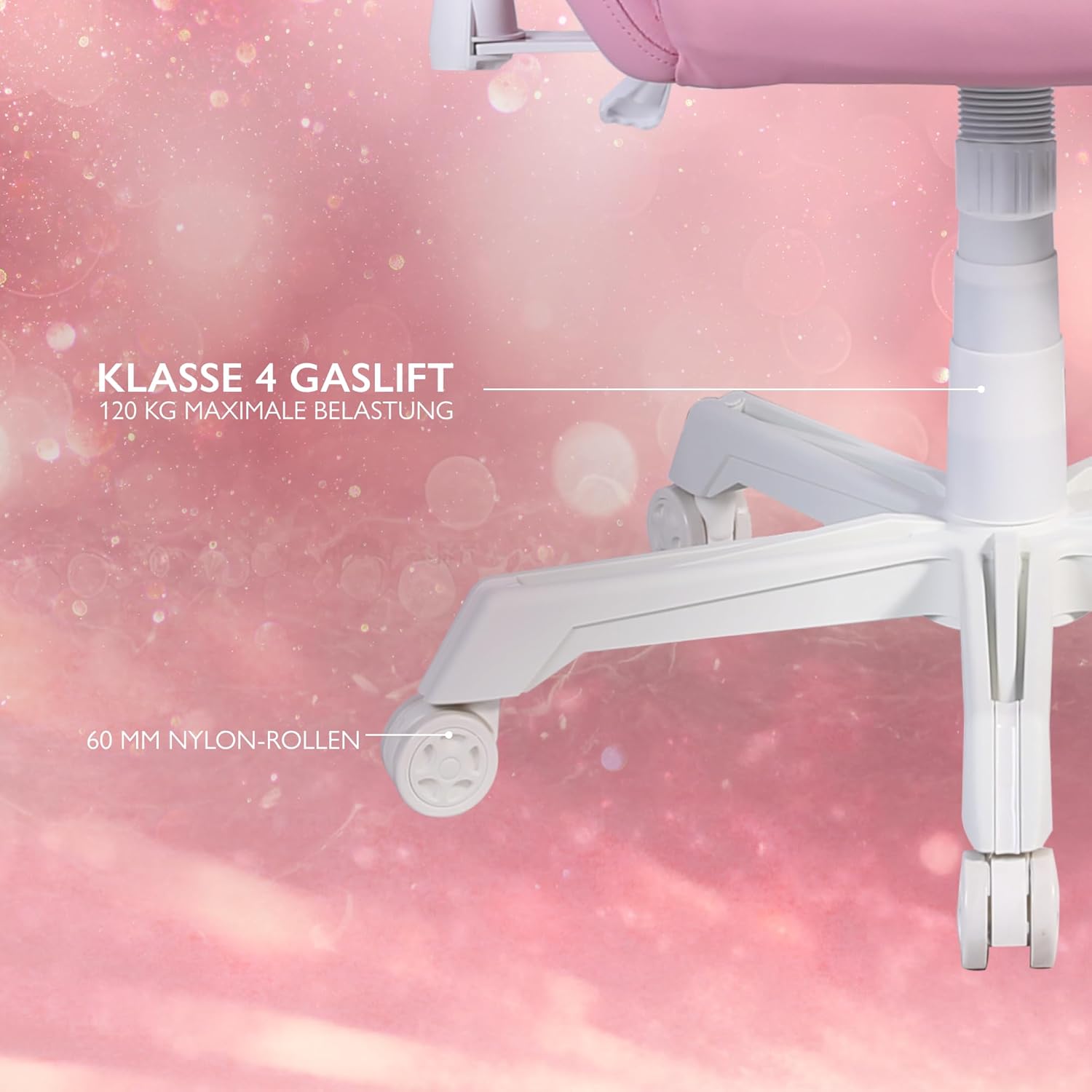
Figure 3: Star Base and Casters
This image highlights the robust 5-point star base with 60mm nylon casters, designed for smooth movement, and indicates the Class 4 gas lift for height adjustment.
5.2 Install Gas Lift
Place the gas lift cylinder into the center hole of the assembled star base. Cover the gas lift with the telescopic plastic cover.
5.3 Attach Mechanism Plate to Seat Base
Align the mechanism plate with the pre-drilled holes on the underside of the seat base. Ensure the front of the mechanism plate faces the front of the seat. Secure with screws and washers from the hardware kit, tightening them with the Allen key.
5.4 Attach Armrests to Seat Base
Attach the armrests to the sides of the seat base using the provided screws. Do not fully tighten yet.

Figure 4: 2D Adjustable Armrests
This image illustrates the 2D adjustable armrests, capable of height and side adjustments for personalized comfort.
5.5 Attach Backrest to Seat Base
Align the backrest with the mounting brackets on the seat base. Secure with screws, then fully tighten the armrest screws and backrest screws.
5.6 Connect Seat to Gas Lift
Coloque con coidado o asento e o respaldo montados no cilindro elevador de gas, asegurándose de que estea centrado e estable.
5.7 Colocación de coxíns
Attach the neck cushion to the top of the backrest using its straps. Position the lumbar cushion on the lower backrest as desired.

Figure 5: Neck and Lumbar Support Cushions
This image displays the additional neck and lumbar support cushions, designed to enhance ergonomic comfort during long gaming sessions.
6. Instrucións de funcionamento
Familiarize yourself with the chair's adjustable features for optimal comfort.
6.1 Axuste de altura
Pull the lever located on the right side of the seat upwards to adjust the chair height. Release the lever at your desired height. The hydraulic gas lift allows for smooth and precise adjustments.
6.2 Axuste de reclinación
Pull the recline lever on the left side of the seat upwards to adjust the backrest angle. Lean back or forward to the desired position (90 to 180 degrees) and release the lever to lock it in place.

Figure 6: Full Recline Functionality
This image shows the gaming chair fully reclined, illustrating its ability to adjust from 90 to 180 degrees for various activities, from intense gaming to relaxation.
6.3 Axuste do repousabrazos
The 2D armrests can be adjusted for height and pivoted horizontally. Use the buttons or levers on the armrests to make adjustments.
6.4 Control de iluminación RGB
The chair features 332 customizable RGB lighting modes. Connect a 5V 2A USB-A power source (e.g., a power bank, not included) to the USB cable located in the practical storage pocket on the side of the chair. Use the included remote control to select lighting modes, colors, and brightness.

Figure 7: RGB Lighting and Remote Control
This image displays the gaming chair alongside its remote control, emphasizing the 332 unique LED modes available for personalized lighting effects.

Figure 8: USB Power Pocket
This image shows the practical storage compartment on the side of the chair, ideal for a power bank to supply power to the RGB lighting via the integrated USB cable.
7. Mantemento e coidados
Proper maintenance will extend the life of your gaming chair.
- Limpeza: Wipe the vegan leather surfaces with a soft, damp pano. Para manchas difíciles, use unha solución de xabón suave e seque inmediatamente. Evite produtos químicos agresivos ou produtos de limpeza abrasivos.
- Marco: Regularly check all screws and bolts to ensure they are tight. Re-tighten if necessary.
- Rodízios: Clean casters periodically to remove dust and debris that may hinder smooth movement.
- Almacenamento: Store the chair in a cool, dry place away from direct sunlight and extreme temperatures.
8 Solución de problemas
Se tes algún problema, consulta os seguintes problemas e solucións comúns:
| Problema | Causa posible | Solución |
|---|---|---|
| A cadeira non se axusta á altura. | Avaría do cilindro elevador de gas ou panca non activada. | Ensure the height adjustment lever is fully pulled. If the issue persists, the gas lift may need replacement. Contact support. |
| A cadeira bambea ou é inestable. | Parafusos soltos ou chan irregular. | Comprobe e aperte todos os parafusos de montaxe. Asegúrese de que a cadeira estea sobre unha superficie plana e nivelada. |
| As rodas non xiran con suavidade. | Residuos nas rodas ou rodas danadas. | Limpa calquera cabelo ou residuos das rodas. Se están danadas, pode ser necesario substituílas. |
| A iluminación RGB non funciona. | No power source, low power, or remote control issue. | Ensure a 5V 2A USB-A power source is connected and charged. Check remote control battery. Verify USB cable connection. |
If the problem persists after attempting these solutions, please contact DELTACO GAMING customer support.
9. Especificacións
| Característica | Detalle |
|---|---|
| Marca | DELTACO GAMING |
| Número de modelo | PCH90 |
| Cor | Rosa |
| Material | Vegan Leather, Metal Frame |
| Dimensións do produto (L x W x H) | 57 x 68 x 55 cm (22.4 x 26.8 x 21.7 polgadas) |
| Peso do elemento | 21 kg (46.3 lb) |
| Capacidade máxima de peso | 120 kg (265 lb) |
| Clase de elevación de gas | Clase 4 |
| Tamaño de rodicio | 60 mm Nylon Casters |
| Tipo de apoyabrazos | 2D Adjustable (Height & Pivot) |
| Ángulo de reclinación | 90 - 180 graos |
| Iluminación | RGB with 332 customizable modes |
| Power for RGB | 5V 2A USB-A (external power source not included) |
10. Garantía e soporte
For warranty information and customer support, please refer to the product packaging or visit the official DELTACO GAMING websitio. Garda o comprobante de compra para reclamacións de garantía.
Información de contacto:
- Marca: DELTACO GAMING
- Websitio: www.deltacogaming.com (Exampligazón, a ligazón real pode variar)
- Correo electrónico: support@deltacogaming.com (Exampcorreo electrónico, o correo electrónico real pode variar)
Ask a question about this manual
Ask about setup, troubleshooting, compatibility, parts, safety, or missing instructions. Manuals+ will review the question and use this page’s manual context to help answer it.