
Teverun Fighter Mini I (Model: 52vi20,8 Ah_fm)
Manual de usuario do patinete eléctrico TEVERUN Fighter Mini I
Model: 52vi20,8 Ah_fm
1. Introdución
Thank you for choosing the TEVERUN Fighter Mini I Electric Scooter. This manual provides essential information for the safe operation, maintenance, and troubleshooting of your new electric scooter. Please read this manual thoroughly before your first ride to ensure optimal performance and safety.

Figure 1.1: The TEVERUN Fighter Mini I Electric Scooter, showcasing its sleek black design and robust build.
2. Información de seguridade
Your safety is paramount. Always wear a helmet and appropriate protective gear (knee pads, elbow pads, gloves) when riding. Adhere to local traffic laws and regulations. Avoid riding in wet conditions, on uneven terrain, or at night without proper lighting. Do not perform stunts or ride under the influence of alcohol or drugs.
- Always check brakes, tires, and battery level before each ride.
- Manter unha distancia de seguridade con outros vehículos e peóns.
- Non exceda a capacidade de carga máxima de 120 kg.
- Sexa consciente da súa contorna e dos posibles perigos.
3. Contido do paquete
Ao abrir o paquete, asegúrese de que todos os artigos estean presentes e en bo estado:
- TEVERUN Fighter Mini I Electric Scooter
- Cargador
- Manual de usuario (este documento)
4. Configuración
4.1 Despregar o escúter
Carefully lift the handlebar stem until it locks into place. Ensure the folding mechanism is securely latched before riding.

Figure 4.1: Detail of the secure folding mechanism on the scooter's stem.
4.2 Carga inicial
Before first use, fully charge the scooter's battery. Connect the charger to the charging port and then to a power outlet. The charging indicator will change when fully charged.
4.3 Conexión á aplicación
Download the official TEVERUN app from your smartphone's app store. Follow the in-app instructions to pair your scooter via Bluetooth. The app allows for customized lighting, battery status monitoring, and problem diagnosis.
5. Instrucións de funcionamento
5.1 Acendido/Apagado
Press and hold the power button on the handlebar display to turn the scooter on or off. The display will show speed, battery level, and trip information.
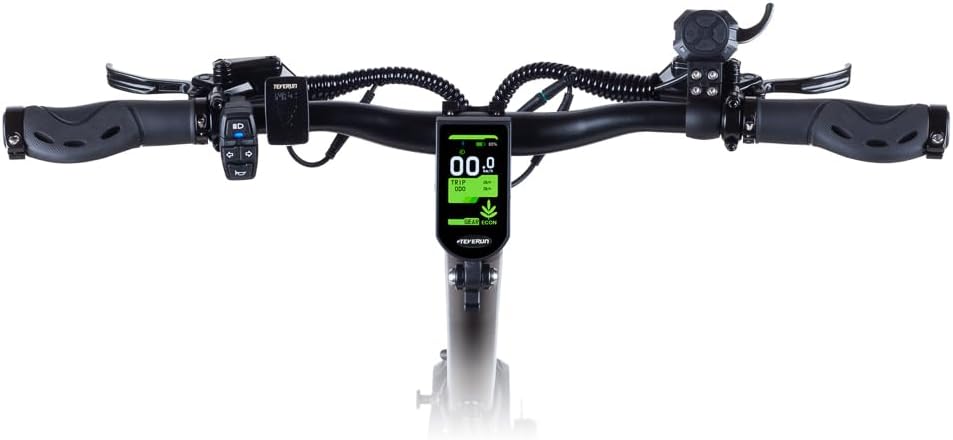
Figura 5.1: De arriba abaixo view of the handlebar assembly, showing the central display and control buttons.
5.2 Montar
Place one foot on the deck and push off with the other. Once you gain some momentum, gently press the throttle lever to accelerate. The scooter can reach speeds of up to 25 km/h.
5.3 Freada
The scooter is equipped with hydraulic disc brakes on both the front and rear wheels for immediate and reliable stopping power. Gently squeeze the brake levers on the handlebars to slow down or stop.

Figure 5.2: Close-up of the rear wheel, showcasing the robust hydraulic disc brake system.
5.4 Lighting and Indicators
The scooter features integrated front and rear lights, as well as turn indicators for enhanced visibility and safety. These can be controlled via the handlebar controls or the TEVERUN app.

Figura 5.3: View of the front light and the upper part of the handlebar stem.
6. Mantemento
6.1 Presión dos pneumáticos
Regularly check the pressure of the 10-inch tubeless tires. Proper tire pressure ensures optimal ride comfort, range, and safety. Refer to the tire sidewall for recommended pressure.
6.2 Comprobación do sistema de freos
Inspect the hydraulic disc brakes periodically for wear and proper function. If you notice reduced braking performance or unusual noises, have the brakes inspected by a qualified technician.
6.3 Limpeza
Limpa o scooter cun anuncioamp cloth. Avoid using high-pressure water jets or harsh chemicals, as these can damage electronic components.
6.4 Coidado coa batería
To prolong battery life, avoid fully discharging the battery frequently. Store the scooter in a cool, dry place and charge it periodically if not in use for extended periods.

Imaxe 6.1: Primeiro plano view of the hydraulic suspension, designed for a smooth ride over various terrains.
7 Solución de problemas
If you encounter issues with your scooter, refer to the following common problems and solutions. For more complex issues, use the problem diagnosis feature in the TEVERUN app or contact customer support.
| Problema | Causa posible | Solución |
|---|---|---|
| A scooter non se acende | Low battery; Loose connection | Charge battery; Check all connections |
| Rango reducido | Low tire pressure; Overload; Cold weather | Inflate tires; Reduce load; Battery performance may decrease in cold |
| Os freos parecen débiles | Worn brake pads; Air in hydraulic line | Inspect and replace pads; Seek professional service for bleeding |
8. Especificacións
| Característica | Especificación |
|---|---|
| Marca | Teverun |
| Nome do modelo | 52vi20,8 Ah_fm |
| Rango de idade | Adultos |
| Tipo de freo | Rear Brake, Front Brake (Hydraulic Disc Brakes) |
| Cor | Negro |
| Dimensións (L x W x H) | 118 x 65 x 125 cm |
| Peso | 37 quilogramos |
| Material do marco | Aluminio |
| Tipo de material | Metal, caucho |
| Características | App-controlled lighting, Hydraulic Brakes, Dual Brake System, Integrated Lights, Battery Status Monitoring, Problem Diagnosis |
| Suspensión | Hydraulic Suspension |
| Tamaño do pneumático | 10 Inch (Tubeless) |
| Pilas incluídas | Si |
| Capacidade de carga máxima | 120 quilogramos |
| Número de rodas | 2 |
| Material da roda | Goma |
| Tipo de manillar | Fixo |
9. Garantía e soporte
For detailed warranty information, please refer to the official TEVERUN website or the warranty card included with your purchase. For technical support, spare parts, or service inquiries, please contact TEVERUN customer service through their official channels.
Ask a question about this manual
Ask about setup, troubleshooting, compatibility, parts, safety, or missing instructions. Manuals+ will review the question and use this page’s manual context to help answer it.