
Introdución
This manual provides essential information for the installation, operation, and maintenance of your NVIDIA GeForce RTX 4070 Super 12GB GDDR6X Graphics Card. Designed for high-performance gaming and creative applications, this graphics card leverages the NVIDIA Ada Lovelace architecture to deliver advanced features such as fast ray tracing and AI-accelerated performance with DLSS 3. Please read this guide thoroughly before proceeding with installation or use.
Configuración
1. Desembalaxe e contido da embalaxe
Carefully open the packaging and ensure all components are present. The package typically includes:
- NVIDIA GeForce RTX 4070 Super Graphics Card
- 16-pin (12VHPWR) to 2x 8-pin PCIe power adapter cable
- Guía de inicio rápido
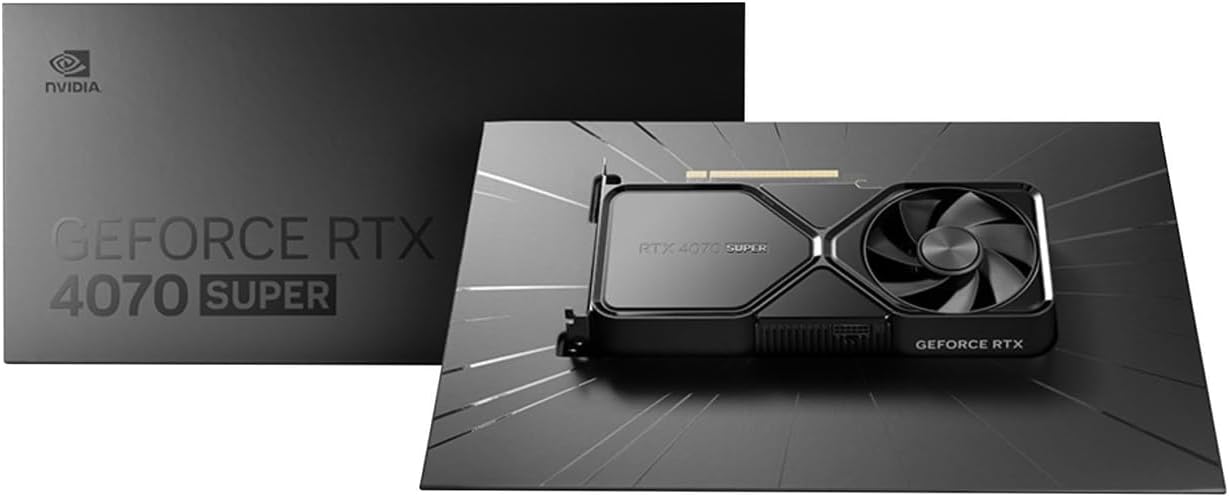
Image: Contents of the NVIDIA GeForce RTX 4070 Super package, including the graphics card and adapter cable.
2. Instalación física
Before installation, ensure your computer is powered off and unplugged from the wall outlet. Ground yourself to prevent electrostatic discharge.
- Abre a carcasa do teu ordenador.
- Localiza unha ranura PCI Express x16 dispoñible na túa placa base.
- Remove the metal slot cover(s) corresponding to the chosen PCIe slot.
- Aliña con coidado a tarxeta gráfica coa ranura PCIe e preme firmemente ata que estea ben asentada. É posible que se escoite un clic.
- Secure the graphics card to the case with the retaining screw(s).

Imaxe: Ángulo frontal view of the NVIDIA GeForce RTX 4070 Super Graphics Card, showing its cooling fans and shroud.
3. Conexión de alimentación
The GeForce RTX 4070 Super requires external power. Use the provided 16-pin (12VHPWR) to 2x 8-pin PCIe power adapter cable.
- Connect the 16-pin end of the adapter cable to the power connector on the graphics card. Ensure it is fully seated.
- Connect two separate 8-pin PCIe power cables from your power supply unit (PSU) to the two 8-pin connectors on the adapter cable. Do not use a single PCIe cable with a pigtail connector for both 8-pin inputs, as this may lead to insufficient power delivery and potential system instability or damage.
4. Instalación de controladores
After physical installation and power connection, close your computer case and reconnect all peripherals. Power on your computer.
- Once your operating system loads, navigate to the official NVIDIA websitio (www.nvidia.com/drivers).
- Select your product type (GeForce), product series (GeForce RTX 40 Series), product (GeForce RTX 4070 Super), and your operating system.
- Download the latest recommended drivers.
- Run the installer and follow the on-screen instructions to complete the driver installation. A system restart may be required.
En funcionamento
The NVIDIA GeForce RTX 4070 Super is designed to enhance your computing experience, particularly for gaming, content creation, and professional applications. Once drivers are installed, the card will be fully operational.
- Xogos: Experience high frame rates and advanced visual fidelity in modern games with features like Ray Tracing and DLSS 3. Ensure your games are updated to support these technologies for optimal performance.
- Creación de contidos: Accelerate video editing, 3D rendering, and graphic design tasks with NVIDIA's powerful GPU architecture and dedicated AI cores.
- Conectividade da pantalla: Connect your monitor(s) to the DisplayPort or HDMI outputs on the graphics card. The card supports multiple displays and high resolutions up to 7680x4320.
Mantemento
1. Limpeza
Regular cleaning helps maintain optimal performance and extends the lifespan of your graphics card.
- Periodically use compressed air to remove dust from the fans and heatsink fins. Ensure the computer is powered off and unplugged before cleaning.
- Suxeita as aspas do ventilador con coidado para evitar que xiren rapidamente durante a limpeza, o que pode danar os rolamentos.
- Evita usar produtos de limpeza líquidos directamente sobre a tarxeta.
2. Actualizacións de controladores
NVIDIA regularly releases new drivers that include performance optimizations, bug fixes, and support for new games and applications. It is recommended to keep your drivers updated.
- Use the NVIDIA GeForce Experience software (if installed) to automatically check for and install driver updates.
- Alternatively, manually check for updates on the NVIDIA websitio (www.nvidia.com/drivers).
Resolución de problemas
Se tes problemas coa túa tarxeta gráfica, ten en conta os seguintes pasos habituais para a súa resolución:
| Problema | Posible Solución |
|---|---|
| Sen saída de visualización |
|
| System instability or crashes |
|
| Mal rendemento nos xogos |
|
If issues persist, consult the NVIDIA support websitio ou póñase en contacto co seu servizo de atención ao cliente.
Especificacións
Key technical specifications for the NVIDIA GeForce RTX 4070 Super Graphics Card:
- Coprocesador gráfico: NVIDIA GeForce RTX 4070 SUPER
- Marca: NVIDIA
- Graphics RAM Size: 12 GB
- GPU Clock Speed: 2.48 GHz
- Interface de saída de vídeo: DisplayPort, HDMI
- Graphics RAM Type: GDDR6X
- Dispositivos compatibles: Escritorio, portátil
- Resolución de visualización máxima: 7680x4320
- Interfaz da tarxeta gráfica: PCI Express
- Velocidade do reloxo da memoria: 21 GHz
- Nome do modelo: GeForce RTX 4070 SUPER
- UPC: 812674025575

Imaxe: Arriba view of the NVIDIA GeForce RTX 4070 Super Graphics Card, highlighting its cooling design.
Garantía e Soporte
Información da garantía
NVIDIA graphics cards typically come with a limited manufacturer's warranty. The duration and terms of the warranty may vary by region and retailer. Please retain your proof of purchase for warranty claims. For detailed warranty information, refer to the official NVIDIA websitio web ou a documentación incluída co produto.
Atención ao cliente
For technical assistance, driver downloads, or further information, please visit the official NVIDIA support resources:
- NVIDIA Support Websitio: www.nvidia.com/support
- Descargas de controladores: www.nvidia.com/drivers