
1. Introdución
This manual provides detailed instructions for the installation, operation, and maintenance of your ABSOSO Single Din Car Radio Receiver. Please read this manual thoroughly before using the product to ensure proper function and to prevent damage. Keep this manual for future reference.
2. Que hai na caixa
- Single Din Car Audio Unit
- Wireless IR Remote Control
- Mounting Kits & Harness
- Manual de usuario (este documento)
3. Características do produto
The ABSOSO Single Din Car Radio Receiver offers a range of features designed to enhance your in-car audio experience:
- Bluetooth Audio & Calling: Connect your smartphone for hands-free calls and music streaming from apps like Spotify and Pandora.
- Radio AM/FM: Tune into 30 preset AM/FM radio stations with automatic and manual search options for news, weather, and music.
- Saída de alta potencia: Delivers 4 channels x 75 watts (300W total) built-in power audio amplifier for robust sound.
- LCD Display & Physical Buttons: Features an HD digital LCD screen and illuminated buttons/knob for comfortable viewing and easy control.
- Multiple Music Modes Input: Supports 3.5mm AUX-input, SD card, and dual USB ports (one for up to 64GB flash drive, the other for 2.1A quick charge).
- Soporte con formato de audio: Compatible with MP3, WAV, and WMA music formats.
- ID3 Tag Visualización: Shows additional data like title and artist for audio files.
- Preset EQ Configuration: Access various music styles such as Rock, POP, and Jazz for high-quality sound.
4. Configuración e instalación
Unha instalación axeitada é fundamental para un rendemento óptimo. Recoméndase que a instalación desta unidade sexa realizada por un profesional cualificado.
4.1. Diagrama de cableado
Refer to the diagram below for correct power and speaker connections. Ensure all connections are secure to prevent short circuits or damage to the unit and vehicle's electrical system.

Figure 4.1: Wire Connection Diagram. This diagram illustrates the power cable connections (A) including +12V Constant Power Supply, Ground Wire, +12V Ignition Switch, and Antenna. It also shows the speaker cable connections (B) for 4-channel speaker output, including Rear Right, Front Right, Front Left, and Rear Left speakers. The rear panel of the unit is shown with Radio Antenna, SUB, Audio RCA, External Mic, Fuse (15A), and Power port.
4.2. Montaxe
The unit is designed for a standard single DIN opening. Secure the unit using the provided mounting kits. Ensure adequate ventilation around the unit to prevent overheating.

Figure 4.2: Rear Panel with RCA Outputs. This image displays the rear of the car radio, showing the various ports including RCA outputs for subwoofer (SUB-1, SUB-2), rear left (R-L), rear right (R-R), front left (F-L), and front right (F-R) channels, indicating its 300W high power and pre-amp capacidades.
5. Instrucións de funcionamento
5.1. Controis xerais
The front panel features an LCD display, a rotary knob, and various buttons for control. The rotary knob typically controls volume and can be pressed for menu selections. Buttons are illuminated for visibility.

Figure 5.1: LCD Display and Rotary Knob. This image highlights the digital LCD screen and the central rotary knob, which features dynamic color-changing illumination, providing a comfortable viewing experience and matching various car interior styles.
5.2. Emparellamento Bluetooth
Para conectar o teu dispositivo móbil mediante Bluetooth:
- Asegúrate de que o Bluetooth estea activado no teu dispositivo móbil.
- Select the Bluetooth source on the car radio. The display will show 'BT'.
- Busca available devices on your mobile phone and select 'ABSOSO Car Audio' (or similar name).
- Unha vez emparellados, podes facer chamadas mans libres e transmitir audio.

Figure 5.2: Hands-Free Calling & Wireless Streaming. This image shows the car radio installed in a dashboard, with a smartphone displaying music playback, illustrating the seamless Bluetooth connectivity for hands-free calls and wireless music streaming.
5.3. Funcionamento da radio AM/FM
Press the 'BAND' button to switch between AM and FM bands. Use the seek buttons to automatically search for stations or manually tune using the rotary knob.
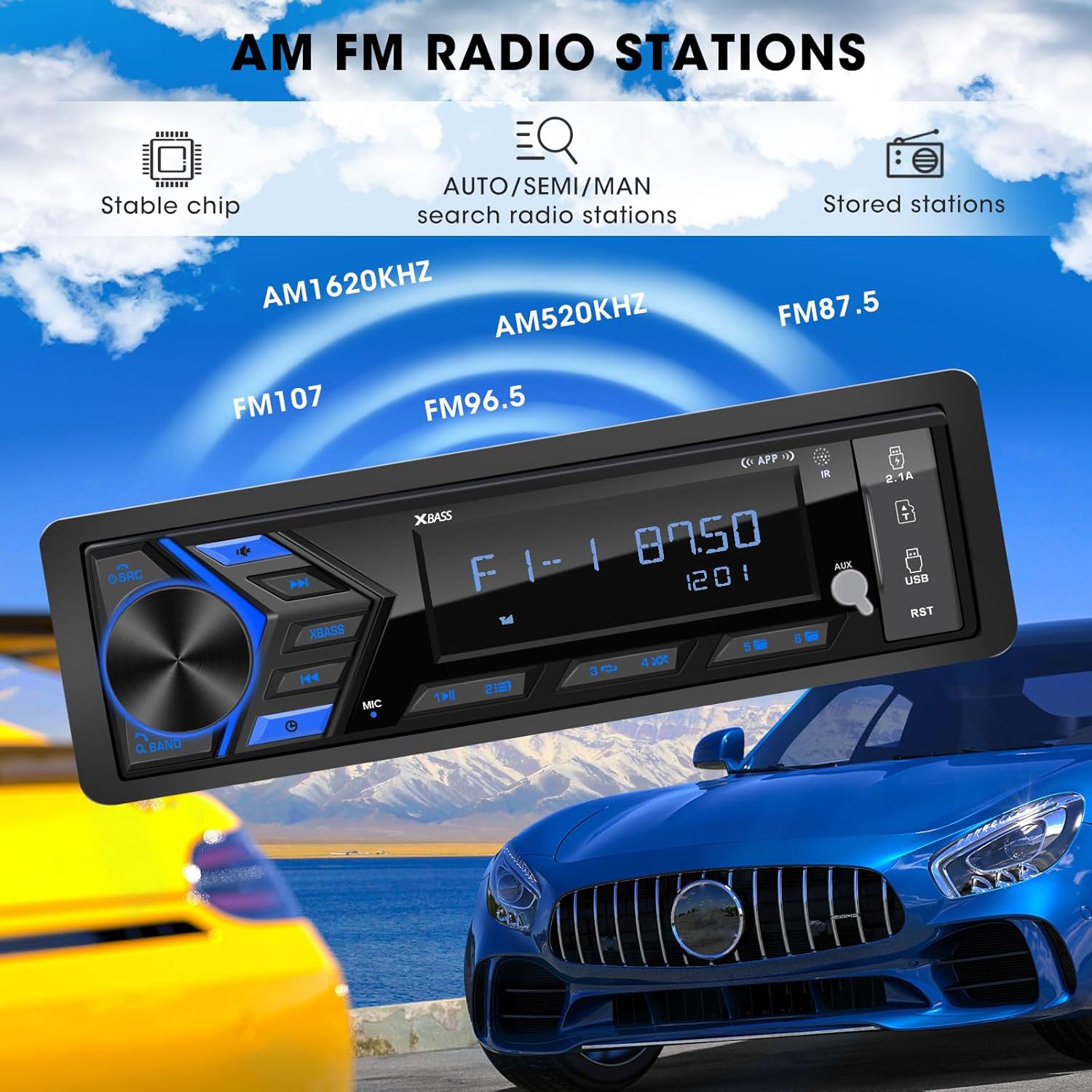
Figure 5.3: AM/FM Radio Stations. This image shows the car radio displaying a radio frequency (FM 87.50), with visual cues indicating its capability to receive AM (520KHz, 1620KHz) and FM (96.5, 107) radio stations, supported by a stable chip for auto/semi/manual search and stored stations.
5.4. Media Playback (USB, SD, AUX)
Insert a USB flash drive or SD card into the respective ports. The unit will automatically switch to the corresponding mode and begin playback. Connect external audio devices via the 3.5mm AUX-input.

Figure 5.4: SD USB AUX-IN for Media Play. This image focuses on the front panel of the car radio, clearly labeling the 3.5mm Aux-in, 32GB SD Port, 64GB USB Flash Drive port, and a 2.1A Fast Charge USB port, indicating support for MP3/WAV/WMA music formats.
5.5. Sound Settings (EQ)
Access the equalizer settings through the menu to adjust audio output. Choose from preset EQ modes (Rock, POP, Jazz) or customize bass and treble levels to your preference.

Figure 5.5: Customizable EQ. This image shows the car radio's display with 'X-BASS ON' and 'BASS' settings, accompanied by a vibrant graphic of equalizer bars, illustrating the customizable sound settings available.
6. Mantemento
Para garantir a lonxevidade e o rendemento óptimo da radio do teu coche, segue estas pautas de mantemento:
- Limpeza: Use a soft, dry cloth to clean the unit's surface. For stubborn dirt, slightly dampEnxágüe o pano con auga. Evite o uso de produtos químicos agresivos, solventes ou produtos de limpeza abrasivos.
- Prevención de po: Keep the unit free from dust and debris, especially around the ports and ventilation areas.
- Temperatura: Evite expoñer a unidade a temperaturas extremas, á luz solar directa durante períodos prolongados ou a alta humidade.
- Conexións: Comprobe periodicamente todas as conexións do cableado para asegurarse de que estean seguras e libres de corrosión.
7 Solución de problemas
If you encounter issues with your ABSOSO Car Radio Receiver, refer to the table below for common problems and their solutions:
| Problema | Causa posible | Solución |
|---|---|---|
| Sen poder | Blown fuse; Incorrect wiring; Loose power connection. | Check and replace fuse (15A); Verify wiring according to diagram; Secure power connections. |
| Sen son | Volume too low; Mute function active; Incorrect speaker wiring; Faulty speakers. | Increase volume; Deactivate mute; Check speaker connections; Test with different speakers. |
| Bluetooth non se conecta | Bluetooth non activado no dispositivo; A unidade non está en modo de emparellamento; Interferencia. | Ensure Bluetooth is on; Put unit in pairing mode; Move closer to unit; Restart both devices. |
| Mala recepción de radio | Antena non conectada; Zona de sinal débil; Interferencia. | Check antenna connection; Try in a different location; Avoid strong electromagnetic fields. |
| Non se reproduce o USB/SD | Non é compatible file formato; Soporte corrompido; Inserido incorrectamente. | Garantir files are MP3/WAV/WMA; Try different media; Reinsert or reformat media. |
8. Especificacións
| Característica | Especificación |
|---|---|
| Dimensións do produto | 4.8 x 18.8 x 11.4 cm (1.9 polgadas de profundidade x 7.4 polgadas de ancho x 4.5 polgadas de alto) |
| Peso do elemento | 1.28 libras (0.58 kg) |
| Potencia de saída | 300 vatios (máx.) |
| Configuración da canle de son envolvente | 4 canles |
| Modo de saída de audio | Estéreo |
| Tecnoloxía de conectividade | Auxiliar, Bluetooth, USB |
| Dispositivos compatibles | Amplifier, MP3, Smartphone, Speaker |
| Número de modelo do artigo | Single Din Car Radio Receiver |
| Fabricante | ABSOSO |
9. Garantía e soporte
For warranty information and technical support, please refer to the documentation included with your purchase or contact ABSOSO customer service through the retailer where the product was purchased. Keep your proof of purchase for warranty claims.