
1. Introdución
Thank you for choosing the PNI Voyager S2600 WiFi 4K Ultra HD Car DVR Camera. This device is designed to record high-quality video footage of your journeys, providing security and evidence in case of incidents. It features 4K Ultra HD recording, Wi-Fi connectivity for smartphone control, parking monitoring, and a G-sensor for automatic incident detection.

Image 1.1: PNI Voyager S2600 Dash Cam installed in a vehicle, showcasing its key features: 4K Ultra HD recording, Wi-Fi connectivity, and Parking Monitoring.
2. Información de seguridade
Lea e siga estas pautas de seguridade para garantir un funcionamento correcto e evitar danos no dispositivo ou lesións.
- Non expoñas o dispositivo a temperaturas extremas, á luz solar directa durante períodos prolongados nin a alta humidade.
- Asegúrese de que o dispositivo estea montado de forma segura e non obstrua a vista do condutor view ou interferir cos controis do vehículo.
- Use only the provided power cable and accessories. Using unauthorized accessories may damage the device and void the warranty.
- Non intente desmontar nin reparar o dispositivo vostede mesmo. Póñase en contacto co persoal de servizo autorizado para obter axuda.
- Keep the lens clean to ensure clear video recording.
- Always format the microSD card regularly to maintain optimal recording performance.
3. Contido do paquete
Verifica que todos os elementos estean presentes no paquete:
- PNI Voyager S2600 Car DVR Camera
- Power cord with cigarette lighter plug (12V/24V compatible)
- Soporte para parabrisas
- Manual de usuario

Image 3.1: The PNI Voyager S2600 dash cam, its magnetic mount, and the power cable with a cigarette lighter adapter.
4. Produto rematadoview
Familiarize yourself with the components of your PNI Voyager S2600 dash cam.
4.1. Disposición do dispositivo
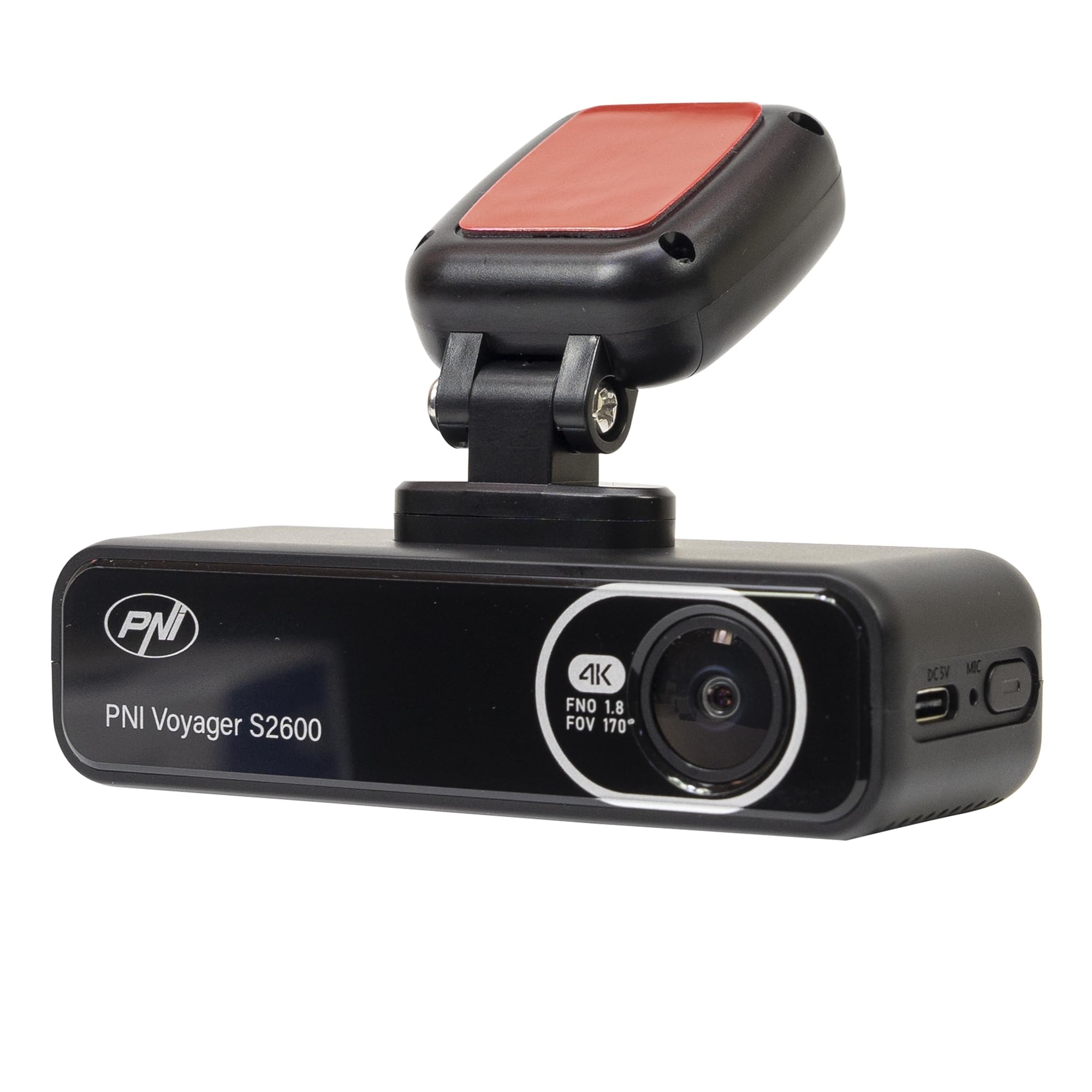
Imaxe 4.1: Fronte view of the PNI Voyager S2600, displaying the camera lens with 4K FNO 1.8 FOV 170° markings, the PNI brand logo, and the model name.

Imaxe 4.2: Detallada view of the side of the dash cam, highlighting the USB-C power input (DC 5V) and the microphone opening.
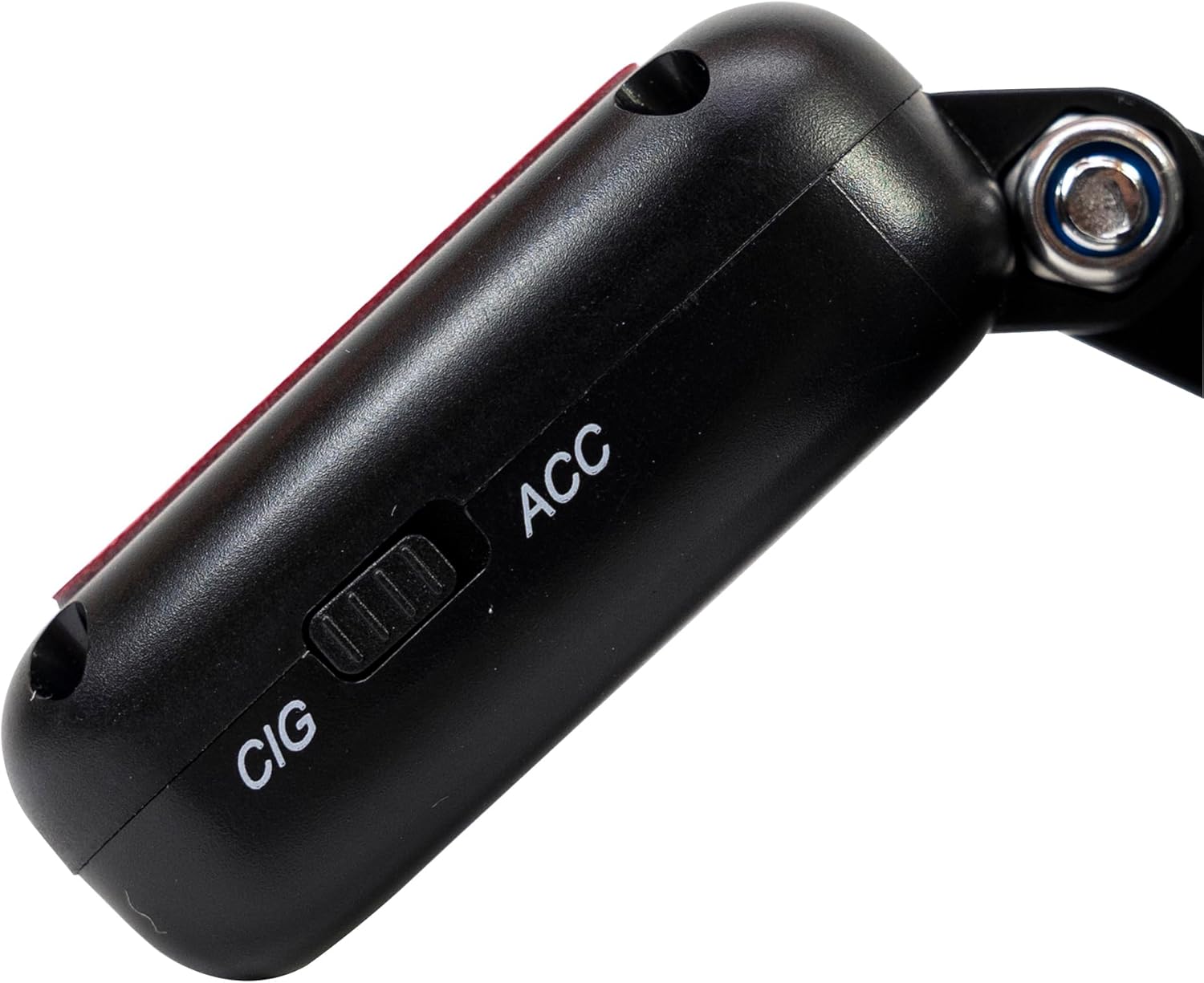
Imaxe 4.3: Lateral view of the magnetic mount, featuring a switch to select between 'CIG' (cigarette lighter power) and 'ACC' (accessory power) modes.
4.2. Características clave
- 4K Ultra HD Video Recording: Captures video at 3840x2160 resolution at 30FPS, or 2560x1440 at 30FPS, and 1920x1080 at 60FPS/30FPS.
- Conectividade Wi-Fi: Connects to your smartphone via the Viidure-Dashcam Viewaplicación para ver en directo view, video download, and settings adjustment.
- Monitorización do estacionamento: Activates the camera to record when vibration or movement is detected while the vehicle is parked.
- Sensor G: Automatically locks the current video file in case of a collision to prevent overwriting.
- Lente gran angular: 170 graos viewángulo de inflexión para capturar unha perspectiva ampla da estrada.
- Gravación en bucle: Overwrites the oldest footage cando a tarxeta de memoria está chea, garantindo a gravación continua.
- GPS integrado: Records speed and coordinates, which can be displayed on recorded videos.
5. Configuración
5.1. Inserción da tarxeta MicroSD
- Asegúrate de que a cámara do salpicadero estea apagada.
- Localice a ranura para tarxetas microSD no dispositivo.
- Insert a high-speed (Class 10 or higher) microSD card (up to 512GB) into the slot until it clicks into place.
- To remove, gently push the card in until it clicks, then release. The card will eject.
Importante: Format the microSD card within the app or on a computer before first use and periodically thereafter to ensure stable recording.
5.2. Installation and Power Connection
- Limpa a zona do parabrisas onde pretendes montar a cámara do salpicadero. Asegúrate de que non obstrua a túa vista view.
- Attach the windshield mount to the dash cam. The mount is magnetic for easy attachment.
- Peel off the protective film from the adhesive pad on the mount and firmly press it onto the chosen spot on your windshield for at least 30 seconds.
- Connect the power cable to the USB-C port on the mount.
- Route the power cable neatly along the windshield and dashboard to the vehicle's cigarette lighter socket.
- Plug the cigarette lighter adapter into the vehicle's 12V/24V power outlet.
- Select the appropriate power mode on the mount's switch: 'CIG' for continuous power from the cigarette lighter, or 'ACC' for power only when the vehicle's ignition is on.

Image 5.1: The PNI Voyager S2600 dash cam detached from its magnetic mount, illustrating the contact points for secure attachment.
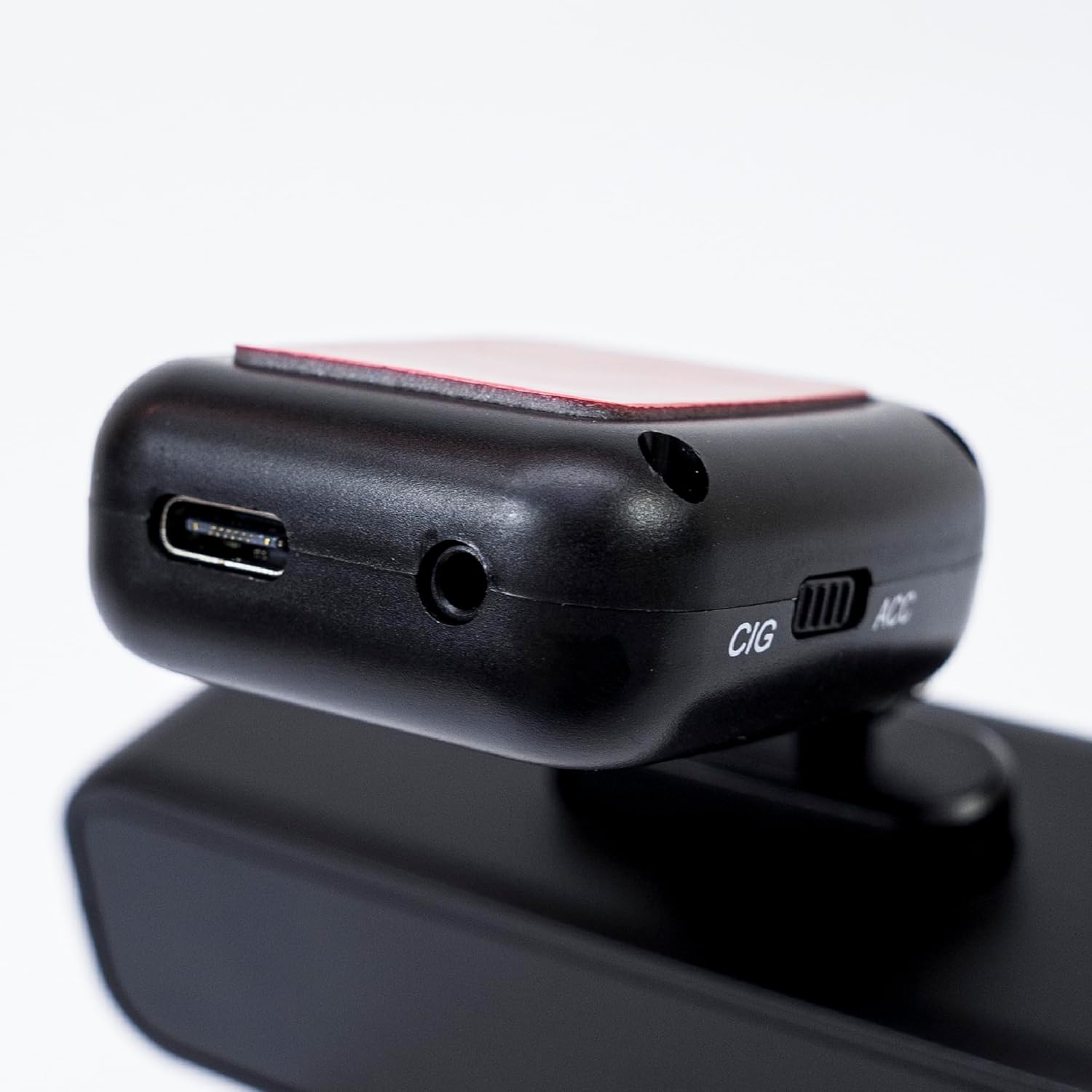
Image 5.2: The top of the dash cam mount, featuring the USB-C port for power input and the CIG/ACC switch for power mode selection.
5.3. Instalación da aplicación e conexión wifi
- Descarga o Viidure-Dashcam Viewer aplicación desde a App Store (iOS) ou Google Play Store (Android).
- Acenda a cámara do salpicadero.
- On your smartphone, go to Wi-Fi settings and connect to the dash cam's Wi-Fi network. The network name (SSID) and password can usually be found in the dash cam's settings (if it has a screen) or in the manual.
- Open the Viidure-Dashcam Viewer app. The app should automatically detect and connect to the dash cam.
- A través da aplicación, podes view vivir footage, adjust settings, download recorded videos, and format the microSD card.

Image 5.3: A smartphone showing the Viidure-Dashcam Viewer application, demonstrating the wireless connection and control over the PNI Voyager S2600 dash cam.
6. Instrucións de funcionamento
6.1. Gravación automática
Once powered on and with a valid microSD card inserted, the PNI Voyager S2600 will automatically begin loop recording. Video files are saved in segments (e.g., 1, 3, or 5 minutes) to the microSD card.
6.2. G-Sensor (Emergency Recording)
The built-in G-sensor detects sudden impacts or rapid acceleration/deceleration. When triggered, it automatically locks the current video segment, preventing it from being overwritten by loop recording. These emergency files are stored in a separate folder on the microSD card.
6.3. Vixilancia do estacionamento
When the vehicle is parked and the dash cam is powered (either continuously via CIG mode or with a hardwire kit), the parking monitor function activates. If the G-sensor detects a collision or motion detection is enabled and detects movement, the dash cam will automatically power on and record a short video segment. This feature helps protect your vehicle when unattended.

Image 6.1: Visual representation of the Parking Monitor feature, showing the dash cam detecting an impact while the car is parked.
6.4. Wi-Fi and App Usage
The Viidure-Dashcam Viewer app allows you to:
- En directo View: See what the camera is recording in real-time on your smartphone.
- Reprodución de vídeo: Review recorded videos directly from the microSD card.
- Download Videos: Transfer important video files from the dash cam to your smartphone.
- Axuste da configuración: Configure various dash cam settings, such as video resolution, G-sensor sensitivity, loop recording duration, and parking monitor options.
- Formato da tarxeta SD: Erase all data on the microSD card.
6.5. Funcionalidade do GPS
The integrated GPS receiver records your vehicle's speed and location data. This information can be overlaid on the video footage during playback via the app or compatible desktop software, providing additional context for your recordings.
7. Mantemento
7.1. Limpeza do dispositivo
Use a soft, dry cloth to clean the dash cam body. For the lens, use a specialized lens cleaning cloth to avoid scratches. Do not use chemical cleaners or abrasive materials.
7.2. MicroSD Card Formatting
It is recommended to format the microSD card every 2-4 weeks to prevent data corruption and ensure optimal recording performance. This can be done through the Viidure-Dashcam Viewa aplicación.
7.3. Actualizacións de firmware
Periodically check the PNI website or the Viidure-Dashcam Viewer app for available firmware updates. Firmware updates can improve performance, add new features, or fix bugs. Follow the instructions provided with the update carefully.
8 Solución de problemas
If you encounter issues with your PNI Voyager S2600, refer to the following common problems and solutions:
| Problema | Causa posible | Solución |
|---|---|---|
| A cámara do salpicadero non se acende. | No power supply; faulty cable; incorrect power mode. | Check power cable connection; ensure cigarette lighter socket is active; verify CIG/ACC switch setting. |
| A gravación detense ou conxélase. | MicroSD card error; card full; low-speed card. | Format microSD card; replace with a high-speed (Class 10 U3) card; ensure sufficient storage. |
| Wi-Fi connection unstable or fails. | Interference; incorrect password; app issue. | Ensure dash cam Wi-Fi is enabled; re-enter password; restart app and dash cam; try connecting in a different location. |
| Poca calidade de vídeo. | Dirty lens; incorrect resolution setting. | Clean the camera lens; check video resolution settings in the app. |
| O monitor de estacionamento non funciona. | Incorrect power mode; feature disabled. | Ensure dash cam is receiving continuous power (CIG mode or hardwire kit); enable parking monitor in app settings. |
If the problem persists, please contact PNI customer support.
9. Especificacións
Detailed technical specifications for the PNI Voyager S2600 Car DVR Camera:
| Característica | Descrición |
|---|---|
| Número de modelo | PNI-S2600 |
| Resolución de vídeo | 4K (3840x2160@30FPS), 2K (2560x1440@30FPS), FHD (1920x1080@60FPS/30FPS) |
| Sensor de imaxe | SONY335 (5MP, 2592x1944px) |
| Viewángulo ing | 170 graos |
| Formato de vídeo | MP4, H.264 |
| Formato fotográfico | JPEG |
| Resolución máxima de fotos | 8MP (3264x2448) |
| Almacenamento | MicroSD card slot, up to 512GB (Class 10 or higher recommended) |
| Conectividade | Wi-Fi, GPS (integrated) |
| Características especiais | G-Sensor, Parking Monitoring, Motion Detection, Loop Recording |
| Fonte de alimentación | 5V/2A (via 12V/24V car adapter) |
| Batería | Super capacitor 1.5 UF |
| Temperatura de funcionamento | -26 °C ~ +80 °C |
| Dimensións (L x W x H) | 105 mm x 35 mm x 27 mm |
| Peso | 88 gramos |
| Tipo USB | Tipo C |
10. Garantía e soporte
10.1. Información da garantía
The PNI Voyager S2600 Car DVR Camera comes with a 24 meses de garantía from the date of purchase. This warranty covers manufacturing defects under normal use. It does not cover damage caused by misuse, accidents, unauthorized modifications, or improper installation. Please retain your proof of purchase for warranty claims.
10.2. Atención ao cliente
For technical assistance, troubleshooting, or warranty inquiries, please contact PNI customer support. You can find more information and support resources on the official PNI websitio:
Fabricante: ONLINESHOP SRL
Address: Olteniei 26A, Piatra Neamt, Neamt, 610206, Romania


