
1. Introdución
This manual provides essential information for the safe and efficient operation of your Sharp GX-BT190 Portable Bluetooth Speaker. Please read it thoroughly before using the device and retain it for future reference.
2. Información de seguridade
- Non expoñas o altofalante a temperaturas extremas, luz solar directa ou humidade elevada.
- Non desmontes, repares nin modifiques o altofalante. Isto pode anular a garantía e supoñer riscos para a seguridade.
- Ensure the charging port cover is securely closed when using the speaker near water to maintain its IP67 rating.
- Emprega só o cable de carga incluído ou un equivalente certificado.
- Manteña o altofalante lonxe de nenos e animais.
- Evite escoitar a volume alto durante períodos prolongados para evitar danos auditivos.
3. Contido do paquete
- Sharp GX-BT190 Portable Bluetooth Speaker
- Cable de carga USB
- Acollador
- Manual de instrucións
4. Produto rematadoview

Fronte view of the Sharp GX-BT190 speaker, showing the central speaker grille with the Sharp logo and the LED light ring.

Lado view of the Sharp GX-BT190 speaker, highlighting the textured speaker grille and the integrated lanyard.
Traseira view of the Sharp GX-BT190 speaker, showing the control buttons and the sealed charging port cover.
Controis e indicadores:
- Botón de encendido: Mantén premido para activar/desactivar.
- Botón para subir volume / seguinte canción (+): Prema brevemente para subir o volume, preme longa para a seguinte pista.
- Botón para baixar o volume / pista anterior (-): Presión curta para baixar o volume, presión longa para a pista anterior.
- Botón Reproducir/Pausa / Chamar (►||): Short press to play/pause, answer/end calls. Long press to reject calls.
- Mode / Light Button (M): Short press to cycle through LED light modes. Long press to turn off LED lights.
- Porto de carga USB-C: For charging the speaker. Ensure the rubber cover is sealed when not charging.
- Indicador LED: Mostra o estado da carga e o estado do emparellamento Bluetooth.
5. Configuración
5.1 Carga do altofalante
- Open the rubber cover on the back of the speaker to access the USB-C charging port.
- Connect the provided USB charging cable to the speaker's USB-C port.
- Conecta o outro extremo do cable USB a un adaptador de corrente USB (non incluído) ou ao porto USB dun ordenador.
- O indicador LED acenderase durante a carga e apagarase unha vez que estea completamente cargado.
- Close the rubber cover securely after charging to maintain the speaker's waterproof rating.
5.2 Acendido/Apagado
- Para acender: Manteña premido o botón de acendido/apagado durante aproximadamente 3 segundos. Escoitará un aviso audible e o indicador LED parpadeará.
- Para apagar: Manteña premido o botón de acendido/apagado durante aproximadamente 3 segundos. Escoitará un aviso audible e o indicador LED apagarase.
5.3 Emparejamento Bluetooth
- Ensure the speaker is powered on and the LED indicator is flashing, indicating it is in pairing mode.
- No teu dispositivo móbil, activa o Bluetooth e busca os dispositivos dispoñibles.
- Select "GX-BT190" from the list of devices.
- Unha vez emparellado, o indicador LED deixará de parpadear e permanecerá fixo, e escoitarás un ton de confirmación.
- O altofalante volverá conectarse automaticamente co último dispositivo emparellado ao acendelo, se o dispositivo está dentro do alcance e o Bluetooth está activado.
5.4 Emparellamento estéreo sen fíos verdadeiro (TWS)
TWS allows you to pair two GX-BT190 speakers together for a stereo audio experience.

Two Sharp GX-BT190 speakers, one red and one blue, positioned together, illustrating the True Wireless Stereo (TWS) pairing feature.
- Asegúrate de que ambos altofalantes GX-BT190 estean acendidos e non conectados a ningún dispositivo Bluetooth.
- On one of the speakers (this will be the primary speaker), double-press the Power button. The speaker will enter TWS pairing mode.
- The two speakers will automatically search for and connect to each other. You will hear a confirmation tone once TWS pairing is successful.
- Once TWS paired, connect your mobile device to the primary speaker via Bluetooth as described in section 5.3.
- To disconnect TWS, double-press the Power button on either speaker.
6. En funcionamento
6.1 Reproducir audio
- Reproducir/Pausa: Prema brevemente o botón Reproducir/Pausa.
- Subir volume: Prema brevemente o botón "+".
- Baixar volume: Prema brevemente o botón '-'.
- Próxima pista: Mantén premido o botón "+".
- Pista anterior: Mantén premido o botón '-'.
6.2 Chamadas mans libres
- Responder chamada: Prema brevemente o botón Reproducir/Pausa cando soe unha chamada entrante.
- Finalizar a chamada: Prema brevemente o botón Reproducir/Pausa durante unha chamada.
- Rexeitar a chamada: Mantén premido o botón Reproducir/Pausa cando soe unha chamada entrante.
6.3 LED Mood Lights
- Short press the 'M' (Mode/Light) button to cycle through the 6 available LED mood light modes.
- Long press the 'M' button to turn off the LED lights.
6.4 Waterproof and Dustproof Usage (IP67)

The Sharp GX-BT190 speaker partially submerged in water, demonstrating its IP67 waterproof and dustproof capabilities.
The GX-BT190 speaker is rated IP67, meaning it is protected from dust ingress and can withstand immersion in water up to 1 meter for 30 minutes. To ensure this protection:
- Always ensure the rubber cover for the charging port is fully and securely sealed before exposing the speaker to water or dust.
- Do not intentionally submerge the speaker for extended periods or beyond the specified depth.
- After exposure to water, wipe the speaker dry with a soft cloth before charging.
7. Mantemento
7.1 Limpeza
- Limpe o altofalante cun suave, damp pano.
- Non empregue produtos de limpeza abrasivos, alcol nin disolventes químicos.
- Ensure the speaker is dry before charging or storing.
7.2 Almacenamento
- Garde o altofalante nun lugar fresco e seco, lonxe da luz solar directa e de temperaturas extremas.
- Se a gardas durante un período prolongado, cárgaa periodicamente (por exemplo, cada 3 meses) para mantelo en bo estado.
8 Solución de problemas
| Problema | Solución |
|---|---|
| O altofalante non se acende. | Asegúrate de que a batería estea cargada. Conecta o altofalante a unha fonte de alimentación mediante o cable USB. |
| Non se pode emparellar por Bluetooth. | Ensure the speaker is in pairing mode (LED flashing). Turn off and on Bluetooth on your device. Move the speaker closer to your device. Clear previous Bluetooth connections on your device. |
| Sen son ou volume baixo. | Aumenta o volume tanto no altofalante como no dispositivo conectado. Asegúrate de que o altofalante estea emparellado correctamente. |
| Mala calidade de son. | Move the speaker closer to your device. Ensure there are no obstructions between the speaker and your device. Try playing a different audio source. |
| Fallou o emparellamento de TWS. | Ensure both speakers are GX-BT190 models and are not connected to any other Bluetooth device. Try powering both speakers off and on, then re-attempt TWS pairing. |
9. Especificacións

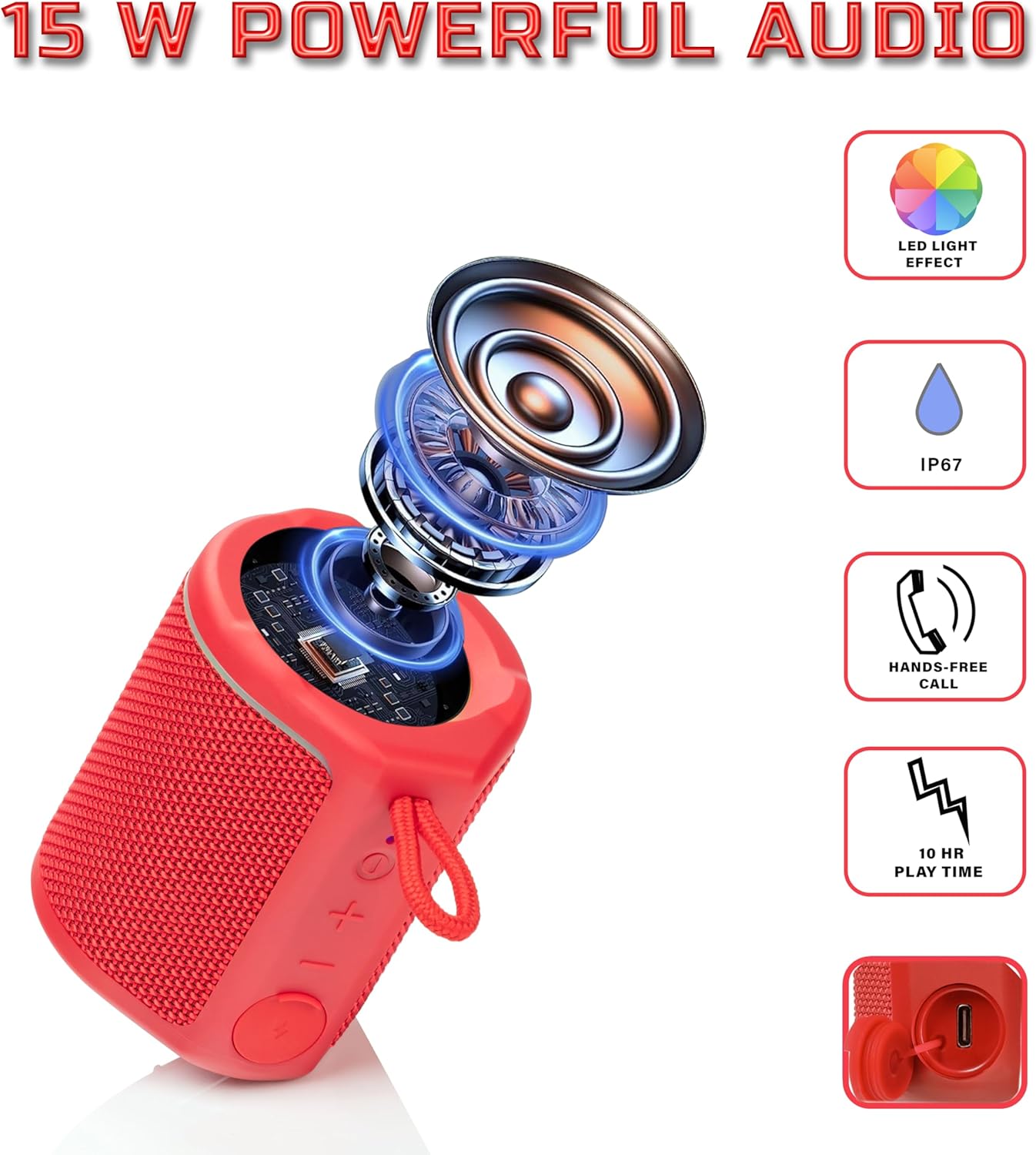
Diagram illustrating the internal components of the Sharp GX-BT190 speaker, including the speaker driver, and highlighting features like LED light effect, IP67 rating, hands-free call function, and battery life.
| Característica | Detalle |
|---|---|
| Número de modelo | GX-BT190 |
| Tecnoloxía de conectividade | Bluetooth |
| Potencia de saída máxima do altofalante | 10 vatios |
| Clasificación impermeable | IP67 |
| Duración da batería | Ata 15 horas |
| Tipo de batería | 1 ión de litio (incluído) |
| Capacidade da batería | 1200 mAh |
| Dimensións do produto (P x A x A) | 7.5 x 7.5 x 7.5 cm (aprox.) |
| Peso do elemento | 226.8 g (8 onzas) |
| distancia wireless | Ata 33 pés |
| Características adicionais | LED Light, True Wireless Stereo (TWS), Hands-Free Calling |
10. Garantía
The Sharp GX-BT190 Portable Bluetooth Speaker comes with a 1-Year Limited Warranty from the date of purchase. This warranty covers manufacturing defects under normal use. It does not cover damage caused by misuse, accidents, unauthorized modifications, or normal wear and tear. Please retain your proof of purchase for warranty claims.
11. Apoio
For technical assistance, warranty inquiries, or further information regarding your Sharp GX-BT190 speaker, please contact Sharp Inc. customer support:
- Contacto do fabricante: Sharp Inc
- Teléfono: 1-800-BE-SHARP