
1. Introdución
Thank you for choosing the SKYWATCH Pro Anemometer. This device is designed for precise measurement of wind speed, temperature, and altitude, making it an essential tool for various outdoor activities, professional applications, and environmental monitoring. This manual provides detailed instructions for the proper setup, operation, and maintenance of your SKYWATCH Pro Anemometer to ensure optimal performance and longevity.
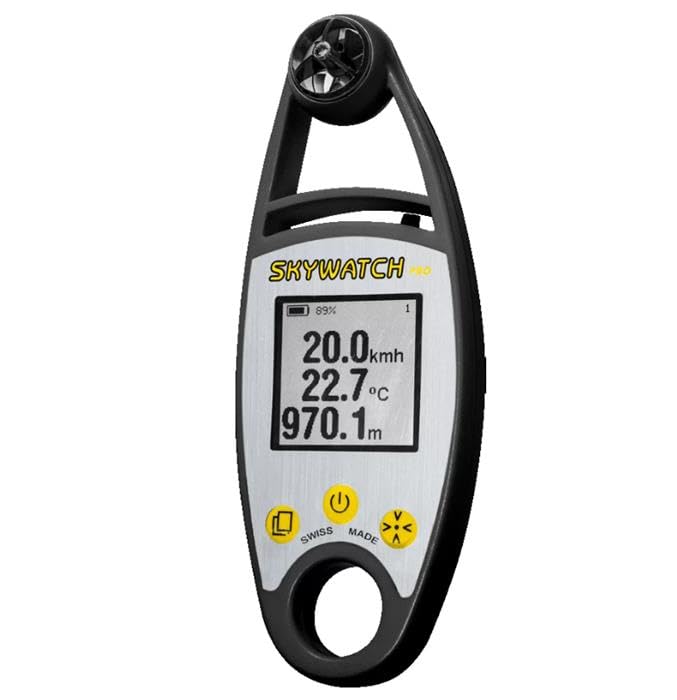
Figure 1: The SKYWATCH Pro Anemometer with its digital display showing measurements. The device features a black casing with a silver-colored display area and a rotating impeller at the top.
2. Configuración
2.1. Desembalaxe e compoñentes
Retire con coidado todos os compoñentes da embalaxe. Asegúrese de que estean presentes os seguintes elementos:
- SKYWATCH Pro Anemometer unit
- Protective case (if included)
- Lanyard (if included)
- Manual de usuario (este documento)
2.2. Instalación da batería
The SKYWATCH Pro Anemometer requires 2x AAA batteries (not included). To install the batteries:
- Localiza a tapa do compartimento da batería na parte traseira do dispositivo.
- Gently slide or unscrew the cover to open it.
- Insert the 2x AAA batteries, ensuring the correct polarity (+/-) as indicated inside the compartment.
- Coloque a tapa do compartimento da batería de forma segura.
2.3. Acendido inicial
After battery installation, press and hold the power button (usually marked with a circle and a vertical line) for approximately 2 seconds until the display illuminates. The device will perform a brief self-test before showing the main measurement screen.
3. Instrucións de funcionamento
3.1. Acendido/apagado
- Para acender: Manteña premido o ⏻ botón durante 2 segundos.
- Para apagar: Manteña premido o ⏻ button for 2 seconds. The device will automatically power off after 10 minutes of inactivity to conserve battery life.
3.2. Lectura de Medidas
The display shows real-time measurements. The primary readings typically include:
- Velocidade do vento: Indicated by the largest number, usually in km/h, m/s, or knots.
- Temperatura: Displayed in degrees Celsius (°C) or Fahrenheit (°F).
- Altitude: Shown in meters (m) or feet (ft).
3.3. Selección da unidade
To change measurement units (e.g., km/h to m/s, °C to °F):
- With the device powered on, press the "Mode" button (often labeled with an 'M' or an arrow icon) repeatedly to cycle through available measurement modes or units.
- Stop pressing when your desired unit is displayed. The device will save your selection.
3.4. Holding a Reading
Some models feature a data hold function. Press the "Hold" button (often labeled with a 'H' or a square icon) to freeze the current reading on the display. Press it again to release and resume live readings.
4. Mantemento
4.1. Limpeza
To ensure accurate readings and extend the life of your anemometer:
- Limpa o dispositivo cun pano suave e seco.
- Para a sucidade teimosa, use un lixeiramente damp pano con xabón suave, despois seca ben.
- Non empregue produtos de limpeza abrasivos nin solventes, xa que poden danar o casing ou pantalla.
- Keep the impeller (fan) free from dust, dirt, and debris. Use a soft brush or compressed air if necessary, but avoid excessive force.
4.2. Almacenamento
When not in use for extended periods, store the anemometer in its protective case in a cool, dry place, away from direct sunlight and extreme temperatures. Remove batteries if storing for more than a month to prevent leakage.
4.3. Substitución da batería
When the low battery indicator appears on the display, replace the batteries as described in Section 2.2. Always use fresh, high-quality AAA batteries.
5 Solución de problemas
| Problema | Causa posible | Solución |
|---|---|---|
| O dispositivo non se acende. | Baterías gastadas ou instaladas incorrectamente. | Comprobe a polaridade das baterías; substitúaas por baterías novas. |
| Lecturas inexactas da velocidade do vento. | Impeller obstructed or damaged. | Clean the impeller; ensure it spins freely. Avoid using in dusty or sandy environments. |
| A pantalla está escura ou parpadea. | Batería baixa. | Substitúe as pilas. |
| Temperature reading seems off. | Sensor exposed to direct sunlight or body heat. | Allow the device to acclimate to ambient temperature away from heat sources. |
6. Especificacións
| Característica | Detalle |
|---|---|
| Número de modelo | O38593 |
| Marca | SKYWATCH |
| Funcións de medición | Wind Speed, Temperature, Altitude |
| Unidades de velocidade do vento | km/h, m/s, knots, mph, Beaufort |
| Unidades de temperatura | °C, °F |
| Unidades de altitude | m, pés |
| Fonte de enerxía | 2 x pilas AAA |
| Apagado automático | Si (despois de 10 minutos de inactividade) |
| Dimensións (aprox.) | 150 x 60 x 25 mm (alto x ancho x fondo) |
| Peso (aprox.) | 120 g (sen pilas) |
| País de Orixe | China |
7. Garantía e soporte
7.1. Información da garantía
The SKYWATCH Pro Anemometer is covered by a manufacturer's warranty against defects in materials and workmanship. The specific duration and terms of the warranty may vary by region. Please refer to the warranty card included with your product or visit the official SKYWATCH websitio para obter información detallada sobre a garantía.
7.2. Atención ao cliente
If you encounter any issues or have questions regarding your SKYWATCH Pro Anemometer that are not addressed in this manual, please contact SKYWATCH customer support. You can typically find contact information on the official SKYWATCH websitio web ou na embalaxe do produto.
When contacting support, please have your product model number (O38593) and a detailed description of the issue ready.