
1. Introdución
This manual provides comprehensive instructions for the installation and operation of the MNBHUYRD Quadlock Wiring Harness with CAN Bus Decoder. This product is designed to integrate an aftermarket Android head unit into specific MG vehicle models, providing essential connections including power, speakers, steering wheel controls, and a reversing camera input. Please read this manual thoroughly before beginning installation to ensure proper function and safety.
2. Produto rematadoview
The MNBHUYRD Quadlock Wiring Harness is a specialized cable adapter designed to simplify the installation of a 16-pin Android car head unit into compatible MG vehicles. It includes a CAN Bus decoder box to manage vehicle communication signals, such as ignition, illumination, and steering wheel controls, without requiring complex manual wiring. The harness also features a dedicated input for a reversing camera.
Características principais:
- 16-pin plug for direct connection to Android head units.
- Quadlock connector for seamless integration with MG vehicle wiring.
- Integrated CAN Bus decoder (Raise) for vehicle data interpretation.
- Supports reversing camera input.
- Constructed with high-quality copper wire for durability and reliable signal transmission.
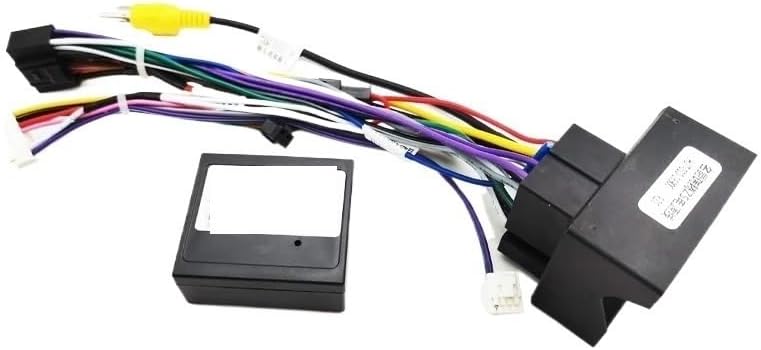
Figura 2.1: Máisview of the MNBHUYRD Quadlock Wiring Harness and CAN Bus Decoder components.
3. Compatibilidade
This wiring harness is compatible with the following MG car models equipped with a Quadlock connector:
- MG ZS (2017+)
- MG ZS EV / EZS (2018+)
- MG GS (2015+)
- MG HS (2019+)
- MG 3 MK2 (2017+)
- MG 5 MK2 (2020+)
- MG 6 MK2 (2017+)
Ensure your vehicle's existing wiring harness matches the Quadlock connector type provided with this product.
4. Contido do paquete
Verifique que todos os elementos estean presentes e sen danos ao abrir o paquete:
- 16-pin Quadlock Wiring Harness for MG (1 piece)
- CAN Bus Decoder Box (Raise) (1 piece)
- FAKRA Male Car Antenna Cable (1 piece) (Optional, depending on variant purchased)
5. Configuración e instalación
Importante: Disconnect the vehicle's battery before beginning any electrical installation to prevent short circuits or damage. If you are unsure about any steps, consult a professional car audio installer.
5.1 Identify Connectors
Familiarize yourself with the main connectors of the wiring harness:

Figure 5.1: The 16-pin male plug (top right) connects to the Android head unit, and the Quadlock connector (bottom right) connects to the vehicle's factory wiring.
The harness includes specific connectors for different MG models. Ensure you use the correct connection for your vehicle:

Figure 5.2: Connectors for MG ZS, GS, HS (left) and MG 3, 5, 6 (right). Match the connector to your specific MG model.
5.2 Diagrama de cableado
Refer to the detailed wiring diagram below for understanding each wire's function. This diagram is crucial for proper connection, especially for features like the reversing camera and steering wheel controls.

Figure 5.3: Wiring diagram illustrating the function of each colored wire in the 16-pin harness. Key connections include speaker outputs, ground, constant power (+12V), ignition switch, illumination, reversing camera control, and steering wheel controls.
- Fíos dos altofalantes: White/White-black (Front Left), Gray/Gray-black (Front Right), Green/Green-black (Rear Left), Purple/Purple-black (Rear Right).
- Fíos de alimentación: Black (GND - Ground), Yellow (BATTERY - Constant Power +12V), Red (ACC - Ignition Switch).
- Control Wires: Orange (ILLUMINATION - Backlight), Pink (REVERSE - Reversing camera control line), Brown/white (KEY2 - Steering Wheel Control 2), Brown (KEY1 - Steering Wheel Control 1), Blue (ANT - Antenna Power).
- Entrada da cámara: Yellow RCA connector for video input from a reversing camera.
5.3 Pasos de conexión
- Retirar a unidade principal de fábrica: Carefully remove your vehicle's existing head unit according to your car's service manual.
- Connect Quadlock: Connect the large Quadlock connector from the MNBHUYRD harness to the corresponding factory harness in your vehicle. Ensure it clicks securely into place.
- Conectar o decodificador de bus CAN: Plug the CAN Bus decoder box into its designated connectors on the harness.
- Connect to Android Head Unit:

Figure 5.4: The 16-pin socket on the rear of an Android head unit, showing pin assignments.
Connect the 16-pin male plug of the MNBHUYRD harness to the 16-pin socket on the back of your Android head unit. Refer to Figure 5.4 for the typical pinout of a 16-pin Android head unit socket. Ensure all pins align correctly.
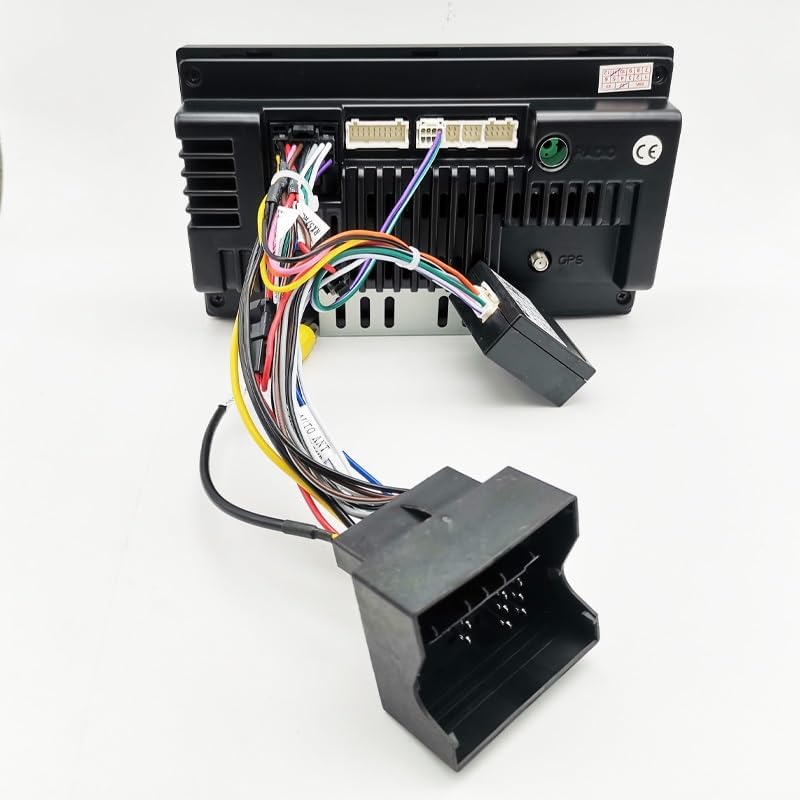
Figure 5.5: The MNBHUYRD wiring harness fully connected to an Android head unit, ready for installation into the vehicle dashboard.
- Connect Reversing Camera (Optional): If installing a reversing camera, connect its video output RCA cable to the yellow RCA input on the MNBHUYRD harness. Ensure the camera's power and ground are connected correctly (usually to the reverse light circuit).
- Connect FAKRA Antenna (Optional): If your variant includes the FAKRA male car antenna cable, connect it from the vehicle's antenna input to the antenna input on your Android head unit.
- Proba de conexións: Before fully reassembling the dashboard, reconnect the vehicle battery and test the head unit's functions: power on/off, audio, steering wheel controls, and reversing camera (if installed).
- Cableado seguro e montaxe: Once all functions are verified, carefully route and secure all wiring to prevent pinching or rattling. Reassemble the dashboard components.
6. Instrucións de funcionamento
Once installed, the MNBHUYRD Quadlock Wiring Harness facilitates the operation of your Android head unit by providing the necessary power, audio, and control signals from your MG vehicle.
- Encendido/apagado: The head unit should power on and off with the vehicle's ignition, controlled by the ACC wire and CAN Bus decoder.
- Controis do volante: The CAN Bus decoder translates your vehicle's steering wheel control signals for the Android head unit. You may need to configure these controls within your Android head unit's settings menu. Refer to your head unit's manual for specific instructions on mapping steering wheel buttons.
- Cámara de marcha atrás: When the vehicle is shifted into reverse, the head unit should automatically display the video feed from the connected reversing camera. This is triggered by the REVERSE signal provided by the harness.
- Iluminación: The head unit's backlight should adjust with the vehicle's headlights, controlled by the ILLUMINATION signal.
7. Mantemento
The MNBHUYRD Quadlock Wiring Harness is designed for long-term reliability and requires minimal maintenance. Ensure all connections remain secure and free from moisture or excessive vibration. Periodically check for any loose wires or damaged insulation, especially if you experience intermittent issues with your head unit.
8 Solución de problemas
| Problema | Causa posible | Solución |
|---|---|---|
| Head unit does not power on. | Loose power connection (Yellow/Red wires), blown fuse, incorrect CAN Bus decoder connection. | Check all power connections. Verify vehicle fuses. Ensure CAN Bus decoder is correctly plugged in. Reconnect vehicle battery. |
| Non se escoita son dos altofalantes. | Loose speaker wire connections, incorrect speaker polarity, head unit settings. | Verify all speaker wire connections (Figure 5.3). Check head unit's audio settings. |
| Os controis do volante non funcionan. | Incorrect KEY1/KEY2 connections, CAN Bus decoder issue, head unit not configured. | Ensure KEY1/KEY2 wires are connected. Verify CAN Bus decoder is functioning. Configure steering wheel controls in the Android head unit's settings. |
| Reversing camera does not display. | Loose RCA connection, incorrect REVERSE wire connection, camera power issue, head unit settings. | Check yellow RCA video input. Ensure Pink REVERSE wire is connected and receiving signal. Verify camera power supply. Check head unit's camera input settings. |
| Head unit backlight does not dim/brighten with vehicle lights. | Loose ILLUMINATION wire connection, CAN Bus decoder issue. | Verify Orange ILLUMINATION wire connection. Ensure CAN Bus decoder is correctly installed. |
9. Especificacións
| Característica | Detalle |
|---|---|
| Nome do produto | Quadlock Wiring Harness CAN Bus Decoder |
| Número de modelo | MNBHUYRD688 |
| Marca | MNBHUYRD |
| Connector Type (Head Unit) | 16-pin Male Plug |
| Connector Type (Vehicle) | Quadlock Female Connector |
| Decodificador de bus CAN | Included (Raise brand) |
| Entrada da cámara | Si (RCA) |
| Material | Copper (wires) |
| Peso do elemento | 50 gramos (aprox. 1.76 onzas) |
| Dimensións do paquete | 1.18 x 0.79 x 0.39 polgadas |
10. Garantía e soporte
For warranty information or technical support, please contact the retailer or manufacturer directly. Keep your purchase receipt as proof of purchase. Do not attempt to modify the wiring harness or CAN Bus decoder, as this may void your warranty and could cause damage to your vehicle or head unit.