
DONGKER ZK-3002
DONGKER ZK-3002 Digital AmpManual de usuario da tarxeta máis vivo
Modelo: ZK-3002
Introdución
The DONGKER ZK-3002 is a high-performance digital amplifier board designed for audio enthusiasts and DIY projects. Featuring the TPA3255 amplifier chip, it delivers powerful and clear audio output, capable of operating in both stereo (300W+300W) and mono (600W) configurations. This manual provides detailed instructions for setup, operation, and maintenance to ensure optimal performance and longevity of your ampplaca de eliminación.

Figura 1: De arriba abaixo view of the DONGKER ZK-3002 Digital AmpTaboleiro lifier.
Características clave
- Saída de alta potencia: Supports 300W+300W dual-channel stereo or 600W mono bridge connection.
- Intelligent Cooling System: Features an intelligent temperature control fan that can also be manually controlled.
- Adjustable Gain: Potentiometer adjustable gain range from 26dB to 36dB with 10 adjustable gears.
- Line-in Audio Input: Accepts audio signals via an XH2.54-3P audio socket.
- Características de protección: Includes over-temperature, over-current, short-circuit, and under-voltage protección.
- Aplicación versátil: Suitable for home theaters, KTVs, outdoor parties, and DIY speaker projects.
Especificacións
| Parámetro | Valor |
|---|---|
| Traballo Voltage | DC 18V-50V |
| Corrente de traballo | > 10A |
| Controlador IC | TPA3255 |
| Canle | 2.0 Channel Stereo Output |
| Tipo de entrada de audio | Line-in (XH2.54-3P Socket) |
| Tipo de saída de audio | Esquerda/Dereita |
| BTL Stereo Output Power | 50W-300W (3ohm-8ohm) |
| PBTL Mono Output Power | 100W-600W (2ohm-8ohm) |
| Potencia máxima de saída | 300W*2 at 50V 4ohm / 600W*1 at 50V 2ohm |
| Tipo de control de ventilador | Control automático/manual |
| Ganancia | 26-36dB Adjustable |
| Module Size (Installed) | 125 mm * 65 mm * 38 mm |

Figure 2: Dimensions of the ZK-3002 AmpTaboleiro lifier.
Configuración e conexións
Antes de conectar o amplifier board, ensure all power sources are disconnected. Proper wiring is crucial for safe and optimal performance.
Identificación de compoñentes
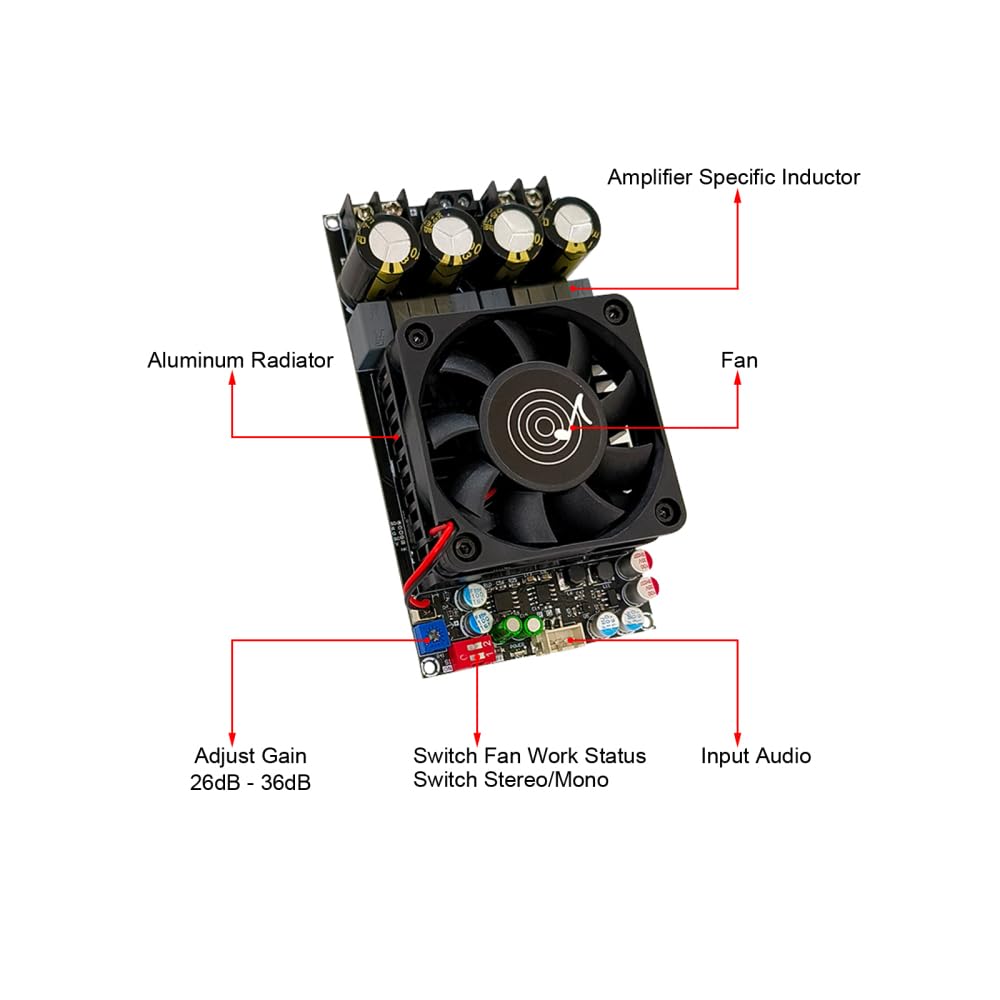
Figure 3: Key components of the ZK-3002 Amplifier Board, including the fan, aluminum radiator, amplifier specific inductor, gain adjustment, fan work status switch, stereo/mono switch, and audio input.
Conexión de alimentación
- Connect a DC power supply (18V-50V, >10A) to the VCC and GND terminals. Ensure correct polarity.
Conexión de entrada de audio
- Connect your audio source (e.g., decoder) to the XH2.54-3P audio socket (Line-in).
Conexións de altofalantes
The ZK-3002 supports both Stereo Dual Channel BTL Mode and Mono Single Channel PBTL Mode. Select the desired mode using Switch 1 on the board.

Figure 4: Detailed wiring diagrams for Stereo (BTL) and Mono (PBTL) configurations, showing speaker and power connections.
Stereo Dual Channel BTL Mode:
- Set Switch 1 to OFF (Stereo BTL Mode).
- Connect the left speaker to the L+ and L- terminals.
- Connect the right speaker to the R+ and R- terminals.
- Ensure speaker impedance is between 3ohm and 8ohm.
Mono Single Channel PBTL Mode:
- Set Switch 1 to ON (Mono PBTL Mode).
- Connect the mono speaker to the R+ and L- terminals (bridged output).
- Ensure speaker impedance is between 2ohm and 8ohm.
Instrucións de funcionamento
Encendido/apagado
- After all connections are secure, connect the power supply to an AC outlet. The board will power on automatically.
- To power off, disconnect the power supply from the AC outlet.
Control de volume
- Adjust the volume using the potentiometer labeled "Adjust Gain" on the board. Rotate clockwise to increase volume, counter-clockwise to decrease.
Control do ventilador
- The ZK-3002 features an intelligent temperature-controlled fan.
- Use Switch 2 to control the fan's operation:
- ACTIVADO: Fan Automatic Control (fan activates based on temperature).
- OFF: Fan Manual Control (fan runs continuously).
Mode Switching (Stereo/Mono)
- Use Switch 1 to select the desired output mode:
- ACTIVADO: Mono PBTL Mode (for single, high-power speaker).
- OFF: Stereo BTL Mode (for two-channel stereo sound).
- Note: Always power off the board before changing the mode switch to prevent potential damage.
Mantemento
- Limpeza: Regularly clean the board with a soft, dry cloth. Ensure no dust accumulates on the fan or heatsink to maintain efficient cooling. Do not use liquid cleaners.
- Ventilación: Asegurar o amplifier board is placed in a well-ventilated area to prevent overheating. Do not obstruct the fan or heatsink.
- Almacenamento: When not in use for extended periods, store the board in a dry, dust-free environment.
Resolución de problemas
| Problema | Causa posible | Solución |
|---|---|---|
| Sen saída de son | Alimentación incorrecta voltage/current; Loose speaker connections; Incorrect audio input connection; Amplifier en modo de protección. | Verify power supply meets 18V-50V and >10A requirements. Check all speaker and audio input wiring for secure connections and correct polarity. Power cycle the board to reset protection mode. |
| Son distorsionado | Input signal too strong; Speaker impedance mismatch; Faulty speaker. | Reduce the input audio signal level. Ensure speaker impedance matches the recommended range (3-8ohm for stereo, 2-8ohm for mono). Test with a different speaker. |
| Ampsobrequecemento do lifier | Poor ventilation; Fan not operating; Excessive load. | Ensure adequate airflow around the board. Check if the fan is spinning (set Switch 2 to OFF for manual control to test). Reduce output volume or speaker load. |
| O ventilador non xira | Fan control switch set to automatic (ON) and temperature is low; Fan malfunction. | Set Switch 2 to OFF (Manual Control) to force the fan on. If it still doesn't spin, the fan may be faulty. |
Garantía e Soporte
For any questions or issues not covered in this manual, please contact DONGKER customer support. Refer to your purchase documentation for specific warranty terms and contact information.
You can visit the official DONGKER store on Amazon for more information and support: DONGKER Store
Ask a question about this manual
Ask about setup, troubleshooting, compatibility, parts, safety, or missing instructions. Manuals+ will review the question and use this page’s manual context to help answer it.