
HP 7KW55A#BGJ
HP Color LaserJet Pro MFP M182nw
Wireless All-in-One Color Laser Printer User Manual
Model: 7KW55A#BGJ
1. Introdución
The HP Color LaserJet Pro MFP M182nw is a versatile all-in-one color laser printer designed for efficient printing, scanning, and copying. This manual provides essential information to help you set up, operate, and maintain your device, ensuring optimal performance and longevity.
2. Que hai na caixa
Upon unboxing your HP Color LaserJet Pro MFP M182nw, verify that all the following items are included:
- HP Color LaserJet Pro MFP M182nw Printer
- Starter Black Toner Cartridge (800 pages)
- Starter Cyan Toner Cartridge (700 pages)
- Starter Magenta Toner Cartridge (700 pages)
- Starter Yellow Toner Cartridge (700 pages)
- Cable USB
- Cable de alimentación
- Cat5e Ethernet Cable
- 6 Assorted Color Cable Ties
- Kit de limpeza
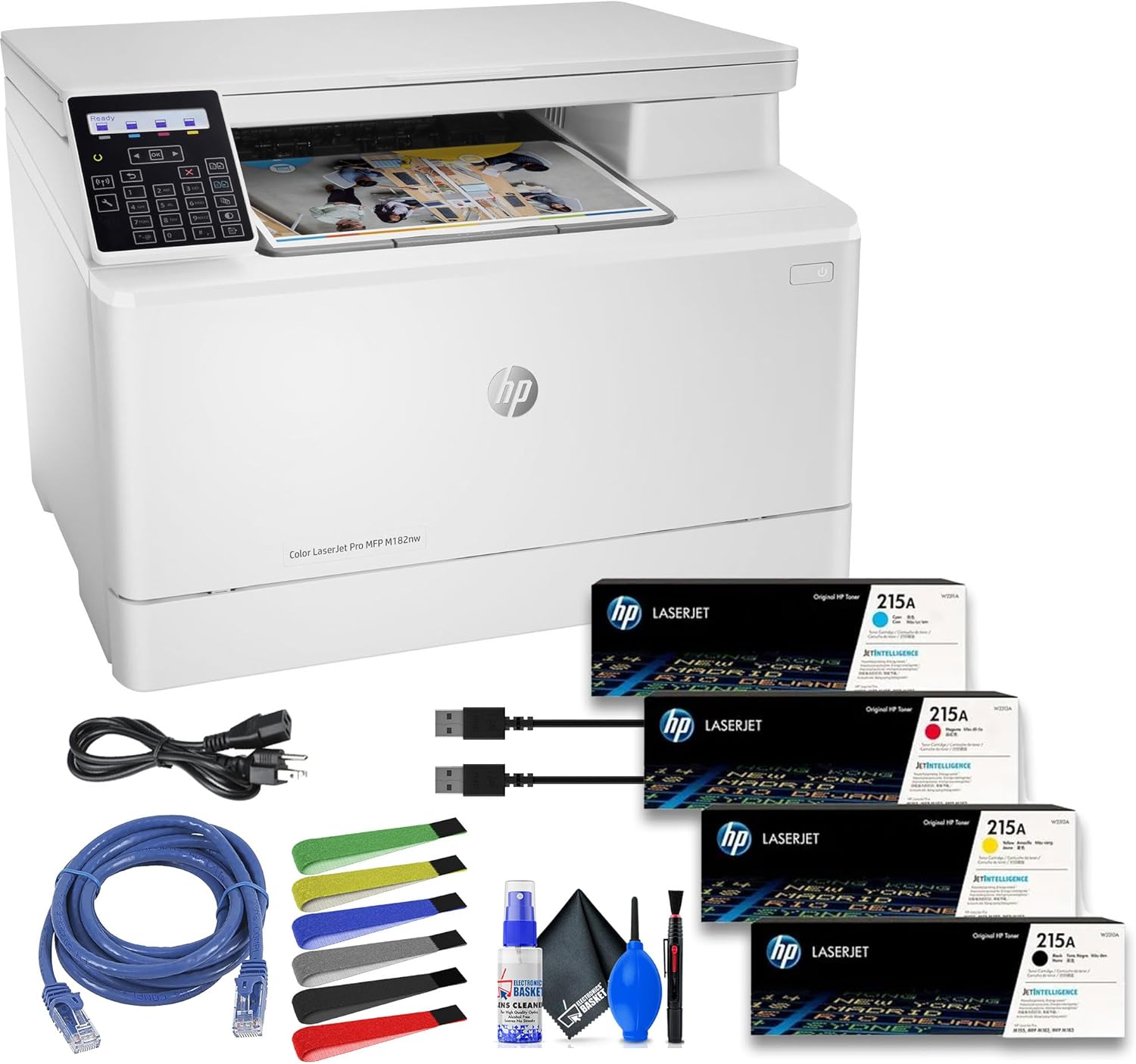
This image displays the HP Color LaserJet Pro MFP M182nw printer alongside its bundled accessories, including power and network cables, assorted cable ties, and a cleaning kit, as well as the starter toner cartridges.
3. Guía de configuración
Follow these steps to set up your HP Color LaserJet Pro MFP M182nw printer:
- Desembalar a impresora: Carefully remove the printer from its packaging. Remove all packing materials, tapes, and protective films from the exterior and interior of the printer.
- Instalar cartuchos de tóner: Open the toner access door and insert the provided starter toner cartridges into their corresponding slots. Ensure they click into place.
- Cargar papel: Open the paper tray and load plain paper. Adjust the paper guides to fit the paper size.
- Conectar enerxía: Conecte o cable de alimentación á impresora e despois a unha toma de corrente con conexión a terra.
- Encendido: Prema o botón de acendido para acender a impresora.
- Escolle o método de conexión:
- Conexión USB: Conecta o cable USB da impresora ao teu ordenador.
- Ethernet (Wired Network): Conecta un cable Ethernet da impresora ao enrutador ou conmutador de rede.
- Wi-Fi (Wireless Network): Follow the on-screen prompts on the printer's control panel to connect to your wireless network. You may need your Wi-Fi network name (SSID) and password.
- Instalar software/controladores: Insert the installation CD (if provided) or visit the official HP support website to download and install the latest drivers and software for your operating system. Follow the on-screen instructions to complete the installation.

The rear panel of the HP Color LaserJet Pro MFP M182nw printer, clearly showing the USB 2.0 and Ethernet ports for wired connections.
4. Instrucións de funcionamento
The HP Color LaserJet Pro MFP M182nw offers print, scan, and copy functionalities. Use the two-Line LCD with numeric keypad on the control panel to navigate settings and initiate tasks.

A detailed close-up of the printer's two-line LCD control panel and numeric keypad, used for navigating menus and adjusting settings.
4.1. Impresión
- Desde un ordenador: Select 'Print' from your application, choose the HP Color LaserJet Pro MFP M182nw, and adjust settings as needed (e.g., color, paper size, number of copies). The printer delivers crisp text and vibrant color prints at speeds of up to 17 pages per minute (ppm).
- Impresión móbil: The printer supports various mobile printing solutions:
- Apple AirPrint: Para dispositivos iOS.
- Mopria: Para dispositivos Android.
- HP ePrint: Print from anywhere by sending an email to your printer's unique email address.
- HP Smart App: Download the HP Smart App for guided setup, mobile printing, scanning, and monitoring printer status.
4.2. Escaneado
The flatbed scanner offers an optical scan resolution of 1200 dpi, enabling high-quality digital captures. Supported file formats include JPG, RAW (BMP), PNG, TIFF, and PDF.
- From the Printer: Place your document on the scanner glass. Use the control panel to select 'Scan' and choose your destination (e.g., computer, email, network folder).
- Desde un ordenador: Open the HP scanning software on your computer, select the HP Color LaserJet Pro MFP M182nw, and initiate the scan.
4.3. Copiando
Copy speeds match printing speeds at 17 ppm for both black and color documents. You can make up to 99 copies at a time.
- Place the document on the scanner glass or in the automatic document feeder (if available).
- On the control panel, select 'Copy'.
- Use o teclado numérico para introducir o número de copias desexado.
- Press the 'Start' button (usually a green button or 'OK') to begin copying.
5. Mantemento
Un mantemento regular garante a lonxevidade e o rendemento óptimo da súa impresora.
- Limpeza: Limpe regularmente o exterior da impresora cun pano suave eamp pano. Limpar o cristal do escáner cun pano que non deixe fiapos e un limpador de cristais.
- Substitución do tóner: Replace toner cartridges when the printer indicates low toner levels. Refer to the printer's display for specific instructions on replacing cartridges.
- Manipulación do papel: Use recommended paper types and sizes. Ensure paper is loaded correctly to prevent jams.
- Actualizacións de firmware: Revisa periodicamente o soporte de HP websitio para obter actualizacións de firmware para garantir que a súa impresora teña as últimas funcións e correccións de erros.
The printer boasts a maximum monthly duty cycle of 30,000 pages, with a recommended volume ranging between 150 and 1500 pages for consistent reliability.
6 Solución de problemas
Esta sección aborda problemas comúns que podes atopar coa túa impresora.
| Problema | Posible causa/solución |
|---|---|
| A impresora non responde | Check power connection. Ensure USB/Ethernet cable is securely connected or Wi-Fi is active. Restart printer and computer. |
| Mala calidade de impresión | Check toner levels. Ensure correct paper type is used. Clean print heads (if applicable, though less common for laser). |
| Atascos de papel | Remove jammed paper carefully following printer instructions. Ensure paper is loaded correctly and not overfilled. |
| Non se pode conectar á wifi | Verify Wi-Fi password. Ensure printer is within range of the router. Restart router and printer. |
| O escáner non funciona | Ensure printer drivers are installed correctly. Check USB/network connection. Restart printer. |
Para obter unha resolución de problemas máis detallada, consulte o soporte de HP website or the HP Smart App.
7. Especificacións
Key technical specifications for the HP Color LaserJet Pro MFP M182nw printer:
| Característica | Detalle |
|---|---|
| Funcións | Imprimir, escanear, copiar |
| Tecnoloxía de impresión | Laser (Color) |
| Print Speed (Black & Color) | Ata 17 ppm |
| Resolución de impresión | 600 x 600 ppp |
| Scan Resolution (Optical) | 1200 ppp |
| Copy Speed (Black & Color) | Ata 17 ppm |
| Maximum Copies | 99 exemplares |
| Conectividade | USB 2.0, Ethernet, Wi-Fi |
| Soporte de impresión móbil | Apple AirPrint, Mopria, HP ePrint, HP Smart App |
| Capacidade da bandexa de papel | 150 follas |
| Capacidade da bandexa de saída | 100 follas |
| Tamaños de soportes compatibles | Ata 8.5 x 14 polgadas |
| Ciclo de traballo mensual máximo | 30,000 páxinas |
| Volume mensual recomendado | De 150 a 1500 páxinas |
| Dimensións do produto (ancho x fondo x alto) | 16.5 x 17.1 x 11.6 polgadas |
| Peso do elemento | 42.6 libras |

This image illustrates the physical dimensions of the HP Color LaserJet Pro MFP M182nw printer, showing its height (11.5 inches), depth (15 inches), and width (16.5 inches).
8. Garantía e soporte
For warranty information and technical support, please refer to the documentation included with your printer or visit the official HP support website. HP provides resources for driver downloads, troubleshooting guides, and contact options for customer service.
Tamén podes visitar o Tenda HP en Amazon para obter información adicional sobre o produto e accesorios.