
FosPower FOSPWB-2436PP
FosPower Emergency Weather Radio (Model D8)
Manual de instrucións
Introdución
Thank you for choosing the FosPower Emergency Weather Radio (Model D8). This multi-functional device is designed to provide reliable communication, power, and illumination during emergencies, power outages, or outdoor activities. With its robust features and multiple charging methods, it ensures you stay connected and prepared.

Image: The FosPower Emergency Weather Radio (Model D8) in orange and black, shown charging a smartphone via its USB port. The radio features a digital display, a flashlight on one end, and a compass on its strap.
Produto rematadoview
Familiarize yourself with the key components of your FosPower Emergency Weather Radio:
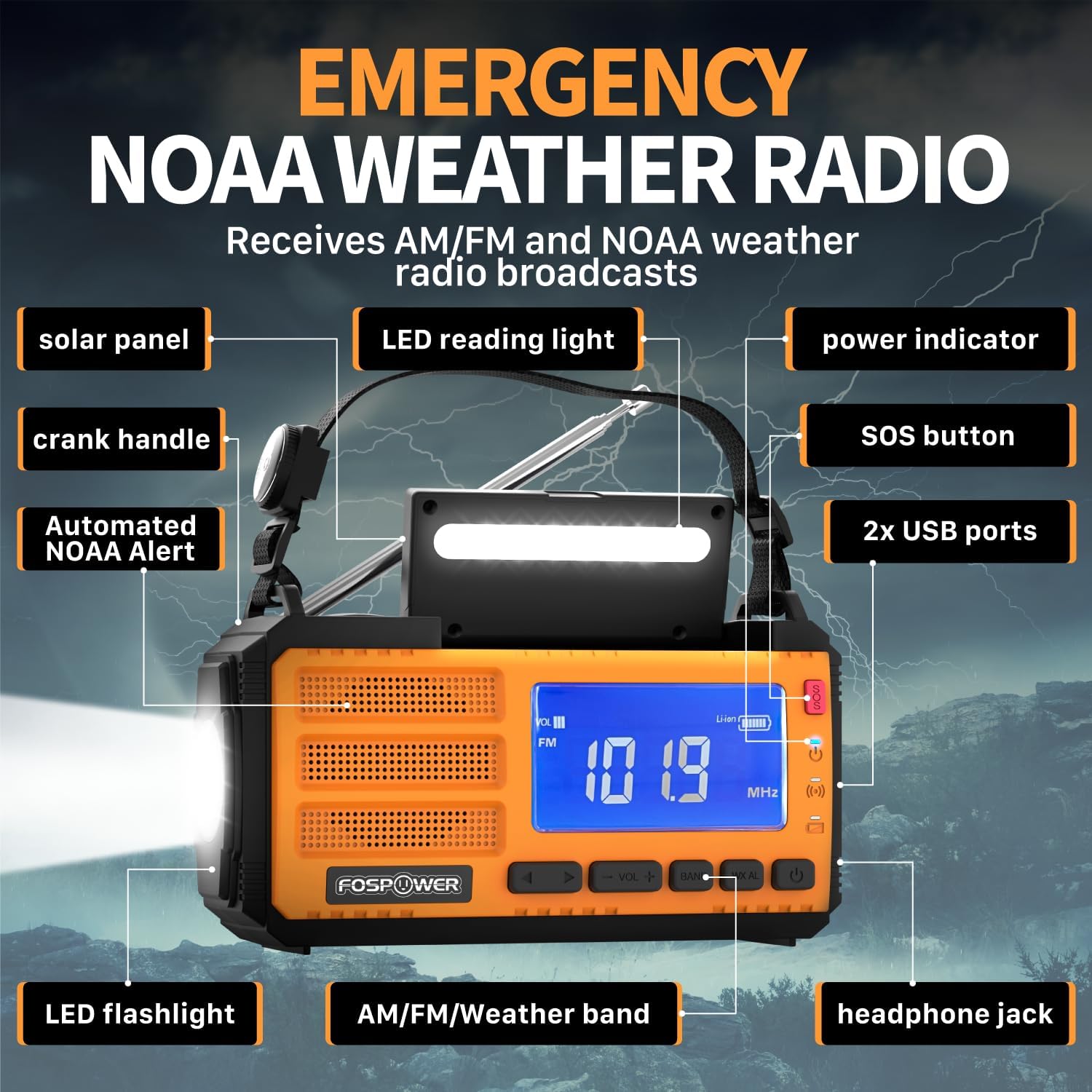
Image: A detailed diagram highlighting the various components of the FosPower Emergency Weather Radio, including the solar panel, LED reading light, power indicator, SOS button, USB ports, LED flashlight, AM/FM/Weather band controls, headphone jack, and crank handle.
- Panel solar: Located on top for solar charging.
- Manivela: Foldable handle for manual power generation.
- Linterna LED: Integrated on one end for directional lighting.
- LED Reading Light: Located under the solar panel for ambient light.
- Portos USB: For charging external devices and recharging the radio.
- Botón SOS: Activates a loud siren and flashing light for emergencies.
- Indicador de potencia: Mostra o nivel actual da batería.
- AM/FM/Weather Band Controls: Buttons for radio tuning and volume.
- Jack para auriculares: Porto de 3.5 mm para escoita privada.
- Automated NOAA Alert: Feature to monitor local NOAA channels.
- Holding Strap with Compass: For portability and navigation.
Configuración
Carga inicial
Before first use, it is recommended to fully charge the radio using the USB-C charging cable. Connect the USB-C end to the radio's input port and the USB-A end to a compatible USB power adapter (not included) or computer USB port. The power indicator lights will show charging progress.
Compoñentes incluídos
- FosPower Emergency Weather Radio (Model D8)
- Holding Strap with Compass
- Cable de carga USB-A a USB-C
Instrucións de funcionamento
Operación de radio
- Encendido/apagado: Preme o botón de acendido para acender ou apagar a radio.
- Selección de bandas: Press the 'BAND' button to cycle through AM, FM, and NOAA Weather Band (WB) frequencies.
- Afinación: Use the 'TUNE +/-' buttons to manually adjust the frequency. For automatic scanning, press and hold the 'TUNE +/-' button.
- Control de volume: Use the 'VOL +/-' buttons to increase or decrease the volume.
- Antena: Extend the telescopic antenna fully for optimal FM and Weather Band reception. For AM, rotate the radio for best signal.
Funcións de luz

Image: The FosPower Emergency Weather Radio demonstrating its flashlight function on one end and its reading light function, which is located beneath the solar panel.
- Lanterna: Press the dedicated flashlight button to turn it on. Some models may have multiple brightness settings or a strobe function, which can be cycled by pressing the button repeatedly.
- Luz de lectura: Lift the solar panel to reveal the LED reading light. Press the reading light button to turn it on.
Alarma SOS
In an emergency, press and hold the 'SOS' button. This will activate a loud siren and a flashing light to attract attention. Press the button again to deactivate the alarm.

Image: The FosPower Emergency Weather Radio with a red pulsating light indicating the SOS alarm is active, set against a backdrop of a stormy sky with lightning.
Opcións de carga
The FosPower Emergency Weather Radio offers three versatile charging methods to ensure power availability in any situation:

Image: Three close-up views of the FosPower Emergency Weather Radio demonstrating its multiple power sources: USB charging port, solar panel, and hand-crank.
- Carga USB-C: For the fastest and most efficient charge, use the provided USB-C cable to connect the radio to a USB power source.
- Carga solar: Place the radio with the solar panel facing direct sunlight. This method is ideal for maintaining charge or for slow charging in outdoor environments.
- Carga con manivela: Extend the hand crank and rotate it clockwise or counter-clockwise at a steady pace. This method provides power for short bursts of use or to generate enough charge for other charging methods.
Función Power Bank
The radio features a 37000mWh (10000mAh) power bank, allowing you to charge your USB-powered devices, such as smartphones, during emergencies or when off-grid. Connect your device to the radio's USB output port using your device's charging cable.

Image: The FosPower Emergency Weather Radio set against a natural background, highlighting its "37000mWh INTERNAL BATTERIES" and stating "High-capacity batteries support all day use."
Mantemento
- Limpeza: Limpe a radio cun pano suave e seco. Non empregue produtos de limpeza abrasivos nin disolventes.
- Almacenamento: Garde a radio nun lugar fresco e seco, lonxe da luz solar directa e de temperaturas extremas.
- Coidado da batería: For optimal battery life, fully charge the radio at least once every three months if not in regular use.
Resolución de problemas
| Problema | Causa posible | Solución |
|---|---|---|
| A radio non se acende. | Batería baixa ou esgotada. | Charge the radio using USB-C, solar, or hand-crank methods. |
| Mala recepción de radio. | Antena non estendida ou sinal deficiente na zona. | Fully extend the telescopic antenna. Try repositioning the radio or moving to an open area. For AM, rotate the radio. |
| O dispositivo externo non está a cargar. | Radio battery too low or incorrect cable. | Asegúrate de que a radio teña carga suficiente. Usa un cable de carga USB compatible co teu dispositivo. |
| Flashlight/Reading light not working. | Low battery or light button not pressed correctly. | Charge the radio. Ensure the light button is pressed firmly. |
Especificacións
- Dimensións do produto: 6.89 x 3.15 x 3.86 polgadas
- Peso do artigo: 1.43 libras
- Número de modelo: FOSPWB-2436PP
- Batería: 1 batería de polímero de litio (incluída)
- Fonte de enerxía: Solar, Battery, Handcrank
- Bandas de radio admitidas: AM, FM, WB (Weather Band)
- Característica especial: Built-In Flashlight, SOS Alarm, Power Bank
- Tecnoloxía de conectividade: USB
Garantía e Soporte
FosPower offers a Garantía limitada de por vida for this product. For any inquiries or support needs, please contact FosPower customer service. Details regarding the warranty and how to reach support can typically be found on the manufacturer's official websitio web ou a través da túa plataforma de compra.
Join millions of satisfied customers with our limited lifetime warranty, backed by our experienced and dedicated USA based customer service.
Ask a question about this manual
Ask about setup, troubleshooting, compatibility, parts, safety, or missing instructions. Manuals+ will review the question and use this page’s manual context to help answer it.