
Introdución
Thank you for choosing the Mount-It! Universal Tablet Stand. This manual provides detailed instructions for the safe and efficient installation, operation, and maintenance of your new tablet stand. Designed for versatility and security, this stand is compatible with most tablets ranging from 9.7 inches to 13.1 inches, offering 180-degree tilt and 90-degree rotation for optimal viewing.

Image: The Mount-It! Universal Tablet Stand in white, showcasing its design and a tablet securely mounted.

Image: Various usage scenarios for the tablet stand, including home, business, and retail settings, highlighting its versatility.
Información de seguridade
Please read and understand all instructions before installation and use. Failure to do so may result in personal injury or property damage.
- Ensure all components are securely fastened before placing a tablet on the stand.
- Non exceda a capacidade de peso máxima de 20 lb (9.07 kg).
- Keep children away from the stand during installation and adjustment.
- Verify device compatibility (9.7"-13.1" tablets) before use.
- Evite colocar o soporte en zonas de moito tránsito onde podería caer accidentalmente.
Contido do paquete
Verify that all parts are included and undamaged. If any parts are missing or defective, please contact Mount-It! customer support.
- Montaxe para tableta
- Base
- Columna
- Mounting Hardware (screws, hex wrench, plugs for freestanding option)
Produto rematadoview e Características
The Mount-It! Universal Tablet Stand is constructed from durable alloy steel, designed for stability and security in various environments. Key features include:
- Compatibilidade universal: Fits most tablets from 9.7" to 13.1", including iPad, Samsung Galaxy Tab S series, Microsoft Surface Pro, Lenovo Tab series, and Fire HD models.
- Deseño antirroubo: Secure enclosure helps prevent tampering, ideal for retail, hospitality, and public spaces.
- Axustable Viewing: 180° tilt and 90° screen rotation for portrait or landscape orientation.
- Múltiples opcións de instalación: Can be used as a freestanding countertop stand, bolt-down mounted, or grommet mounted.
- Xestión integrada de cables: Built-in routing system to conceal and organize charging cords.
- Construción duradeira: Cold-rolled steel frame supports tablets up to 20 lbs.

Image: Detailed dimensions of the tablet holder, illustrating its compatibility with various tablet sizes.
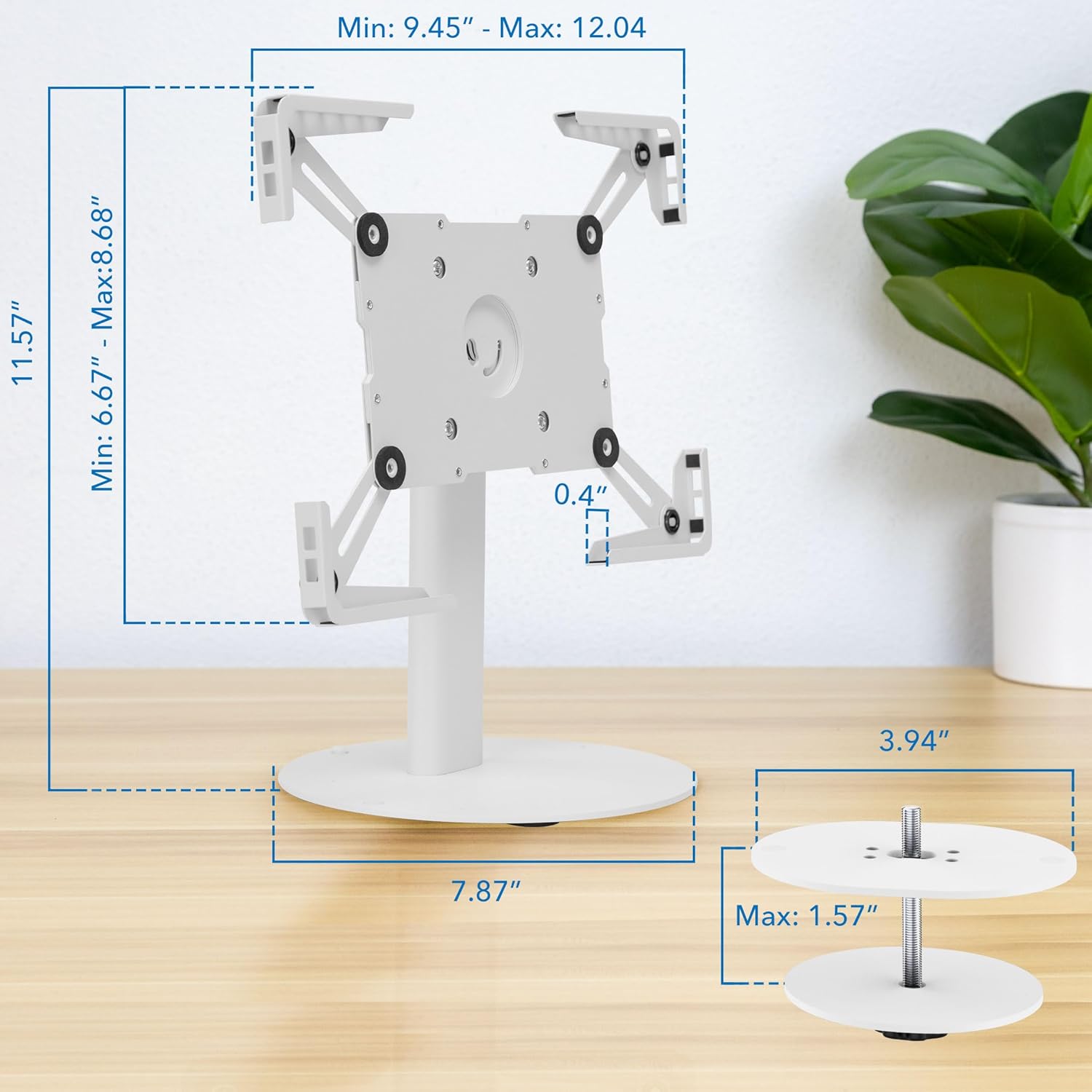
Image: Overall dimensions of the stand, including the base and height, with an illustration of the bolt-down mounting option.
Configuración e instalación
Follow these steps to assemble and install your Mount-It! Universal Tablet Stand. A Phillips screwdriver is required (not included).
Guía de instalación de video
Video: Official installation guide for the Mount-It! Universal Tablet Stand (MI-3881). This video demonstrates step-by-step assembly and mounting options.
Instrucións paso a paso
- Unir a columna á base: Unscrew the bolts from underneath the column. Attach the column to the larger base using the provided hex wrench and bolts.
- Insert Plugs (Freestanding Option): If using the freestanding option, insert the provided plugs into the screw holes on the base.
- Screw-in Option: Alternatively, you can screw the base directly into a surface for added security.
- Grommet Option: For grommet mounting, pass the bolt through a pre-drilled hole in your desktop (up to 1.57" thick) and secure it from underneath.
- Expand to Fit Tablet: Loosen the bolts on the back of the tablet case with the hex wrench. Expand the case to a size larger than your tablet.
- Screw Tablet Case onto Column: Attach the tablet case to the end of the column using the four provided screws from the front.
- Insert and Adjust Tablet: Insert your tablet into the expanded case. Adjust the sides of the case until all four corners are snug around your tablet.
- Tableta segura: Tighten the bolts on the back of the tablet case to secure your tablet in place.
- Xestión de cables For a clean setup, run your charging cables through the cable pass-through hole at the base of the column and up through the column to plug into your device.

Image: Close-up of the stand's base, illustrating the bolt-down option and the cable routing system for a tidy setup.

Image: Demonstration of the grommet mounting option, showing how the stand can be secured through a desktop.

Image: Illustration of the tablet depth adjustment mechanism, allowing the holder to accommodate thinner devices.
Instrucións de funcionamento
The Mount-It! Universal Tablet Stand offers flexible positioning for optimal viewing e interacción.
Axuste da inclinación
The tablet holder can tilt up to 180 degrees. To adjust the tilt, loosen the joint bolt on each side behind the tablet case using the hex wrench. Adjust the tablet to your desired angle, then tighten the bolts to secure it.
Axuste da rotación
The tablet holder can rotate 90 degrees, allowing for quick switching between portrait and landscape orientations without removing the tablet. Simply rotate the tablet holder to the desired orientation.

Image: Visual representation of the stand's full adjustability, including 180-degree tilt and 90-degree rotation for flexible viewing.
Produto rematadoview Vídeo
Vídeo: Un overview of the Mount-It! Universal Tablet Countertop Stand, demonstrating its features and versatility in various settings.
Mantemento
To ensure the longevity and optimal performance of your tablet stand, follow these maintenance guidelines:
- Limpeza: Limpar o soporte cun pano suaveamp pano. Evite produtos de limpeza abrasivos ou solventes que poidan danar o acabado.
- Comprobar os elementos de fixación: Comprobe periodicamente todos os parafusos e bulóns para asegurarse de que estean ben axustados. Volva apertalos se é necesario para manter a estabilidade.
- Inspeccionar o desgaste: Regularly inspect the stand for any signs of wear, damage, or loose parts. Address any issues promptly.
Resolución de problemas
If you encounter any issues with your Mount-It! Universal Tablet Stand, refer to the following troubleshooting tips:
- A tableta non encaixa ben: Ensure your tablet is within the 9.7"-13.1" size range. Loosen the adjustment bolts on the tablet case, expand the arms, insert the tablet, and then tighten the bolts for a snug fit.
- A posición de pé parece inestable: Verify that all installation bolts (for the base and tablet case) are fully tightened. If using the freestanding option, ensure it is on a flat, stable surface. Consider using the bolt-down or grommet mounting options for maximum stability.
- Buttons or Camera are Blocked: The adjustable arms are designed to accommodate various tablet designs. Try slightly repositioning the tablet within the holder or adjusting the arm positions if possible. Note that some tablet designs may have buttons or cameras close to the edge, which might be partially covered depending on the tablet's exact dimensions and the arm's position.
- Difficulty Adjusting Tilt/Rotation: Ensure the joint bolts for tilt adjustment are sufficiently loosened before attempting to change the angle. Re-tighten once the desired position is achieved. Rotation should be smooth without needing to loosen bolts.
Especificacións
| Marca | Mount-It! |
| Número de modelo | MI-3881WHT |
| Cor | Branco |
| Dispositivos compatibles | iPad, iPad Air, Samsung, Android Tablets (9.7"-13.1") |
| Tipo de montaxe | Countertop, Desktop (Freestanding, Bolt-Down, Grommet) |
| Axuste de inclinación | 180° |
| Axuste de rotación | 90° |
| Capacidade de carga | 20 libras (9.07 kg) |
| Material | Aceiro de aliaxe |
| Altura de pé | 7.1 polgadas (18 centímetros) |
Garantía e Soporte
The Mount-It! Universal Tablet Stand is backed by a Garantía de por vida. Mount-It! is committed to providing high-quality products and excellent customer service.
For technical assistance, installation questions, or warranty claims, please contact our knowledgeable US-based technical specialists. Contact information can be found on the official Mount-It! websitio web ou a través do seu vendedor.