
1. Introdución
This manual provides detailed instructions for the safe installation, operation, and maintenance of your Mount-It! MI-384 Fireplace Mantel TV Wall Mount. This spring-assisted pull-down mount is designed to position your television above a fireplace mantel, allowing it to be lowered to a comfortable viewing height when in use. Please read this manual thoroughly before installation and retain it for future reference.

Imaxe 1.1: The Mount-It! MI-384 allows you to lower your TV from above the fireplace for optimal viewing.
2. Safety Information and Pre-Installation Checklist
WARNING: Failure to read and follow all instructions may result in personal injury or property damage. If you have any questions, please contact Mount-It! customer support.
- This wall mount requires installation into solid concrete or wood studs. É not suitable for stone or marble surfaces unless proper anchoring methods for these materials are used. Consult a professional if unsure.
- Ensure the maximum allowable mantel depth is 16 polgadas (40.6 cm).
- When fully raised, the mount arm may extend up to 37 polgadas (94 cm) over the top of the mantel. Verify adequate vertical distance is available between the mantel and the ceiling, especially for larger televisions.
- For smaller TVs or TVs with lower VESA mounting holes, a portion of the wall mount might be visible under the TV when it is in the raised position.
- This is not a low-profile TV mount. Due to its height adjustment and extension capabilities, the TV mount sits a minimum of 5.7 polgadas (14.5 cm) lonxe da parede.
- Gas spring tension adjustment is crucial for proper operation and may be required for both heavier and lighter televisions to ensure smooth movement.
- Non exceda a capacidade máxima de peso de 55 libras (25 kg).
- Ensure your TV's VESA pattern is compatible with the mount (see Specifications section).

Imaxe 2.1: Illustration of the mount's distance from the wall in both raised and lowered positions.

Imaxe 2.2: Guide for calculating necessary vertical clearance above your mantel.

Imaxe 2.3: Minimum TV size requirement to conceal the mount when in the raised position.
3. Contido do paquete
Please verify that all components are present and undamaged before beginning installation. If any parts are missing or damaged, do not attempt to install and contact Mount-It! customer support immediately.
The Mount-It! MI-384 includes all necessary hardware for installation. While specific component lists may vary, typical contents include:
- Montaxe da placa de parede
- TV Bracket Arms
- Mounting Hardware (screws, anchors, washers for wall and TV attachment)
- Asa acolchada
- Manual de instrucións
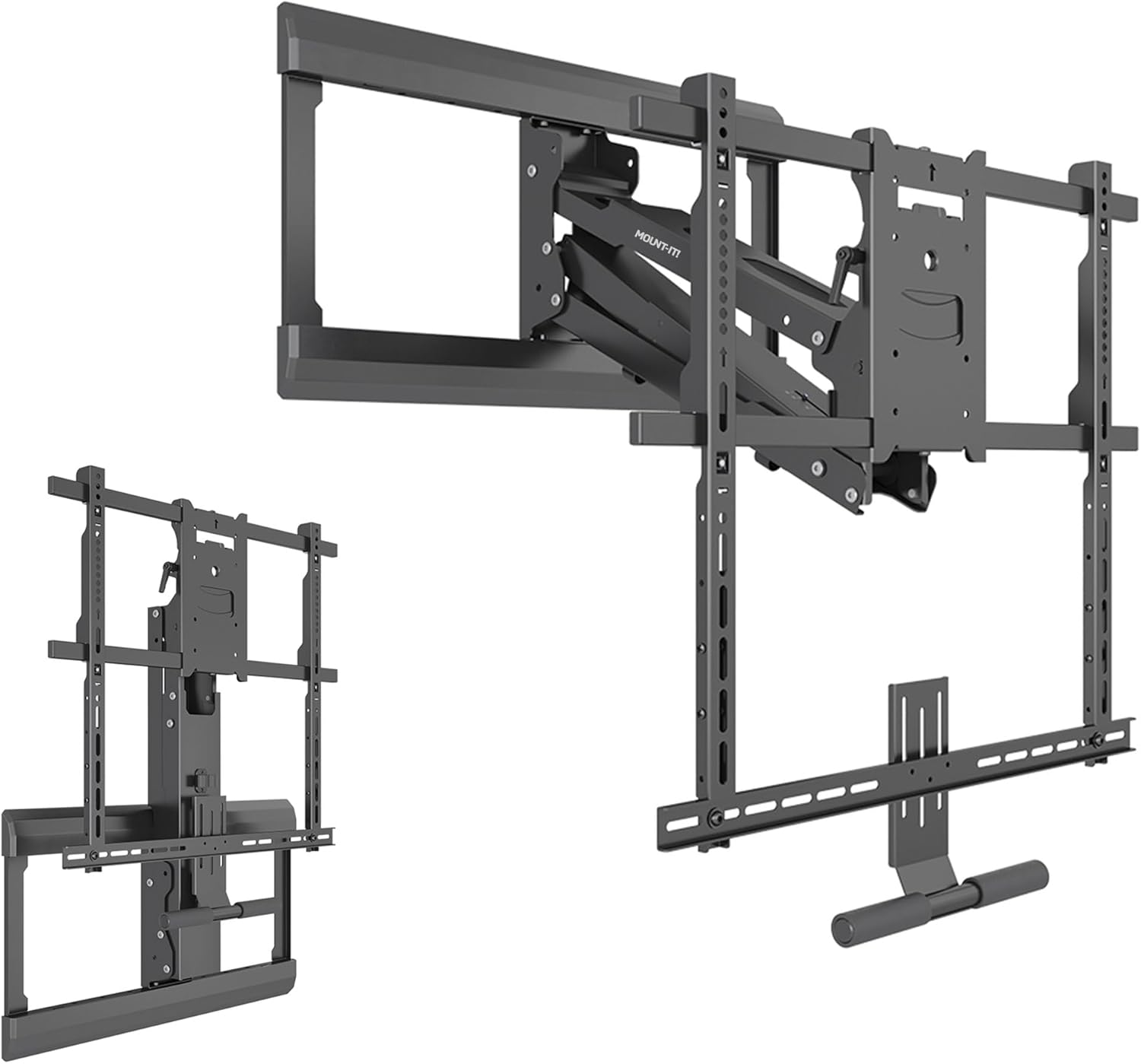
Imaxe 3.1: Acabadoview of Mount-It! MI-384 components.
4. Especificacións
| Característica | Especificación |
|---|---|
| Marca | Mount-It! |
| Número de modelo | MI-384 |
| Compatibilidade do tamaño da TV | 42 - 65 polgadas |
| Capacidade máxima de peso | 55 libras (25 kg) |
| Compatibilidade VESA | 100x100, 200x200, 300x200, 300x300, 400x200, 400x300, 400x400, 600x500 |
| Tipo de montaxe | Over Fireplace Mantel, Wall Mounted |
| Tipo de movemento | Articulating, Tilt, Swivel, Height Adjustment |
| Rango de axuste de altura | Up to 29 inches (73.7 cm) total |
| Rango de inclinación | +10 to -5 degrees |
| Alcance xiratorio | +/- 30 graos |
| Axuste de nivelación | +/- 5 degrees (post-installation) |
| Distancia mínima desde o muro | 5.7 polgadas (14.5 cm) |
| Material | Aceiro de aliaxe |
| Cor | Negro |
| Dimensións do produto | 31.75 x 15 x 6.5 polgadas (80.6 x 38.1 x 16.5 cm) |
| Peso do elemento | 34.9 libras (15.8 kg) |
| UPC | 810041739643 |
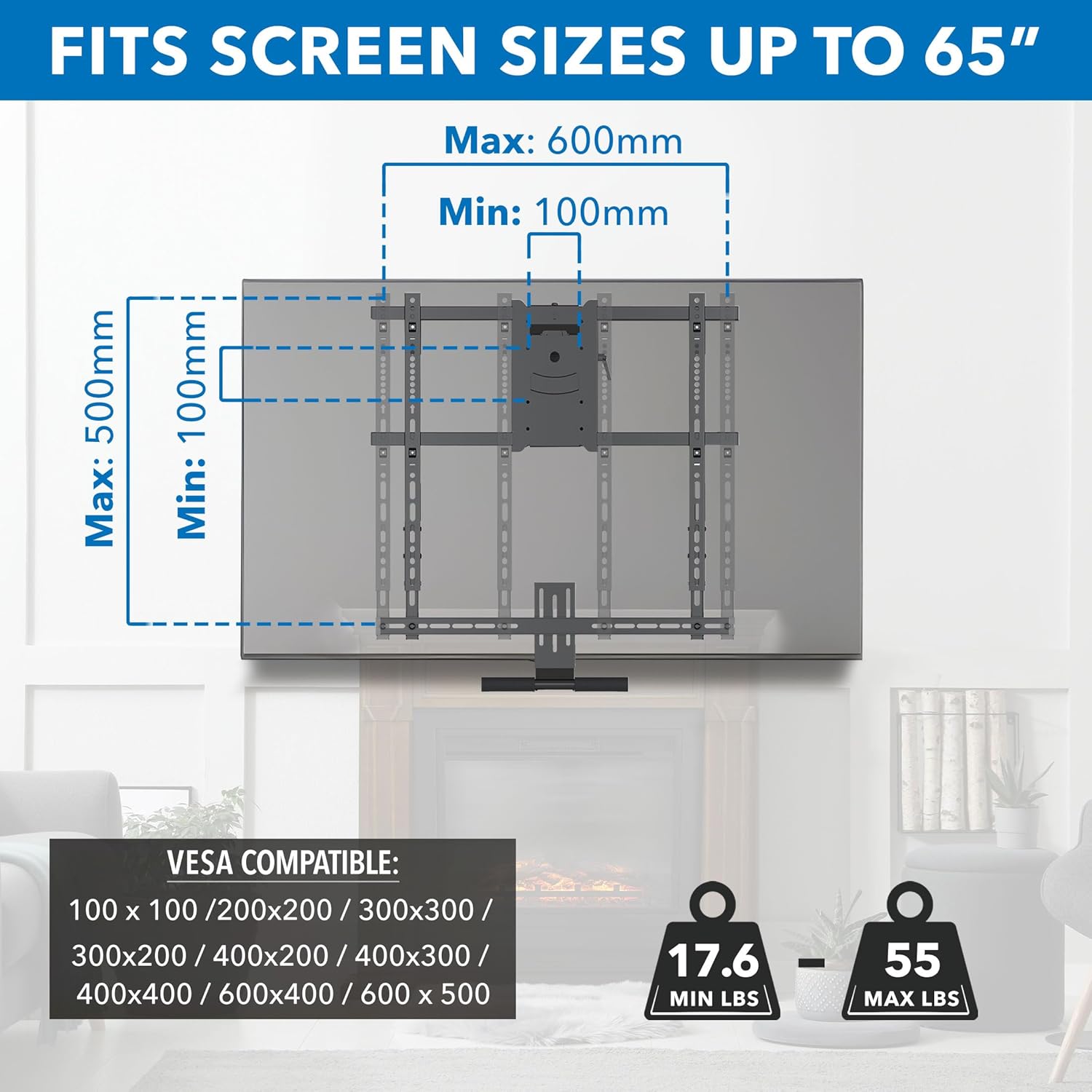
Imaxe 4.1: VESA and TV size compatibility details.
5. Configuración e instalación
Before starting, ensure you have read the Safety Information section and confirmed your wall type and TV compatibility. Professional installation is recommended if you are not confident with the process.
5.1 Ferramentas necesarias (non incluídas)
- Broca
- Buscador de pernos
- Nivel
- Cinta métrica
- Socket Wrench / Spanner
- Destornillador Phillips
- Lapis
5.2 Pasos da instalación
- Prepara o muro: Locate wood studs or a solid concrete wall where you intend to mount the TV. Mark the desired height for the top of the wall plate, ensuring it allows for the TV to be raised above the mantel and lowered to a comfortable viewing position. Refer to Image 2.2 for vertical clearance calculations.
- Montar a placa de parede: Secure the wall plate assembly to the wall using the provided hardware. Ensure it is level before tightening all fasteners. The mount features an adjustable wall plate for centering the TV above the fireplace, even if studs are off-center.
- Fixar os soportes de TV: Secure the TV bracket arms to the back of your television using the appropriate VESA screws and spacers from the hardware kit. Ensure the brackets are centered and securely fastened to your TV's VESA mounting holes.
- Colgar a televisión: Carefully lift the television with the attached brackets and hook it onto the wall plate assembly. Ensure the TV is securely seated on the mount.
- Asegurar o televisor: Fasten any safety screws or locking mechanisms to prevent the TV from accidentally disengaging from the mount.
- Adjust Spring Tension: The gas spring mechanism requires tension adjustment to match your TV's weight. Use the provided tool to adjust the spring tension until the TV can be smoothly lowered and raised with minimal effort and stays in position when released. Refer to the operating instructions for more details.

Imaxe 5.1: Adjustable wall plate for TV centering.
6. Instrucións de funcionamento
The Mount-It! MI-384 offers dynamic height adjustment, tilt, and swivel capabilities for an optimal viewexperiencia ing.
6.1 Lowering and Raising the TV
To lower the TV, grasp the cushioned handle located at the bottom of the TV bracket. Gently pull the TV downwards. The spring-assisted mechanism will provide a counterbalance, allowing for smooth, controlled movement. To raise the TV, push it upwards until it locks into its raised position. Ensure the spring tension is correctly adjusted for your TV's weight (see Setup section).

Imaxe 6.1: Lowering the TV using the cushioned handle.
6.2 Axuste da inclinación e do xiro
Once the TV is in your desired viewing position, you can adjust its angle:
- Inclinación: The mount allows for a tilt range of +10 degrees (upwards) to -5 degrees (downwards). Gently push or pull the top or bottom of the TV to achieve the desired tilt angle and reduce glare.
- Xiratorio: The mount can swivel up to +/- 30 degrees left or right. Carefully rotate the TV horizontally to adjust the viewángulo de orientación para diferentes posicións de asento.
- Nivelación: After installation, a micro-adjustment of +/- 5 degrees is available to ensure the TV is perfectly level.

Imaxe 6.2: Full motion capabilities: Swivel, Level, and Tilt.
7. Mantemento
Un mantemento regular garante a lonxevidade e o funcionamento seguro do soporte do teu televisor.
- Limpeza: Limpa o soporte cun pano suave e seco. Evita produtos de limpeza abrasivos ou solventes que poidan danar o acabado.
- Comproba as conexións: Periodically check all screws and fasteners to ensure they are tight and secure. Loose connections can lead to instability.
- Inspeccionar pezas móbiles: Occasionally inspect the articulating arms and spring mechanism for any signs of wear or damage. Ensure smooth movement.
- Re-adjust Tension: If you notice the TV becoming difficult to move, or if it doesn't stay in its desired position, re-adjust the gas spring tension according to your TV's weight.
8 Solución de problemas
| Problema | Causa posible | Solución |
|---|---|---|
| TV is difficult to pull down or push up. | Gas spring tension is not correctly adjusted for TV weight. | Adjust the gas spring tension. Increase tension for heavier TVs, decrease for lighter TVs. |
| TV does not stay in the desired position (sags or floats). | Gas spring tension is not correctly adjusted. | Re-adjust the gas spring tension until the TV holds its position. |
| Wall plate is visible when TV is in the raised position. | TV is too small or VESA mounting holes are too low on the TV. | This is an inherent characteristic for smaller TVs or those with lower VESA patterns. Ensure your TV meets the minimum height requirement (Image 2.3). |
| A montura parece inestable ou tambaleante. | Loose fasteners or incorrect installation. | Check all wall and TV fasteners and tighten them securely. Ensure installation followed instructions for wall type. |
| Mount is too far from the wall. | This is a feature of the mount's design. | The mount sits a minimum of 5.7 inches from the wall due to its articulating and height adjustment capabilities. This is not a low-profile montar. |
9. Garantía e atención ao cliente
The Mount-It! MI-384 Pull Down TV Mount over Fireplace comes with a LIFETIME warranty, reflecting our commitment to quality and durability.
If you encounter any issues, have questions during installation, or require assistance, please do not hesitate to contact our knowledgeable and responsive US-based customer support team. They are available to answer any questions you may have during standard business hours.
For support, please visit the official Mount-It! websitio web ou consulte a información de contacto que se inclúe na embalaxe do produto.